
ABB
In Stock OK
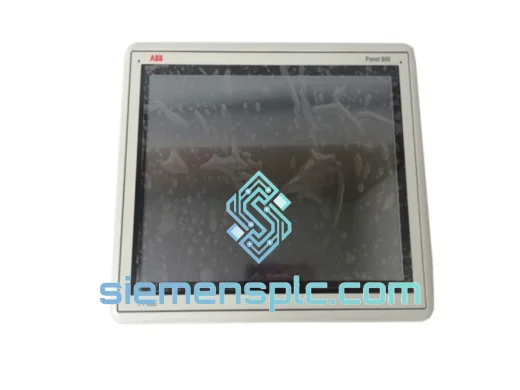
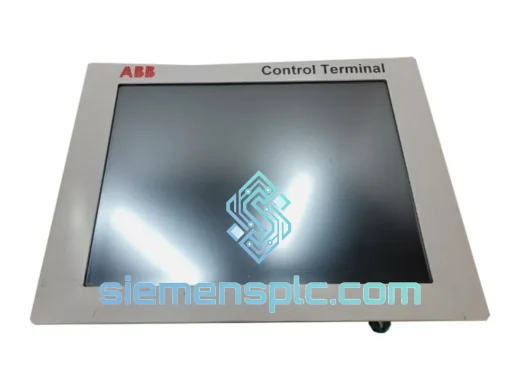
ABB PP245B 3BSC690126R2 Operator Panel
Request verified availability, condition, replacement risk review, packing options and courier lead time for PP245B 3BSC690126R2.
BrandABB
Part NumberPP245B 3BSC690126R2
ConditionAvailability Check
Lead TimeRFQ Confirmation
DocumentsDatasheet / photos by RFQ
ShippingExport packing available
Auto-filled RFQ
PP245B 3BSC690126R2
Click Request Quote and the part number is inserted into the inquiry form automatically.
- Reply by email: [email protected]
- WhatsApp / Tel: +86 18359268345
- Mon-Sat 9:00-18:00 GMT+8
Procurement Data
Key Product Information
Core fields for model confirmation and RFQ routing. Detailed product narrative remains below.
- Brand
- ABB
- Primary Part Number
- PP245B 3BSC690126R2
- Product Type
- Operator Interface Panel
- Series / Family
- AC800M
- Manufacturer
- ABB
- Country of Origin
- SE
- Catalog Category
- HMI Panels
- Operating Temp.
- 0 °C to +55 °C
- Humidity
- 5–95% RH, non-condensing
Model confirmed for inquiry
PP245B 3BSC690126R2
Send quantity, destination and urgency. The RFQ form keeps this part number attached.
Request Quote
Product Overview
ABB PP245B 3BSC690126R2 — Cut Downtime Now: Same-Day Dispatch from Xiamen Stock
Every hour your line sits idle costs real money. The ABB PP245B (3BSC690126R2) is the operator interface panel at the heart of countless ABB 800xA and AC800M control systems — and when it fails, there is no workaround. No software patch. No bypass. The panel is dead, and so is your process. We stock this unit in Xiamen and ship globally via DHL Express and FedEx Priority. From the moment you confirm your order, our logistics team moves. That is the only promise that matters when you are staring at a red alarm screen at 2 AM.
URGENT REQUIREMENT? Contact: [email protected] | WhatsApp: +86 18359268345
Quick Technical Datasheet
| Parameter | Value |
|---|---|
| Manufacturer | ABB |
| Model | PP245B |
| Part Number | 3BSC690126R2 |
| Product Category | Operator Interface Panel |
| Compatible Platform | ABB 800xA, AC800M, Advant OCS |
| Display Type | Monochrome LCD with keypad |
| Communication Interface | Profibus DP, RS-232 (config-dependent) |
| Operating Voltage | 24 V DC (nominal) |
| Operating Temperature | 0 °C to +55 °C |
| Storage Temperature | -25 °C to +70 °C |
| Humidity | 5–95% RH, non-condensing |
| Protection Rating | IP20 (front panel IP54 with bezel) |
| Weight | ~3,400 g |
| Origin | Sweden / ABB Group |
| Condition | New OEM / Tested Surplus |
| Availability | ✔ Ready to Ship — Xiamen Warehouse |
Troubleshooting & Replacement Tips
After ten years of pulling failed panels out of live cabinets, here is what actually goes wrong with the PP245B and what you need to watch before you bolt in the replacement:
Common Failure Modes
- Blank display / no backlight: Usually a failed DC/DC converter on the panel board. The controller still runs; only the local HMI is dead. Confirm by checking if the 800xA system server still shows the node online.
- Intermittent keypad response: Membrane keypad delamination from thermal cycling. Cleaning the ribbon connector contacts with IPA often buys time, but the panel needs replacement within the next maintenance window.
- Communication loss (Profibus fault F0x82 / F0x83): Check the Profibus termination resistor on the panel connector first. A missing or double termination will drop the entire segment. Swap the terminator before condemning the panel.
- Panel boots to “HW FAULT” or “CONFIG ERROR”: Firmware mismatch between the replacement panel and the AC800M controller revision. See firmware matching note below.
- Random resets under vibration: Loose backplane connector. Re-seat the panel and torque the mounting screws to spec (typically 0.5–0.8 Nm). If resets continue, the connector pins are worn — replace the panel.
Pre-Replacement Checklist
- Firmware version: Note the firmware string displayed during the panel’s POST sequence on the old unit. The replacement must run the same major revision. Mismatched firmware between PP245B and AC800M firmware ≥ 5.1 can cause the panel to refuse to join the control network. ABB Tool: use Control Builder M to verify the controller’s expected panel firmware version before powering up the new unit.
- Node address / station number: The PP245B does not use DIP switches for addressing — the address is stored in non-volatile memory and configured via the panel’s own setup menu (Menu → System → Communication → Station Address). Set this before connecting to the live Profibus segment. Connecting an unconfigured panel to a live segment will cause a duplicate-address fault and may disrupt other nodes.
- Profibus segment load: Adding a replacement panel temporarily increases segment load during initialization. If your segment is already near the 32-node limit, plan the swap during a low-traffic window.
- Configuration backup: If the old panel still powers on (even with a dead display), use ABB’s Panel Builder or a direct RS-232 connection to export the screen configuration before swapping. A dead panel means you rebuild from the project archive — confirm your archive is current before you start.
- ESD precautions: The PP245B PCB is sensitive. Ground yourself and use an ESD wrist strap. Electrostatic discharge during handling is a leading cause of “new panel, same fault” callbacks.
Reliability in Harsh Conditions
The PP245B was designed for the floor, not the office. ABB engineered this panel to operate continuously in environments that would kill consumer-grade electronics within weeks. The conformal-coated PCB resists moisture ingress and corrosive atmospheres common in chemical plants and offshore platforms. The industrial-grade LCD assembly is rated for the full 0–55 °C operating range without derating — no fan, no active cooling required. Vibration resistance meets IEC 60068-2-6 test profiles, which means the panel holds up on compressor skids and pump stations where structure-borne vibration is constant. The front bezel achieves IP54 when properly gasketed, keeping water jets and dust out of the display cavity during washdown cycles. We have seen these panels run for 15+ years in pulp mill control rooms and offshore HVAC panels without a single failure. When they do fail, it is almost always the backlight or the keypad membrane — both wear items, not design flaws.
Global Express Logistics
Our warehouse is located in Xiamen, Fujian Province — one of China’s primary export hubs with direct access to DHL, FedEx, and UPS international gateways. Here is exactly how your order moves:
- Order confirmed before 15:00 CST: Same-day pick, pack, and handover to carrier. Tracking number issued within 2 hours of dispatch.
- Packaging: Anti-static foam insert inside a double-wall export carton. Each panel is individually bagged in ESD-safe poly before boxing. No loose packing material that shifts in transit.
- DHL Express Worldwide: Southeast Asia 1–2 days, Europe 3–4 days, Americas 3–5 days. Door-to-door with customs clearance included on DDP terms (available on request).
- FedEx International Priority: Alternative routing for destinations where DHL coverage is limited. Same transit time benchmarks.
- Commercial invoice & packing list: Issued with accurate HS code (8537.10) and declared value. We do not under-declare — it creates customs holds that cost you days, not hours.
- Urgent air freight: For critical shutdowns, we can arrange next-flight-out cargo through Xiamen Gaoqi International Airport. Contact us directly for this option — it is not listed at checkout.
Contact Information
Email: [email protected]
WhatsApp: +86 18359268345
Web: siemensplc.com
© 2026 siemensplc.com. All rights reserved.
Ready to quote
[email protected]
Send This Part Number to Sales
RFQ workflow
Quality workflow ->
Confirmation Process
01Model confirmation
We check the full part number, brand, series and visible nameplate information before quotation.
02Availability reply
Sales confirms stock path, condition option, quantity and realistic lead time for export dispatch.
03Packing & courier
DHL, FedEx, UPS or buyer courier arrangements can be reviewed with packing requirements.
Continue sourcing
Browse full catalog ->
Related Automation Parts
Similar brand or category products for fast comparison and multi-item RFQ lists.
ABB
RFQ Ready
ABB 3BHE031734R3203 TPC1571HD3A1201E-T HMI Touch Panel
AC800M
Origin SE
Industrial HMI Touch Panel