ABB
In Stock OK
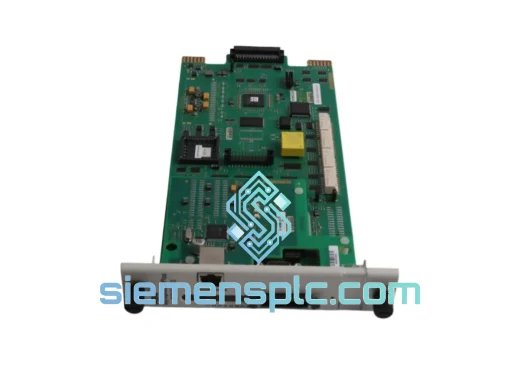
ABB SECG-01 3AAA0000051449 Communication Gateway
Request verified availability, condition, replacement risk review, packing options and courier lead time for SECG-01.
BrandABB
Part NumberSECG-01
ConditionAvailability Check
Lead TimeRFQ Confirmation
DocumentsDatasheet / photos by RFQ
ShippingExport packing available
Auto-filled RFQ
SECG-01
Click Request Quote and the part number is inserted into the inquiry form automatically.
- Reply by email: [email protected]
- WhatsApp / Tel: +86 18359268345
- Mon-Sat 9:00-18:00 GMT+8
Procurement Data
Key Product Information
Core fields for model confirmation and RFQ routing. Detailed product narrative remains below.
- Brand
- ABB
- Primary Part Number
- SECG-01
- Product Type
- PLC Communication Module
- Series / Family
- AC500
- Manufacturer
- ABB
- Country of Origin
- SE
- Catalog Category
- Communication
- Operating Temp.
- 0 °C to +55 °C
Model confirmed for inquiry
SECG-01
Send quantity, destination and urgency. The RFQ form keeps this part number attached.
Request Quote
Product Overview
ABB SECG-01 (3AAA0000051449) — ControlNet Segment Down? We Ship Before Your Next Shift Change.
Every minute your AC500 rack sits with a dead ControlNet gateway is money bleeding out of your operation. Scheduled I/O connections are faulted. Your SCADA screen is a wall of red. Maintenance is standing by waiting for a part that your local distributor says is “4–6 weeks on order.” That is not acceptable — and it is exactly why we stock the SECG-01 in Xiamen, ready to clear customs and land on your workbench in 48–72 hours via DHL Express International Priority.
The SECG-01 (catalog code 3AAA0000051449) is ABB’s dedicated Ethernet-to-ControlNet communication gateway for the AC500 PLC platform. It bridges EtherNet/IP (CIP) supervisory traffic from your SCADA or DCS layer down to the ControlNet scheduled and unscheduled connections that drive your field I/O, drives, and remote adapter nodes. When this module fails, nothing on that ControlNet segment talks — and the AC500 CPU cannot recover it through software alone. You need the hardware replaced, configured, and back online.
We are not a broker guessing at lead times. We physically hold this module. We have shipped SECG-01 units to petrochemical plants in the Middle East, automotive body shops in Eastern Europe, and water treatment facilities across Southeast Asia — all on emergency timelines. The process is the same every time: confirm your order, pull from stock, photograph, document, dispatch. You get a tracking number the same day.
⚡ URGENT REQUIREMENT? Contact: [email protected] | WhatsApp: +86 18359268345
Quick Technical Datasheet
| Manufacturer | ABB |
| Part Number | SECG-01 |
| Order / Catalog Code | 3AAA0000051449 |
| Module Function | Ethernet (EtherNet/IP) to ControlNet Communication Gateway |
| Compatible Platform | ABB AC500 PLC Series (PM5xx, PM5xx-ETH CPUs) |
| Ethernet Port | 10/100 Mbps, IEEE 802.3, RJ45 connector |
| ControlNet Port | Dual BNC coaxial (Channel A + Channel B redundant media), ANSI/IEC 61158 |
| Supported Protocols | EtherNet/IP (CIP), ControlNet Scheduled Connections, ControlNet Unscheduled Messaging |
| Max ControlNet Nodes | 99 nodes per segment (module occupies 1 node address) |
| Node Address Assignment | Software-configured (stored in non-volatile memory — no rotary switch) |
| Power Supply | AC500 backplane bus — no external power supply required |
| Operating Temperature | 0 °C to +55 °C |
| Storage Temperature | -40 °C to +70 °C |
| Relative Humidity | 5–95% RH, non-condensing |
| Protection Class | IP20 |
| PCB Treatment | Conformal coated |
| Certifications | CE, UL, cUL |
| Mounting | AC500 module rack / DIN rail |
| Firmware Upgrade | Field-upgradeable via ABB Automation Builder |
| Weight | ~500 g |
| Origin | Germany |
| Stock Status | ✔ IN STOCK — Ready to Ship from Xiamen |
Troubleshooting & Replacement Tips
How to confirm the SECG-01 is the failed component — not the cable, not the CPU:
- NET LED flashing red, LINK LED solid green: Ethernet side is alive. The CIP-to-ControlNet translation engine inside the SECG-01 has crashed. This is a module fault, not a network cable fault.
- All ControlNet I/O faults simultaneously while SCADA Ethernet comms remain intact: A single cable fault takes down one segment direction. A gateway failure takes down everything behind it at once. If your entire ControlNet I/O tree went red at the same moment, suspect the SECG-01 before you start pulling coax.
- RSNetWorx shows the SECG-01 node address as “offline” or “unknown device”: The module is no longer responding to ControlNet network management traffic. Power cycle the AC500 rack — if the node does not reappear within 30 seconds of CPU boot, the module has failed to initialize.
- Intermittent ControlNet packet loss that clears after a cold restart but returns within hours: Classic early-stage electrolytic capacitor degradation on the SECG-01 power regulation circuit. The module will fail completely within weeks. Order the replacement now, not after the next unplanned shutdown.
- AC500 CPU diagnostic buffer shows repeated “CN scanner fault” or “communication module not responding” entries: The CPU has lost its internal communication path to the SECG-01 over the backplane. Reseat the module first — if the fault returns, the module is defective.
Replacement procedure — step by step:
- Export the ControlNet network schedule before touching anything. Open RSNetWorx for ControlNet → Network → Save As → export the .xc file to a USB drive. This file contains every scheduled connection, NUT setting, and node configuration. Without it, you are rebuilding the network from memory.
- Record the current node address. The SECG-01 stores its ControlNet node address in non-volatile memory — there is no physical rotary switch to read. Note the address from RSNetWorx (typically node 1 or 2 in most AC500 installations) before the module is removed.
- Perform a controlled CPU shutdown. The SECG-01 is not hot-swappable in standard AC500 rack configurations. Issue a controlled stop from Automation Builder or the CPU keypad, then remove power from the rack. Do not pull the module under live backplane voltage.
- Install the replacement SECG-01. Slide the new module into the identical slot position. Reconnect BNC coax cables — Channel A to Channel A, Channel B to Channel B. Swapping the channels will not prevent communication but will cause RSNetWorx to report incorrect media redundancy status.
- Verify firmware version before powering up. Check the firmware label on the replacement module against your Automation Builder project’s hardware catalog version. A firmware mismatch is the leading cause of post-replacement instability. If the replacement module carries an older firmware, update it via ABB’s firmware download utility before downloading the CPU project.
- Power up and download the CPU project. Restore power to the rack. Open Automation Builder, connect to the CPU, and download the full project including hardware configuration. The SECG-01 must be present in the hardware tree — if it was missing from the configuration, the CPU will not attempt to initialize the gateway.
- Restore the ControlNet network schedule. Open RSNetWorx for ControlNet, connect to the network, import your saved .xc file, and download the schedule to the SECG-01. The module stores the schedule in non-volatile memory. Confirm the NUT (Network Update Time) matches your original setting — a default NUT mismatch will cause scheduled connection timeouts on time-critical I/O.
- Validate both ControlNet media channels independently. Disconnect Channel B coax and confirm the network continues to operate on Channel A alone. Reconnect Channel B, disconnect Channel A, confirm operation. A failed BNC terminator on the backup channel will not surface until the primary channel is disturbed — find it now, not during the next fault.
- Confirm I/O data integrity before releasing to production. Force a full ControlNet network reset from RSNetWorx, watch all node LEDs return to solid green, and verify live I/O data in the AC500 CPU’s I/O diagnostic view. Do not hand back to operations until every node is confirmed healthy.
Configuration items engineers frequently overlook:
- The SECG-01 must be explicitly added to the Automation Builder hardware configuration tree and the project re-downloaded — the CPU does not auto-detect a new module on the backplane.
- If your plant uses EtherNet/IP explicit messaging from a Rockwell ControlLogix or CompactLogix to the SECG-01, the EDS file for the replacement module must match the firmware version. Mismatched EDS files cause “connection refused” errors at the EtherNet/IP layer even when ControlNet is healthy.
- ControlNet scheduled connections have a fixed RPI (Requested Packet Interval) baked into the network schedule. After restoring the schedule, verify that all RPI values in RSNetWorx match the values in your Automation Builder I/O configuration — a mismatch causes the CPU to reject the connection at startup.
Reliability in Harsh Conditions
The SECG-01 is built to the same mechanical and electrical standards as the rest of the AC500 platform — a platform that ABB designed specifically for demanding industrial environments, not light commercial automation. Here is what that means when your panel is sitting next to a 500-ton press or a coastal desalination pump station:
Vibration resistance: Qualified to IEC 60068-2-6 sinusoidal vibration testing across the 5–150 Hz frequency range at 1g acceleration. The module’s DIN rail retention clips are spring-tensioned to prevent gradual loosening under the continuous low-frequency vibration generated by compressors, conveyors, and rotating machinery sharing the same structural steel frame as your control cabinet. Boards that fail this test develop intermittent backplane connector faults within 12–18 months in high-vibration environments — the SECG-01 does not.
Thermal performance: The 0–55 °C operating range covers the vast majority of industrial panel installations, but the real qualification test is thermal cycling — the repeated expansion and contraction of solder joints and PCB laminate that occurs every time a panel heats up during production and cools down during a weekend shutdown. ABB validates AC500 modules to IEC 60068-2-14 accelerated thermal cycling protocols. The SECG-01’s conformal-coated PCB resists the micro-cracking at solder joints that causes intermittent failures in uncertified gateway alternatives after 18–24 months of service.
Humidity and moisture: Rated to 5–95% RH non-condensing, the SECG-01 handles the humidity swings common in coastal chemical plants, food and beverage processing facilities, and tropical installations where ambient humidity can shift 40 percentage points between morning and afternoon. The conformal coating on the PCB provides a secondary moisture barrier beyond the IP20 enclosure — critical in environments where condensation can form on cold surfaces during startup after a cold weekend.
Electrical noise immunity: ControlNet’s coaxial physical layer provides inherently superior noise rejection compared to unshielded twisted-pair fieldbuses. The SECG-01 adds galvanic isolation between its Ethernet and ControlNet domains, blocking ground loop currents that would otherwise corrupt data when Ethernet cables run in the same cable tray as VFD output cables or high-current DC bus bars. This isolation is not optional in heavy industrial environments — it is the difference between a stable network and one that faults every time a large motor starts.
EMC certification: CE marking confirms compliance with EN 61000-4 series immunity tests including ESD (Level 3), radiated RF immunity (Level 3), conducted immunity, and surge immunity. UL and cUL marks confirm North American safety compliance. These are not self-declarations — they are third-party tested certifications on the production hardware.
Global Express Logistics
Our warehouse is in Xiamen, Fujian Province — one of China’s primary export hubs with direct DHL Express and FedEx International Priority freighter connections through Xiamen Gaoqi International Airport (XMN). Here is the exact sequence from your order confirmation to the module on your workbench:
- Order confirmed before 15:00 CST → same-day dispatch. We pull the SECG-01 from stock, photograph the module and its label for your records, and begin export documentation immediately. For genuine production emergencies confirmed via WhatsApp before noon, we can arrange same-day airfreight departure.
- Export documentation: HS code 8537.10 (programmable controllers and communication modules). We prepare the commercial invoice, packing list, and certificate of origin in-house. DHL Express customs pre-clearance data is submitted electronically to the destination country before the shipment physically arrives at the Xiamen hub — this eliminates the 12–24 hour delay that occurs when paperwork arrives after the freight.
- Packaging standard: Anti-static bag (ANSI/ESD S20.20 compliant) → closed-cell foam insert → rigid corrugated inner carton → outer corrugated shipping box with ESD warning, fragile, and “This Side Up” labels. The module is protected against both electrostatic discharge and physical shock during transit. We do not use bubble wrap alone for industrial electronics.
- Transit times from Xiamen (DHL Express / FedEx International Priority): Europe 2–3 business days | North America 2–3 business days | Southeast Asia 1–2 business days | Middle East 2–3 business days | Australia / New Zealand 2–3 business days | South America 3–5 business days.
- Import customs: DHL Express handles import brokerage in most countries. For EU shipments, we support DAP and DDP Incoterms and can provide EORI-compatible documentation. For US shipments, we provide ACE filing data. Typical customs clearance time with DHL Express: 4–8 hours at major hubs.
- Tracking: Your DHL or FedEx tracking number is sent to your email and WhatsApp the same evening as dispatch. You can monitor the shipment in real time from Xiamen to your door.
Contact Information
Email: [email protected]
WhatsApp: +86 18359268345
Web: siemensplc.com
© 2026 siemensplc.com. All rights reserved.
Ready to quote
[email protected]
Send This Part Number to Sales
RFQ workflow
Quality workflow ->
Confirmation Process
01Model confirmation
We check the full part number, brand, series and visible nameplate information before quotation.
02Availability reply
Sales confirms stock path, condition option, quantity and realistic lead time for export dispatch.
03Packing & courier
DHL, FedEx, UPS or buyer courier arrangements can be reviewed with packing requirements.
Continue sourcing
Browse full catalog ->
Related Automation Parts
Similar brand or category products for fast comparison and multi-item RFQ lists.
ABB
RFQ Ready
ABB SPBRC410 PLC Communication Controller
AC500
Origin SE
PLC Communication Controller