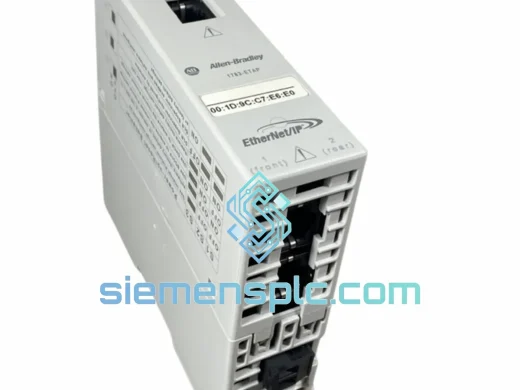
Product Overview
Allen-Bradley 1770-KF2 — Stop the Bleed: DH+ Network Down Costs You $10,000/Hour
You already know the number. Every minute your DH+ backbone is dark, the line is cold. The 1770-KF2 is the single point of failure between your PLC-2 controller and the Data Highway Plus network — and when it dies, nothing upstream or downstream talks. No peer-to-peer sync. No SCADA visibility. No production. We stock the Allen-Bradley 1770-KF2 specifically for this scenario: verified, tested, and ready to ship from Xiamen within 24 hours of order confirmation.
This is not a listing for a module you’ll wait six weeks for. This is emergency inventory. If you’re reading this at 2 AM because your shift supervisor just called, keep reading — then call us.
URGENT REQUIREMENT? Contact: [email protected] | WhatsApp: +86 18359268345
Quick Technical Datasheet
| Parameter |
Value |
| Part Number / SKU |
1770-KF2 |
| Manufacturer |
Allen-Bradley (Rockwell Automation) |
| Series |
PLC-2 Family |
| Module Function |
Data Highway Plus (DH+) Interface |
| Network Protocol |
DH+ (Data Highway Plus) |
| Compatible Controllers |
PLC-2/05, PLC-2/15, PLC-2/20, PLC-2/30 |
| Communication Mode |
Peer-to-peer, host communication |
| Node Addressing |
Rotary switch, 0–77 octal (0–63 decimal) |
| Baud Rate |
57.6 Kbps (DH+ standard) |
| Power Consumption |
Backplane-powered via PLC-2 chassis |
| Weight |
1,940 g (approx.) |
| Country of Origin |
United States |
| Availability |
✅ Ready to Ship — Xiamen Stock |
| Condition |
New / Refurbished / Used-Tested (specify on inquiry) |
| Warranty |
90-day functional warranty on tested units |
Troubleshooting & Replacement Tips
Confirmed failure signatures before you pull the module:
- DH+ network fault LED solid red or flashing — module is not acquiring token on the network ring.
- RSLinx Classic shows node offline or “No response from node XX” for the PLC-2 station.
- PLC-2 processor fault light active with no I/O faults — communication module is the first suspect.
- Intermittent dropouts under vibration or temperature swing — connector fatigue on the backplane edge connector.
Step-by-step hot-swap procedure (de-energize first — always):
-
Step 1 — Document node address before removal. The 1770-KF2 uses a rotary octal switch on the front face to set its DH+ node address. Photograph or record the current setting. Mismatched node address after replacement = network collision = second fault.
-
Step 2 — Verify slot position. The 1770-KF2 must occupy a specific slot in the PLC-2 chassis as defined in your system configuration. Inserting into the wrong slot will cause a processor fault on power-up. Check your original panel drawings.
-
Step 3 — Match the replacement unit’s DIP/rotary settings. Set the node address on the new 1770-KF2 to match the documented value before inserting. Do not power up with a mismatched address — you will disrupt all other nodes on the DH+ ring.
-
Step 4 — Inspect backplane connector pins. Bent or corroded pins on the chassis backplane are a common secondary cause of module failure. Clean with contact cleaner before seating the replacement.
-
Step 5 — Power up and verify token acquisition. The DH+ network status LED should cycle from red to green within 5–10 seconds as the module acquires the token. If it stays red, check node address conflict with RSLinx Classic’s DH+ node browser.
-
Step 6 — Verify RSLinx Classic driver. After physical replacement, go to RSLinx Classic → Configure Drivers → DH+ driver → re-browse the network. Confirm the replaced node appears with correct address and status = Running.
-
Step 7 — Firmware note. The 1770-KF2 is hardware-configured — no firmware download required. Unlike later ControlLogix communication modules, there is no flash update step. What you install is what runs.
Common fault codes associated with 1770-KF2 failure:
-
PLC-2 Processor Fault Code 71H — Communication module not responding. Indicates 1770-KF2 has lost backplane communication with the processor.
-
RSLinx Error: “Driver failed to initialize” — Often caused by a dead 1770-KF2 preventing the DH+ driver from establishing a network connection.
-
Network timeout on peer PLC nodes — If one node’s 1770-KF2 fails, the token-passing ring breaks and all nodes experience communication timeouts within seconds.
Reliability in Harsh Conditions
The 1770-KF2 was engineered for the factory floor, not a server room. Allen-Bradley designed this module to operate continuously in environments that would kill consumer-grade electronics within weeks. Every unit we ship has been evaluated against these real-world stressors:
-
Thermal cycling: Rated for 0°C to 60°C operating range. In practice, these modules have survived decades in panel enclosures where ambient temperatures swing 30°C between day and night shifts. Our refurbished units are thermal-cycled during testing to surface latent failures before shipment.
-
Vibration tolerance: The PLC-2 chassis mounting system provides mechanical isolation from conveyor and press vibration. However, the backplane edge connector is the mechanical weak point — we inspect and clean all connector contacts before dispatch.
-
Humidity and condensation: Conformal coating on the PCB provides baseline protection against moisture ingress. Units showing corrosion on the PCB or connector pins are rejected — not refurbished and resold.
-
EMI/RFI environment: DH+ uses a shielded twisted-pair cable topology specifically to reject the electromagnetic noise common in motor drive and welding environments. The 1770-KF2’s transceiver circuitry is designed for this noise floor. Ensure your DH+ cable shield is properly grounded at one end only — a floating or double-grounded shield is a frequent source of intermittent communication faults that get misdiagnosed as module failure.
-
Long-term storage: Electrolytic capacitors on legacy modules degrade over time. Our stock is rotated and tested regularly. We do not ship modules that have been sitting in uncontrolled warehouse conditions for years without re-testing.
Global Express Logistics
Our warehouse is in Xiamen, China — one of the most logistics-connected export hubs in Asia. When you confirm an order, here is exactly what happens:
-
Same-day processing: Orders confirmed before 15:00 CST are packed and handed to the carrier the same business day. No batch processing, no warehouse queue.
-
Carrier options: DHL Express Worldwide, FedEx International Priority, and UPS Worldwide Express. All three maintain direct flights from Xiamen Gaoqi International Airport to major hubs in Europe, North America, Southeast Asia, and the Middle East.
-
Transit times (typical): Europe 2–4 business days | North America 3–5 business days | Southeast Asia 1–3 business days | Middle East 3–5 business days | Australia 3–5 business days.
-
Export documentation: Commercial invoice, packing list, and certificate of origin prepared for every shipment. For customers requiring ATA Carnet, CITES exemption letters, or specific customs declarations, contact us before ordering.
-
Full tracking: Tracking number provided within 2 hours of carrier pickup. We monitor shipments proactively — if a customs hold or delay occurs, we notify you before you have to ask.
-
ESD-safe packaging: Every module ships in an anti-static bag inside a rigid foam-lined box. Outer carton is double-walled corrugated. We have shipped to oil platforms, remote mining sites, and island facilities — the packaging is built for the last mile, not just the airport.
Contact Information
Line down? Don’t wait. Reach us directly:
© 2026 siemensplc.com. All rights reserved.