
Yaskawa
In Stock OK
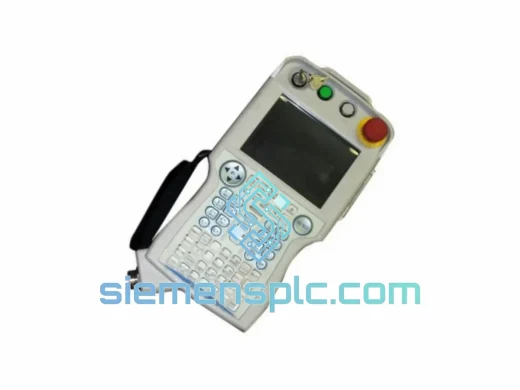
Yaskawa JZRCR-APP01-1 Robot Teach Pendant
Request verified availability, condition, replacement risk review, packing options and courier lead time for JZRCR-APP01-1.
BrandYaskawa
Part NumberJZRCR-APP01-1
ConditionAvailability Check
Lead TimeRFQ Confirmation
DocumentsDatasheet / photos by RFQ
ShippingExport packing available
Auto-filled RFQ
JZRCR-APP01-1
Click Request Quote and the part number is inserted into the inquiry form automatically.
- Reply by email: [email protected]
- WhatsApp / Tel: +86 18359268345
- Mon-Sat 9:00-18:00 GMT+8
Procurement Data
Key Product Information
Core fields for model confirmation and RFQ routing. Detailed product narrative remains below.
- Brand
- Yaskawa
- Primary Part Number
- JZRCR-APP01-1
- Product Type
- Robot Teach Pendant
- Product Family
- Other series
- Country of Origin
- JP
- Catalog Category
- Robotics & Motion
- Operating Temp.
- 0 °C to +45 °C
Model confirmed for inquiry
JZRCR-APP01-1
Send quantity, destination and urgency. The RFQ form keeps this part number attached.
Request Quote
Product Overview
JZRCR-APP01-1 Line Stopped? Every Hour of Robot Downtime Has a Price Tag — We Dispatch from Xiamen Before Your Next Shift
The YRC1000 controller is sitting idle. The teach pendant is gone — enable switch failure, shattered LCD, a keypad that stopped registering inputs, or a communication fault that no amount of cable reseating will fix. You’ve already run the diagnostics. You know what you need. The question is whether you can get a genuine Yaskawa JZRCR-APP01-1 on-site before the production loss becomes a financial crisis.
We stock the JZRCR-APP01-1 at our Xiamen export warehouse. Units are pre-inspected, individually sealed in anti-static packaging, and staged for same-day dispatch via DHL Express or FedEx International Priority. If your order is confirmed before 15:00 CST, it leaves today. No back-order queues. No distributor lead times measured in weeks. A real tracking number in your inbox within two hours of dispatch.
⚡ URGENT REQUIREMENT? Contact: [email protected] | WhatsApp: +86 18359268345
Quick Technical Datasheet
| Parameter | Specification | Status |
|---|---|---|
| Part Number | JZRCR-APP01-1 | ✅ Ready to Ship |
| Compatible Controller | Yaskawa YRC1000 | — |
| Brand / Series | Yaskawa Motoman / YRC1000 | — |
| Display Type | Color LCD with Touchscreen | — |
| Interface Ports | USB Host, Ethernet (controller-side) | — |
| Safety Circuit | 3-Position Enable Switch + Hardwired E-Stop | — |
| Pendant Cable Connector | 37-pin proprietary YRC1000 connector | — |
| IP Protection Rating | IP54 — dust-tight, splash-resistant | — |
| Operating Temperature | 0 °C to +45 °C | — |
| Unit Weight | Approx. 560 g (pendant only) | — |
| Language Options | English / Japanese / Chinese / Multi-language | — |
| Country of Origin | Japan (OEM) | — |
| Condition | New OEM / Certified Pre-tested | ✅ In Stock |
| Dispatch Cutoff | Same day if ordered before 15:00 CST | ✅ Ready to Ship |
Troubleshooting & Replacement Tips
Ten years of field work across automotive body shops, semiconductor fabs, and food processing lines gives you a very specific view of how the JZRCR-APP01-1 fails — and what trips up engineers during the swap. Here’s what actually matters when you’re standing in front of a dead pendant with a production manager breathing down your neck.
Failure Pattern 1 — Enable Switch Degradation
The 3-position enable switch is the highest-wear mechanical component on this pendant. In high-cycle cells running three shifts, the switch contact resistance drifts before it fails outright. You’ll see intermittent SERVO-001 or SERVO-002 alarms that clear on their own, or a robot that drops out of teach mode without warning. Wiggle the enable switch under load while watching the controller alarm log. If the fault correlates with switch movement, the switch is failing internally — the pendant needs replacement, not the controller.
Failure Pattern 2 — LCD Backlight Board Failure
Screen goes completely dark, but the controller still acknowledges the pendant — no PENDANT-001 alarm, axis jog commands still execute. This is a display board failure, not a communication issue. The fastest resolution is a full pendant swap. Attempting to source and replace the backlight inverter board in the field is a time sink that rarely pays off during an emergency.
Failure Pattern 3 — Keypad Membrane Delamination
Common in environments with chemical exposure, high humidity, or frequent cleaning with solvents. Symptoms include keys that require excessive force, random axis jog inputs, or missed keystrokes during job editing. Pull the pendant and inspect the ribbon cable connection between the membrane and the internal PCB. Corrosion at this connector is the usual culprit. If the ribbon is compromised, replace the pendant.
Failure Pattern 4 — Communication Loss / PENDANT-001 Alarm
Before condemning the pendant, inspect the 37-pin cable at both ends. Pin corrosion is common in humid or chemically aggressive environments, and a corroded pin on the controller-side connector will produce the same alarm as a dead pendant. Clean the connector pins with contact cleaner and reseat. If the alarm persists with a known-good cable, the pendant’s internal communication board has failed. Swap the pendant. If the alarm continues after the swap, the YRC1000’s pendant interface card may also require attention.
Failure Pattern 5 — Firmware Mismatch After Replacement (Critical)
This is the one that catches engineers off guard during emergency repairs. The YRC1000 controller validates the pendant firmware version on every power-up. Install a JZRCR-APP01-1 with a mismatched firmware revision and the controller will throw a SYSTEM-023 alarm and refuse to operate. Before pulling the failed pendant, navigate to System → Version Info and record the firmware version. If the old pendant is already dead and you can’t read it, check the controller’s system log — the last connected pendant version is stored there. Match the firmware on the replacement unit, or plan for a firmware update via the controller’s maintenance menu before returning the robot to production.
Field Replacement Checklist:
- Power down the YRC1000 controller completely. Hot-swapping the pendant is not supported and risks controller I/O damage.
- Disconnect the 37-pin pendant cable from the controller cabinet pendant port (labeled PP on the I/O panel). Inspect all 37 pins for corrosion or mechanical damage before reuse.
- Connect the replacement JZRCR-APP01-1 using the same cable. Do not force the connector — misaligned pins will damage both the cable and the controller port.
- Power on the controller and allow the full boot sequence to complete. Monitor for any
SYSTEM-0xxalarms during initialization. - Navigate to System → Version and confirm the pendant firmware version matches your production baseline.
- Execute a full safety validation: E-stop function, 3-position enable switch operation across all three positions, and deadman switch response. Do not return the robot to automatic mode until all safety functions are verified.
- Restore any custom key assignments, user-defined screens, or macro configurations specific to your facility’s programming standard.
- Log the replacement in your maintenance record with the new pendant serial number and firmware version for future reference.
Cross-Compatibility Note — JZRCR-APP01-2: The APP01-2 is a direct hardware revision of the APP01-1 and is backward compatible with YRC1000 controllers running firmware V2.xx or later. If your controller is on an earlier firmware branch, the APP01-1 is the safer choice for an emergency swap — it eliminates the firmware update step from your critical path.
Reliability in Harsh Conditions
The JZRCR-APP01-1 was not designed for a clean room. It was designed for the same floor your robot works on — and that floor is rarely forgiving.
The pendant housing carries an IP54 rating, providing full protection against dust ingress and resistance to water splashing from any direction. In automotive paint booths, foundry environments, and food processing lines where coolant mist, metal particulate, and cleaning agents are part of the daily atmosphere, IP54 is the operational baseline, not a premium feature.
Internal PCB assemblies are conformally coated to resist humidity-driven corrosion. This matters in coastal manufacturing facilities and tropical climates — Malaysia, Thailand, Vietnam, Indonesia — where ambient relative humidity regularly exceeds 80% and uncovered circuit boards develop corrosion within months. Units stored in our Xiamen warehouse are maintained in climate-controlled conditions and individually sealed in anti-static packaging until dispatch, preserving connector and PCB integrity through the full logistics chain.
Vibration resistance is validated to IEC 60068-2-6 standards. On a robot cell where the pendant is routinely dropped, dragged across steel fixtures, or suspended from a cable hook under tension, the internal connector assemblies and display mounting are engineered to absorb mechanical shock without losing electrical continuity. The pendant cable strain relief at the 37-pin connector is a specific design focus — cable fatigue at the connector entry point is a common failure mode on cheaper aftermarket units that the OEM design addresses with a reinforced boot and controlled bend radius.
The 3-position enable switch is rated for a defined actuation cycle count. In high-throughput cells running continuous three-shift operations, this is the component to track for planned end-of-life replacement — proactive replacement during scheduled maintenance is significantly less expensive than an unplanned stoppage caused by enable switch failure mid-production.
Global Express Logistics
Our dispatch hub is in Xiamen, Fujian, China — a tier-one export port with direct carrier gateway access to DHL Express, FedEx International Priority, and UPS Worldwide Express. Xiamen’s customs clearance infrastructure for industrial components is mature and efficient, which translates directly into fewer delays between your order confirmation and the unit arriving at your facility.
How the dispatch process works:
- Order confirmed before 15:00 CST: Same-day packaging, carrier handoff, and tracking number issued within 2 hours of dispatch.
- DHL Express Worldwide: 1–3 business days to Southeast Asia, Europe, and the Middle East. 2–4 business days to North America and South America.
- FedEx International Priority: Available as an alternative for destinations where FedEx provides stronger coverage or preferred customs clearance relationships.
- Export documentation: Commercial invoice, packing list, and certificate of origin prepared for every shipment. Customers requiring specific HS code declarations or country-of-origin documentation for import compliance should specify requirements at order time.
- Packaging standard: Each JZRCR-APP01-1 unit is packed in a custom anti-static foam insert inside a double-wall corrugated export carton. Fragile and orientation labels applied. Pendant cable, if included, is coiled and secured separately to prevent connector stress during transit.
- Declared-value insurance: Available on request. Recommended for all urgent high-value shipments where replacement lead time is critical.
For customers in Southeast Asia — Malaysia, Thailand, Vietnam, Indonesia, Philippines — we regularly achieve next-business-day delivery via DHL Express from Xiamen. If your line is down and you’re in the region, contact us via WhatsApp immediately for a real-time stock confirmation and same-day dispatch commitment.
We have shipped industrial automation components to over 40 countries. Customs clearance delays are uncommon for standard HS-coded automation hardware, but customers in markets with complex import regulations — Brazil, India, and select Middle East destinations — should confirm import requirements before placing an urgent order to avoid clearance delays that offset the speed of express shipping.
Contact Information
📧 Email: [email protected]
📱 WhatsApp: +86 18359268345
🌐 Web: siemensplc.com
© 2026 siemensplc.com. All rights reserved.
Ready to quote
[email protected]
Send This Part Number to Sales
RFQ workflow
Quality workflow ->
Confirmation Process
01Model confirmation
We check the full part number, brand, series and visible nameplate information before quotation.
02Availability reply
Sales confirms stock path, condition option, quantity and realistic lead time for export dispatch.
03Packing & courier
DHL, FedEx, UPS or buyer courier arrangements can be reviewed with packing requirements.
Continue sourcing
Browse full catalog ->
Related Automation Parts
Similar brand or category products for fast comparison and multi-item RFQ lists.
Yaskawa
RFQ Ready
Yaskawa SRDA-SDA21A01A-E JZNC-XPP02B JZNC-XPP04B Teach Pendant Keysheet Film
Origin JP
Robot Pendant Component