Siemens
RFQ Ready
Siemens 6ES7321-1BL00-0AA0 Digital Input Module
SIMATIC
Origin DE
PLC Digital Input Module
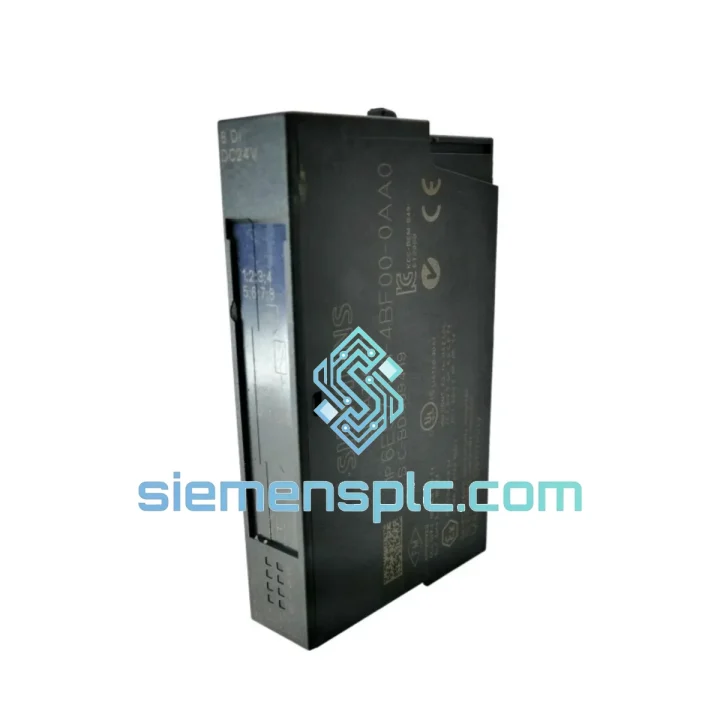
Request verified availability, condition, replacement risk review, packing options and courier lead time for 6ES7131-4BF00-0AA0.
Click Request Quote and the part number is inserted into the inquiry form automatically.
Core fields for model confirmation and RFQ routing. Detailed product narrative remains below.
Every minute your line is down, you’re bleeding money. A failed digital input module on an ET 200S rack doesn’t care about your production schedule — but we do. The Siemens 6ES7131-4BF00-0AA0 is a 4-channel 24 V DC digital input module for the SIMATIC ET 200S distributed I/O platform. We stock it. We test it. We ship it the same day you call. Whether you’re running a refinery in the Middle East, a stamping plant in Germany, or a water treatment facility in Southeast Asia, our logistics chain gets this module to your site before your maintenance window closes.
This isn’t a catalog listing. This is a field-ready replacement unit, inspected, bagged, and sitting on a shelf in Xiamen right now — waiting for your purchase order.
⚡ URGENT REQUIREMENT? Contact us immediately:
📧 [email protected]
📱 WhatsApp: +86 18359268345
| Parameter | Specification |
|---|---|
| Order Number | 6ES7131-4BF00-0AA0 |
| Platform | SIMATIC ET 200S |
| Module Type | 4-Channel Digital Input (DI) |
| Rated Input Voltage | 24 V DC |
| Signal “1” Threshold (min) | 15 V DC |
| Signal “0” Threshold (max) | 5 V DC |
| Input Current at “1” | Typ. 4 mA per channel |
| Input Filter Delay | 0.1 / 0.5 / 3 / 15 ms (configurable) |
| Backplane Bus Voltage | 5 V DC (from ET 200S power module) |
| Current Draw from Bus | Max. 10 mA |
| Power Dissipation | Max. 0.5 W |
| Dimensions (W × H × D) | 15 × 81 × 52 mm |
| Weight | Approx. 30 g |
| Operating Temperature | 0 °C to +60 °C (horizontal mount) |
| Storage Temperature | −40 °C to +70 °C |
| Degree of Protection | IP20 |
| IEC Compliance | IEC 61131-2 Type 1 |
| Certifications | CE, UL/cUL, ATEX Zone 2 (with enclosure) |
| Compatible Interface Modules | IM 151-1, IM 151-1 FO, IM 151-3 PN |
| Stock Status | ✅ Ready to Ship — Xiamen Warehouse |
Fifteen years of field calls teach you patterns. Here’s what actually goes wrong with the 6ES7131-4BF00-0AA0 and how to fix it fast.
Fault 1 — SF LED solid red, specific channel shows “0” regardless of sensor state
Root cause: Input channel hardware failure, typically from a voltage spike exceeding 30 V DC on the field wiring (lightning strike, VFD transient, or incorrect 110 V AC wiring). The module’s internal protection clamps at 30 V but sustained overvoltage kills the input optocoupler. Replacement is the only fix — there is no field repair path for this module. Before installing the new unit, measure the field wiring with a multimeter. If you see anything above 28 V DC, trace the source before powering up the replacement.
Fault 2 — Intermittent channel faults, SF LED flashing, no consistent pattern
Root cause: Loose backplane connection between the electronic module and the terminal module. The plug-in connector on the 6ES7131-4BF00-0AA0 has a locking tab that fatigues after repeated hot-swap cycles. Press the module firmly until you hear the audible click. If the fault persists after reseating, inspect the terminal module’s female connector for bent pins or corrosion — the terminal module (TM-E or TM-P series) may need replacement, not the electronic module itself.
Fault 3 — Module not recognized after replacement, BF LED on IM 151-x stays red
Root cause: Hardware configuration mismatch in STEP 7 or TIA Portal. The ET 200S performs slot-by-slot hardware comparison at startup. If the replacement module’s order number differs from what’s in the project (e.g., you installed a 6ES7131-4BH01-0AA0 8-channel instead of the 4-channel), the IM will reject it. Verify the exact order number on the module label matches the hardware configuration. If you’re replacing like-for-like (same order number), no configuration change is needed — the ET 200S does not use firmware-based module addressing; slot position is the address.
Fault 4 — Input filter causing missed pulses on high-speed sensors
Root cause: Default filter setting is 3 ms, which is appropriate for pushbuttons and limit switches but will miss pulses from proximity sensors on fast-moving machinery. In STEP 7 HW Config or TIA Portal, open the module properties and set the input filter to 0.1 ms for channels connected to inductive proximity sensors with cycle times under 1 ms. This change takes effect after downloading the hardware configuration — no CPU restart required if the ET 200S is in RUN mode with the IM 151-3 PN.
Replacement Procedure (5 steps, no tools required):
No dip switches. No firmware to flash. No address configuration. The ET 200S assigns slot addresses automatically based on physical position on the rail. Slot-based addressing means your replacement is plug-and-run — the CPU sees the same process image address the moment the module initializes.
The 6ES7131-4BF00-0AA0 was not designed for a climate-controlled server room. It was built for the floor — and it shows.
Vibration is the silent killer of plug-in I/O modules. Compressor skids, conveyor drives, and press lines generate continuous low-frequency vibration that works connector joints loose over months. This module meets IEC 60068-2-6: 10–58 Hz at 0.075 mm amplitude, 58–150 Hz at 1 g. The plug-in terminal module design actually helps here — the electronic module can flex slightly relative to the terminal module without stressing the field wiring, which is the failure point on hard-wired I/O blocks.
Temperature cycling is the second killer. Outdoor substations in the Middle East see enclosure temperatures above 55 °C in summer. The module’s rated operating range tops at 60 °C for horizontal installation. In vertical installation, derate to 40 °C. If your enclosure runs hot, add forced ventilation before you add more modules — thermal derating is real and the module will not warn you before it fails.
Humidity and condensation are the third threat. The module is rated for 10–95% relative humidity, non-condensing. “Non-condensing” is the critical qualifier. If your enclosure breathes — if it has cable entry glands that aren’t sealed — humid air enters and condenses on cold surfaces during temperature swings. Conformal coating on the PCB provides some protection, but it is not a substitute for a properly sealed enclosure. If you’re in a coastal or high-humidity environment, inspect the module’s PCB for white residue (flux contamination from condensation) during planned maintenance.
Electrical noise from variable-frequency drives is the fourth threat and the most underestimated. VFDs generate conducted and radiated interference that couples into 24 V DC field wiring. The module’s configurable input filter (0.1–15 ms) is your first line of defense. Your second line is proper cable segregation — 24 V DC signal cables must not run parallel to VFD power cables for more than 300 mm. If you’re seeing intermittent input faults on a line with VFDs, increase the filter delay before replacing the module.
Our warehouse is in Xiamen, China — one of the most logistics-connected cities in Asia, with direct access to DHL, FedEx, and UPS international hubs. Here’s how your order moves from our shelf to your site:
Day 0 — Order Confirmed: Purchase order received before 16:00 CST triggers same-day pick, inspection, and packing. The module is photographed, serial number logged, and packed in anti-static foam with desiccant. Export documentation (commercial invoice, packing list, HS code 8537.10) is prepared simultaneously.
Day 1 — Airfreight Departure: Shipment handed to DHL Express or FedEx International Priority at Xiamen Gaoqi International Airport. Tracking number issued to you within 2 hours of handover. For urgent orders, we can arrange FedEx First Overnight to major hubs in Europe, the Middle East, and North America.
Day 2–4 — Delivery to Site: DHL Express transit times from Xiamen: Europe (Frankfurt, Amsterdam, London) 2–3 business days; Middle East (Dubai, Riyadh, Doha) 2–3 business days; North America (Chicago, Houston, Los Angeles) 3–4 business days; Southeast Asia (Singapore, Bangkok, Jakarta) 1–2 business days. Customs clearance is the variable — we provide complete, accurate documentation to minimize delays. For customers with established import accounts, we can ship DDP (Delivered Duty Paid) to eliminate customs handling on your end.
Volume Orders: For quantities above 10 units or mixed-SKU orders, sea freight via Xiamen Port is available with 18–25 day transit to major global ports. We consolidate with weekly LCL departures to Rotterdam, Los Angeles, and Singapore.
Every shipment includes: commercial invoice, packing list, certificate of conformity, and our incoming inspection report. For customers requiring it, we can provide a Siemens product datasheet (current revision) and country-of-origin certificate.
Your line is down. Don’t wait for a contact form response.
📧 Email: [email protected]
📱 WhatsApp (24/7 urgent): +86 18359268345
🌐 Web: siemensplc.com
© 2026 siemensplc.com. All rights reserved. All product names, trademarks, and registered trademarks are the property of their respective owners. Siemens and SIMATIC are registered trademarks of Siemens AG. This listing is for the supply of genuine Siemens spare parts through authorized distribution channels.
We check the full part number, brand, series and visible nameplate information before quotation.
Sales confirms stock path, condition option, quantity and realistic lead time for export dispatch.
DHL, FedEx, UPS or buyer courier arrangements can be reviewed with packing requirements.
Similar brand or category products for fast comparison and multi-item RFQ lists.