
Emerson
In Stock OK
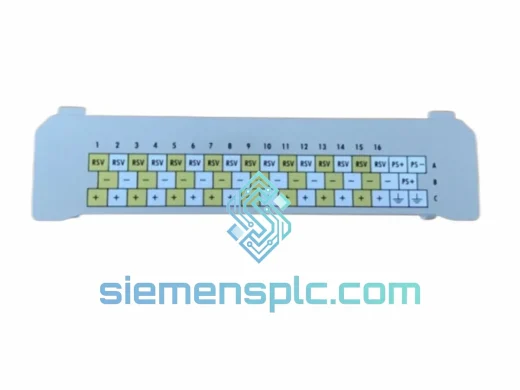
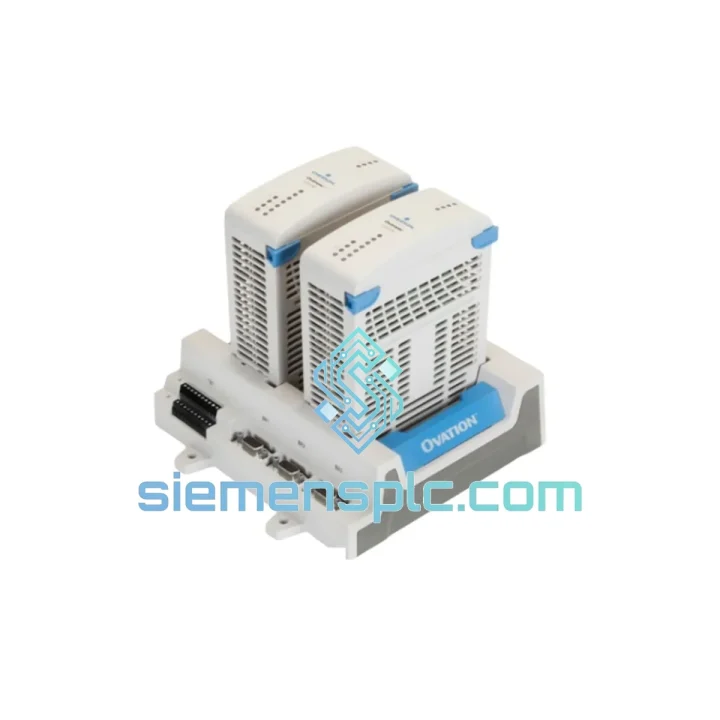
Emerson 1C31205G01 DCS Remote Node Controller
Request verified availability, condition, replacement risk review, packing options and courier lead time for 1C31205G01.
BrandEmerson
Part Number1C31205G01
ConditionAvailability Check
Lead TimeRFQ Confirmation
DocumentsDatasheet / photos by RFQ
ShippingExport packing available
Auto-filled RFQ
1C31205G01
Click Request Quote and the part number is inserted into the inquiry form automatically.
- Reply by email: [email protected]
- WhatsApp / Tel: +86 18359268345
- Mon-Sat 9:00-18:00 GMT+8
Procurement Data
Key Product Information
Core fields for model confirmation and RFQ routing. Detailed product narrative remains below.
- Brand
- Emerson
- Primary Part Number
- 1C31205G01
- Product Type
- DCS Remote Node Controller
- Series / Family
- Ovation
- Manufacturer
- Emerson Electric Co.
- Country of Origin
- US
- Catalog Category
- I/O Modules
- Operating Temp.
- 0 °C to +60 °C
- Humidity
- 5% – 95% RH, non-condensing
Model confirmed for inquiry
1C31205G01
Send quantity, destination and urgency. The RFQ form keeps this part number attached.
Request Quote
Product Overview
Emerson 1C31205G01 — Every Hour of Downtime Costs You. We Ship Today.
Your Ovation DCS node just dropped offline. The board is dead. Maintenance is standing by. Operations is calling every 15 minutes. You don’t need a sales pitch — you need the 1C31205G01 Remote Node Controller Base on a truck today. We stock it. We test it. We ship it from Xiamen within hours of order confirmation via DHL or FedEx Express.
This is not a catalog listing. This is a live inventory position. If you’re reading this page, the unit is available. Contact us now before the next shift starts.
⚡ URGENT REQUIREMENT?
Email: [email protected] | WhatsApp: +86 18359268345
Quick Technical Datasheet
| Part Number | 1C31205G01 |
| Manufacturer | Emerson Electric Co. |
| Series / Platform | Ovation DCS — Remote Node Controller Series |
| Module Function | Remote Node Controller (RNC) Base — I/O chassis backplane carrier |
| Communication Bus | Ovation Controller Network (OCN) |
| Supply Voltage | 24 VDC via Ovation I/O bus |
| Operating Temperature | 0 °C to +60 °C |
| Storage Temperature | −40 °C to +85 °C |
| Humidity | 5% – 95% RH, non-condensing |
| Weight | 630 g |
| Certifications | CE, UL Listed, RoHS Compliant |
| Mounting | Ovation I/O Chassis (DIN Rail / Panel) |
| Condition | New / Tested Surplus |
| Availability | ✔ Ready to Ship — Xiamen Warehouse |
Troubleshooting & Replacement Tips
Most Common Failure Modes on the 1C31205G01
After handling dozens of Ovation RNC failures in the field, the failure pattern is consistent. The base module itself rarely fails catastrophically — what kills it is sustained vibration fatigue on the backplane connector pins, moisture ingress at the OCN interface, or a power surge that takes out the onboard DC-DC converter. Here’s what to check before you condemn the module:
- OCN Link Fault (LED solid amber): 80% of the time this is a bad fiber patch cord or a dirty SFP transceiver, not the RNC Base itself. Swap the fiber first. If the fault clears, you saved yourself a module swap.
- Node offline / no heartbeat in Ovation Developer Studio: Check the 24 VDC rail at the I/O chassis power supply first. A sagging rail (below 22 VDC under load) will cause the RNC to drop off the OCN without throwing a hard fault. Measure at the chassis terminal block, not at the PSU output.
- Intermittent I/O scan errors (Ovation alarm: RNC_COMM_FAIL): This is classic backplane connector fatigue. The gold-plated edge connector on the RNC card degrades after 8–12 years in high-vibration environments. Reseat the RNC card first. If errors persist, the base module backplane contacts are the likely culprit.
- Module recognized but I/O cards not scanning: Verify the RNC firmware version matches the Ovation controller firmware. A version mismatch after a controller upgrade is a common post-maintenance trap. Pull the firmware revision from Ovation Developer Studio → Hardware Configuration → Node Properties.
Step-by-Step Hot-Swap Replacement Procedure
- Confirm redundancy status. If this node has a redundant RNC pair, verify the standby RNC is active and scanning before proceeding. Do not pull the primary until the standby is confirmed healthy in Ovation Developer Studio.
- Document the node address. The RNC Base node address is set via rotary switches on the RNC card (not the base). Photograph the switch positions before removal. Typical range: 01–99. Mismatched node address after replacement = node stays offline.
- De-energize the I/O chassis. Shut off the 24 VDC supply to the affected chassis. Do not attempt a live swap on the base module — the backplane connector is not rated for hot insertion.
- Remove field wiring termination modules. Disconnect all I/O termination cables from the front of the I/O cards. Label each cable position. The base module cannot be extracted with termination modules in place on most chassis configurations.
- Extract the RNC card from the base. Release the card ejector levers and slide the RNC card out. Set it aside — you will reinstall it into the new base.
- Remove the old base module. Unscrew the chassis mounting hardware (typically 4× M4 screws). Slide the base out of the chassis rail.
- Install the 1C31205G01 replacement base. Slide into position, torque mounting screws to 0.5 N·m. Do not overtighten — the chassis rail is aluminum and strips easily.
- Reinstall the RNC card. Verify rotary switch positions match your documentation from Step 2. Seat the card firmly until both ejector levers click.
- Reconnect termination cables and restore 24 VDC. Observe the RNC status LEDs: green OCN link = node is communicating. Amber = link fault. Red = hardware fault.
- Verify in Ovation Developer Studio. Confirm all I/O points are scanning. Check for any latched alarms related to the node. Clear and acknowledge.
Firmware Compatibility Note: The 1C31205G01 base is passive — it carries no firmware. The RNC card seated in the base carries the firmware. If you are replacing both the base and the RNC card simultaneously, ensure the new RNC card firmware matches your Ovation controller version. Mismatched firmware will result in the node appearing in hardware configuration but failing to scan I/O.
Reliability in Harsh Conditions
The Ovation DCS platform was designed for power generation and heavy process industries — environments where ambient temperatures swing 40 degrees between seasons, where cooling fans run 24/7 and coat every surface in conductive dust, and where the control room sits 200 meters from a turbine hall that vibrates at 50 Hz continuously.
The 1C31205G01 base module is built to survive exactly that. The backplane PCB uses heavy copper pour on all power planes to handle sustained current without thermal degradation. The edge connector is gold-plated to resist oxidation in humid coastal and tropical plant environments. The chassis mounting system uses vibration-damped hardware that maintains contact integrity even in environments with continuous mechanical vibration from rotating equipment.
Units we ship have been stored in climate-controlled conditions and inspected for connector oxidation, PCB delamination, and mechanical damage before dispatch. We do not ship modules that show signs of thermal stress, burn marks, or corroded contacts. Every unit leaves Xiamen in anti-static packaging with silica gel desiccant and a humidity indicator card. If the card reads above 30% RH on arrival, contact us immediately — that is a shipping chain failure and we will replace the unit.
For installations in particularly aggressive environments — offshore platforms, tropical coastal plants, high-altitude sites with wide temperature swings — we recommend requesting a conformal-coated unit if available, or applying conformal coating to the RNC card (not the base) after installation as a field modification.
Global Express Logistics
Our dispatch warehouse is located in Xiamen, Fujian Province, China — one of the most logistics-connected export hubs in Asia. We have standing accounts with DHL Express, FedEx International Priority, and UPS Worldwide Express. For urgent orders confirmed before 14:00 CST, same-day dispatch is standard.
Typical transit times from Xiamen:
- Southeast Asia (Singapore, Thailand, Malaysia, Indonesia): 2–3 business days via DHL Express
- Middle East (UAE, Saudi Arabia, Qatar): 3–4 business days via FedEx International Priority
- Europe (Germany, UK, Netherlands, Poland): 3–5 business days via DHL Express
- North America (USA, Canada, Mexico): 4–5 business days via FedEx International Priority
- South America (Brazil, Chile, Colombia): 5–7 business days via DHL Express
- Africa (South Africa, Nigeria, Egypt): 5–8 business days via DHL Express
All shipments include full commercial invoice, packing list, and country of origin certificate. For orders requiring ATA Carnet, CITES documentation, or specific import permits, contact us 24 hours before dispatch to allow documentation preparation. We handle export customs clearance from the China side — your freight forwarder or our nominated broker handles import clearance at destination.
Shipment tracking numbers are provided within 2 hours of dispatch. We insure all shipments at declared value. In the event of transit damage, we initiate the carrier claim and ship a replacement unit immediately — we do not make you wait for the claim to settle before sending a replacement.
Contact Information
Email: [email protected]
WhatsApp: +86 18359268345
Web: siemensplc.com
© 2026 siemensplc.com. All rights reserved.
Ready to quote
[email protected]
Send This Part Number to Sales
RFQ workflow
Quality workflow ->
Confirmation Process
01Model confirmation
We check the full part number, brand, series and visible nameplate information before quotation.
02Availability reply
Sales confirms stock path, condition option, quantity and realistic lead time for export dispatch.
03Packing & courier
DHL, FedEx, UPS or buyer courier arrangements can be reviewed with packing requirements.
Continue sourcing
Browse full catalog ->
Related Automation Parts
Similar brand or category products for fast comparison and multi-item RFQ lists.
Emerson
RFQ Ready
Emerson OVATION VE5008 5X00150G01 AMS Device Interface Module
OVATION
Origin US
DCS I/O Module
Emerson
RFQ Ready
Emerson UNI1404 DCS Universal Input Module – Ovation Series
Ovation
Origin US
DCS Universal Input Module
Emerson
RFQ Ready
Emerson UNI1401 Digital Output Module – Ovation DCS
Ovation
Origin US
Digital Output Module