SHARP
In Stock OK
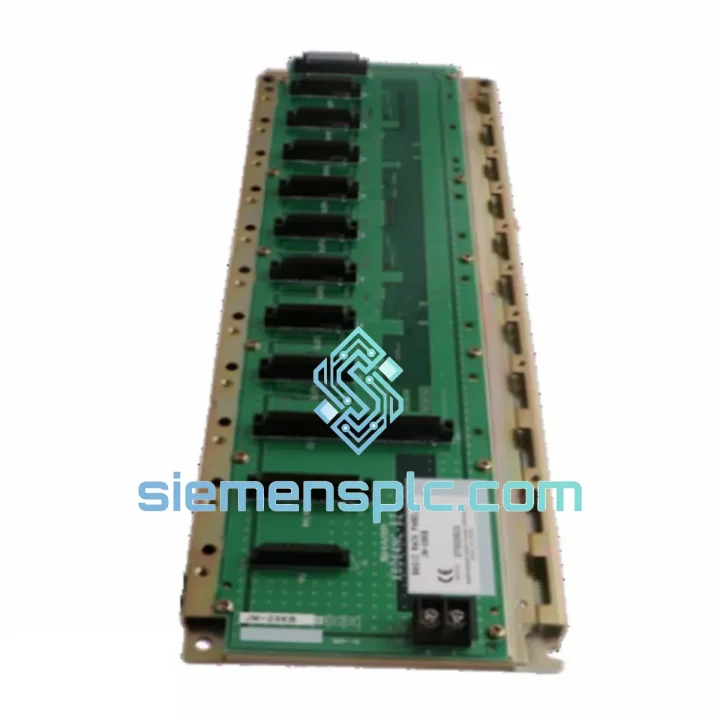
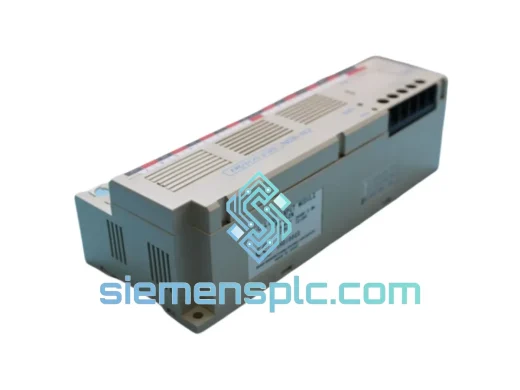
SHARP JW-28KB PLC Expansion Rack
Request verified availability, condition, replacement risk review, packing options and courier lead time for JW-28KB.
BrandSHARP
Part NumberJW-28KB
ConditionAvailability Check
Lead TimeRFQ Confirmation
DocumentsDatasheet / photos by RFQ
ShippingExport packing available
Auto-filled RFQ
JW-28KB
Click Request Quote and the part number is inserted into the inquiry form automatically.
- Reply by email: [email protected]
- WhatsApp / Tel: +86 18359268345
- Mon-Sat 9:00-18:00 GMT+8
Procurement Data
Key Product Information
Core fields for model confirmation and RFQ routing. Detailed product narrative remains below.
- Brand
- SHARP
- Primary Part Number
- JW-28KB
- Product Type
- PLC Expansion Rack
- Series / Family
- JW Series
- Manufacturer
- SHARP Corporation
- Country of Origin
- Japan
- Catalog Category
- PLCs & Controllers
Model confirmed for inquiry
JW-28KB
Send quantity, destination and urgency. The RFQ form keeps this part number attached.
Request Quote
Product Overview
SHARP JW-28KB Expansion Rack: Stop the Clock on Your Downtime — Ship Today from Xiamen
Your JW Series PLC just lost its expansion rack. Every minute the line is down, you’re bleeding production output, missing delivery windows, and fielding calls from plant management. The SHARP JW-28KB is the exact backplane your system needs — and we have it on the shelf, packed and ready to move via DHL or FedEx within 24 hours of order confirmation. No lead-time games, no substitution risk. The right part, the right series, shipped fast.
URGENT REQUIREMENT? Contact: [email protected] | WhatsApp: +86 18359268345
Quick Technical Datasheet
| Parameter | Specification |
|---|---|
| Manufacturer | SHARP Corporation |
| Part Number / SKU | JW-28KB |
| Product Category | PLC Expansion Rack Panel |
| Compatible Series | SHARP JW Series PLC |
| Slot Configuration | Multi-slot I/O backplane (JW Series bus standard) |
| Backplane Bus | JW Series parallel I/O bus |
| Mounting | DIN rail / panel mount compatible |
| Weight | 1,220 g |
| Country of Origin | Japan |
| Condition | New / Surplus (confirmed at quotation) |
| Stock Status | ✔ Ready to Ship — Xiamen Warehouse |
| Lead Time | Ships within 24 hrs of payment confirmation |
| Export Terms | EXW, FOB Xiamen, CIF available |
Troubleshooting & Replacement Tips
Swapping a JW-28KB is not a plug-and-play operation if you skip the pre-checks. Here’s what field experience tells you to verify before you even open the enclosure:
1. Backplane Bus Revision Match
The JW Series went through multiple hardware revisions. Before installing the JW-28KB, confirm your CPU module’s bus revision stamp (typically printed on the CPU label or documented in the system’s hardware configuration file). A mismatch between rack revision and CPU revision causes silent I/O faults — the CPU initializes but field signals never map correctly. Pull the existing rack’s revision label before disposal.
2. Slot Address Jumpers / DIP Switch Settings
On JW Series expansion racks, slot addressing is set via onboard DIP switches or address jumpers located on the rack’s backplane PCB. If your replacement JW-28KB ships with factory-default switch positions, you must reconfigure them to match the original rack’s address map. Failure to do so results in I/O module address conflicts — the CPU will report module errors or fail to scan the rack entirely. Document the original switch positions with a photo before removing the failed unit.
3. Power Supply Sequencing
Do not power the new rack while I/O modules are seated. Insert the rack first, verify all module connectors are fully engaged, then apply power. Hot-insertion of modules into a live JW-28KB backplane risks backplane bus latch-up — a condition that can damage both the rack and the CPU’s I/O interface circuitry.
4. Common Fault Codes After Rack Replacement
- ERR LED solid on CPU: Rack address conflict. Recheck DIP switch settings on the new JW-28KB against the original configuration.
- I/O module LEDs off after power-up: Backplane connector not fully seated. Remove and re-seat each module with firm, even pressure.
- Intermittent I/O faults under vibration: Rack mounting screws not torqued to spec. JW-28KB requires panel-mount screws tightened to prevent micro-movement on the backplane connector pins.
- CPU scan time increase after expansion: Normal behavior when adding I/O slots. Verify scan time is within your application’s watchdog tolerance and adjust the watchdog timer in the CPU configuration if needed.
5. Firmware Compatibility Note
If your JW Series CPU is running firmware below version 2.x, certain I/O module types may not be recognized when mounted in the JW-28KB. Check the CPU firmware version via the programming console before commissioning. Firmware updates for JW Series CPUs are available through SHARP’s industrial support channel — contact us if you need assistance sourcing the update tool.
Reliability in Harsh Conditions
The JW-28KB was engineered for the realities of industrial plant floors — not climate-controlled server rooms. The backplane PCB uses conformal coating on critical signal traces, providing resistance to condensation and airborne contaminants common in food processing, chemical, and coastal manufacturing environments. The rack’s mechanical frame is constructed from cold-rolled steel with a powder-coat finish, maintaining structural rigidity under continuous vibration loads from press machinery, compressors, and conveyor drives.
Thermal performance is a non-issue within the JW Series operating envelope: the JW-28KB is rated for ambient temperatures consistent with standard industrial panel enclosures. The backplane’s passive bus architecture generates no additional heat load — unlike active backplanes found in some competing architectures, there are no onboard regulators to fail under sustained high-temperature operation.
Connector durability is where many third-party rack alternatives fail. The JW-28KB uses OEM-spec edge connectors with gold-plated contacts, maintaining low contact resistance across thousands of insertion cycles. In high-humidity environments, this matters: oxidized contacts on a cheap substitute rack are a leading cause of intermittent I/O faults that are nearly impossible to diagnose without swapping the rack itself. Sourcing the genuine JW-28KB eliminates that variable entirely.
Global Express Logistics
Our Xiamen warehouse operates on a 24-hour dispatch cycle for in-stock items. Here’s exactly how your JW-28KB moves from our shelf to your plant floor:
Step 1 — Order Confirmation: Payment confirmed before 3:00 PM CST triggers same-day pick, inspect, and pack. Units are wrapped in anti-static foam, boxed in double-wall corrugated cartons, and labeled with your commercial invoice and packing list.
Step 2 — Carrier Booking: We book DHL Express or FedEx International Priority based on your destination and urgency. For critical downtime situations, we can arrange DHL On-Demand Delivery with real-time tracking notifications to your phone.
Step 3 — Customs Documentation: All export paperwork — commercial invoice, packing list, HS code declaration (HS 8538.90 for PLC components) — is prepared in-house. We have established customs broker relationships at Xiamen port, which eliminates clearance delays that plague first-time exporters.
Step 4 — Transit Times (Estimated):
- Southeast Asia (SG, MY, TH, VN): 2–3 business days via DHL Express
- Europe (DE, NL, PL, UK): 3–5 business days via FedEx International Priority
- North America (US, CA, MX): 3–5 business days via DHL Express Worldwide
- Middle East (AE, SA, QA): 3–4 business days via FedEx International
- Australia / New Zealand: 3–4 business days via DHL Express
Step 5 — Tracking & Delivery Confirmation: AWB number sent to your email within 2 hours of dispatch. Signature-required delivery ensures the unit reaches your authorized recipient — not a loading dock where it sits for three days.
For plant shutdowns, scheduled maintenance windows, or emergency breakdowns, contact us directly on WhatsApp for real-time stock confirmation and expedited booking. We understand that “next week” is not an acceptable answer when a production line is down.
Contact Information
Email: [email protected]
WhatsApp: +86 18359268345
Web: siemensplc.com
© 2026 siemensplc.com. All rights reserved.
Ready to quote
[email protected]
Send This Part Number to Sales
RFQ workflow
Quality workflow ->
Confirmation Process
01Model confirmation
We check the full part number, brand, series and visible nameplate information before quotation.
02Availability reply
Sales confirms stock path, condition option, quantity and realistic lead time for export dispatch.
03Packing & courier
DHL, FedEx, UPS or buyer courier arrangements can be reviewed with packing requirements.
Continue sourcing
Browse full catalog ->
Related Automation Parts
Similar brand or category products for fast comparison and multi-item RFQ lists.
SHARP
RFQ Ready
Sharp ZW-162N Digital Input Module – ZW Series
ZW Series
Origin JP
Digital Input Module