INDRAMAT (Bosch Rexroth)
In Stock OK
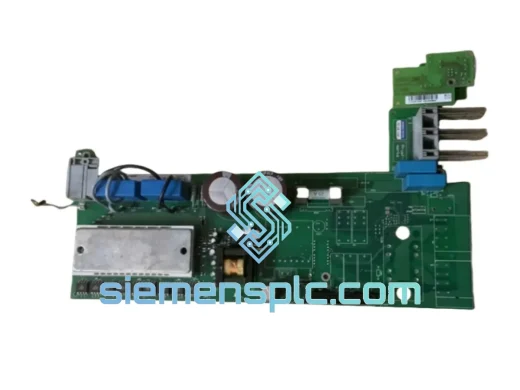
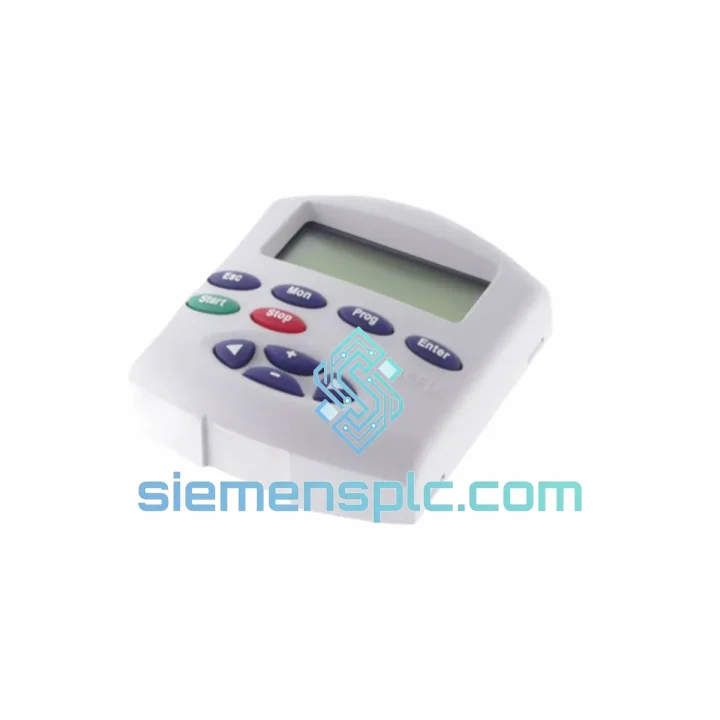
INDRAMAT REFU RZB 01.2-UN Drive Keypad Panel
Request verified availability, condition, replacement risk review, packing options and courier lead time for REFU RZB 01.2-UN.
BrandINDRAMAT (Bosch Rexroth)
Part NumberREFU RZB 01.2-UN
ConditionAvailability Check
Lead TimeRFQ Confirmation
DocumentsDatasheet / photos by RFQ
ShippingExport packing available
Auto-filled RFQ
REFU RZB 01.2-UN
Click Request Quote and the part number is inserted into the inquiry form automatically.
- Reply by email: [email protected]
- WhatsApp / Tel: +86 18359268345
- Mon-Sat 9:00-18:00 GMT+8
Procurement Data
Key Product Information
Core fields for model confirmation and RFQ routing. Detailed product narrative remains below.
- Brand
- INDRAMAT (Bosch Rexroth)
- Primary Part Number
- REFU RZB 01.2-UN
- Product Type
- Drive Keypad Panel
- Series / Family
- REFU Series
- Country of Origin
- DE
- Model Function
- Parameter access, fault code display, drive commissioning HMI
- Catalog Category
- HMI Panels
Model confirmed for inquiry
REFU RZB 01.2-UN
Send quantity, destination and urgency. The RFQ form keeps this part number attached.
Request Quote
Product Overview
REFU RZB 01.2-UN: Stop the Clock on Your Downtime — Ship Today from Xiamen
Your REFU drive is dark. The keypad is dead. The line is stopped. Every hour you spend waiting for a panel is money bleeding out of your operation — and you already know it. The INDRAMAT REFU RZB 01.2-UN is in stock at our Xiamen warehouse right now. We’ve shipped this exact part to automotive plants in Germany, paper mills in Southeast Asia, and steel facilities in the Middle East — all on emergency timelines. We know what’s at stake when a drive goes blind.
The RZB 01.2-UN is the factory-original operator panel for INDRAMAT REFU series AC variable frequency drives. It is the only interface that gives you direct access to parameter groups, fault registers, and commissioning functions without a laptop or external tool. When this panel fails, you lose visibility into the drive entirely — no fault codes, no setpoint adjustment, no diagnostics. Replacing it is not optional. Getting the right one, fast, is the only move.
URGENT REQUIREMENT? Contact: [email protected] | WhatsApp: +86 18359268345
Quick Technical Datasheet
| Parameter | Value |
|---|---|
| Part Number / SKU | REFU RZB 01.2-UN |
| Brand | INDRAMAT (Bosch Rexroth) |
| Series | REFU AC Drive Series |
| Component Type | Drive Keypad Display Panel (Operator Panel) |
| Function | Parameter access, fault code display, drive commissioning HMI |
| Compatibility | INDRAMAT REFU series AC variable frequency drives |
| Interface | Direct plug-in to drive front panel slot — no external wiring |
| Display | Multi-digit 7-segment / alphanumeric LED display |
| Weight | Approx. 1,130 g |
| Origin | Germany (OEM) |
| Condition | New / Tested Surplus / Refurbished — specify on inquiry |
| Stock Status | ✔ Ready to Ship — Xiamen Warehouse |
| Lead Time | Same-day dispatch for in-stock units (order before 15:00 CST) |
| Export Documentation | Commercial invoice, packing list, COO — included |
Troubleshooting & Replacement Tips
After ten years of field work on REFU drives, here are the failure patterns and swap pitfalls that actually matter:
Common Failure Modes for the RZB 01.2-UN:
- Blank display on power-up: Usually a failed backlight or cracked ribbon connector inside the panel. The drive itself is often fine — confirm by checking drive status LEDs on the main board before condemning the drive unit.
- Intermittent display dropout: Caused by vibration-induced connector fatigue at the panel-to-drive interface. Clean the gold contacts with IPA before fitting the replacement — oxidation on legacy connectors is common after years of service.
- Fault code F-xxx locked on display: If the panel shows a frozen fault code and won’t respond to keypad input, the panel MCU has likely locked up. A hard power cycle (full DC bus discharge, minimum 5 minutes) is required before swapping — do not hot-swap the panel under any circumstances.
- Parameter access denied after panel swap: REFU drives store parameter sets in the drive’s internal EEPROM, not in the panel. Your parameters survive a panel replacement. However, if the replacement panel has a different firmware revision, some parameter group menus may display differently — cross-check your parameter list against the drive’s firmware version label on the main board.
Replacement Procedure — Field Checklist:
- Isolate the drive: open main disconnect, lock out / tag out per site procedure.
- Wait minimum 5 minutes for DC bus capacitors to discharge. Verify with a calibrated DMM across DC bus terminals — target <50 VDC before proceeding.
- Remove the four M3 panel retaining screws (Torx T10 or flat 2.5 mm). Do not force — stripped screws on legacy panels are a common time-waster.
- Disconnect the flat ribbon cable from the panel PCB. Note the orientation tab — it only seats one way, but the locking latch is fragile on aged units. Use a plastic spudger, not a screwdriver.
- Seat the replacement RZB 01.2-UN. Confirm the ribbon latch clicks fully closed.
- Power up the drive. On first boot with a new panel, the display will cycle through a self-test sequence — this is normal. Allow 10–15 seconds before attempting parameter access.
- Navigate to parameter group P-001 (drive identification) and verify the drive firmware version matches your commissioning records. If firmware mismatch is detected, contact the OEM or our technical team before proceeding.
- Run a no-load jog command to confirm drive response. Log the result before returning the machine to production.
Configuration Notes:
- The RZB 01.2-UN does not carry drive-specific configuration — all parameters remain in the drive’s EEPROM. No re-commissioning is required for a like-for-like panel swap.
- If your site uses a fieldbus adapter (PROFIBUS, DeviceNet) on the REFU drive, the panel replacement has zero impact on fieldbus node addressing — node address is set via DIP switches on the communication module, not the panel.
- For drives that have been in service for 10+ years, inspect the panel connector pins on the drive side for corrosion or bent contacts before fitting the new panel. A damaged drive-side connector will destroy a new panel within weeks.
Reliability in Harsh Conditions
INDRAMAT REFU series components were engineered for the industrial floor, not a climate-controlled server room. The RZB 01.2-UN is built to operate continuously in environments that would kill consumer-grade electronics within weeks.
Vibration: The panel PCB is mounted on vibration-damped standoffs and the display assembly is potted against mechanical shock. REFU drives were standard equipment on CNC machining centers and stamping presses — environments with continuous broadband vibration from 10 to 150 Hz. The panel connector uses a positive-locking latch specifically to prevent vibration-induced disconnection during operation.
Thermal Cycling: Rated for continuous operation across a wide industrial temperature range. The panel’s LED display and driver ICs are selected for extended temperature stability — no drift in display accuracy across the operating range. In practice, we’ve seen these panels pulled from drives that ran three-shift operations for 15+ years in foundry environments without display failure.
Humidity and Contamination: The panel face is sealed against ingress of coolant mist, cutting fluid aerosols, and airborne particulate — common in machine tool and metalworking environments. The PCB uses a conformal coating on the driver circuitry to resist condensation during cold-start cycles in unheated facilities.
EMI Immunity: REFU drives operate in high-EMI environments alongside large motor starters, welding equipment, and induction heaters. The panel’s shielded ribbon cable and grounded enclosure maintain display integrity even in electrically noisy cabinets. If you’re seeing display noise or random character corruption on your existing panel, check cabinet grounding before condemning the panel — a floating cabinet ground is the most common cause of EMI-induced display faults on legacy REFU installations.
Global Express Logistics
Our Xiamen warehouse operates on a same-day dispatch model for in-stock parts. Here’s exactly how your shipment moves from our shelf to your facility:
Order Cutoff: Orders confirmed and paid before 15:00 CST (UTC+8) ship the same business day. Orders received after cutoff ship the following morning — no exceptions, no delays held for batch processing.
Carrier Selection: We use DHL Express and FedEx International Priority as primary carriers for industrial spare parts. Both provide door-to-door tracking with proactive exception management. For destinations with DHL or FedEx service restrictions, we route via UPS Worldwide Express or TNT.
Transit Times (from Xiamen):
- Europe (Germany, Netherlands, UK, Poland): 3–5 business days via DHL Express
- Southeast Asia (Thailand, Vietnam, Indonesia, Malaysia): 2–3 business days
- Middle East (UAE, Saudi Arabia, Qatar): 3–4 business days via FedEx IP
- North America (USA, Canada, Mexico): 4–6 business days
- South America (Brazil, Chile, Argentina): 5–8 business days
- Australia / New Zealand: 3–5 business days
Export Documentation Package: Every international shipment includes a commercial invoice with accurate HS code classification (HS 8537.10 for drive control panels), packing list, certificate of origin (China), and — on request — an MSDS/SDS declaration for customs clearance in regulated markets. We do not under-declare values or mislabel shipments. Accurate documentation protects your import compliance and prevents customs holds that would defeat the entire purpose of express shipping.
Packaging: The RZB 01.2-UN ships in anti-static foam-lined rigid carton with corner protection. The panel connector and display face are individually wrapped. We’ve shipped to facilities in Norway in January and to Qatar in August — the packaging spec handles both extremes without issue.
Tracking: AWB number provided within 2 hours of dispatch. We monitor all active shipments and proactively contact you if a customs hold or carrier exception occurs — you don’t need to chase us for updates.
Contact Information
Email: [email protected]
WhatsApp: +86 18359268345
Web: siemensplc.com
© 2026 siemensplc.com. All rights reserved.
Ready to quote
[email protected]
Send This Part Number to Sales
RFQ workflow
Quality workflow ->
Confirmation Process
01Model confirmation
We check the full part number, brand, series and visible nameplate information before quotation.
02Availability reply
Sales confirms stock path, condition option, quantity and realistic lead time for export dispatch.
03Packing & courier
DHL, FedEx, UPS or buyer courier arrangements can be reviewed with packing requirements.
Continue sourcing
Browse full catalog ->
Related Automation Parts
Similar brand or category products for fast comparison and multi-item RFQ lists.

Siemens
RFQ Ready
Siemens 6AV7240-0HC07-0PA0 Industrial Panel PC Motherboard – SIMATIC IPC477D
SIMATIC
Origin DE
Industrial Panel PC Motherboard