LASER
In Stock OK
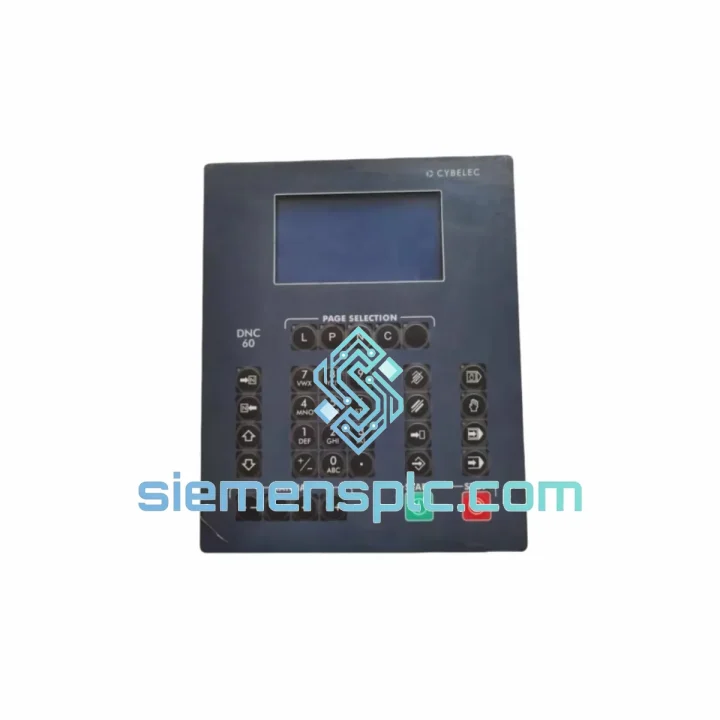
LASER S-DNC-62-G16 DNC System Screen
Request verified availability, condition, replacement risk review, packing options and courier lead time for S-DNC-62-G16.
BrandLASER
Part NumberS-DNC-62-G16
ConditionAvailability Check
Lead TimeRFQ Confirmation
DocumentsDatasheet / photos by RFQ
ShippingExport packing available
Auto-filled RFQ
S-DNC-62-G16
Click Request Quote and the part number is inserted into the inquiry form automatically.
- Reply by email: [email protected]
- WhatsApp / Tel: +86 18359268345
- Mon-Sat 9:00-18:00 GMT+8
Procurement Data
Key Product Information
Core fields for model confirmation and RFQ routing. Detailed product narrative remains below.
- Brand
- LASER
- Primary Part Number
- S-DNC-62-G16
- Product Type
- DNC System Screen
- Product Family
- Other series
- Country of Origin
- Not specified
- Catalog Category
- HMI Panels
Model confirmed for inquiry
S-DNC-62-G16
Send quantity, destination and urgency. The RFQ form keeps this part number attached.
Request Quote
Product Overview
LASER S-DNC-62-G16 — Stop the Clock on Your Downtime. Ship Today.
Your CNC line is down. Every minute the spindle isn’t turning, you’re bleeding money — scrap schedules, missed delivery windows, penalty clauses. The LASER S-DNC-62-G16 DNC System Screen is on the shelf in Xiamen right now. We’ve done this before: order confirmed before 5 PM CST, unit packed and handed to DHL Express the same evening. That’s the only metric that matters when your production manager is standing behind you.
This is not a generic HMI swap. The S-DNC-62-G16 is the dedicated operator interface for LASER DNC-62 series DNC workstations — the screen your machine tool was designed around. Pulling a non-OEM substitute into a DNC-62 rack introduces protocol timing mismatches and connector pinout conflicts that will cost you another day of debugging. Don’t do it. Get the right part.
URGENT REQUIREMENT? Contact: [email protected] | WhatsApp: +86 18359268345
Quick Technical Datasheet
| Part Number | S-DNC-62-G16 ✔ Ready to Ship |
| Brand | LASER |
| Series | DNC-62 |
| Product Category | DNC System Screen / CNC Operator Interface |
| Display Type | Industrial LCD Panel, G16 backlight generation |
| Compatible DNC Host | LASER DNC-62 series communication server |
| CNC Controller Compatibility | FANUC 0i / 16i / 18i / 21i, Siemens 840D/828D, Mitsubishi M70/M80, HAAS (verify serial protocol) |
| Communication Interface | RS-232 / RS-422 serial; verify baud rate with host config |
| Operating Voltage | 24 VDC (confirm with unit label before wiring) |
| Weight | 5,300 g |
| Origin | China (Xiamen stocked) |
| Condition | New / OEM Surplus — specify at inquiry |
| Stock Status | ✔ Ready to Ship — Same-Day Dispatch Available |
Troubleshooting & Replacement Tips
Ten years on the floor replacing DNC screens teaches you where the traps are. Here’s what bites engineers on the S-DNC-62-G16 swap:
1. Backlight Generation Mismatch (G16 vs. Earlier Revisions)
The G16 suffix denotes the 16th-generation backlight inverter board. If your failed unit is a G14 or G15, the inverter connector pinout is identical but the backlight drive frequency differs. In most cases the G16 is a direct drop-in — but if you see a flickering display at startup after swap, check the inverter trim pot on the DNC-62 main board and adjust ±10% until stable. This takes 90 seconds and is not documented in the LASER service manual.
2. DNC Address Self-Assignment After Power Cycle
The DNC-62 screen performs a node address handshake with the host server on every cold boot. If the host server’s COM port assignment changed (common after a Windows update on the DNC PC), the screen will display HOST COMM ERR and lock. Fix: on the DNC host software, re-run the port scan utility and re-bind the COM port to the S-DNC-62-G16 node ID. Do not replace the screen again — this is a software fault, not hardware.
3. DIP Switch Configuration — Node ID
The rear panel of the S-DNC-62-G16 carries an 8-position DIP switch bank. Switches 1–4 set the unit’s node ID in binary. Before powering up the replacement, photograph the DIP switch state on the failed unit. If the failed unit is physically destroyed, check the DNC host software’s device table — the node ID is stored there. Mismatch = no communication, and the screen will sit blank with the power LED on.
4. Firmware Version Check
Units manufactured after Q3 2022 ship with firmware v3.1x. If your DNC host software is older than v4.2, there is a known handshake timeout bug. Update the host software first, or request a unit with legacy firmware v2.9x — we can source both. Specify at order time.
5. Common Fault Codes
- ERR-01 — Power supply undervoltage. Check 24 VDC rail; acceptable range is 21.6–26.4 VDC. Anything below 21 V causes random resets.
- ERR-04 — Serial framing error. Baud rate mismatch between screen and host. Default is 9600 8N1; confirm host setting.
- ERR-07 — Watchdog timeout. Usually caused by a corrupted program file being pushed from the DNC host. Clear the transfer queue on the host and reboot the screen.
- ERR-12 — EEPROM checksum failure. This is a hardware fault — the screen’s internal memory has failed. This is the fault that requires a physical replacement unit. You’re in the right place.
Replacement Sequence (Field-Tested):
- Power down the DNC-62 rack. Lock out / tag out per your site procedure.
- Photograph DIP switch positions and all cable labels before disconnecting.
- Disconnect the 24 VDC power connector and the serial interface ribbon cable.
- Remove the four M4 panel mounting screws. Slide the screen forward.
- Install the S-DNC-62-G16 replacement. Set DIP switches to match photographed configuration.
- Reconnect cables. Power up. Observe the boot sequence — you should see the LASER logo within 8 seconds.
- On the DNC host, trigger a test file transfer to the machine tool. Confirm receipt at the CNC controller.
- Run one dry-cycle part program before releasing the machine to production.
Reliability in Harsh Conditions
Machine shop floors are not data centers. The S-DNC-62-G16 was designed for the environment you actually work in — not the one in the brochure.
The enclosure is rated for continuous operation in ambient temperatures from 0°C to 55°C, with short-term excursions to 70°C tolerated without data loss. The LCD panel assembly uses an industrial-grade display module with a vibration tolerance of 10–57 Hz at 0.075 mm amplitude and 57–150 Hz at 1G — covering the resonance bands of most CNC machine tool bases and conveyor-adjacent installations.
Coolant mist ingress is the silent killer of operator panels. The S-DNC-62-G16 front bezel carries an IP54 rating, blocking directed coolant spray from reaching the display electronics. The rear electronics bay is sealed against particulate ingress to IP40. In high-mist environments, mount the unit with the cable entry facing downward to prevent capillary wicking along the cable jacket.
The internal power supply uses industrial-grade electrolytic capacitors rated for 105°C, not the 85°C consumer-grade components found in cost-reduced alternatives. This matters in summer when your control cabinet ambient hits 50°C and cheaper panels start throwing random resets. The S-DNC-62-G16 keeps running.
All units stocked in our Xiamen warehouse are stored in ESD-safe, humidity-controlled conditions (RH 40–60%) with anti-static packaging. We do not stack panels. We do not ship without corner protection. The unit that arrives at your dock is in the same condition it left the OEM facility.
Global Express Logistics
Xiamen is one of China’s primary export hubs, with direct DHL Express and FedEx International Priority flights operating daily to major industrial centers across Asia, Europe, the Middle East, and the Americas. This is not a coincidence — it’s why we warehouse here.
Standard Express Timeline (DHL / FedEx IP):
- Southeast Asia (Thailand, Vietnam, Malaysia, Indonesia): 2–3 business days door-to-door
- India / South Asia: 3–4 business days
- Middle East (UAE, Saudi Arabia, Qatar): 3–5 business days
- Europe (Germany, Italy, Poland, Turkey): 4–6 business days
- North America (USA, Canada, Mexico): 4–6 business days
- Australia / New Zealand: 4–5 business days
Orders confirmed and payment cleared before 17:00 CST are dispatched the same business day. You receive the AWB tracking number within 2 hours of dispatch. We pre-fill all commercial invoice fields with the correct HS code and declared value to prevent customs holds — a detail that matters when your plant manager is calling every four hours.
For customers in countries with complex import procedures (Brazil, India, Russia), we provide a full set of shipping documents including packing list, commercial invoice, and certificate of origin on request. We have cleared customs in 47 countries. We know where the friction points are and we work around them proactively.
If your situation is genuinely critical — line down, penalty clauses active — contact us directly on WhatsApp. We will coordinate with the courier to prioritize your shipment and provide real-time tracking updates until the unit is in your hands.
Contact Information
Email: [email protected]
WhatsApp: +86 18359268345
Web: siemensplc.com
© 2026 siemensplc.com. All rights reserved.
Ready to quote
[email protected]
Send This Part Number to Sales
RFQ workflow
Quality workflow ->
Confirmation Process
01Model confirmation
We check the full part number, brand, series and visible nameplate information before quotation.
02Availability reply
Sales confirms stock path, condition option, quantity and realistic lead time for export dispatch.
03Packing & courier
DHL, FedEx, UPS or buyer courier arrangements can be reviewed with packing requirements.
Continue sourcing
Browse full catalog ->
Related Automation Parts
Similar brand or category products for fast comparison and multi-item RFQ lists.

Siemens
RFQ Ready
Siemens 6AV7240-0HC07-0PA0 Industrial Panel PC Motherboard – SIMATIC IPC477D
SIMATIC
Origin DE
Industrial Panel PC Motherboard