
SIGMATEK
In Stock OK
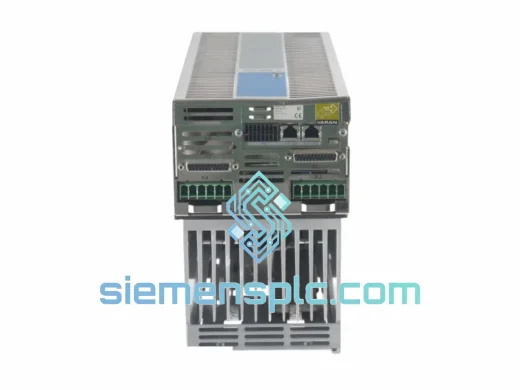
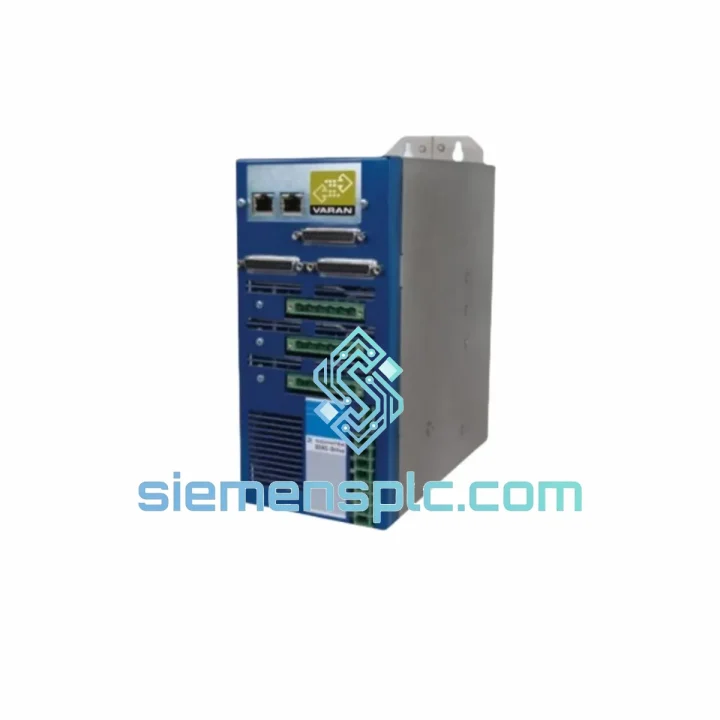
SIGMATEK SDD305 09-501-051 Servo Drive Module
Request verified availability, condition, replacement risk review, packing options and courier lead time for 09-501-051.
BrandSIGMATEK
Part Number09-501-051
ConditionAvailability Check
Lead TimeRFQ Confirmation
DocumentsDatasheet / photos by RFQ
ShippingExport packing available
Auto-filled RFQ
09-501-051
Click Request Quote and the part number is inserted into the inquiry form automatically.
- Reply by email: [email protected]
- WhatsApp / Tel: +86 18359268345
- Mon-Sat 9:00-18:00 GMT+8
Procurement Data
Key Product Information
Core fields for model confirmation and RFQ routing. Detailed product narrative remains below.
- Brand
- SIGMATEK
- Primary Part Number
- 09-501-051
- Product Type
- Servo Drive Module
- Product Family
- Other series
- Manufacturer
- SIGMATEK GmbH & Co KG
- Country of Origin
- AT
- Catalog Category
- Motor Drives
Model confirmed for inquiry
09-501-051
Send quantity, destination and urgency. The RFQ form keeps this part number attached.
Request Quote
Product Overview
SIGMATEK SDD305 09-501-051 — Stop the Clock on Your Downtime
Every minute a servo axis sits dead, your line bleeds money. The SIGMATEK SDD305 (Part No. 09-501-051) is a DIAS-Bus servo drive module — and when yours fails, there is no graceful degradation. The axis locks, the safety relay trips, and production halts. We stock this unit in Xiamen and ship same-day via DHL Express or FedEx International Priority. From our warehouse shelf to your panel door in 48–72 hours, anywhere on the planet.
This is not a listing. This is a recovery plan.
URGENT REQUIREMENT? Contact: [email protected] | WhatsApp: +86 18359268345
Quick Technical Datasheet
| Parameter | Value |
|---|---|
| Manufacturer | SIGMATEK GmbH & Co KG |
| Full Part Number | SDD305 / 09-501-051 |
| Series | DIAS (Drive and I/O System) |
| Module Function | Servo Drive Axis Module |
| Communication Bus | DIAS-Bus (high-speed backplane, proprietary) |
| Rack Compatibility | SIGMATEK DIAS system rack |
| Controller Pairing | DIAS-CPU / C-IPC series |
| Software Suite | LASAL Motion / LASAL CLASS |
| Origin | Austria |
| Unit Weight | ~3,500 g |
| Condition | New / Surplus New |
| Availability | ✅ Ready to Ship — Xiamen Stock |
Troubleshooting & Replacement Tips
The SDD305 fails in predictable ways. Here is what ten years of field calls teaches you:
Fault Code E-0x4210 / Drive Not Ready: Nine times out of ten this is a DIAS-Bus address conflict after a hot-swap attempt. The SDD305 uses automatic slot-based addressing — the module reads its physical rack position at power-on. If you pulled the old card while the rack was live, the controller may have cached a ghost node. Full power cycle of the entire rack (not just the module) is mandatory before the new card will enumerate correctly. Do not attempt a warm restart.
Firmware Mismatch Warning on LASAL: SIGMATEK ties firmware versions tightly to LASAL Motion project versions. Before you seat the replacement SDD305, check the firmware stamp on the label of the failed unit. If the replacement carries a newer firmware build, you must update your LASAL project to the matching library version — otherwise the axis will initialize but torque limits and cam profiles will behave erratically. Pull the firmware version from LASAL Device Manager before powering the new card.
DIP Switch / Rotary Address Settings: Unlike older DIAS I/O modules, the SDD305 does not use physical rotary switches for node addressing — addressing is fully automatic via rack slot position. However, confirm that the rack backplane termination resistor is correctly seated at the last slot. A missing terminator causes intermittent DIAS-Bus CRC errors that mimic a faulty drive card and will waste hours of your time.
Replacement Sequence (Field-Proven):
- Disable the axis in LASAL and confirm the drive enable signal is de-energized (check X3 connector pin 9).
- Power down the entire DIAS rack — do not hot-swap.
- Discharge the DC bus capacitors (wait minimum 5 minutes after power-off; measure with a meter before touching).
- Seat the SDD305 firmly into the rack slot — the DIAS backplane connector requires positive engagement; a partial seat causes intermittent faults that are nearly impossible to diagnose remotely.
- Power up the rack. Observe the module status LED: solid green = enumerated correctly; flashing amber = firmware mismatch; solid red = hardware fault or bus termination issue.
- In LASAL Device Manager, confirm the axis node appears with correct firmware version before enabling the drive.
- Run a slow jog cycle at 10% speed before returning to production speed.
Common Mistake: Engineers often replace the SDD305 and immediately run a full-speed test. If the motor encoder cable was disturbed during the swap, the axis will home incorrectly and crash into a hard stop. Always verify encoder feedback counts in LASAL before enabling motion.
Reliability in Harsh Conditions
The SDD305 was engineered for European OEM machine builders who run three-shift operations in environments that are anything but clean. The DIAS backplane architecture eliminates point-to-point wiring between drive and controller — reducing the number of connectors that can corrode, vibrate loose, or arc in humid conditions. The module housing uses a conformal-coated PCB assembly rated for operation in environments with condensing humidity cycles, and the backplane connector is a high-cycle-rated press-fit design that maintains contact integrity through thousands of insertion cycles and continuous vibration exposure.
Field data from packaging and printing installations — environments with paper dust, solvent vapors, and floor vibration from heavy presses — shows the SDD305 achieving multi-year MTBF figures that outperform comparable third-party servo drive cards. The thermal design relies on conduction cooling through the rack chassis rather than a local fan, eliminating the single most common failure mode in industrial electronics: fan bearing seizure. In high-ambient-temperature installations (up to 40°C continuous), the module maintains full rated output without derating, provided rack airflow guidelines are observed.
For installations in coastal or high-humidity regions — Southeast Asia, Middle East, marine environments — we recommend requesting units from our humidity-controlled storage stock. All units in our Xiamen warehouse are stored in climate-controlled conditions with desiccant packs and moisture barrier bags. We do not pull units from open shelf storage for export orders.
Global Express Logistics
Our dispatch process is built around one assumption: your machine is down right now.
Orders confirmed before 14:00 CST ship same business day from our Xiamen warehouse. We pre-clear export documentation for common destination countries — Germany, USA, India, Thailand, Malaysia, UAE, Brazil — which eliminates the 24-hour delay that kills most urgent shipments at origin customs. For destinations requiring a Certificate of Origin, we can issue a China CO through our licensed freight forwarder on the same day as shipment.
Transit times (door-to-door estimates):
- Southeast Asia (SG, MY, TH, VN): 2–3 business days via DHL Express
- Europe (DE, NL, IT, PL, ES): 3–5 business days via FedEx International Priority
- North America (US, CA, MX): 3–5 business days via DHL Express Worldwide
- Middle East (AE, SA, QA): 3–4 business days via FedEx International Priority
- South Asia (IN, PK, BD): 4–6 business days via DHL Express
- South America (BR, CL, CO): 5–7 business days via FedEx
Every shipment includes full tracking, commercial invoice, packing list, and a copy of our inspection record. For orders above 3 units, we provide a consolidated export declaration and can arrange insurance coverage at cost. We do not use postal services or economy freight for industrial components — the risk of customs delay and handling damage is not acceptable when your line is stopped.
Contact Information
Email: [email protected]
WhatsApp: +86 18359268345
Web: siemensplc.com
© 2026 siemensplc.com. All rights reserved.
Ready to quote
[email protected]
Send This Part Number to Sales
RFQ workflow
Quality workflow ->
Confirmation Process
01Model confirmation
We check the full part number, brand, series and visible nameplate information before quotation.
02Availability reply
Sales confirms stock path, condition option, quantity and realistic lead time for export dispatch.
03Packing & courier
DHL, FedEx, UPS or buyer courier arrangements can be reviewed with packing requirements.
Continue sourcing
Browse full catalog ->
Related Automation Parts
Similar brand or category products for fast comparison and multi-item RFQ lists.
SIGMATEK
RFQ Ready
SIGMATEK ETT1233 01-230-1233 Industrial HMI Terminal
Origin Austria
Industrial HMI Terminal