Siemens
RFQ Ready
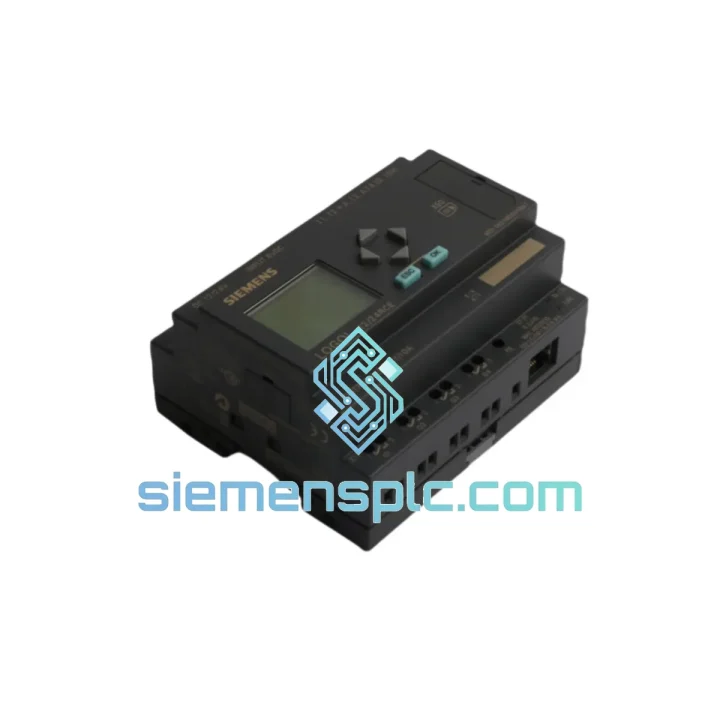
Siemens 6ED1052-1MD00-0BA6 PLC Display Module – LOGO! 0BA6 Series
LOGO!
Origin DE
PLC Display Module
Request verified availability, condition, replacement risk review, packing options and courier lead time for 6ED1052-1MD00-0BA7.
Click Request Quote and the part number is inserted into the inquiry form automatically.
Core fields for model confirmation and RFQ routing. Detailed product narrative remains below.
Your LOGO! 0BA7 base module is running, but the display is dead. Operators can’t read setpoints. Maintenance can’t acknowledge alarms. Nobody can confirm whether that pump is actually running at the right pressure or if the timer fired correctly. You’re flying blind on a live machine — and every hour you wait for a replacement is an hour of unplanned downtime, manual workarounds, and risk exposure.
The Siemens 6ED1052-1MD00-0BA7 is the dedicated display and keypad operator panel for the LOGO! 0BA7 compact PLC generation. It snaps directly onto any 0BA7 base module, powers up from the base module’s internal bus — no separate wiring — and gives you a 6-line × 16-character backlit LCD plus a 6-key navigation pad for on-site program monitoring, parameter editing, and I/O diagnostics. No laptop. No LOGO! Soft Comfort. No service engineer required for routine adjustments.
We stock this module in Xiamen and ship via DHL Express or FedEx International Priority. Most destinations in Southeast Asia, the Middle East, and Europe receive within 3–5 business days from order confirmation. If your line is down, contact us now — we process urgent orders same day.
URGENT REQUIREMENT? Contact: [email protected] | WhatsApp: +86 18359268345
| Parameter | Value | Status |
|---|---|---|
| Part Number | 6ED1052-1MD00-0BA7 | ✅ Ready to Ship |
| Brand | Siemens | 100% Original |
| Series | LOGO! 0BA7 | — |
| Module Type | Display & Keypad Operator Panel | — |
| Display | 6-line × 16-character backlit LCD | — |
| Keypad | 6 keys: ESC, OK, ▲, ▼, ◄, ► | — |
| Power Supply | Via LOGO! Base Module bus (no external supply) | — |
| Operating Temperature | 0 °C to +55 °C | — |
| Storage Temperature | −40 °C to +70 °C | — |
| Protection Rating | IP20 (module) / IP65 (front panel, panel-mounted) | — |
| Mounting | DIN rail or direct snap-on to LOGO! 0BA7 base | — |
| Dimensions (W×H×D) | 72 × 90 × 55 mm | — |
| Weight | ~260 g | — |
| Certifications | CE, UL, cULus, RCM | — |
| Compatible Base Modules | 6ED1052-1CC01-0BA7, 1FB00-0BA7, 1HB00-0BA7, 1CC08-0BA7 | — |
| Software Compatibility | LOGO! Soft Comfort V7 / V8 | — |
| Country of Origin | China (Siemens authorized production) | — |
| Ship-From Location | Xiamen, China | ✅ In Stock |
Most common failure modes for the 6ED1052-1MD00-0BA7:
1. Blank or flickering LCD after power cycle
This is the #1 field complaint. Before condemning the display module, check the base module’s 24 VDC supply rail — a sagging supply (below 20.4 V) will cause the display to drop out intermittently while the logic continues running. Measure at the base module terminals, not at the panel feed. If voltage is stable and the display is still dead, the module’s internal bus connector pins are the next suspect. Inspect for bent pins or corrosion on the snap-on interface. A replacement 6ED1052-1MD00-0BA7 will confirm the fault in under 2 minutes.
2. Keypad unresponsive — cursor moves but no input registers
This typically indicates a failed membrane contact layer inside the keypad assembly. There is no field repair for this — the module must be replaced. Note: if the keypad is locked via the LOGO! program (using the Key Lock function block), it will appear unresponsive. Check the program logic in LOGO! Soft Comfort before ordering a replacement.
3. “No Module” or “Module Error” on base module display after swap
This error appears when a 0BA8-generation display module is accidentally installed on a 0BA7 base, or vice versa. The 6ED1052-1MD00-0BA7 is strictly 0BA7-only. Verify the last three characters of the base module order number: must end in 0BA7, not 0BA8. The connector is physically similar — this mistake happens in the field more than you would expect.
4. Display shows garbled characters after firmware update
If the LOGO! base module was updated to a firmware version incompatible with the display module’s internal firmware, character mapping can corrupt. Siemens does not provide a standalone firmware update for the display module — the fix is to replace the display module with a new unit, which ships with the latest compatible firmware pre-loaded.
Replacement procedure — field-tested, 5 minutes:
Configuration note: The 6ED1052-1MD00-0BA7 has no DIP switches, no address settings, and no firmware to configure. It is a true plug-and-play replacement. The only parameter to verify post-swap is the display contrast setting, accessible via the LOGO! menu under Setup → Display → Contrast.
Industrial environments don’t care about your maintenance schedule. The 6ED1052-1MD00-0BA7 is built to operate where conditions are consistently hostile — and it has the installed base to prove it.
Vibration resistance: The snap-on mechanical interface is designed to withstand continuous vibration up to 10–57 Hz / 0.075 mm amplitude and 57–150 Hz / 1g, per IEC 60068-2-6. This covers the majority of pump skid, compressor room, and conveyor applications where cabinet-mounted PLCs experience constant low-frequency vibration. The connector does not loosen under normal operating vibration — field reports of display modules vibrating loose are almost always traced to improper DIN rail mounting of the base module itself.
Thermal performance: The 0 °C to +55 °C operating range covers the vast majority of industrial cabinet environments. In practice, the module has been deployed in outdoor enclosures in Southeast Asian climates where ambient temperatures regularly reach 45 °C — with proper cabinet ventilation, the module operates without derating. The backlit LCD maintains readability across the full temperature range; contrast may shift slightly at temperature extremes but remains functional.
Humidity and condensation: Rated for 10–95% relative humidity, non-condensing. The IP65 front panel rating when panel-mounted with the supplied gasket provides a meaningful barrier against wash-down splash and dust ingress in food processing and water treatment applications. The rear of the module inside the cabinet remains IP20 — standard cabinet sealing practices apply.
EMC performance: Certified to EN 61000-6-2 (industrial immunity) and EN 61000-6-4 (industrial emissions). In high-noise environments near VFDs, large contactors, or welding equipment, ensure the LOGO! system’s 24 VDC supply is properly filtered and the cabinet is correctly grounded. The display module itself does not introduce EMC vulnerabilities beyond the base module.
We operate from Xiamen, China — one of the country’s primary export hubs with direct access to DHL, FedEx, and UPS international gateways. When your line is down, logistics speed is not a secondary concern.
Standard process for urgent orders:
For orders requiring delivery to a specific site address — including offshore platforms, remote industrial facilities, or bonded warehouse addresses — contact us directly. We have handled complex last-mile logistics to destinations that standard courier services won’t quote.
All shipments are fully insured. In the event of carrier damage or loss, we initiate a replacement shipment immediately while the insurance claim is processed — your downtime does not wait for a claims investigation.
Email: [email protected]
WhatsApp: +86 18359268345
Web: siemensplc.com
© 2026 siemensplc.com. All rights reserved.
We check the full part number, brand, series and visible nameplate information before quotation.
Sales confirms stock path, condition option, quantity and realistic lead time for export dispatch.
DHL, FedEx, UPS or buyer courier arrangements can be reviewed with packing requirements.
Similar brand or category products for fast comparison and multi-item RFQ lists.