KUKA
In Stock OK
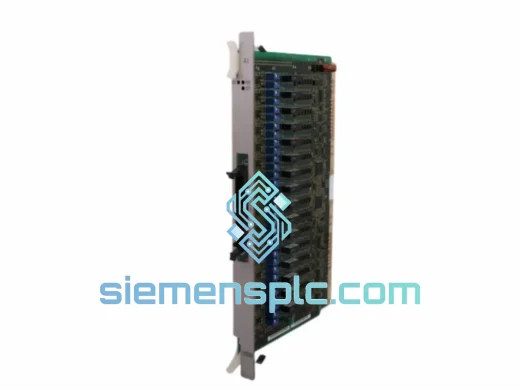
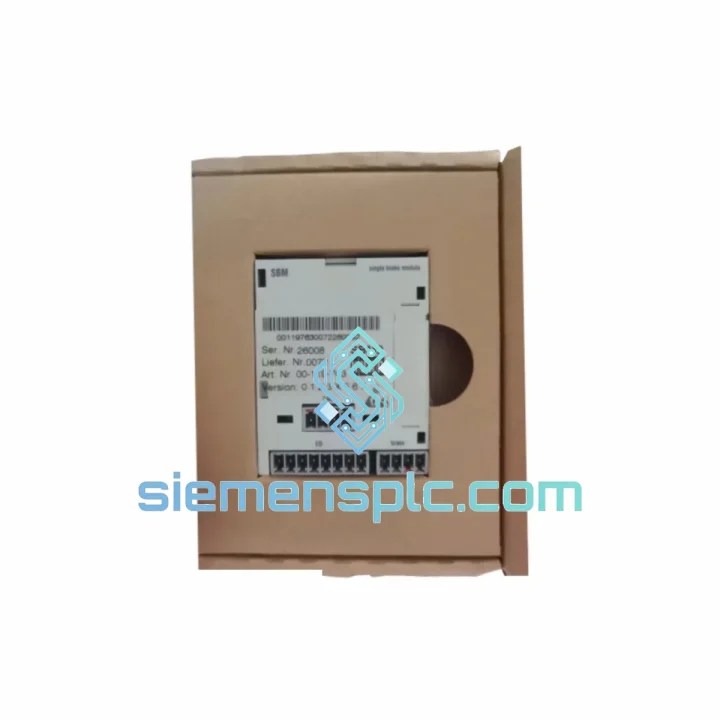
KUKA K202 00-017-361 Electronic Board
Request verified availability, condition, replacement risk review, packing options and courier lead time for 00-017-361.
BrandKUKA
Part Number00-017-361
ConditionAvailability Check
Lead TimeRFQ Confirmation
DocumentsDatasheet / photos by RFQ
ShippingExport packing available
Auto-filled RFQ
00-017-361
Click Request Quote and the part number is inserted into the inquiry form automatically.
- Reply by email: [email protected]
- WhatsApp / Tel: +86 18359268345
- Mon-Sat 9:00-18:00 GMT+8
Procurement Data
Key Product Information
Core fields for model confirmation and RFQ routing. Detailed product narrative remains below.
- Brand
- KUKA
- Primary Part Number
- 00-017-361
- Product Type
- PLC & Robot Controller Spare Parts
- Product Family
- Other series
- Manufacturer
- KUKA Roboter GmbH
- Country of Origin
- DE
- Catalog Category
- Industrial Automation Spares
Model confirmed for inquiry
00-017-361
Send quantity, destination and urgency. The RFQ form keeps this part number attached.
Request Quote
Product Overview
KUKA K202 00-017-361 — Stop the Bleed: Get Your KRC2 Controller Back Online Before the Next Shift
Your KRC2 cabinet is dark. The teach pendant is unresponsive. The robot arm hasn’t moved in the last two hours, and your production supervisor is already on the phone. You’ve isolated the fault to the K202 electronic interface board — part number 00-017-361 (cross-referenced as 00-273-150, 00-154-293, and 00-119-763). You don’t need a lecture on what this board does. You need one on the shelf, tested, and moving toward your dock today.
That’s exactly what we stock. The KUKA K202 00-017-361 is available for immediate dispatch from Xiamen. We’ve handled emergency pulls for automotive body shops in Germany, palletizing lines in Thailand, and arc welding cells in Mexico. The logistics are already mapped. The board is already tested. The only variable is how fast you can confirm the order.
⚡ URGENT REQUIREMENT? Contact: [email protected] | WhatsApp: +86 18359268345
Quick Technical Datasheet
| Parameter | Value |
|---|---|
| Manufacturer | KUKA Roboter GmbH |
| Board Designation | K202 |
| Primary Part Number | 00-017-361 |
| Cross-Reference PN | 00-273-150 / 00-154-293 / 00-119-763 |
| Compatible Controller | KUKA KRC2 Series |
| Board Function | Electronic Interface / Logic Board (CPU ↔ Drive ↔ Safety Bus) |
| Compatible Robots | KR 6, KR 16, KR 30, KR 60, KR 100, KR 150, KR 200, KR 210, KR 240, KR 360 |
| Condition | Used-Tested / Refurbished / NOS (specify on inquiry) |
| Origin | Germany (OEM) |
| Stock Status | ✅ Ready to Ship — Xiamen, China |
| Lead Time | Same-day dispatch on confirmed orders before 15:00 CST |
| Shipping Options | DHL Express / FedEx International Priority |
| Export Documentation | Commercial Invoice, Packing List, Test Report included |
Troubleshooting & Replacement Tips
The K202 board sits at the intersection of the KRC2’s communication backbone. When it fails, the symptoms are rarely subtle. Here’s what field experience tells you to look for — and what to watch when you swap it out.
Common Fault Signatures Pointing to K202 Failure:
- KCP2 teach pendant shows blank screen or “Connection Lost” immediately on power-up — the K202 handles the serial/CAN link to the pendant. A dead board kills this path entirely.
- Error codes KSS 00223, KSS 00224, or KSS 00226 — these indicate communication faults on the internal bus that the K202 arbitrates. If swapping cables and checking the DSE-IBS doesn’t resolve them, the K202 is the next suspect.
- Drive units power up but robot refuses to initialize (stuck at “Initializing” screen) — the K202 must handshake with the MFC3/MFC4 motion control board during boot. A partial failure here causes the controller to hang indefinitely.
- Intermittent E-stop faults with no physical E-stop activation — the K202 interfaces with the SIB safety board. Degraded signal integrity on this path generates phantom safety faults that are notoriously difficult to trace without board-level substitution.
- Controller boots normally but robot loses position data after power cycle — check the onboard battery on the K202 first (CR2032 or equivalent). If the battery is good and the issue persists, the board’s NVRAM may be corrupted.
Replacement Procedure — Field Notes:
- Step 1 — Backup first, always. Before pulling the board, use WorkVisual or the KCP2 to export the current robot configuration, safety parameters, and mastering data. The K202 holds no mastering data itself, but a full backup prevents compounding problems if something else is disturbed during the swap.
- Step 2 — Power down completely. Switch off the main disconnect, wait 5 minutes for the KPS-600 capacitors to discharge. Verify with a multimeter at the DC bus terminals before touching anything inside the cabinet.
- Step 3 — Document connector positions. The K202 has multiple ribbon cables and harness connectors. Photograph everything before disconnecting. Connector keying prevents most mis-insertions, but don’t rely on it — one reversed ribbon cable will send you chasing a ghost fault for an hour.
- Step 4 — Check DIP switch / jumper configuration. Some KRC2 cabinet revisions require specific jumper settings on the K202 to match the installed robot type or safety configuration. Compare the jumper layout on the failed board against the replacement before installing. If the boards differ in revision level, consult the KRC2 service manual (KUKA doc BA KR C2 ed05) for the correct settings for your cabinet serial number range.
- Step 5 — Firmware compatibility check. The K202 does not carry user-flashable firmware in the traditional sense, but the KRC2 system software version (KSS) must be compatible with the board hardware revision. KSS 5.x and KSS 4.x have different hardware requirements. If you’re installing a board from a different KRC2 generation, verify the hardware revision stamp on the board against your KSS version compatibility matrix.
- Step 6 — Cold start and re-mastering. After installation, perform a cold start (not a warm restart). The robot will likely require re-mastering if the previous board’s NVRAM data is not transferable. Have your mastering gauge ready.
- Step 7 — Safety validation. After any controller board replacement, run the full safety function test per your site’s safety validation protocol before returning the robot to automatic mode. This is non-negotiable.
Reliability in Harsh Conditions
The KRC2 was designed for the factory floor, not a server room. The K202 board inside it was built to the same standard. KUKA’s industrial-grade PCB manufacturing spec calls for conformal coating on critical board areas, wide-temperature-range components rated for continuous operation in ambient temperatures from 0°C to 45°C (controller cabinet internal), and vibration resistance per EN 60068-2-6 (10–150 Hz, 1g).
In practice, we’ve seen K202 boards pulled from automotive stamping plants where the cabinet sits 3 meters from a 2,000-ton press — constant vibration, airborne metal dust, and temperature swings every time the plant doors open in winter. Boards from these environments, when properly cleaned and tested, routinely pass functional verification. The design has margin built in.
That said, the K202’s most common environmental failure mode is not vibration or heat — it’s moisture ingress combined with conductive contamination (metallic dust, coolant mist). If your cabinet is in a wet or dusty environment and you’re seeing intermittent faults that clear after the cabinet warms up, inspect the K202 for surface contamination before condemning it. A board that looks dirty may only need professional cleaning, not replacement. A board that shows corrosion on the connector pins or burnt traces around the power regulation section needs to come out.
Every K202 unit we ship has been through a cleaning and inspection process: ultrasonic cleaning where applicable, visual inspection under magnification for cold solder joints and cracked components, and functional bench testing in a KRC2-compatible test rig. We don’t ship boards that we wouldn’t install ourselves.
Global Express Logistics
Our dispatch hub is in Xiamen, China — a major international freight gateway with daily DHL Express and FedEx International Priority departures to every major industrial region on the planet. Here’s how the process works from the moment you confirm an order:
- Order confirmed before 15:00 CST: Board is packed, ESD-bagged, foam-cushioned, and handed to the carrier the same day. Tracking number issued within 2 hours of pickup.
- DHL Express to Europe (DE, FR, IT, PL, CZ): Typically 2–3 business days door-to-door. Customs clearance handled with pre-lodged commercial invoice and HS code 8537.10 declaration.
- FedEx International Priority to North America (US, CA, MX): 2–3 business days. We include FDA/CBP-compliant documentation for electronic components.
- DHL to Southeast Asia (TH, VN, MY, ID, SG): 1–2 business days from Xiamen. Regional hub proximity makes this our fastest corridor.
- Middle East and South Asia (AE, SA, IN, PK): 3–4 business days via DHL Express. We handle all export licensing requirements for industrial electronics.
- Emergency freight options: For genuine production-critical situations, we can arrange next-flight-out courier service. Contact us directly on WhatsApp for real-time coordination.
Every shipment includes a commercial invoice, detailed packing list, and a functional test report. For customers in countries with strict import controls on electronic components, we can provide additional documentation on request. We’ve shipped to 60+ countries without a single customs seizure on properly documented industrial spare parts.
Contact Information
📧 Email: [email protected]
💬 WhatsApp: +86 18359268345
🌐 Web: siemensplc.com
© 2026 siemensplc.com. All rights reserved.
Ready to quote
[email protected]
Send This Part Number to Sales
RFQ workflow
Quality workflow ->
Confirmation Process
01Model confirmation
We check the full part number, brand, series and visible nameplate information before quotation.
02Availability reply
Sales confirms stock path, condition option, quantity and realistic lead time for export dispatch.
03Packing & courier
DHL, FedEx, UPS or buyer courier arrangements can be reviewed with packing requirements.
Continue sourcing
Browse full catalog ->
Related Automation Parts
Similar brand or category products for fast comparison and multi-item RFQ lists.