
KUKA
In Stock OK
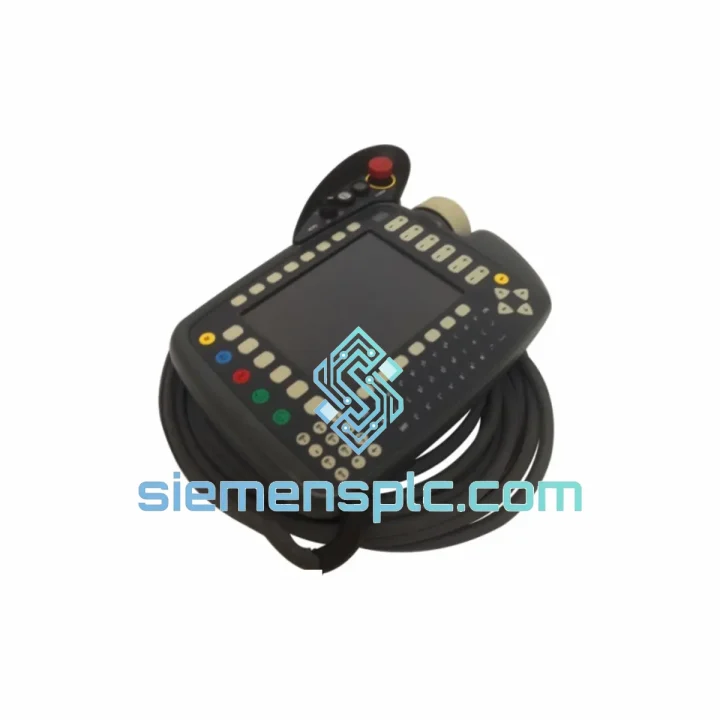
KUKA KSD1-64 KCP2 Teach Pendant
Request verified availability, condition, replacement risk review, packing options and courier lead time for KSD1-64.
BrandKUKA
Part NumberKSD1-64
ConditionAvailability Check
Lead TimeRFQ Confirmation
DocumentsDatasheet / photos by RFQ
ShippingExport packing available
Auto-filled RFQ
KSD1-64
Click Request Quote and the part number is inserted into the inquiry form automatically.
- Reply by email: [email protected]
- WhatsApp / Tel: +86 18359268345
- Mon-Sat 9:00-18:00 GMT+8
Procurement Data
Key Product Information
Core fields for model confirmation and RFQ routing. Detailed product narrative remains below.
- Brand
- KUKA
- Primary Part Number
- KSD1-64
- Product Type
- Robot Teach Pendant
- Product Family
- Other series
- Country of Origin
- DE
- Catalog Category
- Industrial Automation Spares
Model confirmed for inquiry
KSD1-64
Send quantity, destination and urgency. The RFQ form keeps this part number attached.
Request Quote
Product Overview
KUKA KSD1-64 KCP2 Teach Pendant – Every Hour of Downtime Costs You Money. We Ship Today.
Your KR C2 or KR C4 robot cell is down. The KCP2 pendant is dead — cracked screen, failed enabling device, corrupted firmware, or a connector that finally gave out after years of cable stress. Production is stopped. Your maintenance team is standing around. Every minute the line sits idle, you’re bleeding money.
This is exactly the scenario we built our supply chain to solve. We stock the KUKA KSD1-64 KCP2 Teach Pendant (cross-reference: 00-117-345 / 00-198-959 / 3080-AK / 00-130-547) in Xiamen and ship via DHL Express or FedEx International Priority — same business day for orders confirmed before 14:00 CST. No waiting on factory lead times. No distributor backorders. Just a verified unit in a box, moving toward your facility within hours.
URGENT REQUIREMENT? Contact: [email protected] | WhatsApp: +86 18359268345
Quick Technical Datasheet
| Parameter | Specification |
|---|---|
| Part Number | KSD1-64 / 00-117-345 / 00-198-959 / 3080-AK / 00-130-547 |
| Brand | KUKA Robotics |
| Series | KCP2 (KUKA Control Panel 2) |
| Compatible Controllers | KR C2, KR C4 |
| Display | Color TFT touchscreen with backlit membrane keypad |
| Communication Interface | Proprietary KCP bus + Ethernet |
| Cable Length | 10 m standard (custom on request) |
| Operating Temperature | 0 °C to +45 °C |
| Protection Rating | IP 54 |
| Weight | Approx. 800 g |
| Safety Switch | 3-position enabling device, EN ISO 13850 E-Stop |
| Condition | New / Tested Refurbished (specify at order) |
| Stock Status | ✅ READY TO SHIP – Xiamen Warehouse |
Troubleshooting & Replacement Tips
After handling hundreds of KCP2 failures in the field, these are the failure modes that actually show up — and what to do about them before you even touch the new pendant:
1. Blank or frozen screen on power-up
Nine times out of ten this is a failed backlight inverter or a corrupted KUKA System Software (KSS) boot partition — not a dead pendant. Before ordering a replacement, connect a laptop via the X11 Ethernet port and check if the controller still responds to WorkVisual. If it does, the pendant hardware is likely fine and you need a KSS recovery USB. If the controller is also unresponsive, the pendant is the culprit — proceed with swap.
2. Enabling device (deadman switch) fault — Safety Stop 0
The 3-position enabling device on the KCP2 is a wear item. After 3–5 years of intensive use, the middle position contact degrades and triggers intermittent or permanent Safety Stop 0 faults. You’ll see error codes like KSS00223 or KSS00224 in the message log. There is no field repair for this — the enabling device is integrated into the pendant housing. Replace the full KSD1-64 unit.
3. KCP bus communication error after pendant swap
This catches people off guard. When you install a replacement KCP2 pendant on a KR C2 controller, the controller may throw a KSS01325 (KCP communication interrupted) fault on first boot. This is almost always a firmware version mismatch. Check the KSS version running on the controller (Settings → About) and confirm the replacement pendant’s embedded firmware is compatible. On KR C4 systems, WorkVisual will flag this automatically during project deployment — do not skip the deployment step.
4. Replacement procedure — field checklist
- Power down the KR C2/C4 controller completely. Do not hot-swap the KCP2 pendant — the KCP bus does not support live insertion.
- Disconnect the pendant cable at the controller-side X19 connector. Inspect the connector pins for corrosion or bent contacts before plugging in the replacement.
- Connect the new KSD1-64 and power up. Allow the full boot sequence to complete (typically 90–120 seconds on KR C2).
- Navigate to: Configure → Robot Data → Teach Pendant and verify the pendant serial number is recognized.
- Run a full axis mastering check after any pendant replacement — mastering data is stored in the controller, not the pendant, but it’s good practice to confirm nothing shifted during the swap.
- Test all safety functions: E-Stop, enabling device (all three positions), and operator safety input before returning the cell to production.
5. KR C4 note — smartPAD vs KCP2
The KR C4 platform supports both the legacy KCP2 (KSD1-64) and the newer smartPAD (KCP4). They are electrically and mechanically incompatible. Confirm your controller cabinet label before ordering. KR C4 cabinets manufactured after approximately 2012 may have been retrofitted with smartPAD — check the X65 connector type on the cabinet door.
Reliability in Harsh Conditions
Industrial robot cells are not clean environments. The KCP2 pendant was designed for exactly the conditions that destroy consumer electronics — and the KSD1-64 units we supply have been verified to meet those demands.
The IP 54 rated housing keeps out the metal swarf, coolant mist, and weld spatter that are standard background noise in automotive and heavy manufacturing cells. The membrane keypad is sealed against fluid ingress and resists the chemical cleaning agents used in food processing and pharmaceutical automation. The cable strain relief at both the pendant and controller ends is engineered for the repetitive flexing that comes from a pendant being picked up, used, and set down hundreds of times per shift.
Vibration is a constant in press shops and stamping lines. The KCP2’s internal PCB mounting uses vibration-damped standoffs, and the connector system is latched rather than friction-fit. Units that have been in service for 8–10 years in high-vibration environments typically fail at the enabling device or the cable jacket — not at the electronics. That’s a design that holds up.
Operating temperature range of 0 °C to +45 °C covers the vast majority of industrial environments, including unheated warehouses in northern climates during winter startups. For applications at the temperature extremes, confirm ambient conditions with your KUKA service engineer before deployment.
Global Express Logistics
Our warehouse is located in Xiamen, Fujian Province — one of China’s primary export hubs with direct access to DHL, FedEx, and UPS international gateways. This is not a drop-shipping arrangement. Stock is physically on our shelves, inspected, and ready to pack.
Standard export process:
- Order confirmation received before 14:00 CST: Same-day dispatch. DHL Express or FedEx International Priority label generated within 2 hours of payment confirmation.
- Export documentation: Commercial invoice, packing list, and certificate of origin prepared for every shipment. HS Code 8537.10 declared. ECCN classification EAR99 for most destinations — no export license required for standard industrial use.
- Transit times: Europe 2–4 business days, North America 3–5 business days, Southeast Asia 1–3 business days, Middle East 3–5 business days. Times are DHL/FedEx estimates and subject to customs clearance at destination.
- Customs support: We provide pre-shipment HS code documentation and can prepare a detailed technical description letter for customs authorities in countries with strict import controls on industrial electronics.
- Tracking: AWB number provided within 4 hours of dispatch. Real-time tracking link sent via email and WhatsApp.
- Bulk orders: For 3+ units, contact us for consolidated shipping options and volume pricing. Sea freight available for non-urgent bulk procurement.
We have shipped KCP2 pendants to automotive plants in Germany, battery factories in Poland, food processing facilities in Australia, and semiconductor fabs in Malaysia. The logistics process is documented and repeatable. Your procurement team will have everything needed for import clearance before the shipment leaves Xiamen.
Contact Information
For urgent requirements, stock confirmation, or technical pre-sales questions — reach us directly. We respond to WhatsApp messages within 30 minutes during business hours (08:00–20:00 CST, Monday–Saturday).
📧 Email: [email protected]
💬 WhatsApp: +86 18359268345
🌐 Web: siemensplc.com
© 2026 siemensplc.com. All rights reserved. All trademarks are property of their respective owners. KUKA is a registered trademark of KUKA AG.
Ready to quote
[email protected]
Send This Part Number to Sales
RFQ workflow
Quality workflow ->
Confirmation Process
01Model confirmation
We check the full part number, brand, series and visible nameplate information before quotation.
02Availability reply
Sales confirms stock path, condition option, quantity and realistic lead time for export dispatch.
03Packing & courier
DHL, FedEx, UPS or buyer courier arrangements can be reviewed with packing requirements.
Continue sourcing
Browse full catalog ->
Related Automation Parts
Similar brand or category products for fast comparison and multi-item RFQ lists.
KUKA
RFQ Ready
KUKA 00-106-558 RV-30B-76 Cycloidal Reduction Gear – KR30 Series
Origin DE
Cycloidal Reduction Gear