ABB
In Stock OK
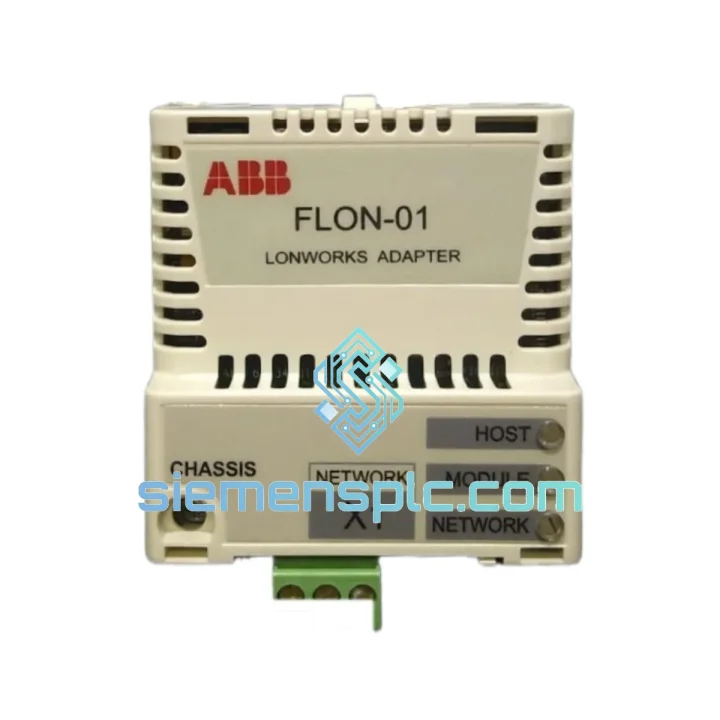
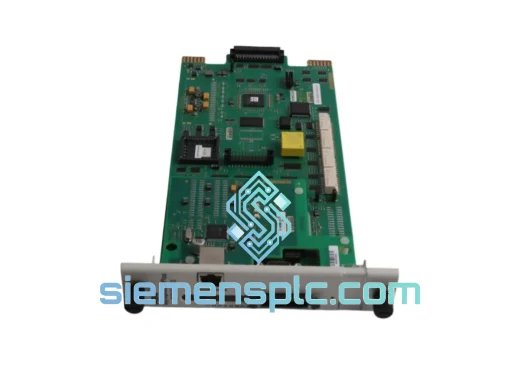
ABB FLON-01 LonWorks Adapter Module
Request verified availability, condition, replacement risk review, packing options and courier lead time for FLON-01.
BrandABB
Part NumberFLON-01
ConditionAvailability Check
Lead TimeRFQ Confirmation
DocumentsDatasheet / photos by RFQ
ShippingExport packing available
Auto-filled RFQ
FLON-01
Click Request Quote and the part number is inserted into the inquiry form automatically.
- Reply by email: [email protected]
- WhatsApp / Tel: +86 18359268345
- Mon-Sat 9:00-18:00 GMT+8
Procurement Data
Key Product Information
Core fields for model confirmation and RFQ routing. Detailed product narrative remains below.
- Brand
- ABB
- Primary Part Number
- FLON-01
- Product Type
- PLC Communication Adapter
- Series / Family
- AC500
- Manufacturer
- ABB
- Country of Origin
- SE
- Catalog Category
- Communication
- Operating Temp.
- -25 °C to +70 °C
- Humidity
- 5–95% RH non-condensing
Model confirmed for inquiry
FLON-01
Send quantity, destination and urgency. The RFQ form keeps this part number attached.
Request Quote
Product Overview
ABB FLON-01 LonWorks Adapter — Stop the Clock on Your Downtime
Your AC500 node just dropped off the LonWorks backbone. The BAS dashboard is red. HVAC zones are running blind. Every minute of uncontrolled operation in a district cooling plant or airport terminal costs real money — and the clock is ticking. The FLON-01 is the single point of failure between your AC500 CPU and the entire LonWorks field network. When it fails, nothing else matters until it is back in the slot.
We stock the ABB FLON-01 in Xiamen and ship globally via DHL Express and FedEx International Priority. Place your order before 15:00 CST and it leaves the same day. Most destinations in Southeast Asia receive within 48 hours. Europe and North America within 72–96 hours. No waiting on ABB lead times. No distributor back-order queues.
URGENT REQUIREMENT? Contact: [email protected] | WhatsApp: +86 18359268345
Quick Technical Datasheet
| Part Number | FLON-01 ✔ Ready to Ship |
| Manufacturer | ABB |
| Series | AC500 Communication Adapter |
| Protocol | LonWorks / LonTalk (ISO/IEC 14908-1) |
| Compatible CPUs | AC500 PM5xx, PM5xx-ETH series |
| Network Topology | TP/FT-10 Free topology, Bus, Ring |
| Max Nodes | 127 nodes per domain |
| Baud Rate | 78 kbps (TP/FT-10) |
| Field Connector | Screw terminal |
| Power Source | AC500 CPU backplane — no external PSU |
| Operating Temperature | -25 °C to +70 °C |
| Storage Temperature | -40 °C to +85 °C |
| Humidity | 5–95% RH non-condensing |
| Protection Rating | IP20 |
| Weight | 360 g |
| Mounting | Direct plug-in, AC500 CPU left-side expansion slot |
| Certifications | CE, UL, LonMark Certified, RoHS |
| Country of Origin | Germany |
| Stock Status | ✔ In Stock — Ships Same Day |
Troubleshooting & Replacement Tips
Common failure signatures that point to a dead FLON-01:
- All LonWorks nodes show “offline” or “no response” in the network management tool (LNS / OpenLNS) simultaneously — while the AC500 CPU itself is running normally and other I/O modules are healthy.
- The FLON-01 status LED is dark or stuck solid red after CPU power cycle. Normal healthy state is steady green with brief amber flicker during network traffic.
- ABB Automation Builder diagnostic log throws COM_ADAPTER_FAULT or BUS_OFF error on the communication adapter slot.
- Intermittent node dropouts that correlate with panel temperature rise — classic sign of a failing internal oscillator on the Neuron chip inside the adapter.
Step-by-step hot-swap procedure (AC500 with redundant power):
- Step 1 — Capture Neuron IDs. Before pulling the old module, export the full network topology from your LNS database. Every field device binding is tied to the FLON-01’s Neuron ID. You will need this to recommission after swap.
- Step 2 — Set CPU to STOP mode. Do not pull the adapter while the CPU is in RUN. Use Automation Builder or the front-panel key switch to force STOP. This prevents a BUS_OFF fault from propagating to the application program.
- Step 3 — Power down the panel. The FLON-01 plugs into the CPU expansion slot — it is not hot-swappable. Cut 24 VDC supply to the CPU rack before extraction.
- Step 4 — Seat the replacement module. Align the connector carefully. The module clicks into place with firm, even pressure. Do not force it — misaligned pins will damage the CPU backplane connector.
- Step 5 — Power up and verify LED sequence. On first power-up, the new FLON-01 runs a self-test (amber LED, ~3 seconds), then transitions to steady green if the TP/FT-10 network termination is correct. If it stays amber, check your 105 Ω termination resistors at both cable ends.
- Step 6 — Recommission in LNS. The replacement unit has a new Neuron ID. Use the LNS network tool to replace the old device entry with the new Neuron ID. All existing network variable bindings are preserved in the LNS database — you are not re-engineering the network, just re-registering the hardware identity.
- Step 7 — Return CPU to RUN. Monitor the first 10 minutes of operation. Confirm all previously offline nodes return to active status in the network management tool.
Configuration checklist before declaring the repair complete:
- Verify Automation Builder shows the adapter slot as “OK” with no fault codes.
- Confirm node count in LNS matches pre-failure baseline.
- Check application program — any latched fault bits triggered by the BUS_OFF event must be manually reset.
- Log the replacement in your maintenance record with the new Neuron ID for future reference.
Reliability in Harsh Conditions
The FLON-01 is not office hardware. ABB designed it to operate inside industrial control panels where ambient temperatures swing from sub-zero cold-start conditions in outdoor substations to sustained +60 °C in poorly ventilated enclosures. The onboard Neuron 5000 processor is rated for the full -25 °C to +70 °C operating range without derating.
Vibration resistance meets EN 61131-2 requirements — the same standard applied to the AC500 CPU itself. In pump station and compressor room installations where panel vibration is continuous, the direct plug-in mounting to the CPU backplane eliminates the cable connectors that are the first failure point on externally mounted communication modules.
EMC immunity is certified to EN 61000-6-2 (industrial environment), covering conducted and radiated immunity, electrostatic discharge, and electrical fast transient bursts. In LonWorks building automation networks where the field bus cable runs alongside power wiring in cable trays, this immunity rating is not a checkbox — it is what keeps your network stable when an elevator motor starts or a large HVAC compressor kicks in.
Humidity tolerance up to 95% RH non-condensing covers coastal and tropical installations where panel breathing cycles cause moisture ingress over time. Units stored in our Xiamen warehouse are kept in climate-controlled conditions with humidity indicator cards inside each anti-static bag. You receive a module that has not been sitting in a damp stockroom for three years.
Global Express Logistics
Our dispatch hub is in Xiamen, Fujian — one of China’s primary export ports with direct DHL and FedEx gateway access. This is not a drop-ship arrangement. The FLON-01 is physically on our shelf. When you confirm payment, our warehouse team picks, inspects, and packs within two hours during business hours.
- DHL Express Worldwide — Door-to-door tracking from Xiamen. Typical transit: Southeast Asia 1–2 days, Middle East 2–3 days, Europe 3–4 days, North America 3–5 days.
- FedEx International Priority — Alternative carrier for destinations where FedEx has stronger last-mile coverage. Same transit estimates as DHL.
- Export documentation — Commercial invoice, packing list, and HS code 8537.10 declaration included with every shipment. We handle export customs clearance from the China side. Import duties at destination are the buyer’s responsibility — contact us if you need a proforma invoice for import pre-clearance.
- Same-day dispatch cutoff — Orders confirmed with payment before 15:00 CST ship the same calendar day. Orders after 15:00 CST ship the following morning.
- Tracking — AWB number sent to your email within 2 hours of dispatch. Real-time tracking link provided.
For plant shutdowns with a hard restart deadline, contact us on WhatsApp before placing the order. We will confirm stock, provide a shipping time commitment in writing, and coordinate with the courier for priority handling where available.
Contact Information
Email: [email protected]
WhatsApp: +86 18359268345
Web: siemensplc.com
© 2026 siemensplc.com. All rights reserved.
Ready to quote
[email protected]
Send This Part Number to Sales
RFQ workflow
Quality workflow ->
Confirmation Process
01Model confirmation
We check the full part number, brand, series and visible nameplate information before quotation.
02Availability reply
Sales confirms stock path, condition option, quantity and realistic lead time for export dispatch.
03Packing & courier
DHL, FedEx, UPS or buyer courier arrangements can be reviewed with packing requirements.
Continue sourcing
Browse full catalog ->
Related Automation Parts
Similar brand or category products for fast comparison and multi-item RFQ lists.
ABB
RFQ Ready
ABB SPBRC410 PLC Communication Controller
AC500
Origin SE
PLC Communication Controller