
ABB
In Stock OK
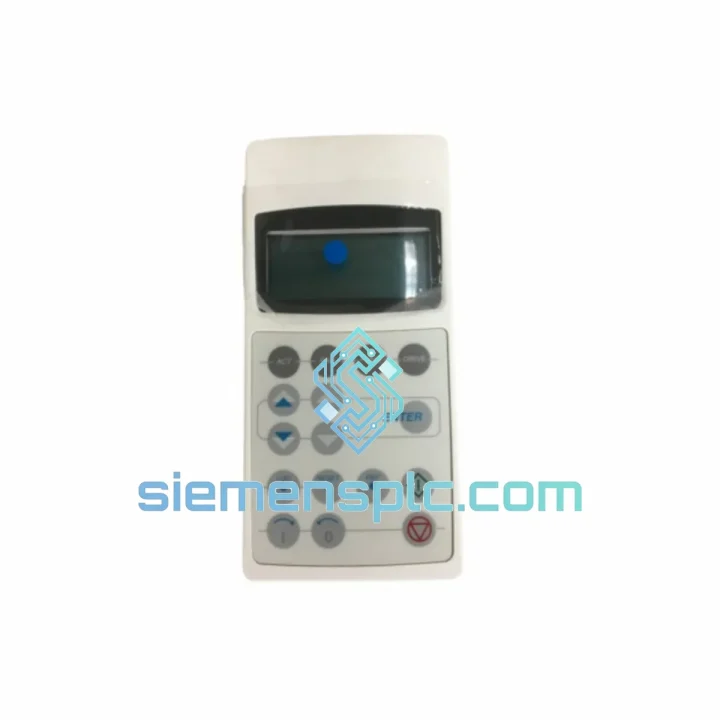
ABB CDP312R Remote Control Panel
Request verified availability, condition, replacement risk review, packing options and courier lead time for CDP312R.
BrandABB
Part NumberCDP312R
ConditionAvailability Check
Lead TimeRFQ Confirmation
DocumentsDatasheet / photos by RFQ
ShippingExport packing available
Auto-filled RFQ
CDP312R
Click Request Quote and the part number is inserted into the inquiry form automatically.
- Reply by email: [email protected]
- WhatsApp / Tel: +86 18359268345
- Mon-Sat 9:00-18:00 GMT+8
Procurement Data
Key Product Information
Core fields for model confirmation and RFQ routing. Detailed product narrative remains below.
- Brand
- ABB
- Primary Part Number
- CDP312R
- Product Type
- Remote Control Panel
- Series / Family
- S800
- Manufacturer
- ABB
- Country of Origin
- SE
- Catalog Category
- Motor Drives
- Operating Temp.
- 0 °C to +50 °C
Model confirmed for inquiry
CDP312R
Send quantity, destination and urgency. The RFQ form keeps this part number attached.
Request Quote
Product Overview
CDP312R Down? Every Minute of Downtime Costs You Money — We Ship Today
Your ACS800 drive is dead in the water. The CDP312R panel is blank, unresponsive, or throwing a fault you can’t clear. Production is stopped. Your maintenance team is standing by. You don’t need a sales pitch — you need the part on a plane tonight.
We stock the ABB CDP312R in Xiamen. Orders confirmed before 15:00 CST ship same day via DHL Express or FedEx International Priority. Most destinations in Southeast Asia, the Middle East, and Europe receive delivery within 2–4 business days. This is not a lead-time estimate — it is our operational standard.
URGENT REQUIREMENT? Contact: [email protected] | WhatsApp: +86 18359268345
Quick Technical Datasheet
| Parameter | Specification |
|---|---|
| Part Number | CDP312R |
| Manufacturer | ABB |
| Compatible Series | ACS800 (all frame sizes) |
| Panel Type | Remote Control Panel (CDP) |
| Display | Alphanumeric LCD, multi-language |
| Communication Interface | RS-485 serial, panel bus connector |
| Max Cable Extension | 3 m standard (extended cable available separately) |
| Operating Temperature | 0 °C to +50 °C |
| Protection Rating | IP54 (panel-mounted configuration) |
| Power Source | Powered via drive panel bus — no external supply needed |
| Weight | ~100 g |
| Certifications | CE, UL |
| Stock Status | ✅ Ready to Ship — Xiamen Warehouse |
Troubleshooting & Replacement Tips
After ten years of field work on ACS800 installations, these are the failure patterns that actually show up on site — not the ones in the manual.
Fault: Panel blank on power-up. Before condemning the CDP312R, check the panel bus cable first. The RJ-45 connector on the drive side is a known wear point on older frames. Reseat the cable, power-cycle the drive, and wait 10 seconds for the panel to initialize. If still blank, swap the panel. The CDP312R itself rarely fails from internal component failure — physical connector damage and cable faults account for the majority of panel communication losses in the field.
Fault: PANEL LOSS alarm on ACS800. This alarm triggers when the drive loses communication with the CDP panel for more than the configured timeout (parameter 16.02). If you are replacing the panel mid-run on a system where the drive is set to LOCAL control mode, the drive will trip on panel loss the moment you unplug the old unit. Before swapping: switch control to REMOTE via the drive I/O, confirm the drive is running from an external reference, then hot-swap the panel. Re-establish LOCAL control after the new panel initializes.
Fault: Parameter upload/download fails after replacement. The CDP312R stores a parameter backup in its internal memory. When you install a replacement panel on a drive that has been previously configured, the drive will prompt you to either upload parameters from the drive to the panel or download from the panel to the drive. On a fresh replacement panel, always choose UPLOAD (drive to panel) first to capture the current drive configuration. Only use DOWNLOAD if you are intentionally restoring a known-good parameter set from a previously backed-up panel.
Firmware mismatch warning. The CDP312R firmware version must be compatible with the ACS800 drive firmware. On drives running firmware below version 7.x, older CDP312R hardware revisions (pre-2010 manufacture date) may display garbled characters on certain menu screens. This is a display rendering issue only and does not affect drive operation. If you are on a legacy firmware drive and need full menu readability, request a hardware revision check when ordering.
Replacement steps (field-verified sequence):
- Note the current control mode (LOCAL/REMOTE) and active fault history via the existing panel before removal.
- Switch drive to REMOTE control and confirm external reference is active.
- Disconnect the panel bus cable from the old CDP312R.
- Fit the new CDP312R — the connector is keyed and cannot be inserted incorrectly.
- Power-cycle the drive or reconnect the panel bus cable. Allow 10–15 seconds for initialization.
- When prompted, select UPLOAD to copy drive parameters to the new panel memory.
- Verify fault history and parameter group 99 (Start-Up Data) are intact.
- Return to LOCAL control if required and confirm drive responds to panel commands.
Reliability in Harsh Conditions
The CDP312R is not office equipment. ABB designed it for the same environments where the ACS800 drive itself operates — steel mills, paper machines, offshore platforms, and outdoor pump stations. The housing is rated IP54 when panel-mounted, providing protection against dust ingress and water spray from any direction. The LCD display is specified for operation from 0 °C to +50 °C ambient, covering the majority of industrial enclosure environments without additional cooling.
The panel bus connector and cable assembly are the most mechanically stressed components in the CDP312R system. On installations subject to vibration — compressor rooms, press lines, mobile equipment — inspect the RJ-45 connector and cable routing at every scheduled maintenance interval. A loose or intermittently connected panel cable will generate nuisance PANEL LOSS faults that are frequently misdiagnosed as panel hardware failure. Secure the cable with a cable tie anchor within 50 mm of the drive connector to eliminate vibration-induced contact loss.
In high-humidity environments such as coastal installations or food processing facilities, condensation on the LCD can cause temporary display anomalies. These clear within minutes of the panel reaching operating temperature and do not indicate hardware damage. If condensation is a recurring issue, review the enclosure ventilation design — the CDP312R itself does not require any additional environmental protection beyond its IP54 rating.
Global Express Logistics
Our dispatch operation runs from Xiamen, Fujian Province — one of China’s primary export hubs with direct DHL and FedEx gateway access. This is not a drop-ship arrangement. Stock is physically held in our warehouse and inspected before every shipment.
Same-day dispatch: Orders confirmed with payment before 15:00 CST Monday–Saturday ship the same calendar day. You receive a tracking number within 2 hours of dispatch.
DHL Express Worldwide: Standard routing for most industrial destinations. Transit times: Southeast Asia 1–2 days, Middle East 2–3 days, Europe 3–4 days, Americas 3–5 days. DHL industrial spare parts handling protocol applies — shipments are not consolidated with general cargo.
FedEx International Priority: Available on request for destinations where FedEx has a service advantage. Particularly recommended for remote sites in Australia, South Africa, and Latin America where DHL coverage is thinner.
Export documentation: Commercial invoice, packing list, and certificate of origin are prepared for every international shipment. HS code 8537.10 applies to this product. We can provide an advance copy of shipping documents to your customs broker before the shipment departs Xiamen — request this at time of order.
Emergency freight: For genuine production-down situations, contact us directly on WhatsApp. We have arranged next-flight-out courier shipments for customers in critical downtime scenarios. This is not a standard service offering — it is a capability we use when the situation demands it.
Contact Information
📧 Email: [email protected]
📱 WhatsApp: +86 18359268345
🌐 Web: siemensplc.com
© 2026 siemensplc.com. All rights reserved.
Ready to quote
[email protected]
Send This Part Number to Sales
RFQ workflow
Quality workflow ->
Confirmation Process
01Model confirmation
We check the full part number, brand, series and visible nameplate information before quotation.
02Availability reply
Sales confirms stock path, condition option, quantity and realistic lead time for export dispatch.
03Packing & courier
DHL, FedEx, UPS or buyer courier arrangements can be reviewed with packing requirements.
Continue sourcing
Browse full catalog ->
Related Automation Parts
Similar brand or category products for fast comparison and multi-item RFQ lists.
ABB
RFQ Ready
ABB SDCS-UCM-1 3ADT220090R0008 Excitation Control Board
S800
Origin SE
DC Drive Control Module
ABB
RFQ Ready
ABB SDCS-PIN-51-COAT 3ADT220090R0006 DC Drive Control Card
S800
Origin SE
DC Drive Control Card