ABB
In Stock OK
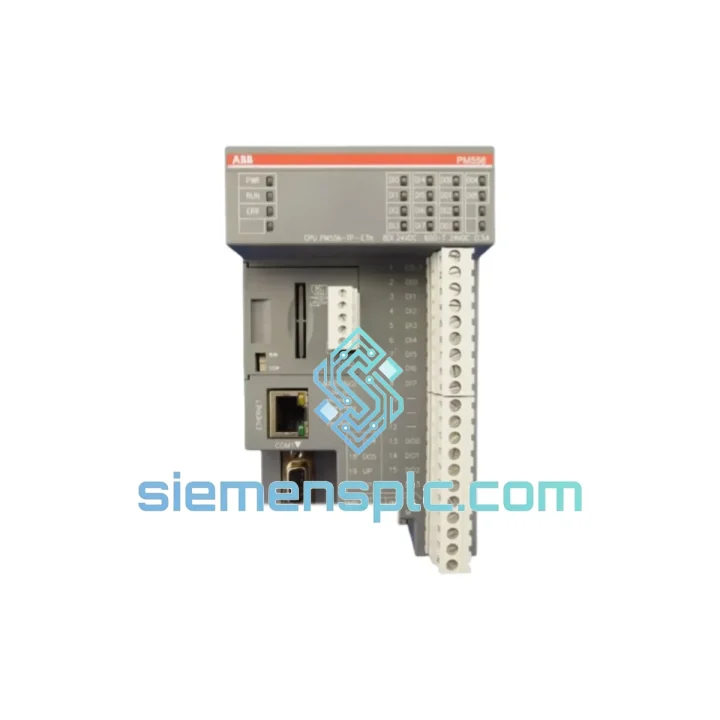
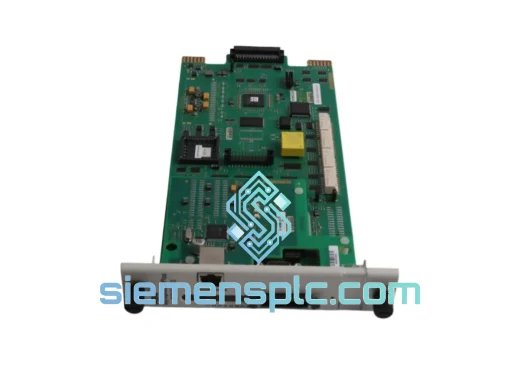
ABB 1SAP121200R0071 PLC CPU Module
Request verified availability, condition, replacement risk review, packing options and courier lead time for 1SAP121200R0071.
BrandABB
Part Number1SAP121200R0071
ConditionAvailability Check
Lead TimeRFQ Confirmation
DocumentsDatasheet / photos by RFQ
ShippingExport packing available
Auto-filled RFQ
1SAP121200R0071
Click Request Quote and the part number is inserted into the inquiry form automatically.
- Reply by email: [email protected]
- WhatsApp / Tel: +86 18359268345
- Mon-Sat 9:00-18:00 GMT+8
Procurement Data
Key Product Information
Core fields for model confirmation and RFQ routing. Detailed product narrative remains below.
- Brand
- ABB
- Primary Part Number
- 1SAP121200R0071
- Product Type
- PLC CPU Module
- Series / Family
- AC500
- Country of Origin
- SE
- Catalog Category
- Communication
- Operating Temp.
- 0 °C to +60 °C
Model confirmed for inquiry
1SAP121200R0071
Send quantity, destination and urgency. The RFQ form keeps this part number attached.
Request Quote
Product Overview
ABB PM556-TP-ETH 1SAP121200R0071 — Stop the Clock on Your Downtime
Every minute your AC500 system sits dead costs real money. A failed PM556-TP-ETH CPU doesn’t just halt one machine — it cascades: conveyors stop, SCADA loses its heartbeat, and your maintenance team is staring at a blank HMI with a plant manager breathing down their neck. We stock the ABB PM556-TP-ETH (1SAP121200R0071) precisely for this moment. Same-day dispatch from Xiamen. DHL Express to your door. No waiting on ABB lead times.
URGENT REQUIREMENT? Contact: [email protected] | WhatsApp: +86 18359268345
Quick Technical Datasheet
| Parameter | Specification |
|---|---|
| Part Number / SKU | 1SAP121200R0071 |
| Model | PM556-TP-ETH |
| Brand | ABB |
| Series | AC500 |
| Product Type | Compact CPU Module |
| Integrated Communication | Ethernet (TP) — Modbus TCP, EtherNet/IP, PROFINET |
| Programming Standard | IEC 61131-3 (LD, FBD, ST, IL, SFC) |
| Programming Tool | ABB Automation Builder / PS501 Control Builder Plus |
| Mounting | DIN rail, AC500 terminal base (TB521-ETH / TB541-ETH) |
| Operating Temperature | 0 °C to +60 °C |
| Protection Rating | IP20 |
| Supply Voltage | 24 V DC via AC500 system bus |
| Weight | approx. 320 g |
| Certifications | CE, UL |
| Origin | Germany |
| Stock Status | ✔ Ready to Ship — Xiamen Warehouse |
Troubleshooting & Replacement Tips
Swapping a PM556-TP-ETH in the field is not plug-and-play if you skip the checklist. Here’s what ten years of emergency callouts have taught:
1. Firmware Version Lock
Before you pull the old CPU, note the firmware version displayed in Automation Builder or on the module label. The replacement unit must run the same firmware generation — a V2.x CPU will not load a project compiled under V1.x without a full recompile and I/O re-mapping. If you’re shipping a spare from stock, confirm the firmware revision matches your project’s target platform setting in PS501.
2. Terminal Base Pairing
The PM556-TP-ETH mounts on a dedicated terminal base — TB521-ETH or TB541-ETH. Do not attempt to seat it on a TB511 or TB561 base; the connector pinout differs and you will damage the backplane. Verify the base part number before inserting the new CPU.
3. IP Address & Node Configuration
The PM556-TP-ETH stores its Ethernet IP address in non-volatile memory on the CPU itself, not on the terminal base. After swapping, the new module will boot with factory defaults (DHCP enabled or 192.168.0.1 depending on firmware). You must reassign the static IP via Automation Builder’s online device scan or the front-panel FTP/web interface before the SCADA system will reconnect. Have your network topology sheet on hand.
4. Program Restore Procedure
If the original CPU is completely dead and you have no online backup, retrieve the project from your engineering workstation archive. Boot the new CPU, establish an Automation Builder connection, download the compiled project, and perform a cold start. Watch the diagnostic LEDs: RUN (green steady) = normal; ERR (red flashing) = configuration mismatch; SF (red steady) = I/O module fault requiring individual module reset.
5. Common Fault Codes on PM556-TP-ETH
- ERR LED flashing 2×: Project checksum mismatch — re-download from Automation Builder.
- ERR LED flashing 4×: I/O module configuration error — check S500 module addressing and terminal base seating.
- SF LED on, no I/O response: Backplane communication fault — reseat all S500 modules, check terminal base locking tabs.
- ETH LED off after boot: IP conflict or cable fault — verify switch port, check IP assignment via Automation Builder scan.
- CPU stuck in STOP mode after download: Retain data mismatch — clear retain memory via Automation Builder > Online > Reset Memory, then re-download.
6. S500 Module Auto-Addressing
AC500 S500 I/O modules use automatic slot-based addressing. After replacing the CPU, the system re-enumerates the I/O bus on first power-up. If you have added or removed any S500 modules during the outage, the slot addresses will shift — update your project’s hardware configuration in Automation Builder before downloading to avoid I/O mapping errors that can trigger unsafe outputs.
Reliability in Harsh Conditions
The PM556-TP-ETH is not a lab instrument. ABB designed the AC500 platform for environments where office-grade electronics fail within weeks. The module’s conformal-coated PCB resists condensation and airborne contaminants common in coastal chemical plants and humid tropical facilities. Vibration tolerance meets IEC 60068-2-6 (sinusoidal, 5–150 Hz, 1g), making it suitable for installation on machine frames subject to continuous mechanical vibration — pump skids, compressor packages, and press lines included.
Thermal management is passive: no internal fan, no moving parts. The CPU dissipates heat through its aluminum housing directly to the DIN rail and enclosure. Operating range of 0–60 °C covers the vast majority of industrial panel environments, and storage tolerance extends to –40 °C, meaning units can be warehoused in unheated facilities without degradation. EMC compliance to IEC 61000-4 series (ESD, EFT, surge, conducted RF) ensures the CPU holds its program and communication links even in electrically noisy environments — arc furnace substations, VFD-dense panels, and high-current switchgear rooms.
Every unit we dispatch from Xiamen is stored in ESD-safe packaging with silica gel desiccant, sealed against humidity during transit. Shock-absorbing foam inserts protect the module from the inevitable rough handling that international freight involves. When it arrives on your bench, it’s in the same condition it left our warehouse.
Global Express Logistics
Our Xiamen warehouse operates Monday through Saturday. Orders confirmed before 14:00 CST ship the same day. Here’s the standard flow:
- Order Confirmation: You send PO or email confirmation to [email protected]. We issue a proforma invoice within 2 hours.
- Export Documentation: Commercial invoice, packing list, certificate of origin (China), and HS code 8537.10 declaration prepared same day. We handle all export customs formalities from Xiamen port.
- Carrier Selection: DHL Express is our primary carrier for urgent MRO shipments — typical transit times: Southeast Asia 1–2 days, Europe 3–4 days, Americas 4–5 days, Middle East 2–3 days. FedEx International Priority available on request. TNT and UPS also supported for specific destinations.
- Tracking: AWB number sent to your email within 4 hours of dispatch. Real-time tracking link provided. Our team monitors shipments and proactively alerts you to any customs holds.
- Customs Clearance Support: We provide all documentation required for import customs in most jurisdictions. For destinations with specific import licensing requirements (e.g., certain Middle East countries), we advise in advance.
- Delivery Confirmation: Post-delivery check-in from our team to confirm receipt and condition. Any transit damage claims handled within 48 hours.
For plant shutdowns with hard restart deadlines, contact us on WhatsApp for real-time coordination: +86 18359268345. We have arranged emergency overnight shipments to active shutdown sites across Europe, the Gulf, and Southeast Asia.
Contact Information
Email: [email protected]
WhatsApp: +86 18359268345
Web: siemensplc.com
© 2026 siemensplc.com. All rights reserved.
Ready to quote
[email protected]
Send This Part Number to Sales
RFQ workflow
Quality workflow ->
Confirmation Process
01Model confirmation
We check the full part number, brand, series and visible nameplate information before quotation.
02Availability reply
Sales confirms stock path, condition option, quantity and realistic lead time for export dispatch.
03Packing & courier
DHL, FedEx, UPS or buyer courier arrangements can be reviewed with packing requirements.
Continue sourcing
Browse full catalog ->
Related Automation Parts
Similar brand or category products for fast comparison and multi-item RFQ lists.
ABB
RFQ Ready
ABB SPBRC410 PLC Communication Controller
AC500
Origin SE
PLC Communication Controller