ABB
In Stock OK
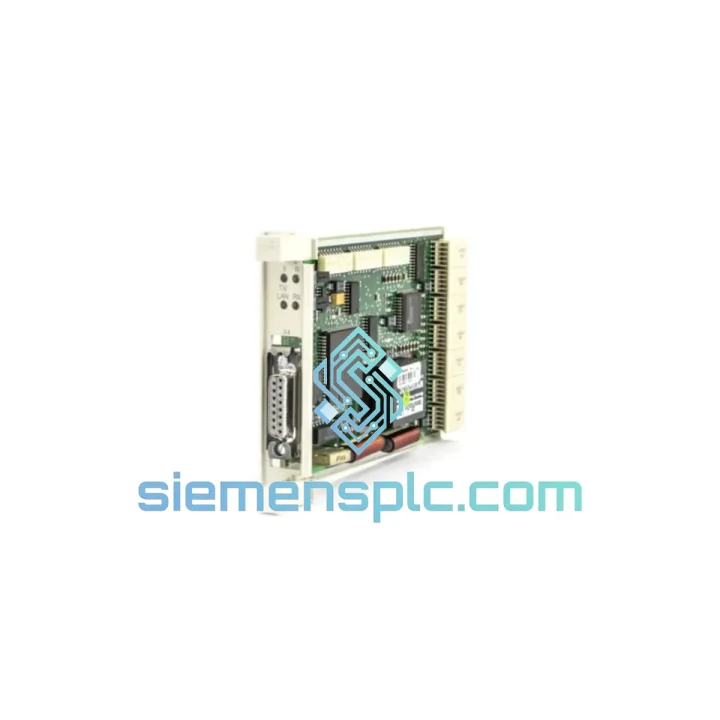
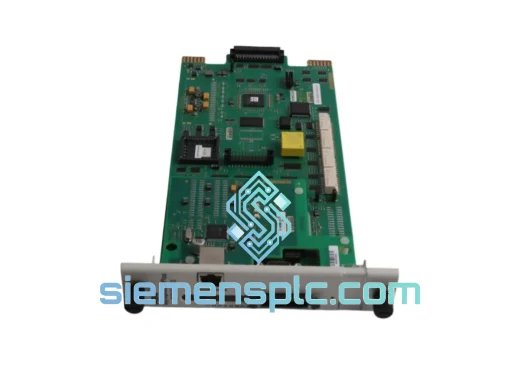
ABB CS513 PLC Communication Module
Request verified availability, condition, replacement risk review, packing options and courier lead time for CS513.
BrandABB
Part NumberCS513
ConditionAvailability Check
Lead TimeRFQ Confirmation
DocumentsDatasheet / photos by RFQ
ShippingExport packing available
Auto-filled RFQ
CS513
Click Request Quote and the part number is inserted into the inquiry form automatically.
- Reply by email: [email protected]
- WhatsApp / Tel: +86 18359268345
- Mon-Sat 9:00-18:00 GMT+8
Procurement Data
Key Product Information
Core fields for model confirmation and RFQ routing. Detailed product narrative remains below.
- Brand
- ABB
- Primary Part Number
- CS513
- Product Type
- PLC Communication Module
- Series / Family
- AC500
- Manufacturer
- ABB
- Country of Origin
- SE
- Catalog Category
- Communication
- Operating Temp.
- −25 °C to +70 °C
- Humidity
- 5 %–95 % RH, non-condensing
Model confirmed for inquiry
CS513
Send quantity, destination and urgency. The RFQ form keeps this part number attached.
Request Quote
Product Overview
ABB CS513 – Line Down? This Module Ships Today from Xiamen
Every hour your AC500 system sits offline costs real money. Whether it’s a tripped Ethernet link, a corrupted firmware state, or a module that simply stopped responding after a power surge — the CS513 is the part you need, and we have it on the shelf. No lead-time games, no “check back in 4 weeks.” We pull it, test it, and hand it to DHL the same day.
URGENT REQUIREMENT? Contact: [email protected] | WhatsApp: +86 18359268345
Quick Technical Datasheet
| Parameter | Specification |
|---|---|
| Part Number | CS513 |
| Manufacturer | ABB |
| Platform | AC500 PLC Series (PM5xx CPUs) |
| Module Function | Ethernet LAN Communication Interface |
| Physical Interface | 10/100 Mbps RJ-45 |
| Supported Protocols | Ethernet/IP · Modbus TCP/IP · PROFINET IO (Device) · FTP · HTTP |
| IP Configuration | Static or DHCP — set via Automation Builder or web interface |
| Mounting | Direct plug-in to AC500 CPU communication slot (no rail space consumed) |
| Power Source | AC500 backplane — no external PSU required |
| Operating Temperature | −25 °C to +70 °C |
| Storage Temperature | −40 °C to +85 °C |
| Humidity | 5 %–95 % RH, non-condensing |
| Protection Rating | IP20 |
| Weight | 323 g |
| Country of Origin | Germany |
| Certifications | CE · UL · cUL · ATEX |
| Stock Status | ✔ Ready to Ship — Xiamen Warehouse |
Troubleshooting & Replacement Tips
Common failure signatures that point to a dead CS513:
- ERR LED solid red on the CS513 face after power cycle — module not initializing on backplane.
- Automation Builder loses connection to the CPU’s Ethernet node; ping to the CS513 IP times out even though the switch port shows link-up.
- PROFINET IO devices go into “No Data Exchange” state simultaneously — all slaves drop at once, not one by one (rules out cable faults).
- Modbus TCP connections accepted but all register reads return exception code 0x04 (Server Failure) — internal firmware crash state.
- CPU diagnostic buffer logs event 0x8F01 or 0x8F02 — communication module hardware fault.
Step-by-step hot-swap procedure (AC500 with redundant power):
- Export the current CS513 configuration from Automation Builder (Project → Export → Communication Settings). Save the .zip offline — you will need the IP address, subnet mask, gateway, and PROFINET device name.
- Set the CPU to STOP mode via the front-panel keyswitch or Automation Builder. Do not power down the entire rack if other I/O modules are live and process-critical.
- Disconnect the RJ-45 Ethernet cable from the CS513. Label it if multiple cables are present.
- Press the module release latch (bottom of the CS513 housing) and slide the module straight out of the CPU communication slot. Note: the slot is keyed — the replacement can only insert one way.
- Inspect the backplane connector pins on the CPU side for bent contacts or corrosion before inserting the replacement unit.
- Slide the new CS513 firmly into the slot until the latch clicks. Do not force — if resistance is felt, check alignment.
- Reconnect the Ethernet cable. Power the CPU back to RUN mode.
- The CS513 does not self-address from the CPU — it reads its IP configuration from onboard flash. You must re-download the communication parameters via Automation Builder (Online → Download → Communication Module). Alternatively, use the CS513’s built-in web server (default IP 192.168.1.1 if factory-reset) to manually set the IP before going online.
- For PROFINET: the device name stored in the CS513 must match the name assigned in the PROFINET controller configuration. Use the “Assign Device Name” function in Automation Builder or a PROFINET commissioning tool (e.g., Proneta) to write the correct name to the new module before starting the IO controller.
- Verify: all PROFINET slaves return to “Data Exchange” state, Modbus TCP connections re-establish, and the CPU diagnostic buffer shows no new 0x8Fxx events.
Firmware note: CS513 firmware is bundled with the Automation Builder release. If your project was built on Automation Builder 2.3+ and the replacement module ships with an older firmware, Automation Builder will prompt a firmware update automatically on first download. Allow the update to complete — do not interrupt power during this 90-second process.
DIP switch / address switch: The CS513 has no physical DIP switches for address setting. All network parameters are software-configured. If you are replacing a unit that was previously set via the web interface rather than Automation Builder, retrieve the IP settings from your network documentation or use an IP scanner before the old module is removed.
Reliability in Harsh Conditions
The CS513 is not a commercial-grade Ethernet adapter repackaged for industrial use. It is designed from the ground up to operate inside steel enclosures on factory floors, offshore platforms, and outdoor substations where conditions are nothing like a server room.
Vibration & Mechanical Shock: Tested to IEC 60068-2-6 (sinusoidal vibration, 5–150 Hz, 1 g) and IEC 60068-2-27 (shock, 15 g / 11 ms half-sine). The direct plug-in backplane mounting eliminates the connector fatigue that kills modules mounted on DIN rail with flying leads.
Thermal Cycling: Rated −25 °C to +70 °C continuous operation. The onboard components are selected for automotive-grade temperature tolerance, not consumer-grade. In practice, this means the module survives the 06:00 cold-start in an unheated outdoor cabinet and the 14:00 peak inside a sun-baked enclosure without derating.
Humidity & Condensation: Conformal coating on the PCB provides protection against humidity up to 95 % RH non-condensing. In environments with rapid temperature swings that risk condensation, the IP20 rating of the module should be supplemented by a properly sealed enclosure with desiccant or thermostat-controlled anti-condensation heater — standard practice for outdoor panel installations.
EMC: Compliant with IEC 61000-4-2 (ESD), IEC 61000-4-4 (EFT/Burst), and IEC 61000-4-5 (Surge). In high-EMI environments (VFD-heavy panels, arc welding proximity), ensure the Ethernet cable is shielded (STP Cat5e or better) and the shield is terminated at the panel earth, not floating.
Global Express Logistics
Our warehouse is located in Xiamen, Fujian — one of China’s primary export hubs with direct access to DHL, FedEx, and UPS international gateways. This is not a drop-ship arrangement. The module is physically in our facility, inspected, and ready to pack.
Standard dispatch timeline:
- Order confirmed before 15:00 CST: Same-day dispatch. Tracking number issued by 18:00 CST.
- Order confirmed after 15:00 CST: Next business day dispatch.
- DHL Express Worldwide: Europe 2–3 business days · North America 3–4 business days · Southeast Asia 1–2 business days · Middle East 3–5 business days.
- FedEx International Priority: Available on request for time-critical shipments with guaranteed delivery windows.
Export documentation: Commercial invoice, packing list, and certificate of origin (China) are prepared for every shipment. For shipments requiring an ABB factory test report or CE declaration of conformity, request these at the time of order — we include them at no additional charge.
Customs HS Code: 8537.10 (Boards, panels, consoles for electric control) — pre-declared on all shipments to minimize customs clearance delays. For destinations with specific import licensing requirements (e.g., certain Middle East or South American countries), contact us before ordering so we can advise on documentation.
Packaging: The CS513 is packed in an anti-static ESD bag, placed in foam-lined inner box, and shipped in a double-wall corrugated outer carton. Drop-test rated to 1.2 m. We photograph every unit before sealing — images available on request for insurance or receiving inspection purposes.
Contact Information
Email: [email protected]
WhatsApp: +86 18359268345
Web: siemensplc.com
© 2026 siemensplc.com. All rights reserved.
Ready to quote
[email protected]
Send This Part Number to Sales
RFQ workflow
Quality workflow ->
Confirmation Process
01Model confirmation
We check the full part number, brand, series and visible nameplate information before quotation.
02Availability reply
Sales confirms stock path, condition option, quantity and realistic lead time for export dispatch.
03Packing & courier
DHL, FedEx, UPS or buyer courier arrangements can be reviewed with packing requirements.
Continue sourcing
Browse full catalog ->
Related Automation Parts
Similar brand or category products for fast comparison and multi-item RFQ lists.
ABB
RFQ Ready
ABB SPBRC410 PLC Communication Controller
AC500
Origin SE
PLC Communication Controller