ABB
RFQ Ready
ABB HAC807B102 Analog Input Termination Unit – AC800M Series
AC800M
Origin SE
Analog Input Termination Unit
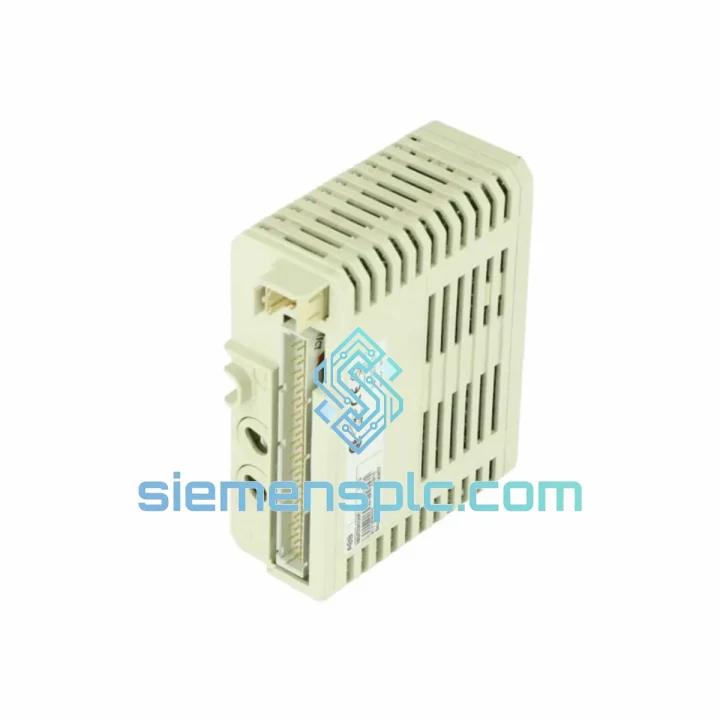
Request verified availability, condition, replacement risk review, packing options and courier lead time for DI840 3BSE020836R1.
Click Request Quote and the part number is inserted into the inquiry form automatically.
Core fields for model confirmation and RFQ routing. Detailed product narrative remains below.
Every minute your AC800M DCS sits idle with a dead DI840, you’re burning money. A single unplanned shutdown in a process plant can cost anywhere from $10,000 to $250,000 per hour depending on your industry. We keep DI840 3BSE020836R1 units on the shelf in Xiamen — tested, packed, and ready to clear customs today. No lead-time negotiation. No factory backorder queue. You call, we ship.
URGENT REQUIREMENT? Contact: [email protected] | WhatsApp: +86 18359268345
| Parameter | Specification |
|---|---|
| Part Number | 3BSE020836R1 |
| Model | DI840 |
| Brand | ABB |
| Series | S800 I/O (ModuleBus) |
| Module Type | Digital Input (DI) |
| Input Voltage | 24 VDC |
| Channels | 16 |
| Input Standard | IEC 61131-2 Type 1 / Type 3 |
| Isolation | Galvanic — field vs. system bus |
| Compatible Controllers | AC800M: PM851 / PM856 / PM860 / PM861 / PM864 / PM866 / PM891 |
| Terminal Base | TB840 / TB840A / TB842 |
| Operating Temperature | 0 °C to +55 °C |
| Certifications | CE, UL, ATEX Zone 2 |
| Origin | Germany |
| Stock Status | ✅ Ready to Ship — Xiamen Warehouse |
Swapping a DI840 in a live AC800M system is straightforward if you follow the sequence. Rush jobs go wrong when engineers skip steps under pressure — don’t let that be you.
Step 1 — Confirm the fault is the module, not the field wiring. Before pulling the card, check the DI840’s channel LEDs. A solid red on individual channels points to field-side wiring or sensor failure. A module-wide fault (all channels dark, system bus LED flashing amber) is your confirmation the DI840 itself has failed.
Step 2 — Check for hot-swap eligibility. The DI840 on a TB840A terminal base supports online module replacement (OMR) — you can pull and insert without shutting down the controller. On a standard TB840, verify with your site safety procedure whether a controlled shutdown is required.
Step 3 — No address switches to set. Unlike older S800 generation modules, the DI840 uses automatic address assignment via the ModuleBus. The module reads its slot position from the terminal base. No rotary switches, no DIP banks — just seat it firmly until the latch clicks.
Step 4 — Firmware matching. The DI840 carries embedded firmware that is auto-negotiated with the AC800M controller on power-up. If your controller runs CBM firmware below 5.0, verify compatibility in the ABB release notes. Mismatched firmware will cause the module to appear as “Unknown” in the hardware tree — not a hardware fault, a software handshake issue.
Step 5 — Common fault codes to know:
Step 6 — Post-replacement verification. After seating the new DI840, force a channel-level I/O test from Control Builder M’s online diagnostic view. Confirm all 16 channels toggle correctly before releasing the loop to automatic control.
The DI840 was not designed for a climate-controlled server room. It was built for the floor — the kind of environment where ambient temperature swings 30 degrees between day and night, where vibration from compressors and pumps never stops, and where humidity from coastal or tropical sites condenses on every surface it can find.
ABB’s S800 I/O platform is rated for continuous operation from 0 °C to +55 °C with short-term excursions to +70 °C. The conformal coating on the DI840 PCB provides protection against moisture ingress and corrosive atmospheres — a critical feature in offshore platforms, chemical plants, and coastal installations where salt-laden air attacks unprotected electronics within months.
Vibration resistance meets IEC 60068-2-6 standards, covering sinusoidal vibration profiles that replicate the mechanical stress of pump skids, compressor trains, and rotating machinery. The module’s card-edge connector and latch mechanism are designed to maintain contact integrity under sustained vibration — a failure mode that plagues cheaper third-party alternatives that use lower-tolerance connectors.
EMC immunity is certified to IEC 61000-4 series, including ESD, radiated immunity, and conducted disturbance tests. In high-voltage switchgear environments where transient spikes are routine, the DI840’s galvanic isolation barrier between field and system bus is your last line of defense against a fault that propagates from the field into the controller backplane.
Units supplied from our Xiamen warehouse are inspected for physical integrity — connector pins, PCB surface condition, and housing — before dispatch. Any unit showing signs of thermal stress, corrosion, or mechanical damage is quarantined. You receive a module that is ready to perform, not one that will fail again in six months.
Our dispatch hub is in Xiamen, China — one of the country’s primary export ports with direct DHL and FedEx gateway access. Here’s what the timeline looks like from your purchase order to your receiving dock:
We send proactive updates at dispatch, customs clearance, and delivery. If your shipment is held at customs, we respond within 4 hours with the documentation your broker needs to release it.
Email: [email protected]
WhatsApp: +86 18359268345
Web: siemensplc.com
© 2026. All rights reserved.
We check the full part number, brand, series and visible nameplate information before quotation.
Sales confirms stock path, condition option, quantity and realistic lead time for export dispatch.
DHL, FedEx, UPS or buyer courier arrangements can be reviewed with packing requirements.
Similar brand or category products for fast comparison and multi-item RFQ lists.