
ABB
In Stock OK
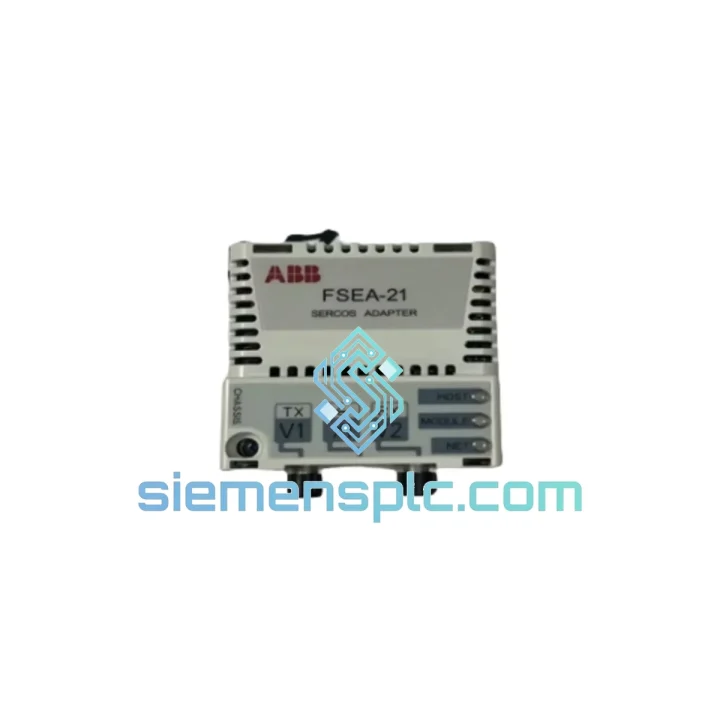
ABB FSEA-21 Fieldbus Adapter
Request verified availability, condition, replacement risk review, packing options and courier lead time for FSEA-21.
BrandABB
Part NumberFSEA-21
ConditionAvailability Check
Lead TimeRFQ Confirmation
DocumentsDatasheet / photos by RFQ
ShippingExport packing available
Auto-filled RFQ
FSEA-21
Click Request Quote and the part number is inserted into the inquiry form automatically.
- Reply by email: [email protected]
- WhatsApp / Tel: +86 18359268345
- Mon-Sat 9:00-18:00 GMT+8
Procurement Data
Key Product Information
Core fields for model confirmation and RFQ routing. Detailed product narrative remains below.
- Brand
- ABB
- Primary Part Number
- FSEA-21
- Product Type
- Fieldbus Communication Adapter
- Series / Family
- S800
- Manufacturer
- ABB
- Country of Origin
- SE
- Catalog Category
- Motor Drives
- Operating Temp.
- 0 °C to +55 °C
- Humidity
- 5–95% RH, non-condensing
Model confirmed for inquiry
FSEA-21
Send quantity, destination and urgency. The RFQ form keeps this part number attached.
Request Quote
Product Overview
ABB FSEA-21 — Stop the Clock on Your Downtime. Ship Today from Xiamen.
Your ACS800 drive just dropped off the Modbus network. The line is cold. Every minute of unplanned downtime is burning through your production budget. The FSEA-21 Modbus RTU/ASCII fieldbus adapter is the single component standing between you and full restart — and we have it on the shelf, tested, and ready to dispatch within hours.
At siemensplc.com, we stock the ABB FSEA-21 specifically for emergency procurement scenarios. No lead-time games, no “check back in 6–8 weeks.” You call, we ship. DHL Express from Xiamen to your plant floor — most destinations in 2–4 business days.
URGENT REQUIREMENT? Contact: [email protected] | WhatsApp: +86 18359268345
Quick Technical Datasheet
| Parameter | Specification |
|---|---|
| Part Number | FSEA-21 |
| Manufacturer | ABB |
| Series | FSEN — ACS800 Option Adapter Series |
| Protocol | Modbus RTU / Modbus ASCII |
| Physical Interface | RS-485, 2-wire, half-duplex |
| Baud Rate Range | 1,200 – 115,200 bps (drive parameter selectable) |
| Slave Address Range | 1 – 247 (set via drive parameter 98.02) |
| Drive Compatibility | ABB ACS800 all variants (01, 02, 04, 07, 11, 17, 31, 37) |
| Mounting Location | Drive option slot 1 or slot 2 |
| Power Source | Internally powered by drive backplane — no external PSU needed |
| Operating Temperature | 0 °C to +55 °C |
| Storage Temperature | −40 °C to +70 °C |
| Humidity | 5–95% RH, non-condensing |
| Weight (packaged) | ~800 g |
| Stock Status | ✅ Ready to Ship — Xiamen Warehouse |
Troubleshooting & Replacement Tips
Swapping an FSEA-21 is not a plug-and-play operation if you skip the configuration steps. Here is what actually matters on the bench:
1. Confirm the fault before pulling the card. On the ACS800 keypad, navigate to Fault History (Menu → Diagnostics → Fault History). A recurring COMM FAULT or FIELDBUS TIMEOUT with no wiring fault upstream almost always points to a failed FSEA-21 or corrupted adapter firmware. If the drive shows OPTION MODULE MISSING on power-up, the adapter has already failed its self-test — replacement is confirmed.
2. Power down completely before removal. The ACS800 option slot is not hot-swappable. Shut down the drive, wait for the DC bus voltage to discharge below 50 V (check the DC bus terminals with a meter — do not rely on the keypad alone), then remove the adapter. Pulling the FSEA-21 under live bus voltage will damage the backplane connector and potentially the RMIO control board.
3. Slot assignment matters. The FSEA-21 can occupy slot 1 or slot 2. The drive’s parameter group 98 (Option Modules) must reflect the correct slot. After installing the new adapter, verify parameter 98.01 (COMM MODULE) shows the correct slot assignment. If the drive was previously using slot 2 and you install into slot 1, the drive will not recognize the adapter until 98.01 is updated.
4. Re-enter Modbus parameters manually. The FSEA-21 does not retain parameters independently — all Modbus settings (baud rate, parity, slave address, data format) are stored in the drive’s parameter group 51 (EXT COMM MODULE). After replacement, you must re-enter: 51.01 (MODULE TYPE), 51.02 (BAUD RATE), 51.03 (PARITY), and 51.04 (STATION NUMBER). Have your original drive parameter backup file ready before you start. If no backup exists, pull the values from the Modbus master configuration or the plant’s electrical drawings.
5. Firmware version check. The FSEA-21 firmware is embedded in the adapter hardware and does not require separate flashing. However, if your ACS800 is running a very early firmware revision (pre-2005 drives), verify compatibility with ABB Technical Note TN00073EN before installation. In practice, all FSEA-21 units are backward-compatible with ACS800 drives from 2001 onward.
6. RS-485 termination resistor. If the FSEA-21 is the last device on the Modbus segment, the 120 Ω termination resistor on the adapter’s terminal block must be enabled (jumper JP1 to the ON position). Failure to terminate a long RS-485 run causes signal reflections that produce intermittent communication errors — a fault that looks like a bad adapter but is actually a wiring issue. Check this before condemning the new unit.
7. First power-up verification. After installation and parameter entry, power up the drive and watch the FSEA-21 LED indicators: a steady green on the MODULE LED confirms the adapter is recognized by the drive. A flashing red on the BUS LED indicates the adapter is not receiving valid Modbus frames from the master — check master polling address and baud rate match. Both LEDs off after 10 seconds means the adapter is not seated correctly in the option slot connector.
Reliability in Harsh Conditions
Industrial environments do not forgive weak hardware. The FSEA-21 is designed to operate continuously in conditions that would kill consumer-grade electronics. The adapter’s conformal-coated PCB resists moisture ingress and condensation — critical in coastal plants, paper mills, and food processing facilities where humidity swings are constant. The operating temperature ceiling of +55 °C means the adapter handles the thermal load inside a drive cabinet without derating, even in summer shutdowns where ambient temperatures spike.
Vibration resistance is built into the option slot mechanical design: the card locks into the ACS800 backplane with a positive-retention latch, not friction alone. This matters in compressor stations, pump houses, and mobile equipment where continuous vibration would loosen a poorly designed connector over months of operation. Units we ship have been inspected for connector pin integrity and PCB trace continuity — common failure points on aged adapters that have been subjected to years of thermal cycling.
Every FSEA-21 leaving our Xiamen warehouse passes a functional verification check: the adapter is powered up, the MODULE LED is confirmed green, and the Modbus register map is polled via a test master to verify correct data exchange. We do not ship untested stock. If a unit fails our bench check, it does not ship — period.
Global Express Logistics
Our dispatch operation runs out of Xiamen, Fujian — one of China’s primary export hubs with direct access to DHL, FedEx, and UPS international gateways. Here is how the process works from the moment you confirm your order:
Same-day dispatch: Orders confirmed before 15:00 CST are packed and handed to the carrier the same business day. Orders after 15:00 ship the following morning. We do not batch shipments — your order moves independently.
Carrier options: DHL Express Worldwide is our default for most destinations — transit times of 2–3 business days to Europe, 3–4 days to North America, and 1–2 days to Southeast Asia. FedEx International Priority is available for US-bound shipments requiring customs pre-clearance. For destinations with DHL service restrictions, we route via UPS Worldwide Express.
Documentation: Commercial invoice, packing list, and HS code declaration (HS 8537.10) are prepared at dispatch. For customers requiring a Certificate of Origin or specific customs documentation for import clearance, notify us at order confirmation and we will prepare the paperwork in parallel with packing.
Tracking: A tracking number is sent to your email within 2 hours of carrier pickup. We monitor shipments actively — if a customs hold or delivery exception occurs, we contact you proactively rather than waiting for you to chase us.
Emergency freight: For genuine production-down situations, contact us via WhatsApp at +86 18359268345. We can arrange same-day DHL On Demand Delivery with priority customs handling for an additional freight surcharge. This option has gotten replacement parts to plant floors in Germany, Australia, and the UAE within 36 hours of order confirmation.
Contact Information
📧 Email: [email protected]
💬 WhatsApp: +86 18359268345
🌐 Web: siemensplc.com
© 2026 siemensplc.com. All rights reserved.
Ready to quote
[email protected]
Send This Part Number to Sales
RFQ workflow
Quality workflow ->
Confirmation Process
01Model confirmation
We check the full part number, brand, series and visible nameplate information before quotation.
02Availability reply
Sales confirms stock path, condition option, quantity and realistic lead time for export dispatch.
03Packing & courier
DHL, FedEx, UPS or buyer courier arrangements can be reviewed with packing requirements.
Continue sourcing
Browse full catalog ->
Related Automation Parts
Similar brand or category products for fast comparison and multi-item RFQ lists.
ABB
RFQ Ready
ABB SDCS-UCM-1 3ADT220090R0008 Excitation Control Board
S800
Origin SE
DC Drive Control Module
ABB
RFQ Ready
ABB SDCS-PIN-51-COAT 3ADT220090R0006 DC Drive Control Card
S800
Origin SE
DC Drive Control Card