ABB
In Stock OK
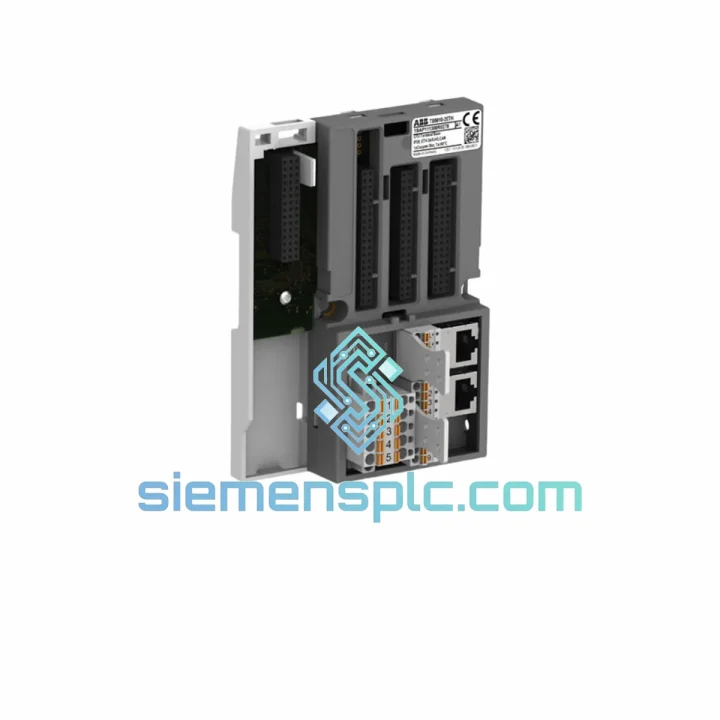
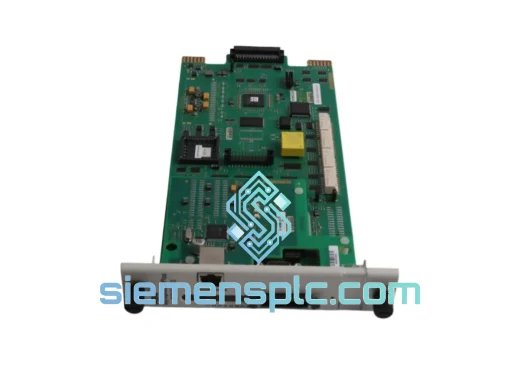
ABB TB5610-2ETH Ethernet Communication Module
Request verified availability, condition, replacement risk review, packing options and courier lead time for TB5610-2ETH.
BrandABB
Part NumberTB5610-2ETH
ConditionAvailability Check
Lead TimeRFQ Confirmation
DocumentsDatasheet / photos by RFQ
ShippingExport packing available
Auto-filled RFQ
TB5610-2ETH
Click Request Quote and the part number is inserted into the inquiry form automatically.
- Reply by email: [email protected]
- WhatsApp / Tel: +86 18359268345
- Mon-Sat 9:00-18:00 GMT+8
Procurement Data
Key Product Information
Core fields for model confirmation and RFQ routing. Detailed product narrative remains below.
- Brand
- ABB
- Primary Part Number
- TB5610-2ETH
- Product Type
- PLC Communication Module
- Series / Family
- AC500
- Manufacturer
- ABB
- Country of Origin
- SE
- Catalog Category
- Communication
- Operating Temp.
- -25°C to +70°C
- Humidity
- 5%–95% RH, non-condensing
Model confirmed for inquiry
TB5610-2ETH
Send quantity, destination and urgency. The RFQ form keeps this part number attached.
Request Quote
Product Overview
ABB TB5610-2ETH: Stop the Clock on Your Downtime — Dual-Port Ethernet Module, Shipped Today
Your AC500 line is down. Every minute the conveyor sits idle, every batch that misses its window, every SLA breach — it all converts directly into money leaving your operation. The TB5610-2ETH is the Ethernet communication backbone of your AC500 system, and when it fails, nothing else matters until it’s back online. We stock this module in Xiamen, verified, tested, and ready to leave the warehouse the same day you call.
URGENT REQUIREMENT? Contact: [email protected] | WhatsApp: +86 18359268345
Quick Technical Datasheet
| Parameter | Specification |
|---|---|
| Part Number / SKU | TB5610-2ETH |
| Manufacturer | ABB |
| Series | AC500 PLC Platform |
| Module Function | Dual-Port Ethernet Communication |
| Ethernet Ports | 2 × RJ45, 10/100 Mbps auto-negotiation |
| Supported Protocols | PROFINET IO, Modbus TCP, EtherNet/IP (device mode) |
| Network Topology | Star, Daisy-Chain, MRP Ring (sub-200 ms failover) |
| Compatible CPUs | AC500 PM5xx, PM5xx-ETH series |
| Power Source | AC500 CPU backplane — no external 24 VDC required |
| Operating Temperature | -25°C to +70°C |
| Storage Temperature | -40°C to +85°C |
| Humidity | 5%–95% RH, non-condensing |
| Protection Rating | IP20 |
| Certifications | CE, UL, cUL, ATEX Zone 2 (II 3G), IECEx |
| Country of Origin | Germany |
| HS Code | 8537.10 |
| Stock Status | ✅ Ready to Ship — Xiamen Warehouse |
Troubleshooting & Replacement Tips
Seen this module fail in the field more times than I can count. Here’s what actually happens and what to check before you even touch the replacement unit:
Common Failure Signatures:
- BF LED solid red: Bus fault — the module has lost communication with the AC500 CPU backplane. First suspect: backplane connector pins corroded or bent from vibration. Reseat before condemning the module.
- SF LED flashing red: Station failure on PROFINET. Check IP address conflict first — a duplicate IP on the subnet will cause this every time. Run a network scan before swapping hardware.
- Link LED off on both ports: Physical layer issue. Could be the module, could be the cable, could be the switch port. Swap cable first. If link still dead after module swap, check the managed switch port configuration — auto-negotiation mismatches are common with older Hirschmann/Siemens switches.
- Module recognized but no I/O data: PROFINET device name mismatch. The replacement module ships with no device name assigned. You must assign the correct PROFINET device name via Automation Builder or a PROFINET commissioning tool before the IO Controller will establish AR (Application Relationship).
Replacement Procedure — Field Checklist:
- Export the current AC500 project from Automation Builder and note the TB5610-2ETH firmware version (visible in the hardware catalog properties). Confirm your replacement unit carries the same or higher firmware revision.
- Power down the AC500 rack. The TB5610-2ETH is hot-swap capable in theory, but in a live PROFINET network, a sudden device disappearance will trigger IO Controller alarms across the entire subnet — coordinate with the control room before pulling the module.
- Seat the replacement module firmly into the backplane slot. The locking lever must click — a partially seated module will power up but produce intermittent BF faults under vibration.
- Power up. Assign the PROFINET device name using Automation Builder: right-click the device in the network view → “Assign Device Name”. The module’s MAC address is printed on the label — use it to identify the correct target on the network scan.
- If the project uses a fixed IP address assignment (not DHCP), verify the IP is correctly assigned via the PROFINET DCP protocol during commissioning. Do not rely on the old module’s IP persisting — the replacement starts with factory defaults.
- Verify both port LEDs show green link. Check the PROFINET diagnostic view in Automation Builder for any remaining alarms. A clean AR establishment takes 3–10 seconds after device name assignment.
- If firmware upgrade is required: connect via Ethernet, open Automation Builder firmware update tool, upload the target firmware file. Do not interrupt power during flash — a failed firmware update will brick the module and require factory recovery.
Note on MRP Ring Configurations: If the TB5610-2ETH is part of a Media Redundancy Protocol ring, the ring will open during module replacement. Inform the network team — other devices on the ring will log MRP topology change events. After replacement, verify ring closure via the MRP manager diagnostics.
Reliability in Harsh Conditions
The TB5610-2ETH was not designed for a climate-controlled server room. ABB engineered this module for the floor — the actual factory floor, where ambient temperatures swing, humidity condenses on cold mornings, and the panel takes vibration from presses, compressors, and overhead cranes running 24 hours a day.
The -25°C to +70°C operating range is not a marketing number. It qualifies the module for outdoor enclosures in northern European winters and for panels mounted adjacent to furnaces and dryers in food processing and paper mills. The conformal coating on the PCB provides a barrier against humidity ingress that would corrode unprotected boards within months in coastal or high-humidity environments.
Vibration resistance is validated to IEC 60068-2-6 (sinusoidal) and IEC 60068-2-27 (shock). In practice, this means the module survives the mechanical environment of a stamping press panel or a ship’s engine room auxiliary control cabinet without the connector fatigue failures that plague lower-grade communication hardware. The backplane connector design uses a positive-locking mechanism that maintains contact integrity under sustained vibration — the same failure mode that kills standard DIN rail modules in high-vibration applications.
ATEX Zone 2 / IECEx certification means the TB5610-2ETH can be deployed in areas where flammable gas or vapor may be present under abnormal conditions — chemical plants, offshore platforms, paint booths. This is not a feature most buyers need, but when you need it, there is no substitute.
Global Express Logistics
Our warehouse is in Xiamen, China — one of the country’s primary export hubs with direct access to DHL, FedEx, and UPS international express networks. This is not a drop-ship arrangement. The module is physically on our shelf, inspected, and ready to pack.
Typical Transit Times from Xiamen:
- Southeast Asia (Singapore, Thailand, Malaysia, Vietnam): DHL Express 1–2 business days
- Middle East (UAE, Saudi Arabia, Qatar): FedEx International Priority 2–3 business days
- Europe (Germany, Netherlands, UK, Poland): DHL Express 3–4 business days
- North America (USA, Canada, Mexico): FedEx International Priority 3–5 business days
- Australia / New Zealand: DHL Express 3–4 business days
- South America (Brazil, Chile, Colombia): FedEx 4–6 business days
Every shipment includes full commercial invoice, packing list, and certificate of origin for customs clearance. For orders requiring expedited customs processing, we can provide pre-shipment documentation electronically within hours of order confirmation. HS Code 8537.10 is pre-declared on all shipments — no delays from customs classification disputes.
For emergency orders placed before 14:00 CST, same-day dispatch is standard. We will send you the AWB number and tracking link before the courier vehicle leaves our facility. If your freight forwarder requires a specific carrier or service level, contact us before ordering — we accommodate customer-nominated carriers at no additional handling charge.
Contact Information
📧 Email: [email protected]
💬 WhatsApp: +86 18359268345
🌐 Web: siemensplc.com
© 2026 siemensplc.com. All rights reserved.
Ready to quote
[email protected]
Send This Part Number to Sales
RFQ workflow
Quality workflow ->
Confirmation Process
01Model confirmation
We check the full part number, brand, series and visible nameplate information before quotation.
02Availability reply
Sales confirms stock path, condition option, quantity and realistic lead time for export dispatch.
03Packing & courier
DHL, FedEx, UPS or buyer courier arrangements can be reviewed with packing requirements.
Continue sourcing
Browse full catalog ->
Related Automation Parts
Similar brand or category products for fast comparison and multi-item RFQ lists.
ABB
RFQ Ready
ABB SPBRC410 PLC Communication Controller
AC500
Origin SE
PLC Communication Controller