ABB
In Stock OK
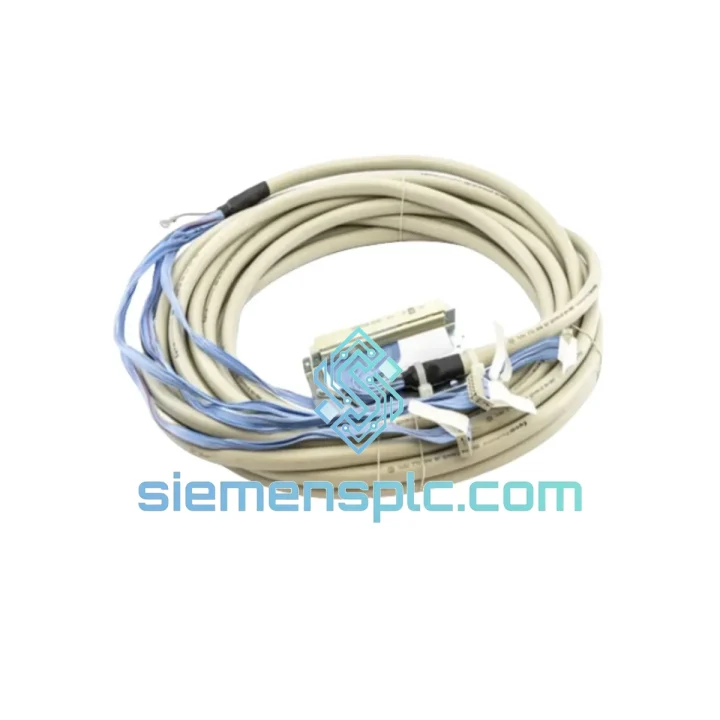
ABB TK801V006 Modulebus Extension Cable
Request verified availability, condition, replacement risk review, packing options and courier lead time for TK801V006.
BrandABB
Part NumberTK801V006
ConditionAvailability Check
Lead TimeRFQ Confirmation
DocumentsDatasheet / photos by RFQ
ShippingExport packing available
Auto-filled RFQ
TK801V006
Click Request Quote and the part number is inserted into the inquiry form automatically.
- Reply by email: [email protected]
- WhatsApp / Tel: +86 18359268345
- Mon-Sat 9:00-18:00 GMT+8
Procurement Data
Key Product Information
Core fields for model confirmation and RFQ routing. Detailed product narrative remains below.
- Brand
- ABB
- Primary Part Number
- TK801V006
- Product Type
- PLC Communication Cable
- Series / Family
- AC500
- Manufacturer
- ABB
- Country of Origin
- SE
- Model Function
- Modulebus Extension Shielded Cable
- Catalog Category
- Communication
- Compliance
- CE, RoHS
Model confirmed for inquiry
TK801V006
Send quantity, destination and urgency. The RFQ form keeps this part number attached.
Request Quote
Product Overview
ABB TK801V006 — Stop the Clock on Your Downtime
Every minute your AC500 system sits offline, the losses compound. A broken Modulebus link between your CPU and expansion I/O is one of the most deceptively simple faults that can halt an entire production line. The ABB TK801V006 is a 0.6 m factory-original Modulebus Extension Shielded Cable — a precision-terminated, impedance-matched interconnect that restores communication between your PM5xx CPU and downstream SM/DC expansion modules in minutes, not days. We stock it in Xiamen. It ships today.
URGENT REQUIREMENT? Contact: [email protected] | WhatsApp: +86 18359268345
Quick Technical Datasheet
| Part Number | TK801V006 ✅ Ready to Ship |
| Manufacturer | ABB |
| Series | AC500 PLC |
| Function | Modulebus Extension Shielded Cable |
| Cable Length | 0.6 m (600 mm) |
| Interface | Modulebus — ABB AC500 proprietary backplane bus |
| Shielding | Full EMI/RFI shielded construction |
| Connector | Proprietary Modulebus plug, both ends, factory-terminated |
| Compatible CPUs | PM554 / PM556 / PM564 / PM572 / PM581–PM595 (V1); PM5630–PM5686 (V2) |
| Compatible I/O | All SM5xx and DC5xx expansion modules with Modulebus port |
| Operating Temp | −25 °C to +70 °C |
| Compliance | CE, RoHS |
| Origin | Germany |
| Stock Status | ✅ In Stock — Ships within 24 hours |
Troubleshooting & Replacement Tips
The Modulebus cable is often the last thing engineers check — and the first thing that fails silently. Here is what you need to know before you pull the old cable and plug in the new one.
Fault Symptom Recognition
- ERR LED solid red on expansion module: Classic Modulebus communication loss. Check cable seating before assuming module failure.
- Intermittent I/O dropout under vibration: Connector micro-fretting. The TK801V006’s factory crimp eliminates this failure mode that field-made cables cannot.
- CPU reports “Expansion bus fault” in Automation Builder diagnostics: Run a cable swap first — it takes 90 seconds and rules out the most common cause.
- Random CRC errors on Modulebus: Often caused by a damaged shield drain wire. Inspect the cable jacket for kinks or crush damage near the connector boot.
Step-by-Step Replacement Procedure
- Place the AC500 CPU in STOP mode via Automation Builder or the front-panel RUN/STOP switch. Do not hot-swap the Modulebus cable under power — the bus is not designed for live insertion.
- Note the cable routing path before disconnecting. Photograph it if the panel is complex.
- Squeeze the locking tab on the Modulebus connector and pull straight out — never lever sideways. Damaged connector housings on the CPU or I/O module are a secondary failure you do not want.
- Inspect the vacated ports on both the CPU and expansion module for bent pins or debris. A can of compressed air and a visual check takes 30 seconds.
- Insert the TK801V006 connectors firmly until you hear the latch click on both ends. A half-seated connector will pass initial power-on but fail under vibration within weeks.
- Route the cable with a minimum bend radius of 25 mm. Avoid routing parallel to high-current power cables — maintain at least 50 mm separation or use a grounded metal divider.
- Power up and confirm the expansion module ERR LED extinguishes within 5 seconds of CPU entering RUN mode. If it persists, the fault is in the module, not the cable.
No DIP Switch or Firmware Action Required: The TK801V006 is a passive cable. There is no addressing, no firmware, and no configuration. Plug in and run.
Reliability in Harsh Conditions
Industrial panels are not lab environments. The TK801V006 is built for the conditions you actually work in, not the conditions the datasheet assumes.
The cable’s full-coverage foil-and-braid shield is terminated at both connector shells, creating a continuous Faraday enclosure around the signal conductors. In drive-heavy panels where VFDs and contactors generate broadband EMI, this shielding architecture keeps Modulebus signal integrity intact where unshielded or partially shielded alternatives fail within months.
The connector housings are glass-fiber reinforced thermoplastic rated to 70 °C continuous — relevant in summer shutdowns when panel internal temperatures spike well above ambient. The conductor insulation maintains flexibility down to −25 °C, so cold-start commissioning in unheated facilities does not crack the jacket during installation.
Vibration resistance is a function of connector latch retention force and cable strain relief geometry. ABB’s factory termination applies consistent crimp force and positions the strain relief boot to prevent conductor fatigue at the connector entry point — the exact location where field-assembled cables fail first under cyclic vibration from compressors, presses, and conveyor drives.
Humidity and condensation are handled by the connector’s sealed mating interface. In applications where the panel breathes — outdoor enclosures, coastal facilities, food processing washdown areas — the sealed connector prevents moisture ingress that would otherwise cause intermittent contact resistance and progressive signal degradation.
Global Express Logistics
Our warehouse is located in Xiamen, Fujian — one of China’s primary export hubs with direct access to international freight lanes operated by DHL Express, FedEx International Priority, and UPS Worldwide Express.
Orders confirmed before 15:00 CST ship same day. Standard transit times from Xiamen:
- Southeast Asia (SG, MY, TH, VN, ID): 2–3 business days via DHL Express
- Europe (DE, NL, PL, FR, IT, ES): 3–5 business days via FedEx International Priority
- North America (US, CA, MX): 3–5 business days via DHL or FedEx
- Middle East (AE, SA, QA, KW): 3–4 business days via DHL Express
- Australia & New Zealand: 3–5 business days via FedEx
- South America (BR, CL, CO, PE): 5–7 business days via DHL
Every shipment includes a tracking number issued within 2 hours of dispatch. For production-critical emergencies, contact us directly on WhatsApp — we can arrange same-day courier pickup and provide airway bill confirmation before end of business.
Export documentation (commercial invoice, packing list, certificate of origin) is prepared as standard. HS Code 8544.42 applies for customs classification in most jurisdictions. We can provide a formal COC (Certificate of Conformity) on request for regulated industries.
Contact Information
📧 Email: [email protected]
💬 WhatsApp: +86 18359268345
🌐 Web: siemensplc.com
© 2026 siemensplc.com. All rights reserved.
Ready to quote
[email protected]
Send This Part Number to Sales
RFQ workflow
Quality workflow ->
Confirmation Process
01Model confirmation
We check the full part number, brand, series and visible nameplate information before quotation.
02Availability reply
Sales confirms stock path, condition option, quantity and realistic lead time for export dispatch.
03Packing & courier
DHL, FedEx, UPS or buyer courier arrangements can be reviewed with packing requirements.
Continue sourcing
Browse full catalog ->
Related Automation Parts
Similar brand or category products for fast comparison and multi-item RFQ lists.
ABB
RFQ Ready
ABB SPBRC410 PLC Communication Controller
AC500
Origin SE
PLC Communication Controller