ABB
In Stock OK
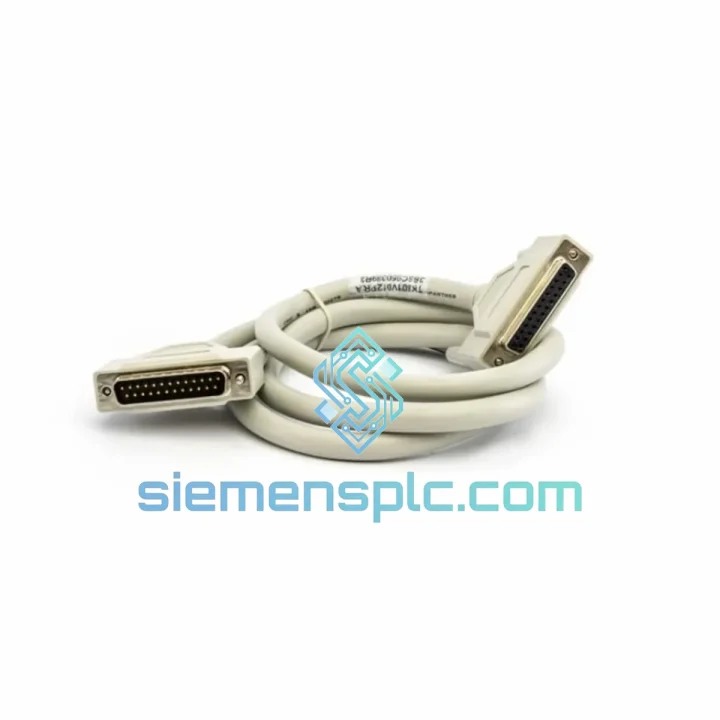
ABB TK801V012 Modulebus Extension Cable
Request verified availability, condition, replacement risk review, packing options and courier lead time for TK801V012.
BrandABB
Part NumberTK801V012
ConditionAvailability Check
Lead TimeRFQ Confirmation
DocumentsDatasheet / photos by RFQ
ShippingExport packing available
Auto-filled RFQ
TK801V012
Click Request Quote and the part number is inserted into the inquiry form automatically.
- Reply by email: [email protected]
- WhatsApp / Tel: +86 18359268345
- Mon-Sat 9:00-18:00 GMT+8
Procurement Data
Key Product Information
Core fields for model confirmation and RFQ routing. Detailed product narrative remains below.
- Brand
- ABB
- Primary Part Number
- TK801V012
- Product Type
- PLC Communication Cable
- Series / Family
- AC500
- Manufacturer
- ABB
- Country of Origin
- SE
- Catalog Category
- Communication
Model confirmed for inquiry
TK801V012
Send quantity, destination and urgency. The RFQ form keeps this part number attached.
Request Quote
Product Overview
ABB TK801V012 Modulebus Shielded Extension Cable — Stop the Clock on Your Downtime
Every minute your AC500 PLC rack sits offline costs real money. A failed or damaged Modulebus extension cable is one of the most overlooked causes of sudden I/O communication loss — and it’s also one of the fastest fixes when you have the right part on hand. The ABB TK801V012 is a 0.12 m factory-assembled, fully shielded Modulebus extension cable that restores the physical backplane link between your CPU and I/O modules in under five minutes. We stock it in Xiamen and ship globally via DHL/FedEx Express. Your line does not have to stay down.
URGENT REQUIREMENT? Contact: [email protected] | WhatsApp: +86 18359268345
Quick Technical Datasheet
| Part Number | TK801V012 ✔ Ready to Ship |
| Manufacturer | ABB |
| Series | AC500 / Modulebus |
| Cable Type | Modulebus Extension, Shielded |
| Cable Length | 0.12 m (120 mm) |
| Interface | Modulebus — ABB proprietary backplane bus |
| Shielding | Foil + braid, full coverage, EMI/RFI rated |
| Connector | Keyed Modulebus plug, both ends, factory-crimped |
| Compatible CPUs | PM571, PM572, PM581, PM582, PM583, PM585, PM591, PM592, PM595, AC500-S safety CPUs |
| Compatible I/O | All AC500 digital, analog, and communication I/O modules |
| Operating Temp | –25 °C to +70 °C |
| RoHS | Compliant |
| Origin | Germany (ABB factory) |
| Stock Status | ✔ In Stock — Ships within 24 hours |
Troubleshooting & Replacement Tips
Symptom pattern that points to TK801V012 failure: Your AC500 CPU is powered and running, but one or more I/O modules downstream of the cable show a red SF/BF LED. Automation Builder hardware diagnostics report a Modulebus communication error on a specific slot. Reseating the I/O module does not clear the fault. The CPU event log shows repeated “Modulebus timeout” or “I/O module not responding” entries.
Step-by-step replacement procedure:
- Step 1 — Safe state first. Place the CPU in STOP mode via the mode selector or Automation Builder. Confirm all outputs are de-energized. Do not hot-swap the Modulebus cable — this is not a hot-plug interface.
- Step 2 — Power down the rack. Remove 24 VDC supply to the CPU and I/O modules. Wait 10 seconds for capacitors to discharge.
- Step 3 — Disconnect the faulty cable. Press the locking tab on each Modulebus connector and pull straight out. Inspect the connector pins for bent contacts or corrosion — a damaged connector on the module itself requires module replacement, not just cable replacement.
- Step 4 — Install TK801V012. Align the keyed connector with the Modulebus port on the CPU (or upstream I/O module) and press firmly until you hear the latch click. Repeat on the downstream module. Do not force — the keying prevents reverse insertion.
- Step 5 — Power up and verify. Restore 24 VDC. The CPU should auto-detect the I/O module within one scan cycle. In Automation Builder, confirm the module status returns to green. Clear any latched faults via the diagnostic buffer.
- Step 6 — No DIP switch or firmware action required. The TK801V012 is a passive cable. There is no addressing, no termination resistor, and no firmware update needed after replacement. The Modulebus auto-configures at startup.
Common fault codes associated with Modulebus cable failure:
- 0x8101 / 0x8102 — Modulebus communication error, check physical layer first
- SF LED solid red on I/O module — Loss of Modulebus sync; cable or connector fault
- “Hardware configuration mismatch” in Automation Builder — Often triggered after a cable fault causes the CPU to lose track of downstream modules; re-download hardware config after cable replacement
Pro tip from the field: Keep one TK801V012 taped inside the panel door as a cold spare. At 0.12 m and under 200 g, it costs almost nothing to store and saves hours when a cable fails at 2 AM during a production run.
Reliability in Harsh Conditions
Industrial panels are not gentle environments. The TK801V012 is built to survive the conditions that kill cheaper cables:
- Vibration: The factory-crimped Modulebus connectors are mechanically locked with a positive-latch mechanism. Unlike field-assembled cables, there are no loose crimp joints that work free under continuous machine vibration. ABB validates the AC500 platform to IEC 61131-2 vibration and shock requirements.
- Temperature cycling: The cable jacket and insulation are rated for –25 °C to +70 °C continuous operation. In foundry or outdoor enclosure applications where panel temperatures swing dramatically between shifts, the cable maintains signal integrity without cracking or delaminating.
- EMI from VFDs and contactors: The foil-plus-braid double shield is terminated at both connector shells, providing a continuous Faraday cage around the Modulebus signal conductors. In panels with multiple variable-frequency drives switching at high carrier frequencies, this shielding is the difference between clean I/O communication and random bus errors that waste hours of diagnostic time.
- Humidity and condensation: The cable jacket material resists moisture ingress. In coastal or high-humidity environments, the shielded construction also prevents galvanic corrosion at the connector interface when the panel breathes.
Every TK801V012 we ship is an original ABB factory unit — not a field-assembled replica. The connector geometry, pin plating, and cable construction are manufactured to ABB’s own tolerances. Counterfeit or generic Modulebus cables are a documented problem in the secondary market and are a leading cause of intermittent bus faults that are nearly impossible to diagnose without swapping the cable.
Global Express Logistics
Our warehouse is located in Xiamen, China — a major international freight hub with direct DHL Express and FedEx International Priority connections to over 220 countries and territories.
- Order cut-off: Orders confirmed before 15:00 CST ship same business day.
- DHL Express / FedEx IP transit times: Southeast Asia 1–2 days; Europe 3–5 days; North America 3–5 days; Middle East / Africa 4–6 days.
- Tracking: A waybill number is emailed within 2 hours of dispatch. Real-time tracking is available via the DHL or FedEx portal.
- Export documentation: Commercial invoice, packing list, and certificate of origin are prepared for every shipment. HS code 8544.42 applies to this cable. We can provide an ABB datasheet and authenticity documentation for customs clearance if required.
- Emergency freight: For critical plant shutdowns, contact us directly via WhatsApp for a same-day DHL On-Demand Delivery or FedEx SameDay City quote where available.
Contact Information
Email: [email protected]
WhatsApp: +86 18359268345
Web: siemensplc.com
© 2026 siemensplc.com. All rights reserved.
Ready to quote
[email protected]
Send This Part Number to Sales
RFQ workflow
Quality workflow ->
Confirmation Process
01Model confirmation
We check the full part number, brand, series and visible nameplate information before quotation.
02Availability reply
Sales confirms stock path, condition option, quantity and realistic lead time for export dispatch.
03Packing & courier
DHL, FedEx, UPS or buyer courier arrangements can be reviewed with packing requirements.
Continue sourcing
Browse full catalog ->
Related Automation Parts
Similar brand or category products for fast comparison and multi-item RFQ lists.
ABB
RFQ Ready
ABB SPBRC410 PLC Communication Controller
AC500
Origin SE
PLC Communication Controller