Product Overview
OS9600/OS9700-CMM Down? Every Minute of Network Outage Has a Price Tag
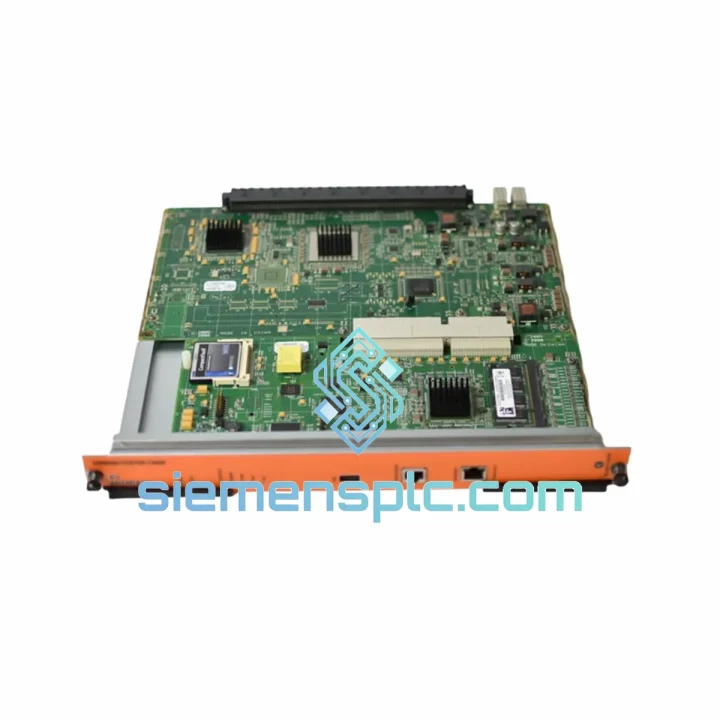
A failed Chassis Management Module on your OmniSwitch 9600 or 9700 doesn’t just drop packets — it takes down your entire control plane. No CLI access. No redundancy failover. No visibility. If your secondary CMM slot is empty or the standby unit has also failed, you’re looking at a full chassis blackout. We’ve seen it happen at 2 AM on a Friday before a long weekend. That’s exactly why we stock the OS9600/OS9700-CMM and ship same-day from Xiamen.
Stop calculating downtime cost per hour. Get the replacement moving now.
URGENT REQUIREMENT? Contact: [email protected] | WhatsApp: +86 18359268345
Quick Technical Datasheet
| Parameter |
Specification |
| Part Number / SKU |
OS9600/OS9700-CMM |
| Brand |
Alcatel-Lucent (Nokia) |
| Series |
OmniSwitch 9000 Series |
| Module Function |
Chassis Management Module – Control Plane Controller |
| Compatible Chassis |
OmniSwitch 9600, OmniSwitch 9700 |
| CMM Slots |
CMM-A (Primary) / CMM-B (Secondary) |
| Redundancy Mode |
1+1 Hot-Standby, sub-second failover |
| Management Interfaces |
Console (RJ-45), Out-of-Band Ethernet (10/100) |
| Onboard Storage |
Flash memory for AOS image + startup config |
| AOS Compatibility |
AOS 6.x / 7.x |
| Form Factor |
Hot-swappable blade, C-size |
| Weight |
~1,350 g |
| Country of Origin |
France |
| Stock Status |
✅ Ready to Ship – Xiamen Warehouse |
Troubleshooting & Replacement Tips
Common failure signatures for the OS9600/OS9700-CMM:
-
CMM LED solid amber or rapid blinking: Indicates POST failure or flash corruption. The module has lost its boot image. Do not attempt a forced reload — you risk locking the chassis. Pull the failed CMM and insert the replacement cold.
-
Console port unresponsive after power cycle: 90% of the time this is a dead CMM, not a cable or terminal issue. Swap the CMM before chasing serial settings.
-
Chassis boots but no management access: The CMM may have booted into a minimal recovery shell. Check if the AOS image on flash is intact via the boot prompt. If corrupted, the replacement CMM with a pre-loaded image resolves this immediately.
-
Redundancy failover not triggering: If the secondary CMM is installed but not taking over, verify both units are running identical AOS versions. A version mismatch between CMM-A and CMM-B will block automatic switchover.
Step-by-step replacement procedure:
-
Confirm redundancy status: Run
show cmm from CLI if the primary is still partially responsive. Identify which slot (A or B) has failed.
-
Notify upstream: Alert NOC or network team — even a hot-swap on a redundant chassis causes a brief control-plane hiccup. Schedule a maintenance window if traffic is critical.
-
ESD precautions: Ground yourself before handling. The CMM contains sensitive flash and SDRAM components. One static discharge can kill a new module before it’s seated.
-
Hot-swap extraction: Loosen the two captive screws on the CMM faceplate. Pull the ejector levers simultaneously and slide the module straight out. Do not twist.
-
Insert replacement: Align the replacement OS9600/OS9700-CMM with the guide rails. Slide in firmly until the ejector levers click. Tighten captive screws finger-tight.
-
AOS version sync: The chassis will automatically push the running AOS image to the new CMM’s flash. This takes 3–8 minutes. Do not power-cycle during this window — the CMM LED will cycle through green/amber during synchronization.
-
Verify takeover: Run
show cmm again. Confirm the replacement shows as PRIMARY or SECONDARY with status RUNNING. Check show log for any post-swap errors.
-
Configuration note: The OS9600/OS9700-CMM does not use DIP switches or manual address assignment. All slot addressing is handled automatically by the chassis backplane. No jumper configuration required.
Firmware matching: Always confirm the replacement CMM’s factory firmware is compatible with your chassis AOS release before insertion. If you’re running AOS 7.3.x, a CMM shipped with AOS 6.x factory firmware will still synchronize — but allow extra time for the full image transfer. Contact us and we can pre-verify firmware revision before dispatch.
Reliability in Harsh Conditions
The OmniSwitch 9600/9700 platform — and its CMM — was engineered for environments that would kill consumer-grade hardware within weeks. Alcatel-Lucent designed the OS9600/OS9700-CMM to operate continuously in conditions that field engineers encounter daily:
-
Thermal tolerance: Rated for 0°C to 45°C operating range with forced-air cooling from the chassis fan tray. In practice, we’ve seen these modules pulled from telecom equipment rooms running at 40°C ambient for years without failure. The onboard thermal sensors feed directly into the chassis management system, triggering fan speed adjustments before temperatures reach critical thresholds.
-
Vibration resistance: The CMM blade uses a locking ejector mechanism that prevents micro-movement on the backplane connector — a common failure point in modules installed in environments with constant mechanical vibration (generator rooms, factory floors adjacent to heavy machinery). The backplane connector is rated for 200+ insertion cycles.
-
Humidity and condensation: Conformal coating on the PCB provides protection against humidity ingress in non-condensing environments up to 95% RH. For installations in coastal or high-humidity industrial zones, ensure the chassis enclosure maintains positive airflow to prevent condensation on the module surface.
-
Power transient immunity: The CMM’s onboard power regulation circuitry handles input voltage fluctuations from the chassis power supply. In sites with unstable utility power, the CMM is typically the last module to fail — the power supplies and line cards absorb transients first.
-
Long MTBF: Alcatel-Lucent rates the OmniSwitch 9000 series CMM for >100,000 hours MTBF under standard operating conditions. Units sourced through our Xiamen warehouse are inspected and function-tested before dispatch — we do not ship modules that show signs of thermal stress, capacitor bulge, or connector wear.
Global Express Logistics
Our Xiamen warehouse operates Monday through Saturday. Orders confirmed before 15:00 CST ship the same day. Here’s exactly what happens after you place your order:
-
Order confirmation (0–30 min): You receive a proforma invoice and stock confirmation. For urgent orders, call or WhatsApp directly — we’ll pull and photograph the unit within the hour.
-
Packaging (same day): The OS9600/OS9700-CMM is wrapped in anti-static foam, sealed in an ESD bag, and packed in a double-wall corrugated carton. Fragile and electronics labels applied. Net weight and dimensions documented for customs.
-
Carrier selection: DHL Express is our default for most destinations — typical transit times are 2–4 business days to Europe, 3–5 days to North America, 1–3 days to Southeast Asia. FedEx International Priority is available for US destinations requiring faster clearance. For Middle East and Africa, we route via DHL with pre-clearance documentation to minimize customs holds.
-
Customs documentation: Commercial invoice, packing list, and HS code declaration (HS 8517.62 or 8543.70 depending on destination customs authority) are prepared and attached to the shipment. For countries requiring a Certificate of Origin, we provide a Chamber of Commerce-stamped CO from Xiamen.
-
Tracking: AWB number sent to your email within 2 hours of pickup. Real-time DHL/FedEx tracking link provided. We monitor all express shipments and proactively contact you if customs clearance requires additional documentation.
-
Delivery confirmation: We follow up post-delivery to confirm the unit arrived in good condition and is functioning in your chassis. If there’s any issue, we resolve it — no ticket queues, no waiting.
Contact Information
Need a quote, stock confirmation, or technical pre-sales support? Reach us directly:
© 2026 siemensplc.com. All rights reserved.