Siemens PLC sourcing desk · Multi-brand automation spares [email protected] +86 18359268345
Request Quote
Honeywell In Stock OK

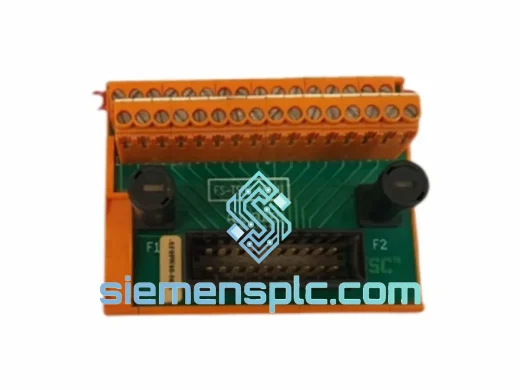
Honeywell FS-TSDI-16115 Field Termination Assembly

Request verified availability, condition, replacement risk review, packing options and courier lead time for FS-TSDI-16115.

Exact partFS-TSDI-16115 RFQ auto-fillPart number attached Export packingDHL / FedEx / UPS Sales replyEmail or WhatsApp
BrandHoneywell Part NumberFS-TSDI-16115 ConditionAvailability Check Lead TimeRFQ Confirmation DocumentsDatasheet / photos by RFQ ShippingExport packing available
Auto-filled RFQ FS-TSDI-16115

Click Request Quote and the part number is inserted into the inquiry form automatically.

Procurement Data

Key Product Information

Core fields for model confirmation and RFQ routing. Detailed product narrative remains below.

Brand
Honeywell
Primary Part Number
FS-TSDI-16115
Product Type
Field Termination Assembly
Series / Family
Safety Manager
Manufacturer
Honeywell Process Solutions
Country of Origin
US
Catalog Category
I/O Modules
Operating Temp.
0 °C to +60 °C
Model confirmed for inquiry FS-TSDI-16115 Send quantity, destination and urgency. The RFQ form keeps this part number attached.
Request Quote
Product Overview

Honeywell FS-TSDI-16115 — When Your ESD Loop Goes Dark, Every Minute Costs You

A failed Safe Digital Input FTA in a live FSC Safety Manager rack doesn’t just trigger a nuisance alarm — it can force a full unit shutdown, halt production, and put your SIL validation at risk. The FS-TSDI-16115 is the exact field termination assembly your system needs to restore 16-channel SIL-rated digital input capability. We stock it in Xiamen, inspected and ready to ship today. While your team is still diagnosing the fault, your replacement is already on a DHL plane.

URGENT REQUIREMENT? Contact: [email protected] | WhatsApp: +86 18359268345

Quick Technical Datasheet

Part Number FS-TSDI-16115
Manufacturer Honeywell Process Solutions
Series FSC / Safety Manager
Module Function Safe Digital Input Field Termination Assembly
Input Channels 16 × discrete digital input channels
Safety Rating SIL 2 / SIL 3 capable (IEC 61508 / IEC 61511)
Signal Type Discrete / Digital (DI), dry contact or wet contact
Termination Screw-terminal field wiring panel, IEC/ANSI labeling
Compatible Processor FS-SDI series I/O processor module (FSC rack)
Chassis Compatibility Honeywell Safety Manager, Safety Manager SC, legacy FSC
Operating Temperature 0 °C to +60 °C
Storage Temperature −40 °C to +70 °C
Protection Class IP20 (cabinet-mounted)
Certifications TÜV, IEC 61508, ATEX Zone 2 (consult datasheet)
Weight Approx. 800 g
Stock Status ✔ Ready to Ship — Xiamen Warehouse

Troubleshooting & Replacement Tips

Common Failure Signatures on the FS-TSDI-16115:

  • All 16 channels show OPEN/FAULT simultaneously — Classic FTA backplane connector failure or internal bus fault. Don’t waste time checking field wiring first; swap the FTA.
  • Intermittent channel dropouts (channels 9–16 most common) — Thermal cycling stress on the secondary connector block. Check for discoloration on the PCB near the terminal strip. If found, the board is compromised — replace immediately.
  • FSC diagnostic alarm: “FTA Communication Error” or “SDI Module Mismatch” — Firmware revision mismatch between the FS-SDI processor and the FTA. Confirm FTA hardware revision label (R1x vs R2x) matches your system’s compatibility matrix before installing the replacement.
  • Single channel stuck LOW despite field device healthy — Likely an opto-isolator failure on that specific channel. Not field-repairable; full FTA replacement required to maintain SIL integrity.
  • Spurious ESD trip traced to DI channel — Before condemning the FTA, verify field cable shield grounding at the terminal strip. Unshielded runs in high-EMI environments (VFD cabinets nearby) can inject noise that mimics a real trip signal.

Step-by-Step Replacement Procedure:

  1. Obtain a Permit to Work (PTW) — Coordinate with the control room. Confirm the affected I/O group can be bypassed or the loop placed in manual before proceeding.
  2. Document current channel states — Screenshot or print the FSC diagnostic display for all 16 channels. You’ll need this to verify restoration after swap.
  3. Photograph terminal wiring — The FS-TSDI-16115 uses a dense screw-terminal layout. Photograph both sides of the terminal strip before disconnecting a single wire.
  4. De-energize the FTA supply rail — Locate the FTA power feed in the marshalling cabinet. Isolate it. Confirm with a multimeter — do not rely on the indicator LED alone.
  5. Disconnect field cables in reverse order — Work from channel 16 back to channel 1. Label each wire with a numbered tag as you remove it.
  6. Release the FTA from the FSC rack — The module uses a slide-and-lock mechanism. Press the release tab firmly while pulling the module straight out. Do not rock it side-to-side — the backplane connector is fragile.
  7. Inspect the backplane connector on the rack — Check for bent pins or carbon deposits. Clean with IPA and a non-conductive brush if contaminated. A damaged rack connector will kill your new FTA within weeks.
  8. Verify replacement FTA hardware revision — Match the revision label on the new FS-TSDI-16115 to the FSC compatibility matrix for your firmware version. Mismatched revisions will generate a persistent “Module Mismatch” alarm and may prevent the system from accepting the module.
  9. Seat the new FTA firmly — Align the guide rails and push until you feel the backplane connector fully engage. The locking tab should click into place.
  10. Reconnect field cables in forward order — Channel 1 through 16, referencing your photographs and wire tags. Torque screw terminals to spec (typically 0.5–0.6 Nm for this terminal type).
  11. Re-energize and monitor — Restore the FTA supply rail. Watch the FSC diagnostic display for 60 seconds. All 16 channels should return to their pre-fault states. Any persistent fault on a specific channel indicates a field wiring issue, not the FTA.
  12. Perform a functional test — Simulate an input signal on each channel (or verify with the field device) before releasing the bypass and returning the loop to automatic.

Configuration Notes:

  • The FS-TSDI-16115 has no DIP switches or jumper settings — channel configuration is handled entirely in the FSC application software (Safety Builder / Control Builder).
  • If replacing across a firmware boundary (e.g., upgrading from SM to SM-SC), re-download the I/O configuration to the controller after FTA swap to clear any cached module parameters.
  • For NAMUR sensor inputs, confirm you have the correct variant (FS-TSDI-16115N). The standard -16115 does not support NAMUR signal conditioning.

Reliability in Harsh Conditions

The FS-TSDI-16115 is built to operate continuously in the environments where safety systems matter most — offshore platforms, desert refineries, and tropical LNG terminals. The PCB assembly uses conformal coating as standard, providing protection against condensation, salt spray, and airborne chemical contaminants that are endemic to process plant environments. The screw-terminal field wiring interface is rated for vibration levels consistent with compressor and turbine skid installations, where mechanical resonance can loosen connections on lesser-quality termination assemblies over time.

Thermal performance is validated across the full 0–60 °C operating range with no derating of channel count or SIL capability. In practice, FSC cabinets in tropical climates with marginal air conditioning regularly see internal temperatures of 45–55 °C — the FS-TSDI-16115 handles this without degradation. The opto-isolator components used for channel isolation are selected for long-term stability under continuous energization, a known wear mechanism in digital input modules that see 24/7 field device monitoring duty cycles.

Every unit we ship has been visually inspected for PCB integrity, terminal strip condition, and backplane connector pin alignment. Units showing any sign of prior installation stress — discolored terminals, bent connector pins, or evidence of rework — are rejected. You receive a module that will perform identically to a factory-new unit from day one.

Global Express Logistics

Our warehouse is located in Xiamen, China — a major international cargo hub with direct DHL and FedEx flight connections to Europe, the Middle East, Southeast Asia, and the Americas. When you confirm an order before 15:00 CST, the unit is packed, labeled, and handed to the carrier the same day.

  • Europe (UK, Germany, Netherlands, Norway): DHL Express — typically 3–5 business days door-to-door. Customs clearance documentation (commercial invoice, packing list, HS code 8537.10) prepared and included in every shipment.
  • Middle East (UAE, Saudi Arabia, Qatar, Kuwait): FedEx International Priority — 3–4 business days. We have experience with SABER, FASAH, and local customs requirements for industrial automation components.
  • Southeast Asia (Singapore, Malaysia, Thailand, Indonesia): DHL Express — 2–3 business days. Preferred routing for offshore and refinery customers in this region.
  • Americas (USA, Canada, Brazil, Mexico): FedEx Priority or DHL Express — 4–6 business days. EEI/AES filing handled for US-bound shipments where required.
  • Australia & New Zealand: DHL Express — 4–5 business days.

All shipments include full tracking from pickup to delivery, with proactive notification if customs clearance requires additional documentation. For critical shutdowns where air freight lead time is still too long, contact us — we can arrange same-day courier handoff to a freight forwarder with charter or next-flight-out options from Xiamen Gaoqi International Airport.

Contact Information

📧 Email: [email protected]
💬 WhatsApp: +86 18359268345
🌐 Web: siemensplc.com
© 2026 siemensplc.com. All rights reserved.

Ready to quote

Send This Part Number to Sales

[email protected]
RFQ workflow

Confirmation Process

Quality workflow ->
01Model confirmation

We check the full part number, brand, series and visible nameplate information before quotation.

02Availability reply

Sales confirms stock path, condition option, quantity and realistic lead time for export dispatch.

03Packing & courier

DHL, FedEx, UPS or buyer courier arrangements can be reviewed with packing requirements.