KUKA
In Stock OK
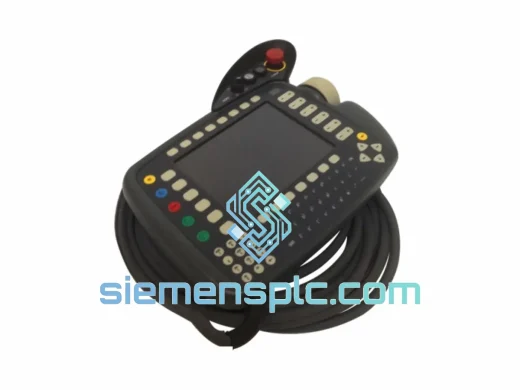
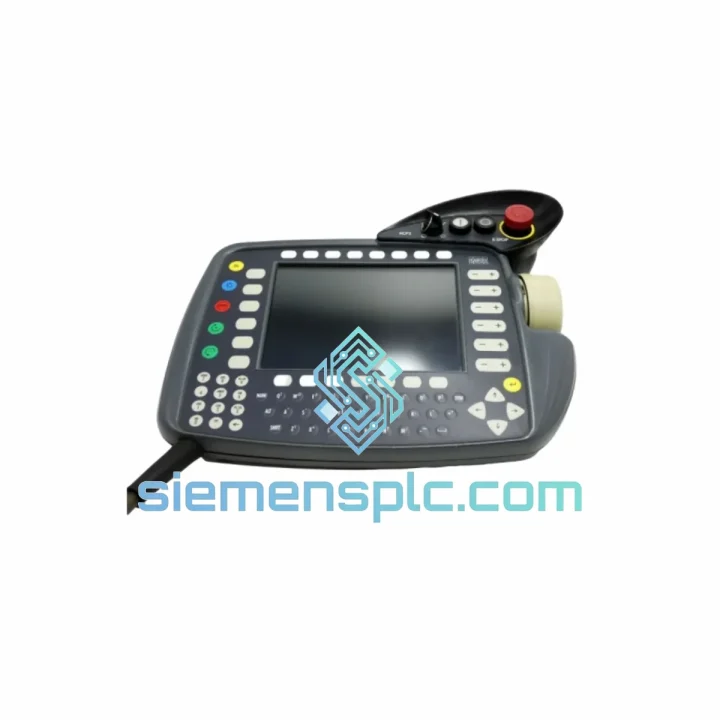
KUKA 00-198-260 KR C4 Teach Pendant
Request verified availability, condition, replacement risk review, packing options and courier lead time for 00-198-260.
BrandKUKA
Part Number00-198-260
ConditionAvailability Check
Lead TimeRFQ Confirmation
DocumentsDatasheet / photos by RFQ
ShippingExport packing available
Auto-filled RFQ
00-198-260
Click Request Quote and the part number is inserted into the inquiry form automatically.
- Reply by email: [email protected]
- WhatsApp / Tel: +86 18359268345
- Mon-Sat 9:00-18:00 GMT+8
Procurement Data
Key Product Information
Core fields for model confirmation and RFQ routing. Detailed product narrative remains below.
- Brand
- KUKA
- Primary Part Number
- 00-198-260
- Product Type
- Teach Pendant
- Product Family
- Other series
- Country of Origin
- DE
- Catalog Category
- Industrial Automation Spares
Model confirmed for inquiry
00-198-260
Send quantity, destination and urgency. The RFQ form keeps this part number attached.
Request Quote
Product Overview
KUKA 00-198-260 KR C4 Teach Pendant — Stop the Clock on Your Downtime
Every minute a KUKA robot cell sits idle, your production schedule bleeds money. A failed Teach Pendant — cracked screen, dead enabling switch, corrupted smartHMI — is one of the fastest ways to halt an entire line. The KUKA 00-198-260 is in stock at our Xiamen warehouse right now. We ship same business day via DHL Express or FedEx International Priority. No waiting on OEM lead times. No back-and-forth with regional distributors. You call, we ship.
URGENT REQUIREMENT? Contact: [email protected] | WhatsApp: +86 18359268345
Quick Technical Datasheet
| Part Number | 00-198-260 |
| Brand | KUKA Robotics |
| Series / Platform | KR C4 (KR C4 compact / KR C4 smallsize compatible) |
| Product Type | Teach Pendant — Handheld Operator Terminal |
| HMI Interface | KUKA smartHMI (Windows-based, color touchscreen) |
| Cabinet Connection | KLI / KSI Ethernet port on KR C4 cabinet |
| Safety Devices | 3-position enabling switch, hardwired E-stop, key switch |
| Ingress Protection | IP54 |
| Operating Temperature | 0 °C to +45 °C |
| Weight | Approx. 600 g |
| KSS Compatibility | KSS 8.2 and above |
| Certification | CE, UL (UL C4 variant) |
| Origin | Germany |
| Stock Status | ✔ Ready to Ship — Xiamen Warehouse |
Troubleshooting & Replacement Tips
After ten years of field work on KUKA cells, these are the failure patterns that actually send engineers scrambling for a replacement pendant:
1. Enabling Switch Failure (Most Common)
The 3-position enabling device wears out faster than any other component — especially on high-cycle programming stations. Symptom: robot refuses to enter T1 or T2 mode, KSS throws “Enabling switch not actuated” or safety chain fault. Before condemning the pendant, check the KR C4 safety controller log under KSS > Diagnosis > Safety. If the fault clears momentarily when you squeeze the enabling switch hard, the switch is failing mechanically. Replace the pendant — the enabling switch is not a field-serviceable component on this assembly.
2. smartHMI Touchscreen Unresponsive
Caused by either a cracked digitizer layer (physical impact) or a corrupted Windows CE / Windows Embedded partition on the pendant’s internal flash. Check: connect a USB mouse to the pendant’s USB-A port — if the cursor moves but touch doesn’t register, it’s a hardware digitizer failure. If neither input works, the OS partition is likely corrupted. A firmware reflash via WorkVisual may recover software faults, but a hardware digitizer failure requires pendant replacement.
3. KLI Communication Loss — Pendant Not Detected
KSS error: “KCP not connected” or “Teach Pendant communication timeout.” First check the KLI cable and RJ45 connector at both ends — the coiled cable strain relief point near the cabinet entry is a known wear point. If the cable checks out, swap the pendant. The KR C4 cabinet auto-detects the pendant via MAC address on the KLI subnet; no manual IP configuration is required after swap.
4. Replacement Procedure — Key Steps
- Power down the KR C4 cabinet fully (main switch OFF, wait for UPS discharge if fitted).
- Disconnect the KLI cable from the old pendant. Note the cable routing — the coiled cable must not contact hot surfaces or moving axes.
- Connect the replacement 00-198-260 pendant. The KR C4 does not require pendant-specific firmware flashing — KSS pushes the correct smartHMI software version automatically on first boot.
- Power up. KSS will detect the new pendant within 30–60 seconds. Verify the pendant serial number appears under KSS > Help > Info.
- Perform a full safety function test: E-stop, enabling switch (all three positions), key switch modes (T1, T2, AUT, AUT EXT).
- Re-enter any custom operator screen configurations if WorkVisual project customizations were applied to the previous pendant.
5. Firmware / KSS Version Matching
The 00-198-260 pendant is compatible with KSS 8.2 through the current KSS 8.7 release. If your cabinet runs KSS 8.1 or earlier, contact us before ordering — a firmware update on the cabinet side may be required. Running a mismatched KSS version will result in a boot loop on the smartHMI with a version mismatch error.
Reliability in Harsh Conditions
The KR C4 Teach Pendant 00-198-260 is built for environments that destroy consumer-grade electronics. The IP54 enclosure keeps metal dust, coolant mist, and weld spatter out of the internals — a non-negotiable requirement in automotive stamping and welding cells. The housing is constructed from glass-fiber reinforced polymer that absorbs repeated drops to concrete floors without cracking the internal PCB assembly.
Vibration resistance is validated to IEC 60068-2-6 standards, covering the continuous low-frequency vibration typical of press lines and conveyor-mounted robot bases. The internal connectors use positive-locking contacts rather than friction-fit pins, preventing intermittent faults caused by vibration-induced micro-movement.
Thermal performance is rated to +45 °C ambient — sufficient for non-air-conditioned production halls in Southeast Asia and the Middle East. The touchscreen maintains calibration accuracy across the full temperature range; thermal drift on the digitizer layer is compensated by the smartHMI software automatically.
Units supplied from our stock are stored in climate-controlled conditions with anti-static packaging. Each unit undergoes a pre-shipment functional check covering display, enabling switch, E-stop, and KLI communication before leaving the warehouse.
Global Express Logistics
Our Xiamen warehouse is positioned 40 minutes from Xiamen Gaoqi International Airport (XMN), a major DHL and FedEx hub for South China export freight. This geography is deliberate — it cuts the time between your order confirmation and the package being airborne to under 24 hours on business days.
Standard Dispatch Process:
- Orders confirmed before 14:00 CST ship same business day.
- Export documentation (commercial invoice, packing list, HS code 8537.10) prepared in parallel with packing — no delays at customs clearance.
- DHL Express Worldwide: Europe 2–3 business days, North America 3–4 business days, Southeast Asia 1–2 business days.
- FedEx International Priority available as an alternative carrier on request.
- Tracking number provided within 2 hours of dispatch via email and WhatsApp.
- For critical shutdowns, contact us directly on WhatsApp for real-time shipment coordination: +86 18359268345.
All shipments include a shock indicator label on the outer carton. If the indicator is triggered on arrival, photograph it before opening and contact us immediately — we will initiate a carrier claim and arrange a replacement dispatch within 24 hours.
Contact Information
Email: [email protected]
WhatsApp: +86 18359268345
Web: siemensplc.com
© 2026 siemensplc.com. All rights reserved.
Ready to quote
[email protected]
Send This Part Number to Sales
RFQ workflow
Quality workflow ->
Confirmation Process
01Model confirmation
We check the full part number, brand, series and visible nameplate information before quotation.
02Availability reply
Sales confirms stock path, condition option, quantity and realistic lead time for export dispatch.
03Packing & courier
DHL, FedEx, UPS or buyer courier arrangements can be reviewed with packing requirements.
Continue sourcing
Browse full catalog ->
Related Automation Parts
Similar brand or category products for fast comparison and multi-item RFQ lists.