
LAUER
In Stock OK
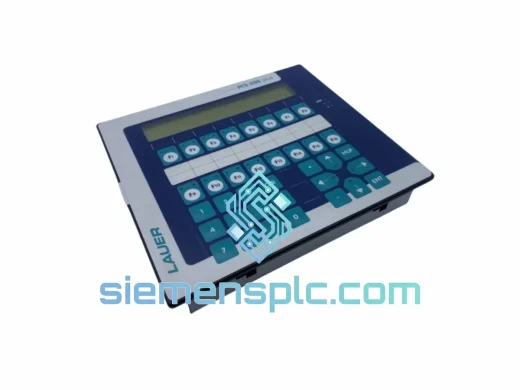
LAUER PCS 695 HMI Operator Panel
Request verified availability, condition, replacement risk review, packing options and courier lead time for PCS 695.
BrandLAUER
Part NumberPCS 695
ConditionAvailability Check
Lead TimeRFQ Confirmation
DocumentsDatasheet / photos by RFQ
ShippingExport packing available
Auto-filled RFQ
PCS 695
Click Request Quote and the part number is inserted into the inquiry form automatically.
- Reply by email: [email protected]
- WhatsApp / Tel: +86 18359268345
- Mon-Sat 9:00-18:00 GMT+8
Procurement Data
Key Product Information
Core fields for model confirmation and RFQ routing. Detailed product narrative remains below.
- Brand
- LAUER
- Primary Part Number
- PCS 695
- Product Type
- HMI Operator Panel
- Product Family
- Other series
- Country of Origin
- DE
- Catalog Category
- HMI Panels
Model confirmed for inquiry
PCS 695
Send quantity, destination and urgency. The RFQ form keeps this part number attached.
Request Quote
Product Overview
LAUER PCS 695 – Stop the Clock on Your Downtime
Every minute your line is down, you’re bleeding money. The LAUER PCS 695 HMI operator panel is a critical node in your control architecture — when it fails, nothing moves. We stock verified PCS 695 units in Xiamen, China, ready for same-day dispatch via DHL Express or FedEx Priority. From our warehouse to your panel cabinet in 48–72 hours, anywhere on the planet. No waiting on factory lead times. No broker runaround. Just the part, fast.
URGENT REQUIREMENT? Contact: [email protected] | WhatsApp: +86 18359268345
Quick Technical Datasheet
| Parameter | Specification |
|---|---|
| Brand | LAUER |
| Full SKU | PCS 695 |
| Series | PCS Series |
| Product Type | HMI Operator Panel |
| Display Interface | Keypad + LED indicator array |
| Communication | RS-232 / RS-485, LAUER PCS bus |
| Supply Voltage | 24 VDC |
| Mounting | Panel cutout, front-mount |
| Weight | 530 g |
| Origin | Germany (OEM) |
| Condition | New / Surplus New |
| Stock Status | Ready to Ship – Xiamen Stock |
Troubleshooting & Replacement Tips
The PCS 695 fails in predictable ways. Here is what field experience with this panel reveals:
Fault 1 – Blank display, no backlight on power-up. Nine times out of ten this is a failed internal DC/DC converter on the panel power board, not a PLC comms issue. Before pulling the unit, verify 24 VDC is present at the supply connector. Voltage good, panel dead — the board is gone. Swap the unit.
Fault 2 – BUS FAULT or persistent communication error on screen. Check the RS-485 termination resistor first. The PCS 695 requires a 120 ohm terminator at the physical end of the bus segment. A missing or degraded terminator causes intermittent dropouts that mimic a panel fault. Also verify baud rate DIP switch settings match the PLC configuration exactly — a mismatch gives a permanent comms fault with no further diagnostic detail.
Fault 3 – Keys registering wrong inputs or no response. The membrane keypad degrades with age and chemical exposure. If individual keys are unresponsive or ghost-pressing, the membrane is delaminating internally. Not field-repairable. Replace the unit.
Replacement Procedure:
- Power down the cabinet. Lock out and tag out per your site procedure.
- Photograph existing wiring and connector orientation before disconnecting anything.
- Record the DIP switch positions on the rear of the old PCS 695 — replicate these exactly on the replacement unit. These switches set node address and baud rate.
- Disconnect the bus cable and 24 VDC supply connector.
- Release the four panel-mount clips and remove the unit from the cutout.
- Seat the new PCS 695, reconnect supply and bus cable, confirm DIP switches match your notes.
- Power up and confirm the panel initializes and establishes comms with the PLC within 10 to 15 seconds.
- If the PLC program references a specific panel node address, confirm it matches the DIP switch setting on the new unit before resuming production.
Firmware note: The PCS 695 does not support user-flashable firmware in the field. If the replacement unit firmware revision differs from the original and causes display formatting anomalies, contact LAUER or your system integrator for a firmware-matched unit. Minor revision differences are typically transparent to the application.
Reliability in Harsh Conditions
The PCS 695 was engineered for the factory floor. The front face meets IP65 ingress protection when correctly installed in a sealed panel cutout, keeping coolant mist, cutting fluid, and wash-down spray away from the electronics. Operating temperature range spans 0 to 55 degrees Celsius continuous, with storage rated to minus 20 degrees Celsius.
In foundry and press environments where ambient temperatures spike, ensure your panel cabinet has adequate ventilation or forced-air cooling to keep internal temperature within spec. The PCS 695 has no active cooling of its own — thermal management is the cabinet’s job.
Vibration resistance is adequate for conveyor, press, and machine-tool installations. For high-shock applications such as drop forges or heavy stamping lines, mount the panel on a vibration-isolating sub-plate. The membrane keypad and internal connector joints are the most vibration-sensitive components on this unit and should be inspected first after any mechanical shock event.
All units in our Xiamen stock are held in climate-controlled storage with anti-static packaging. We do not dispatch units that show signs of moisture ingress, connector corrosion, or uncontrolled storage history. Each unit is visually inspected before packing.
Global Express Logistics
Our dispatch hub is in Xiamen, Fujian Province — one of China’s primary export gateways with direct DHL and FedEx access. Here is how your order moves from our shelf to your cabinet:
Day 0 – Order confirmed: Payment verified, unit pulled from climate-controlled stock, inspected, packed in double-wall carton with anti-static foam insert. Commercial invoice and packing list prepared.
Day 1 – Dispatch: Shipment handed to DHL Express or FedEx International Priority. Tracking number issued to you by email within two hours of pickup scan.
Estimated transit times: Southeast Asia and Japan: 1 to 2 business days. Europe (Germany, UK, Netherlands, France): 2 to 3 business days. Middle East (UAE, Saudi Arabia): 2 to 3 business days. North America (USA, Canada): 3 to 4 business days. South America and Africa: 4 to 6 business days depending on customs clearance.
All shipments include full export documentation: commercial invoice, packing list, and certificate of origin where required. EU customers receive EORI-compliant documentation. Customs duties and import taxes are the buyer’s responsibility — we declare accurate commercial values on all shipments.
For orders placed before 14:00 CST on business days, same-day dispatch is standard. Weekend orders ship on the next business day. If your line is down and you need stock confirmation before placing an order, contact us directly via WhatsApp — response within 30 minutes during business hours.
Contact Information
Email: [email protected]
WhatsApp: +86 18359268345
Web: siemensplc.com
© 2026 siemensplc.com. All rights reserved.
Ready to quote
[email protected]
Send This Part Number to Sales
RFQ workflow
Quality workflow ->
Confirmation Process
01Model confirmation
We check the full part number, brand, series and visible nameplate information before quotation.
02Availability reply
Sales confirms stock path, condition option, quantity and realistic lead time for export dispatch.
03Packing & courier
DHL, FedEx, UPS or buyer courier arrangements can be reviewed with packing requirements.
Continue sourcing
Browse full catalog ->
Related Automation Parts
Similar brand or category products for fast comparison and multi-item RFQ lists.
LAUER
RFQ Ready
Lauer PCS095.S 095S-i HMI Operator Panel – PCS Series
PCS Series
Origin Germany
HMI Operator Panel