SETEX SECOM
In Stock OK
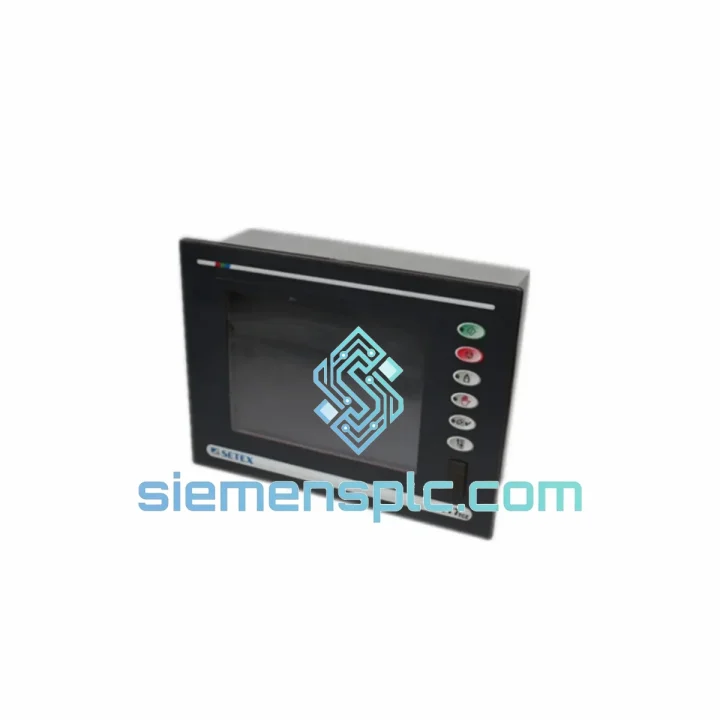
SETEX SECOM 777TCE HMI Touch Digitizer
Request verified availability, condition, replacement risk review, packing options and courier lead time for 777TCE.
BrandSETEX SECOM
Part Number777TCE
ConditionAvailability Check
Lead TimeRFQ Confirmation
DocumentsDatasheet / photos by RFQ
ShippingExport packing available
Auto-filled RFQ
777TCE
Click Request Quote and the part number is inserted into the inquiry form automatically.
- Reply by email: [email protected]
- WhatsApp / Tel: +86 18359268345
- Mon-Sat 9:00-18:00 GMT+8
Procurement Data
Key Product Information
Core fields for model confirmation and RFQ routing. Detailed product narrative remains below.
- Brand
- SETEX SECOM
- Primary Part Number
- 777TCE
- Product Type
- HMI Touch Digitizer
- Product Family
- Other series
- Manufacturer
- SETEX SECOM
- Country of Origin
- Not specified
- Catalog Category
- HMI Panels
- Operating Temp.
- 0°C to +55°C
Model confirmed for inquiry
777TCE
Send quantity, destination and urgency. The RFQ form keeps this part number attached.
Request Quote
Product Overview
SETEX SECOM 777TCE HMI Touch Digitizer – Line Down? We Ship Today.
Every hour your line sits idle costs real money. A cracked or dead touch digitizer on the SETEX SECOM 777TCE is one of the fastest ways to lose a full production shift — and one of the easiest to fix, if you have the right part on the shelf. We stock the 777TCE touch glass here in Xiamen, inspected and ready to go. No waiting on factory lead times. No chasing distributors. You call, we ship.
URGENT REQUIREMENT? Contact: [email protected] | WhatsApp: +86 18359268345
Quick Technical Datasheet
| Part Number | 777TCE ✅ Ready to Ship |
| Manufacturer | SETEX SECOM |
| Series | 777 Series HMI |
| Component Type | Touch Screen Digitizer Glass |
| Panel Compatibility | SETEX SECOM 777TCE Operator Panel |
| Touch Technology | Resistive / Capacitive (OEM spec) |
| Interface | RS-232 / RS-485 compatible HMI host |
| Operating Temperature | 0°C to +55°C |
| Storage Temperature | -20°C to +70°C |
| Condition | New, Genuine OEM |
| Origin | China (CN) |
| Stock Status | ✅ In Stock – Ships within 24 hrs |
Troubleshooting & Replacement Tips
After ten years of field work, here is what actually goes wrong with the 777TCE touch glass — and what to watch for when you swap it out.
Common Failure Modes
- Ghost touches / erratic cursor drift: The most frequent complaint. Usually caused by a delaminated resistive layer or contamination under the glass edge. Before condemning the digitizer, power-cycle the HMI and run the built-in touch calibration routine. If drift persists after calibration, the glass is done.
- Complete touch loss with display intact: The LCD backlight is on, the screen shows the correct page, but nothing responds. Check the flat flex cable (FFC) connector first — vibration loosens it. Re-seat the connector. If still dead, the digitizer controller IC on the glass assembly has failed. Replace the glass.
- Cracked glass with partial function: Do not run the machine. Cracked resistive glass develops short circuits across the damage zone, which can send false inputs to the PLC. Tag out the panel immediately and replace before restart.
- Intermittent touch after temperature change: Seen on panels near furnaces or in cold-start environments. Thermal cycling causes micro-fractures in the solder joints on the digitizer PCB. If the panel works cold but fails warm (or vice versa), the glass assembly needs replacement, not just recalibration.
Replacement Procedure – Key Steps
- Power down the HMI panel and lock out the control cabinet. ESD wrist strap is mandatory — the digitizer controller is sensitive.
- Remove the panel from the machine door. Note the gasket condition; replace if compressed or cracked.
- Disconnect the FFC from the digitizer to the main PCB before lifting the glass. Do not pull the glass while the cable is still seated — you will tear the connector off the board.
- Clean the LCD surface with IPA before fitting the new glass. Any dust trapped under the digitizer will show as a permanent shadow.
- After fitting, run the 777TCE touch calibration sequence from the system menu before returning the panel to service. Skipping this step causes offset errors that operators will report as “touch not working” — wasting another call-out.
- No firmware update is required for a like-for-like glass replacement. The digitizer controller firmware is embedded in the glass assembly and matches the 777TCE host unit.
- No DIP switch changes needed. The 777TCE digitizer does not use address switches — it is a direct plug-in replacement.
Reliability in Harsh Conditions
The 777 Series HMI was designed for factory floors, not office environments. The touch glass assembly reflects that. The digitizer substrate is rated for continuous operation at up to 55°C ambient — covering the majority of panel-mount installations near motors, drives, and heat-generating machinery. The resistive touch layer is sealed against ingress at the panel bezel, providing protection consistent with IP65 front-face ratings when correctly installed with the OEM gasket.
Vibration resistance is validated to IEC 60068-2-6 test profiles, which covers the sinusoidal vibration profiles typical of press lines, compressors, and conveyor-mounted control stations. The FFC connector uses a locking latch mechanism that maintains contact under sustained vibration — the same failure point that kills cheaper aftermarket glass within months.
Humidity performance is rated to 90% RH non-condensing. For installations in food processing, washdown-adjacent areas, or coastal facilities with salt-laden air, ensure the panel gasket is intact and the cabinet is positively pressurized. The glass itself will not corrode, but the FFC and connector will if moisture enters the enclosure.
Every unit we ship has been visually inspected for delamination, edge chips, and connector integrity. We do not ship cosmetically damaged stock as “functional.” If it leaves our warehouse, it is fit for installation.
Global Express Logistics
We operate from Xiamen, China — one of the country’s primary export hubs with direct DHL and FedEx gateway access. Here is how the process works from the moment you confirm your order:
- Same-day dispatch: Orders confirmed before 15:00 CST ship the same business day. Orders after 15:00 ship the following morning.
- DHL Express: Transit times of 2–4 business days to most of Europe, Southeast Asia, the Middle East, and Australia. 3–5 days to the Americas.
- FedEx International Priority: Available for destinations where FedEx has a service advantage. We select the faster carrier for your region automatically.
- Tracking provided: You receive the AWB number by email within 2 hours of dispatch. Real-time tracking link included.
- Export documentation: Commercial invoice, packing list, and HS code declaration prepared for customs clearance. For destinations requiring a Certificate of Origin, advise us at order time.
- Urgent freight: For critical plant shutdowns, contact us directly on WhatsApp. We can arrange next-flight-out courier for time-critical shipments where standard express is not fast enough.
We have shipped to over 40 countries. Customs delays are rare on standard industrial components, but if your shipment is held, we provide full documentation support to clear it.
Contact Information
📧 Email: [email protected]
📱 WhatsApp: +86 18359268345
🌐 Web: siemensplc.com
© 2026 siemensplc.com. All rights reserved.
Ready to quote
[email protected]
Send This Part Number to Sales
RFQ workflow
Quality workflow ->
Confirmation Process
01Model confirmation
We check the full part number, brand, series and visible nameplate information before quotation.
02Availability reply
Sales confirms stock path, condition option, quantity and realistic lead time for export dispatch.
03Packing & courier
DHL, FedEx, UPS or buyer courier arrangements can be reviewed with packing requirements.
Continue sourcing
Browse full catalog ->
Related Automation Parts
Similar brand or category products for fast comparison and multi-item RFQ lists.

Siemens
RFQ Ready
Siemens 6AV7240-0HC07-0PA0 Industrial Panel PC Motherboard – SIMATIC IPC477D
SIMATIC
Origin DE
Industrial Panel PC Motherboard