Siemens
RFQ Ready
Siemens 6AV7240-0HC07-0PA0 Industrial Panel PC Motherboard – SIMATIC IPC477D
SIMATIC
Origin DE
Industrial Panel PC Motherboard
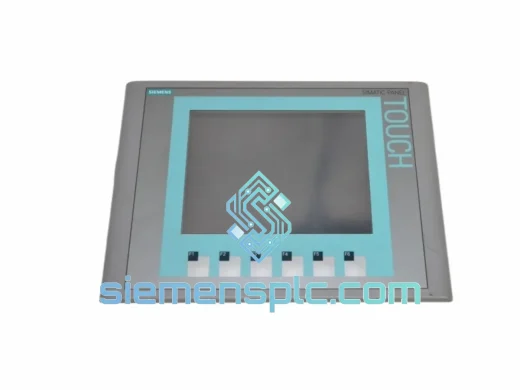
Request verified availability, condition, replacement risk review, packing options and courier lead time for 6AV6647-0AG11-3AX0.
Click Request Quote and the part number is inserted into the inquiry form automatically.
Core fields for model confirmation and RFQ routing. Detailed product narrative remains below.
Your line is down. Operators are staring at a blank 15″ screen. The shift supervisor is on the phone. Every minute the TP1500 BASIC PN stays dark costs you real money — missed output targets, idle labor, and a maintenance log that nobody wants to write. We stock the Siemens 6AV6647-0AG11-3AX0 precisely for this moment. Verified original, bench-tested, export-packed, and ready to leave Xiamen on the next DHL or FedEx cut-off. No lead-time negotiation. No waiting on a distributor’s back-order queue. You call, we ship.
URGENT REQUIREMENT? Contact: [email protected] | WhatsApp: +86 18359268345
| Parameter | Specification | Status |
|---|---|---|
| Part Number (MLFB) | 6AV6647-0AG11-3AX0 | ✅ Ready to Ship |
| Series | SIMATIC HMI TP1500 BASIC PN | |
| Display | 15.6″ Widescreen TFT, 1366 × 768 (WXGA) | |
| Colors | 16 million (24-bit) | |
| Touch Type | Resistive, single-touch | |
| Communication | PROFINET (1× RJ45) | |
| USB | 2× USB 2.0 Type-A | |
| User Memory | 10 MB | |
| Power Supply | 24 V DC | |
| Power Consumption | ≈ 25 W | |
| Operating Temp. | 0 °C to +50 °C | |
| Storage Temp. | -20 °C to +60 °C | |
| Front Protection | IP65 | |
| Dimensions (W×H×D) | 399 × 264 × 46 mm | |
| Weight | ≈ 2.8 kg | |
| Engineering SW | WinCC Basic / TIA Portal V13 SP1+ | |
| Certifications | CE, UL, cULus, RCM | |
| Origin | Germany |
Most TP1500 BASIC PN failures fall into three buckets. Know which one you are dealing with before you pull the panel — it saves you a second trip.
1. Blank Screen / No Boot
Check 24 V DC at the rear terminal block first — not the cabinet supply rail, the panel terminal itself. Voltage drop across a corroded ferrule will kill the boot sequence. If supply is confirmed good and the panel stays dark past 45 seconds, the backlight inverter or main board has failed. This is a hardware replacement, not a firmware issue. Order the 6AV6647-0AG11-3AX0 and proceed.
2. PROFINET Communication Loss — “S7 connection broken”
Swap the RJ45 patch cable first and verify the switch port is not in error-disabled state. If the fault persists, open TIA Portal → Device & Networks → Online → Accessible Devices. Panel not appearing? Power-cycle the panel and the managed switch simultaneously to flush stale MAC entries. Still missing after that? The panel’s PROFINET stack is corrupted or the PROFINET ASIC has failed — replacement required.
3. Touch Calibration Drift / Ghost Touches
Resistive touch layers degrade under UV exposure and repeated cleaning with aggressive solvents. Consistent offset drift: recalibrate via Control Panel → Touch Calibration (hold touch for 3 seconds at startup). Random ghost touches: the touch controller IC is failing — field recalibration will not fix this. Replacement is the only resolution. Do not attempt to re-laminate the touch film on-site.
Replacement Configuration Checklist:
The TP1500 BASIC PN is not office hardware wearing an industrial badge. The aluminum die-cast housing carries full EMC shielding rated to handle electrical noise from variable-frequency drives, servo amplifiers, and resistance welders sharing the same cabinet or bus. The front IP65 seal blocks metal swarf, coolant mist, and high-pressure washdown water — the kind of daily abuse that destroys consumer-grade touchscreens within weeks.
The 0 °C to +50 °C operating range covers unheated warehouses in northern climates and non-air-conditioned production halls across Southeast Asia. The TFT backlight is rated at 50,000 hours continuous — roughly 5.7 years at 24/7 runtime before brightness drops to half. In practice, most panels outlast two or three PLC generations before backlight degradation becomes an operational issue.
Vibration resistance meets IEC 61131-2, covering the mechanical shock and continuous vibration profiles of press lines, compressor rooms, and mobile equipment enclosures. The resistive touch layer responds correctly with heavy gloves or a wet screen surface — a decisive advantage over capacitive panels in foundry, food processing, and outdoor enclosure applications where capacitive sensing routinely fails.
Every unit dispatched from our Xiamen facility undergoes a bench power-on test: 24 V DC applied, full boot sequence verified, display uniformity checked across the entire screen area, touch response confirmed at all four corners and center point. Units showing backlight non-uniformity, touch dead zones, or PROFINET communication faults are quarantined. What ships to you has been confirmed operational.
Our warehouse is in Xiamen, Fujian — direct access to DHL Express, FedEx International Priority, and UPS Worldwide Express gateways. For orders confirmed before 14:00 CST, same-day dispatch is standard. Here is the logistics chain from your PO to your receiving dock:
Email: [email protected]
WhatsApp: +86 18359268345
Web: siemensplc.com
© 2026 siemensplc.com. All rights reserved.
We check the full part number, brand, series and visible nameplate information before quotation.
Sales confirms stock path, condition option, quantity and realistic lead time for export dispatch.
DHL, FedEx, UPS or buyer courier arrangements can be reviewed with packing requirements.
Similar brand or category products for fast comparison and multi-item RFQ lists.