Siemens
RFQ Ready
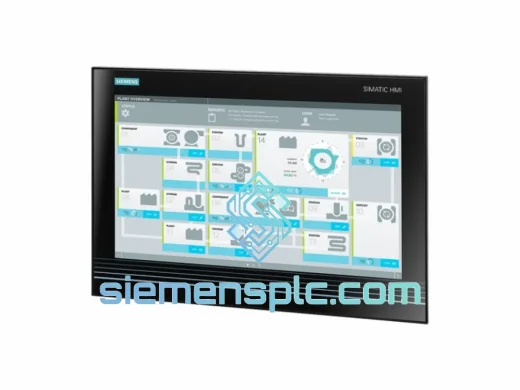
Siemens 6AV7260-5GA10-0BX0 Industrial Panel PC
SIMATIC
Origin DE
Industrial Panel PC
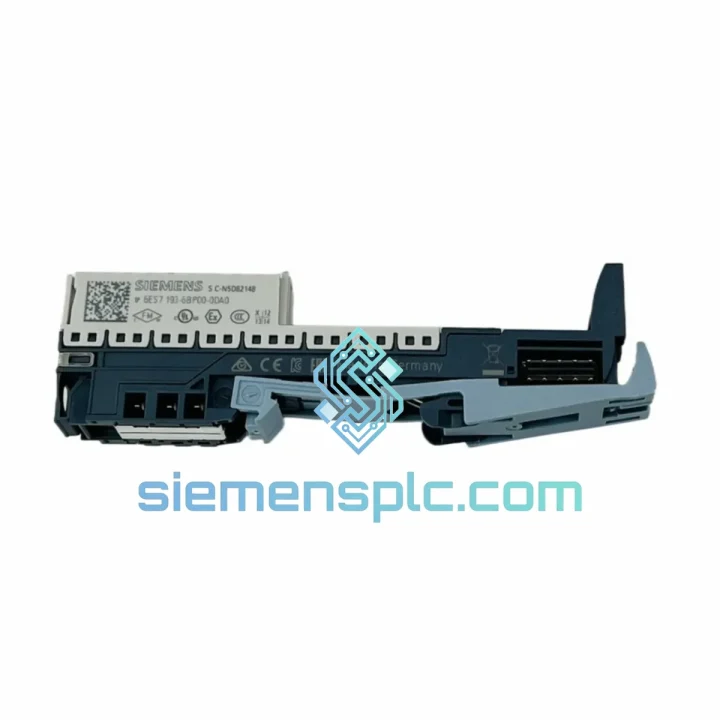
Request verified availability, condition, replacement risk review, packing options and courier lead time for 6ES7193-6BP00-0DA0.
Click Request Quote and the part number is inserted into the inquiry form automatically.
Core fields for model confirmation and RFQ routing. Detailed product narrative remains below.
Your ET 200SP station just dropped a slot. The line is cold. Every minute costs real money — and you already know the part number. The Siemens 6ES7193-6BP00-0DA0 Base Unit is on our shelf in Xiamen right now. We ship DHL Express same day on confirmed orders placed before 15:00 CST. No waiting on distributor lead times. No back-order promises. Stock in hand, label printed, box sealed.
This is the BU-type Base Unit for the SIMATIC ET 200SP distributed I/O system — the mechanical and electrical backbone that every I/O module plugs into. Without it, your entire I/O slice is dead. With a verified replacement in transit within hours, you’re back to commissioning instead of explaining downtime to management.
URGENT REQUIREMENT? Contact: [email protected] | WhatsApp: +86 18359268345
| Parameter | Value |
|---|---|
| Part Number | 6ES7193-6BP00-0DA0 |
| Product Family | SIMATIC ET 200SP |
| Module Category | Base Unit (BU) — Standard |
| Color Coding | Light (BU-type A0) |
| Terminal Type | Push-in spring-cage, 0.2–1.5 mm² |
| Mounting | 35 mm DIN rail (EN 60715) |
| Protection Class | IP20 |
| Operating Temperature | 0 °C to +60 °C |
| Storage Temperature | −40 °C to +70 °C |
| Relative Humidity | 5–95%, non-condensing |
| Vibration Resistance | 5–150 Hz, 1g (IEC 60068-2-6) |
| Shock Resistance | 15g / 11 ms (IEC 60068-2-27) |
| Weight | Approx. 80 g |
| Certifications | CE, UL, cULus, ATEX Zone 2, IECEx, RoHS |
| TIA Portal Compatibility | V13 SP1 and above |
| Stock Status | ✅ Ready to Ship — Xiamen, China |
Swapping a 6ES7193-6BP00-0DA0 looks straightforward — until it isn’t. Here’s what catches engineers off guard on the bench:
1. Slot addressing after hot-swap: The ET 200SP interface module (IM) assigns slot addresses automatically during startup. After inserting the new Base Unit and I/O module, trigger a hardware re-scan in TIA Portal or cycle power on the IM. If the IM is running firmware below V3.0, automatic re-addressing may not work — check the IM firmware version first via the web server or STEP 7 hardware catalog.
2. Color-code mismatch fault: The 6ES7193-6BP00-0DA0 uses a light-colored coding key. If you’re replacing a dark-coded BU (type B0), the I/O module will physically seat but the IM will throw a configuration mismatch fault (SF LED solid red, diagnostic code 0x0200). Verify the color code on the original BU before ordering — light vs. dark is not interchangeable without reconfiguring the hardware catalog entry.
3. Potential group continuity: This BU carries the potential group bus through the station. After replacement, verify that the potential group jumper (the small orange bridge on the left side of the BU) is correctly positioned. A missing or misaligned jumper breaks the 24 V supply rail to downstream modules — they’ll power up dark with no diagnostic output.
4. Terminal torque on screw-variant installations: If your panel uses the screw-terminal variant of this BU, re-torque all field wiring connections to 0.5–0.6 Nm after seating. Vibration in the original installation often leaves terminals at 60–70% of spec, which causes intermittent signal faults that look like module failures.
5. Common fault codes to clear after replacement:
6. Firmware compatibility check: The 6ES7193-6BP00-0DA0 is passive hardware — it carries no firmware itself. However, the I/O module seated on it must be compatible with the IM firmware version. If you’re upgrading an older ET 200SP station, cross-check the I/O module’s minimum IM firmware requirement in the Siemens SIMATIC ET 200SP system manual (A5E03576850).
The ET 200SP platform was engineered for field deployment, not lab conditions. The 6ES7193-6BP00-0DA0 Base Unit is validated to IEC 60068 environmental test standards — the same test suite used for aerospace and heavy industrial equipment.
Vibration testing at 5–150 Hz with 1g acceleration covers the resonance frequencies generated by compressors, conveyor drives, and press machinery. Shock testing at 15g / 11 ms simulates the impulse loads from pneumatic actuators and emergency stops. The push-in spring-cage terminals maintain contact force through thermal cycling — unlike screw terminals that loosen under repeated heat expansion and contraction.
The IP20 housing keeps fingers and tools out of live terminals in open panel environments. For installations in dusty or wet areas, the BU is designed to be mounted inside sealed enclosures rated IP54 or higher — the module itself handles the electrical environment; the enclosure handles the physical one.
Operating range of 0–60 °C covers the vast majority of industrial panel environments. Storage down to −40 °C means units shipped from Xiamen in winter freight conditions arrive fully functional without thermal conditioning. We’ve shipped to Siberian oil fields, Southeast Asian foundries, and Middle Eastern petrochemical plants — the hardware performs.
Our warehouse is located in Xiamen, Fujian Province — one of China’s primary export hubs with direct DHL and FedEx gateway access. Here’s exactly how your order moves:
Day 0 (Order Confirmed): Payment cleared before 15:00 CST triggers same-day pick, pack, and ESD-safe packaging. Export documentation — commercial invoice, packing list, HS code 8538.90 classification — is prepared in parallel.
Day 1: Shipment handed to DHL Express or FedEx International Priority at Xiamen gateway. Tracking number issued and emailed within 2 hours of handover.
Day 2–4: Transit to most destinations in Southeast Asia, the Middle East, Europe, and North America. DHL Express typically delivers to major industrial cities in Germany, the UK, and the US within 3 business days from Xiamen.
Customs clearance: We pre-declare all shipments with accurate HS codes and commercial values. For destinations with import duty concerns, we can provide a formal proforma invoice and certificate of origin (Form E for ASEAN, EUR.1 for EU where applicable) to support your customs broker.
Bulk orders: For quantities above 20 units or mixed BOM orders, we consolidate into a single DHL or FedEx freight shipment with full packing list. Sea freight via Xiamen port is available for non-urgent large-volume orders — transit 18–25 days to European ports.
Every shipment is insured. If a package is lost or damaged in transit, we reship at no additional cost. No claims process, no waiting — we send a replacement and sort the carrier claim on our end.
📧 Email: [email protected]
📱 WhatsApp: +86 18359268345
🌐 Web: siemensplc.com
© 2026 siemensplc.com. All rights reserved.
We check the full part number, brand, series and visible nameplate information before quotation.
Sales confirms stock path, condition option, quantity and realistic lead time for export dispatch.
DHL, FedEx, UPS or buyer courier arrangements can be reviewed with packing requirements.
Similar brand or category products for fast comparison and multi-item RFQ lists.