Siemens
RFQ Ready
Siemens 6ES7321-1BL00-0AA0 Digital Input Module
SIMATIC
Origin DE
PLC Digital Input Module
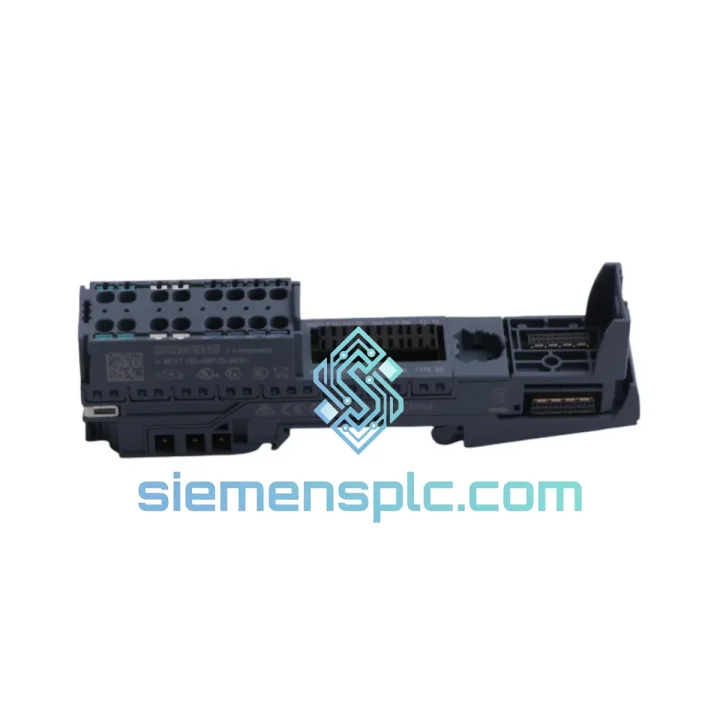
Request verified availability, condition, replacement risk review, packing options and courier lead time for 6ES7193-6BP20-0BB0.
Click Request Quote and the part number is inserted into the inquiry form automatically.
Core fields for model confirmation and RFQ routing. Detailed product narrative remains below.
Your ET 200SP station just dropped off the PROFINET network. The interface module is throwing a “BaseUnit fault” diagnostic. Field signals from that I/O slice are gone — blind spots in your process, alarms cascading, production line halted. You’ve already pulled the suspect 6ES7193-6BP20-0BB0 and confirmed it’s the BaseUnit. Now you need a replacement, fast, and you need it to be right the first time.
We stock the Siemens 6ES7193-6BP20-0BB0 — the BU-type B2 push-in BaseUnit for the SIMATIC ET 200SP distributed I/O system — and we ship same-day from Xiamen. No waiting on distributor lead times. No minimum order quantity. One unit, shipped today, tracked to your door.
URGENT REQUIREMENT? Contact: [email protected] | WhatsApp: +86 18359268345
| Parameter | Specification |
|---|---|
| Part Number | 6ES7193-6BP20-0BB0 |
| Product Series | SIMATIC ET 200SP |
| Module Category | BaseUnit / Terminal Module |
| BU Type | B2 (Light color — standard I/O) |
| Terminal Technology | Push-in (tool-free, ferrule or solid wire) |
| Supply Voltage | 24 V DC |
| Mounting | 35 mm DIN rail |
| Protection Rating | IP20 |
| Operating Temperature | 0 °C to +60 °C |
| Width | 15 mm (narrow, high-density) |
| Weight | approx. 60 g |
| Certifications | CE, UL, cULus, ATEX Zone 2 |
| Origin | Germany |
| Stock Status | ✅ Ready to Ship — Xiamen Warehouse |
Fault Symptom Pattern: When a 6ES7193-6BP20-0BB0 fails, the ET 200SP interface module (IM 155-6 PN/DP) typically reports one of the following in TIA Portal diagnostics: “Module removed”, “BaseUnit fault”, or a persistent red LED on the affected I/O slice. The PROFINET controller may log 0x0200 (module missing) or 0x0201 (module mismatch) in the diagnostic buffer.
Step-by-Step Replacement Procedure:
Step 1 — Isolate before you touch anything. Confirm the affected slice by checking the IM’s LED strip. The BaseUnit with the fault will show a solid red or flashing red on its status indicator. Do not assume — verify with TIA Portal online diagnostics before pulling any module.
Step 2 — Check for hot-swap eligibility. The ET 200SP supports module replacement under power if the IM is configured for “isochronous mode” or standard operation with the “Module replacement without PG” option enabled in hardware config. If this is not enabled, you must take the station offline. Attempting hot-swap on a non-configured station risks corrupting the IM’s module table.
Step 3 — Release the I/O module first. Press the orange release lever on the I/O module seated on the BaseUnit and slide it upward. The push-in terminal wiring stays in the BaseUnit — this is the key advantage of the 6BP20 design. Field wiring is never disturbed during module swap.
Step 4 — Inspect the BaseUnit bus connector. Before seating the new 6ES7193-6BP20-0BB0, visually inspect the backplane bus connector pins on the left side of the slot. Bent or corroded pins are a common secondary failure cause — if the BaseUnit failed due to a surge event, the bus connector may also be damaged.
Step 5 — Verify color coding. The 6ES7193-6BP20-0BB0 uses a light (white/beige) color code, indicating it accepts standard digital and analog I/O modules. Dark-coded BaseUnits (6ES7193-6BP20-0DC0 series) are for high-feature modules. Seating the wrong I/O module type on a mismatched BaseUnit will generate a hardware mismatch fault immediately on power-up.
Step 6 — No address switches on this unit. Unlike older S7-300 I/O modules, the ET 200SP BaseUnit carries no DIP switches or rotary address selectors. Slot addressing is handled automatically by the IM based on physical position in the station. After replacement, the IM re-enumerates the slot — no manual addressing required. If the IM does not recognize the new module within 30 seconds, cycle power to the station.
Step 7 — Firmware note. The 6ES7193-6BP20-0BB0 itself carries no firmware — it is a passive wiring carrier. However, if you are replacing it alongside an I/O module, ensure the I/O module firmware is compatible with your IM firmware version. Mismatched firmware between IM and I/O modules is a common cause of “module not recognized” faults after replacement. Check the Siemens compatibility matrix in the ET 200SP system manual (A5E03576850).
Common Failure Causes for 6ES7193-6BP20-0BB0: Mechanical stress from repeated module insertions (terminal fatigue), contamination of push-in terminal contacts from conductive dust or moisture ingress, and backplane bus connector damage from ESD events during unprotected maintenance. In high-vibration environments, check the DIN rail mounting clip integrity — a loose BaseUnit causes intermittent bus communication errors that are notoriously difficult to trace.
The ET 200SP platform — and the 6ES7193-6BP20-0BB0 BaseUnit specifically — was engineered for deployment outside the control room. Siemens designed this series to operate in environments where standard office-grade electronics would fail within weeks.
Vibration resistance is validated to IEC 60068-2-6 (sinusoidal) and IEC 60068-2-27 (shock). In automotive body shop applications, where resistance welding generates continuous mechanical shock through the cabinet structure, ET 200SP stations mounted on the weld cell frame have demonstrated multi-year MTBF without BaseUnit failures attributable to vibration. The push-in terminal design contributes directly to this — unlike screw terminals that can back off under vibration, push-in contacts maintain constant clamping force regardless of mechanical stress cycles.
Thermal performance is rated to +60 °C ambient without derating, and the narrow 15 mm form factor promotes natural convection airflow between modules. In foundry and glass manufacturing environments where cabinet ambient temperatures routinely reach 50–55 °C, the 6ES7193-6BP20-0BB0 operates within specification without forced cooling. The PCB substrate and terminal block housing are rated for continuous operation at elevated temperatures without creep or deformation.
Humidity and contamination protection at IP20 means the BaseUnit is not sealed against liquid ingress — it relies on the control cabinet for environmental protection. However, the conformal coating applied to the internal PCB provides resistance to condensation events and airborne conductive particulates. In food processing facilities where washdown procedures generate high-humidity conditions inside cabinets, this coating has proven critical in preventing corrosion-related failures on the backplane bus contacts.
ATEX Zone 2 certification (for gas group IIC, temperature class T4) makes the 6ES7193-6BP20-0BB0 deployable in potentially explosive atmospheres when installed in an appropriate Ex e or Ex p enclosure. This is relevant for chemical processing, oil & gas upstream, and paint booth automation applications where standard industrial components cannot be used.
Our warehouse is located in Xiamen, Fujian Province, China — one of the most logistics-efficient export hubs in Southeast China, with direct access to Xiamen Gaoqi International Airport and Xiamen Port. This geographic position gives us same-day handoff capability to DHL Express, FedEx International Priority, and UPS Worldwide Express.
Standard export process for urgent orders:
Order confirmed before 14:00 CST → same-day pick, pack, and export documentation → handoff to DHL/FedEx by 18:00 CST → airfreight departure from XMN that evening → transit to major hubs (Frankfurt, Memphis, Dubai) within 24 hours → final delivery to your facility within 2–5 business days depending on destination country.
Typical transit times from Xiamen:
Every shipment includes full export documentation: commercial invoice, packing list, certificate of origin, and where required, a material safety data sheet. For customers in countries with import duty exemptions or preferential tariff agreements with China, we can provide Form E (ASEAN-China FTA) or other applicable certificates of origin upon request.
All packages are shipped in anti-static, moisture-barrier packaging with foam cushioning. Fragile components are double-boxed. Tracking numbers are provided within 2 hours of dispatch. For orders above a certain value threshold, we recommend DHL Express with shipment insurance — contact us to arrange.
Production line down? Don’t wait. Reach our technical sales team directly:
Response time: within 30 minutes during business hours (CST 09:00–18:00, Mon–Sat). For critical downtime situations, WhatsApp is monitored outside business hours.
© 2026 siemensplc.com. All rights reserved.
We check the full part number, brand, series and visible nameplate information before quotation.
Sales confirms stock path, condition option, quantity and realistic lead time for export dispatch.
DHL, FedEx, UPS or buyer courier arrangements can be reviewed with packing requirements.
Similar brand or category products for fast comparison and multi-item RFQ lists.