Siemens
RFQ Ready
Siemens 6ES7321-1BL00-0AA0 Digital Input Module
SIMATIC
Origin DE
PLC Digital Input Module
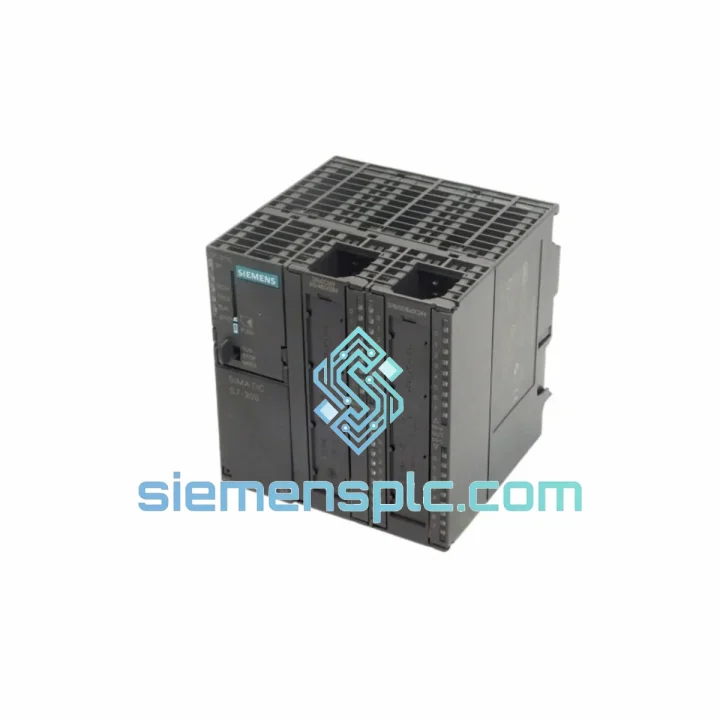
Request verified availability, condition, replacement risk review, packing options and courier lead time for 6ES7313-5BF03-0AB0.
Click Request Quote and the part number is inserted into the inquiry form automatically.
Core fields for model confirmation and RFQ routing. Detailed product narrative remains below.
Your S7-300 line is down. The CPU is dead. Maintenance is standing by. Procurement is calling. You’ve been here before — and you know the clock is running at full production-loss rate. The Siemens 6ES7313-5BF03-0AB0 is in stock at our Xiamen warehouse right now. We don’t need 4–6 weeks. We need 24 hours to get it on a plane to you.
This is a 100% genuine Siemens SIMATIC S7-300 Compact CPU with 24 integrated digital inputs and 16 digital outputs, onboard PROFIBUS DP master, and MPI interface. It is the exact hardware your system was built around — not a substitute, not a clone. Pull the failed unit, slot this in, transfer the MMC, and you’re back online.
⚡ URGENT REQUIREMENT? Contact: [email protected] | WhatsApp: +86 18359268345
| Order Number | 6ES7313-5BF03-0AB0 |
| Platform | SIMATIC S7-300 |
| CPU Type | Compact CPU with integrated I/O |
| Working Memory | 128 KB (code + data) |
| Load Memory | 128 KB Flash EPROM + MMC slot (up to 8 MB) |
| Integrated DI | 24 × 24 V DC |
| Integrated DO | 16 × 24 V DC, 0.5 A |
| Bit Processing Speed | 0.1 µs / instruction |
| Communication | MPI (187.5 kbps) + PROFIBUS DP Master (12 Mbps) |
| Max DP Slaves | 32 |
| Supply Voltage | 24 V DC (via backplane) |
| Operating Temperature | 0 °C to +60 °C |
| Firmware Revision | V3.3 (BF03) |
| Programming Tool | STEP 7 V5.x (TIA Portal via migration) |
| Certifications | CE, UL, cULus, ATEX Zone 2 |
| Dimensions (W×H×D) | 80 × 125 × 130 mm |
| Weight | ~900 g |
| Stock Status | ✅ Ready to Ship — Xiamen Warehouse |
Swapping a 6ES7313-5BF03-0AB0 in the field is straightforward if you follow the sequence. Skip a step and you’ll spend another two hours chasing a fault that shouldn’t exist.
Step 1 — Power down correctly. Cut the 24 V DC supply to the PS 307 first. Do not hot-swap an S7-300 CPU. The backplane bus does not support live insertion on this series.
Step 2 — Extract the MMC before touching anything else. The Micro Memory Card holds your entire program. It sits in the slot on the front face of the CPU, behind the mode selector cover. Remove it before you pull the module. This is the single most common field error — engineers forget the card, yank the CPU, and the card stays in the rack or gets lost.
Step 3 — Note the mode selector position. The rotary switch should be in STOP before removal. Confirm the replacement unit is also in STOP before insertion.
Step 4 — Slot the replacement CPU into Slot 2. The 6ES7313-5BF03-0AB0 mounts exclusively in Slot 2 on any standard S7-300 rack (UR1, UR2, UR2-H). There is no address DIP switch on this CPU — slot position is fixed by mechanical design.
Step 5 — Reinsert the MMC. Push it in until it clicks. The CPU will not enter RUN without a valid MMC. If the SF LED stays red after power-up with the MMC inserted, the card may be corrupted — connect STEP 7 and check the diagnostic buffer (OB 82 / OB 86 entries).
Step 6 — Firmware check. The BF03 revision runs firmware V3.3. If your existing program was compiled on STEP 7 targeting an earlier BF00/BF01 variant, recompile and download is recommended but not always mandatory. Watch for OB 85 (program execution error) on first RUN — this is the tell-tale sign of a firmware-program mismatch.
Common fault codes to know:
MPI address conflict: Default MPI address is 2. If you’re adding this CPU to an existing MPI network with another device already at address 2, you’ll get a bus collision. Change the MPI address in HW Config before downloading, or use a direct point-to-point connection first to set the address via STEP 7 → PLC → Set PG/PC Interface.
Industrial environments don’t care about your schedule. Vibration from compressors and presses, temperature swings between night shutdown and midday production peaks, humidity from wash-down areas and coastal installations — the 6ES7313-5BF03-0AB0 was designed with all of it in mind.
The CPU board uses conformal coating on critical circuit areas, providing resistance to condensation and airborne contaminants common in food processing and chemical plant environments. The housing meets IP20 ingress protection — adequate for installation inside sealed control cabinets with filtered ventilation, which is the correct deployment for any S7-300 system.
Vibration tolerance is rated to IEC 60068-2-6: 10–58 Hz at 0.075 mm amplitude, 58–150 Hz at 1 g. This covers the operating envelope of most industrial machinery including CNC machine tools, packaging lines, and conveyor systems. Shock resistance per IEC 60068-2-27 at 15 g / 11 ms half-sine pulse means the module survives the kind of mechanical impact that happens during panel installation and transport.
Operating temperature range of 0 °C to +60 °C with storage down to -40 °C means this module can be warehoused in unheated facilities and deployed in both temperate and tropical climates without derating. Units shipped from our Xiamen warehouse are stored in climate-controlled conditions and individually inspected before dispatch.
Our warehouse is located in Xiamen, Fujian — one of China’s primary export hubs with direct access to international freight lanes via Xiamen Gaoqi International Airport and Xiamen Port. This geography is not accidental. It means your urgent order moves fast.
Standard express timeline:
Every shipment includes a commercial invoice with accurate HS code classification (HS 8537.10 for PLC modules), enabling smooth customs clearance. We can declare under DAP or DDP Incoterms depending on your import requirements — contact us before order placement if DDP is needed for your country.
Tracking numbers are issued within 2 hours of dispatch and sent directly to your registered email. For critical shipments, we provide the DHL/FedEx waybill number and direct carrier tracking link so your logistics team can monitor in real time. If a shipment is held at customs, we provide all supporting documentation — certificate of origin, packing list, and product datasheet — within the same business day.
For urgent stock confirmation, volume pricing, or technical pre-sales questions:
📧 Email: [email protected]
📱 WhatsApp: +86 18359268345
🌐 Web: siemensplc.com
© 2026 siemensplc.com. All rights reserved.
We check the full part number, brand, series and visible nameplate information before quotation.
Sales confirms stock path, condition option, quantity and realistic lead time for export dispatch.
DHL, FedEx, UPS or buyer courier arrangements can be reviewed with packing requirements.
Similar brand or category products for fast comparison and multi-item RFQ lists.