Siemens
In Stock OK
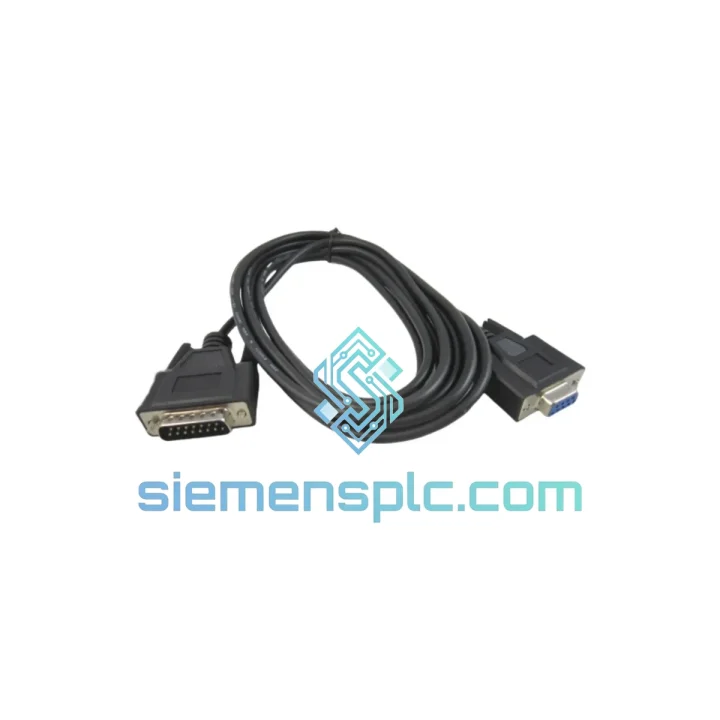
Siemens 6XV1440-2KH32 OP Communications Cable
Request verified availability, condition, replacement risk review, packing options and courier lead time for 6XV1440-2KH32.
BrandSiemens
Part Number6XV1440-2KH32
ConditionAvailability Check
Lead TimeRFQ Confirmation
DocumentsDatasheet / photos by RFQ
ShippingExport packing available
Auto-filled RFQ
6XV1440-2KH32
Click Request Quote and the part number is inserted into the inquiry form automatically.
- Reply by email: [email protected]
- WhatsApp / Tel: +86 18359268345
- Mon-Sat 9:00-18:00 GMT+8
Procurement Data
Key Product Information
Core fields for model confirmation and RFQ routing. Detailed product narrative remains below.
- Brand
- Siemens
- Primary Part Number
- 6XV1440-2KH32
- Product Type
- Industrial Communication Cable
- Product Family
- Other series
- Manufacturer
- Siemens AG — SIMATIC NET
- Country of Origin
- DE
- Catalog Category
- HMI Panels
- Operating Temp.
- -20 °C to +70 °C
- Compliance
- CE · RoHS · PROFIBUS International Certified
Model confirmed for inquiry
6XV1440-2KH32
Send quantity, destination and urgency. The RFQ form keeps this part number attached.
Request Quote
Product Overview
Siemens 6XV1440-2KH32 — Stop the Clock on Your Downtime. Ship Today.
Your HMI panel just went dark. The PROFIBUS link is dead. Production is hemorrhaging money by the minute. You’ve traced the fault to the OP communications cable — and you need a verified, original Siemens 6XV1440-2KH32 in your hands now, not in three weeks. We stock it. We ship it today from Xiamen via DHL Express. Every hour you wait costs more than this cable.
URGENT REQUIREMENT? Contact: [email protected] | WhatsApp: +86 18359268345
Quick Technical Datasheet
| Order Number (MLFB) | 6XV1440-2KH32 |
| Manufacturer | Siemens AG — SIMATIC NET |
| Cable Type | OP Communications Cable, Pre-terminated |
| Protocol Support | PROFIBUS DP/FMS · MPI (Multi-Point Interface) · PPI (Point-to-Point Interface) |
| Connector | Sub-D 9-pin (RS-485), both ends |
| Cable Length | 3.2 m |
| Characteristic Impedance | 150 Ω (PROFIBUS compliant) |
| Max Data Rate | 12 Mbit/s (PROFIBUS DP) · 187.5 kbit/s (MPI/PPI) |
| Shielding | Braided copper shield + drain wire, full-length EMI protection |
| Operating Temperature | -20 °C to +70 °C |
| Compliance | CE · RoHS · PROFIBUS International Certified |
| Weight | Approx. 200 g |
| Stock Status | ✔ Ready to Ship — Xiamen Warehouse |
Troubleshooting & Replacement Tips
After ten years of field work, I can tell you: most “PLC communication failures” that get blamed on the CPU or the DP master are actually a dead cable. Before you pull the CPU card, check the 6XV1440-2KH32 first. Here’s the field-tested replacement procedure:
Step 1 — Confirm the fault is the cable, not the port. Swap the suspect 6XV1440-2KH32 with a known-good cable of the same type on the same port. If the HMI reconnects within 30 seconds, the cable is your culprit. If not, check the MPI/DP port on the CPU with a PROFIBUS tester (e.g., ProfiTrace) before ordering a CPU replacement.
Step 2 — Check connector pin integrity before installing the new cable. Sub-D 9-pin connectors on PROFIBUS cables fail at pins 3 (RxD/TxD-P, B-line) and 8 (RxD/TxD-N, A-line) first — these carry the differential RS-485 signal. Use a continuity tester end-to-end. A resistance above 5 Ω on either signal conductor indicates internal wire damage, usually from repeated tight bending near the connector boot.
Step 3 — Verify bus termination before going live. In a point-to-point OP-to-PLC connection, both ends of the RS-485 segment must be terminated. The S7 CPU MPI port has an internal switchable terminator — confirm it is enabled in the hardware configuration (HW Config in STEP 7 or Device Configuration in TIA Portal). The OP panel typically auto-terminates. If you’re inserting this cable into an existing PROFIBUS segment via a bus connector (e.g., 6ES7972-0BA52-0XA0), ensure the bus connector’s termination switch is set correctly for the segment end-node topology.
Step 4 — Address assignment after reconnection. After swapping the cable, the OP panel may lose its MPI address assignment if the panel was powered down during the swap. Navigate to the panel’s Start Center → Transfer → MPI/DP settings and confirm the MPI address matches the address configured in your HMI project (WinCC Flexible or TIA Portal). Mismatch here causes the classic “No connection to PLC” error that looks like a hardware fault but is purely a configuration issue.
Common fault codes associated with a failed 6XV1440-2KH32:
- WinCC Flexible Runtime: “Connection to PLC failed” / Error 0x00000001 — Loss of MPI/PROFIBUS physical layer. First suspect: cable or connector.
- STEP 7 HW Config: Station unreachable (red X on OP node) — DP slave not responding on bus. Check cable continuity and termination.
- OP Panel: “Establishing connection…” loop on startup — Panel cannot complete MPI handshake. Verify cable, MPI address, and baud rate match (default 187.5 kbit/s for MPI).
- Intermittent data loss / sporadic “Communication error” alarms — Partial shield break or intermittent pin contact. Replace cable; do not attempt field repair of PROFIBUS cables.
Baud rate note: If you’re replacing a cable on an existing MPI segment running at a non-default baud rate (e.g., 1.5 Mbit/s for larger networks), ensure the new cable’s length is within the distance limit for that baud rate. At 1.5 Mbit/s, maximum segment length is 200 m — the 3.2 m 6XV1440-2KH32 is well within spec at any supported MPI baud rate.
Reliability in Harsh Conditions
The 6XV1440-2KH32 is not a data center patch cable. It was engineered for the floor — where VFDs generate conducted noise across the full RS-485 frequency band, where cabinet temperatures swing from pre-dawn cold starts to mid-afternoon thermal saturation, and where cables get stepped on, pinched in cable trays, and bent around tight corners during every maintenance cycle.
The braided copper shield achieves greater than 85% optical coverage, providing attenuation of radiated EMI that meets the requirements of EN 55011 Class A industrial environments. The drain wire is bonded to the connector shell at the panel end, creating a low-impedance path to chassis ground that shunts induced currents away from the signal conductors — critical in panels where VFD switching frequencies (typically 4–16 kHz) overlap with PROFIBUS signal harmonics.
The cable jacket compound is rated for continuous operation at +70 °C, with short-term excursions to +80 °C without jacket deformation or insulation breakdown. In cold-start environments (foundries, outdoor enclosures in northern climates), the jacket remains flexible to -20 °C, preventing the micro-cracking that causes intermittent shield continuity faults in cheaper cable assemblies.
Vibration resistance is validated per IEC 60068-2-6 (sinusoidal vibration, 10–150 Hz, 1g). The molded connector boots distribute mechanical stress across the cable entry zone rather than concentrating it at the solder joint — the primary failure point in field-assembled cables. In high-vibration applications (press lines, compressor rooms, mobile equipment), secure the cable with a strain relief clamp within 100 mm of each connector to prevent fatigue failure at the boot transition.
Global Express Logistics
We operate from Xiamen, China — one of the most logistics-efficient export hubs on the mainland, with direct DHL Express and FedEx International Priority access to major industrial centers worldwide. When you place an order before 16:00 CST, your 6XV1440-2KH32 ships the same business day.
Typical transit times from Xiamen:
- Southeast Asia (Singapore, Thailand, Vietnam, Malaysia): 2–3 business days via DHL Express
- Middle East (UAE, Saudi Arabia, Qatar): 3–4 business days via FedEx International Priority
- Europe (Germany, Netherlands, Poland, UK): 3–5 business days via DHL Express Worldwide
- North America (USA, Canada, Mexico): 4–6 business days via FedEx International Priority
- South America (Brazil, Chile, Colombia): 5–8 business days via DHL Express
- Australia / New Zealand: 3–5 business days via DHL Express
Every shipment includes full end-to-end tracking, commercial invoice, packing list, and — upon request — a Siemens product datasheet and CE/RoHS declaration of conformity for customs clearance. Components are packed in anti-static bags, cushioned with foam inserts, and sealed in double-wall corrugated cartons rated for international air freight handling. We have zero tolerance for transit damage: if your shipment arrives damaged, we reship at no cost, no questions asked.
For urgent orders requiring same-day DHL pickup confirmation, contact us via WhatsApp before 14:00 CST. We will confirm stock, generate the commercial invoice, and provide the AWB number within 2 hours of payment confirmation.
Contact Information
Email: [email protected]
WhatsApp: +86 18359268345
Web: siemensplc.com
© 2026 siemensplc.com. All rights reserved.
Ready to quote
[email protected]
Send This Part Number to Sales
RFQ workflow
Quality workflow ->
Confirmation Process
01Model confirmation
We check the full part number, brand, series and visible nameplate information before quotation.
02Availability reply
Sales confirms stock path, condition option, quantity and realistic lead time for export dispatch.
03Packing & courier
DHL, FedEx, UPS or buyer courier arrangements can be reviewed with packing requirements.
Continue sourcing
Browse full catalog ->
Related Automation Parts
Similar brand or category products for fast comparison and multi-item RFQ lists.

Siemens
RFQ Ready
Siemens 6AV7240-0HC07-0PA0 Industrial Panel PC Motherboard – SIMATIC IPC477D
SIMATIC
Origin DE
Industrial Panel PC Motherboard