Siemens
RFQ Ready
Siemens 6FC5357-0BY21-1AE1 NCU572.2 CNC Control Unit
SINUMERIK 840D
Origin DE
CNC Numerical Control Unit
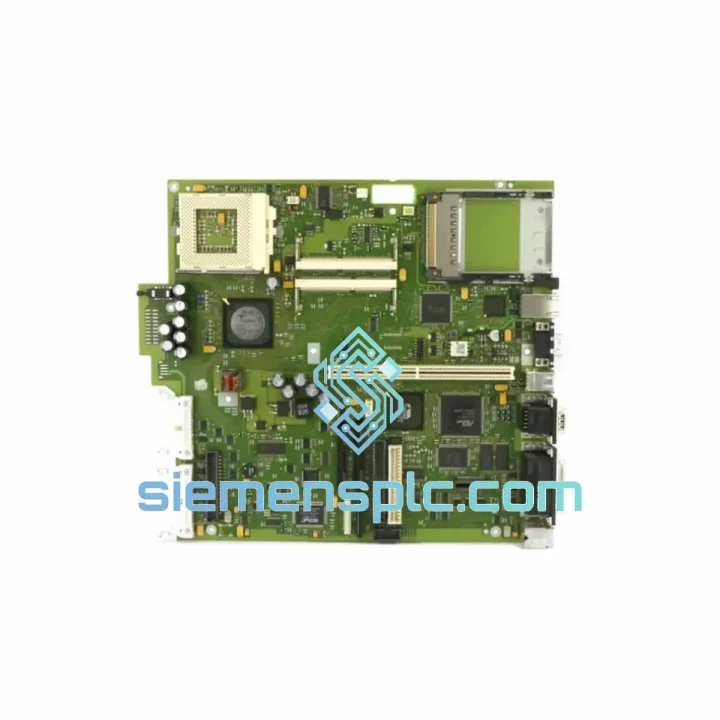
Request verified availability, condition, replacement risk review, packing options and courier lead time for A5E00104787.
Click Request Quote and the part number is inserted into the inquiry form automatically.
Core fields for model confirmation and RFQ routing. Detailed product narrative remains below.
Your SIMATIC PC BOX 620 or 670 just went dark. The line is stopped. Maintenance is on the phone. You need a board — not a quote, not a lead time estimate, not a “we’ll check stock” reply. You need the Siemens A5E00104787 in your hands within 48–72 hours, seated, booted, and running your WinCC or Step 7 image. That’s exactly what siemensplc.com delivers.
We maintain physical stock of the A5E00104787 in Xiamen, China. No broker chain. No warehouse-to-warehouse relay. One call, one shipment, one tracking number — DHL or FedEx express, door to door, anywhere on the planet.
URGENT REQUIREMENT? Contact: [email protected] | WhatsApp: +86 18359268345
| Parameter | Specification |
|---|---|
| Part Number | A5E00104787 |
| Manufacturer | Siemens AG |
| Product Series | SIMATIC PC BOX 620 / 670 |
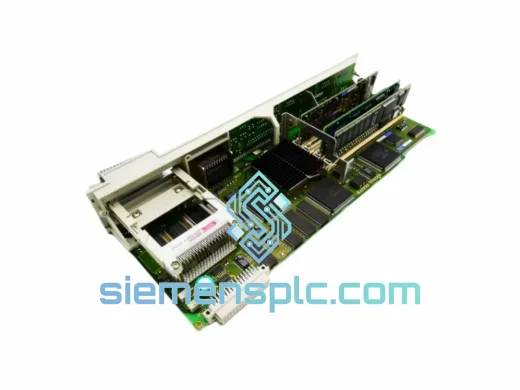
| Component Type | Industrial PC Motherboard (Mainboard) |
| Form Factor | Proprietary SIMATIC PC BOX chassis format |
| Compatible OS | Windows XP / Windows 7 (per original SIMATIC spec) |
| Bus Interface | ISA + PCI (legacy industrial backplane) |
| Processor Socket | Socket 370 / FC-PGA (Celeron / PIII era) |
| RAM Type | SDRAM / PC133 DIMM |
| Onboard I/O | COM x2, LPT x1, USB 1.1, PS/2, VGA |
| Weight | ~1,600 g (board + heatsink assembly) |
| Condition | New / Tested Refurbished (specify at inquiry) |
| Stock Status | ✅ Ready to Ship — Xiamen Warehouse |
| Lead Time | Same-day dispatch on confirmed orders before 15:00 CST |
| Origin | China (CN) |
Ten years of field calls on SIMATIC PC BOX systems teach you one thing fast: most “motherboard failures” are actually misdiagnosed. Before you commit to a board swap, run through this checklist — it will save you a second trip.
Step 1 — Confirm the board is actually dead. The A5E00104787 has a known weak point at the CMOS battery (CR2032, soldered). A dead CMOS causes POST failure, BIOS reset loops, and date/time errors that look like a dead board. Replace the battery first. If the system still won’t POST, move on.
Step 2 — Check the RAM seating. SIMATIC PC BOX 620/670 chassis vibrate. PC133 SDRAM DIMMs work loose over years of operation. Reseat both slots. If you have a known-good stick, swap it in. A bad DIMM produces the same blank-screen symptom as a failed board.
Step 3 — Inspect the ISA/PCI riser card connector. The A5E00104787 connects to the chassis backplane via a proprietary riser. Oxidized contacts here cause intermittent boot failures and random freezes. Clean with isopropyl alcohol and a firm brush. Reseat firmly.
Step 4 — Read the POST beep codes. If you get beeps but no display: 1 long + 2 short = video fault (check VGA cable and onboard VGA jumper JP1). Continuous short beeps = RAM fault. No beeps at all = power delivery or board-level failure. Document the code before you pull the board — it tells the next engineer exactly what happened.
Step 5 — Board swap procedure. Power down and lock out the panel PC. Ground yourself. Remove the four M3 standoff screws securing the A5E00104787 to the chassis tray. Disconnect all ribbon cables — label them with tape before removal, the connectors are not keyed. Lift the board straight up off the riser. Install the replacement in reverse order. Do not overtorque the standoffs — the PCB mounting holes are not reinforced.
Step 6 — BIOS configuration after swap. The replacement board ships with factory BIOS defaults. You must re-enter the SIMATIC-specific BIOS settings: set the boot device order (HDD first), disable unused COM ports if your application requires it, and re-enter the correct date/time. If your system uses a SIMATIC Dongle or hardware key on the parallel port, verify LPT port mode is set to ECP in BIOS — some boards default to SPP which breaks dongle authentication.
Step 7 — OS image restoration. The A5E00104787 does not store any application data. Your WinCC runtime, Step 7 project, or SCADA configuration lives on the HDD. If the original HDD is intact, it will boot on the replacement board without reinstallation in most cases. If you get a “HAL.DLL” error on Windows XP, you may need to perform a repair install — this is a known issue when moving an XP image between slightly different hardware revisions of the same board generation.
Common fault codes seen before board failure:
The SIMATIC PC BOX 620/670 platform was engineered for the factory floor, not the server room. The A5E00104787 motherboard reflects that design philosophy. The PCB uses conformal coating on critical signal traces to resist moisture ingress — a necessity in food processing, pharmaceutical, and coastal industrial environments where humidity regularly exceeds 85% RH.
The board’s operating temperature range spans 0°C to 55°C ambient, with short-term tolerance to 60°C in forced-air configurations. In practice, we’ve seen these boards running continuously in steel mill control cabinets where ambient temperatures routinely hit 45°C — and they hold. The key is airflow: the SIMATIC PC BOX chassis fan must be functional. A failed chassis fan will kill this board within hours at elevated ambient temperatures.
Vibration resistance is achieved through the board’s mechanical mounting design — four-point chassis attachment with rubber-isolated standoffs on some variants — and through Siemens’ component selection: industrial-grade capacitors rated for 105°C, not the 85°C consumer-grade parts found on standard desktop boards. This matters in press lines, compressor rooms, and anywhere with continuous mechanical vibration above 0.5g.
EMC shielding is integral to the SIMATIC PC BOX chassis design. The A5E00104787 is designed to operate within that shielded enclosure. Do not operate the board outside the chassis for extended periods — radiated emissions from unshielded industrial PC boards can interfere with nearby PLCs and drives.
siemensplc.com ships from our Xiamen warehouse, located in Fujian Province, China — one of the most logistics-dense export hubs in Asia. We have daily pickup contracts with both DHL Express and FedEx International Priority. Here’s what the timeline looks like from your order confirmation to your receiving dock:
For shipments to sanctioned or restricted destinations, we comply fully with Chinese export regulations and international trade law. We do not ship to embargoed countries. If you are unsure about import requirements in your country, contact us — we’ve shipped to over 60 countries and can advise on documentation requirements.
Emergency weekend dispatch is available for confirmed urgent orders — contact us via WhatsApp for after-hours coordination.
📧 Email: [email protected]
💬 WhatsApp: +86 18359268345
🌐 Web: siemensplc.com
© 2026 siemensplc.com. All rights reserved.
We check the full part number, brand, series and visible nameplate information before quotation.
Sales confirms stock path, condition option, quantity and realistic lead time for export dispatch.
DHL, FedEx, UPS or buyer courier arrangements can be reviewed with packing requirements.
Similar brand or category products for fast comparison and multi-item RFQ lists.