SST (Woodhead / Molex)
RFQ Ready
SST 5136-PFB-PCI PROFIBUS-DP Communication Card
Origin United States
PROFIBUS Communication Card
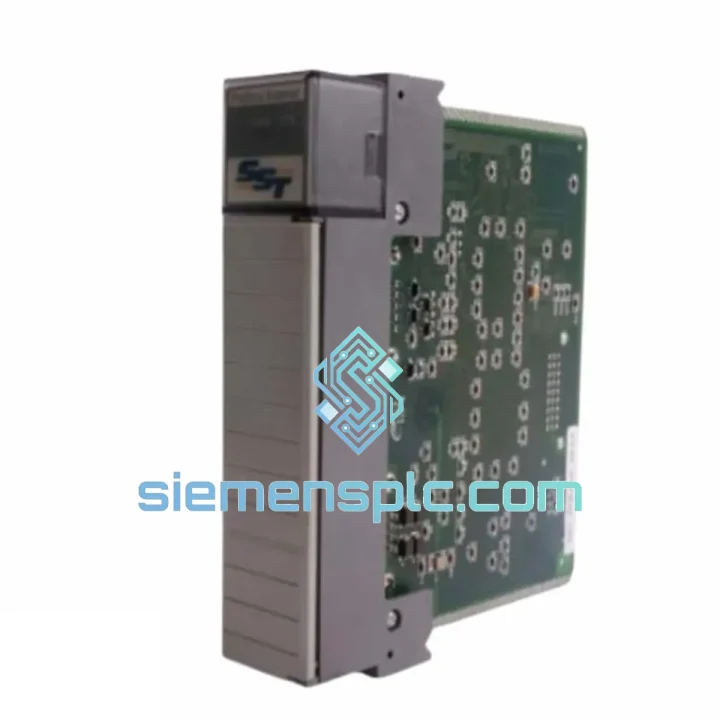
Request verified availability, condition, replacement risk review, packing options and courier lead time for SST-PFB-SLC.
Click Request Quote and the part number is inserted into the inquiry form automatically.
Core fields for model confirmation and RFQ routing. Detailed product narrative remains below.
A failed PROFIBUS-DP scanner in an SLC 500 rack doesn’t just trip an alarm — it kills the entire fieldbus segment. Drives go to safe state. Distributed I/O goes dark. Your line stops. If you’re reading this at 2 AM with a production manager breathing down your neck, here’s what matters: we have the SST-PFB-SLC in stock in Xiamen, packed and ready for DHL Express. Lead time from your PO to airborne: under 4 hours during business hours.
This is not a listing. This is a field rescue operation.
URGENT REQUIREMENT? Contact: [email protected] | WhatsApp: +86 18359268345
| Part Number | SST-PFB-SLC ✅ Ready to Ship |
| Manufacturer | SST (Woodhead / Molex) |
| Module Function | PROFIBUS-DP Class 1 Master / Scanner |
| Host Platform | Allen-Bradley SLC 500 (1746 backplane) |
| Compatible Processors | SLC 5/03, 5/04, 5/05 — NOT 5/01 or 5/02 |
| Protocol Standard | PROFIBUS-DP (EN 50170 / IEC 61158) |
| Max Slave Nodes | 125 DP slaves per segment |
| Baud Rate Range | 9.6 kbps – 12 Mbps (auto-negotiated) |
| I/O Data Capacity | 128 words IN / 128 words OUT (256 bytes each) |
| Backplane Interface | Standard 1746 I/O slot — no external PSU needed |
| Configuration Tool | SST PROFIBUS Config Software (GSD-based) |
| Connector | DB-9 female (PROFIBUS standard pinout) |
| Operating Temperature | 0°C to +60°C |
| Storage Temperature | -40°C to +85°C |
| Humidity | 5%–95% RH non-condensing |
| Power Supply | 5 VDC via SLC 500 backplane |
| Weight | 160 g |
| Certifications | CE, UL |
| Origin | USA (SST / Molex) |
| Stock Status | ✅ In Stock — Ships from Xiamen within 4 hrs |
Fault Scenario 1 — All PROFIBUS slaves show “Communication Fault” simultaneously
This is the classic SST-PFB-SLC failure signature. The module loses its token on the bus and all slaves drop to safe state. Before condemning the module, check: (1) DB-9 termination resistors — both ends of the segment must be terminated at 220Ω/390Ω. (2) Backplane seating — reseat the module firmly; the 1746 edge connector is notorious for micro-fretting in high-vibration environments. (3) SLC processor fault table — look for Module Communication Error (MCE) codes in the fault file (S:6). If the fault clears on power cycle but returns within minutes, the module’s internal PROFIBUS ASIC is failing. Replace immediately.
Fault Scenario 2 — Module LED pattern: RUN solid green, BUS LED flashing red
The module is powered and communicating with the SLC backplane, but the PROFIBUS segment has a bus fault. Isolate slaves one by one by disconnecting the DB-9 daisy chain. A shorted terminator or a failed slave pulling the bus low will produce this pattern. If the BUS LED goes green when all slaves are disconnected, the fault is on the fieldbus cable or a slave device — not the SST module itself.
Fault Scenario 3 — Module not recognized by SLC processor after replacement
This is a configuration mismatch. The SST-PFB-SLC stores its PROFIBUS network configuration internally. After swapping a module, you must re-download the configuration from SST PROFIBUS Configuration Software. The SLC processor will show a “Module Mismatch” fault (I/O fault code 16#0010) until the new module receives its configuration. Steps: (1) Connect laptop to the new module via RS-232 or USB-to-serial adapter. (2) Open the saved .pfb project file. (3) Download configuration to module. (4) Cycle SLC power. (5) Verify BUS LED goes solid green.
Fault Scenario 4 — Intermittent slave dropouts at high baud rates (6 Mbps / 12 Mbps)
High-speed PROFIBUS segments are extremely sensitive to cable quality and stub lengths. If you’re seeing random slave dropouts after module replacement, reduce baud rate to 1.5 Mbps temporarily. If dropouts stop, the issue is cable impedance or stub length — not the module. Maximum stub length at 12 Mbps is 1 meter. Verify cable is PROFIBUS-certified (purple jacket, 150Ω characteristic impedance).
Replacement Checklist (print this out):
The SST-PFB-SLC was designed for the realities of industrial floors — not lab benches. The module’s conformal-coated PCB resists moisture ingress in high-humidity environments like food processing washdown areas and coastal facilities. Operating range of 0°C to +60°C covers the thermal extremes of unventilated control cabinets in summer and unheated substations in winter.
Vibration tolerance is a critical factor in automotive and heavy manufacturing installations. The 1746 backplane edge connector, combined with the module’s solid-state PROFIBUS ASIC (no moving parts, no electrolytic capacitors in the signal path), gives the SST-PFB-SLC a mean time between failures (MTBF) measured in decades under normal operating conditions. The modules that fail in the field typically do so due to external causes: power surges on the backplane, physical damage to the DB-9 connector from repeated cable swaps, or electrostatic discharge during unprotected handling.
Units shipped from our Xiamen facility are stored in ESD-safe packaging in a climate-controlled warehouse. Each module is inspected for physical damage, connector integrity, and label authenticity before dispatch. We do not ship modules with bent backplane pins, cracked housings, or missing firmware labels — these are the telltale signs of counterfeit or salvaged stock that plague the grey market.
Our dispatch hub is located in Xiamen, Fujian — one of China’s primary export ports with direct DHL Express and FedEx International Priority connections to major industrial hubs worldwide.
Typical transit times from Xiamen:
Logistics process: Once your PO or payment is confirmed, the module is pulled from stock, inspected, packed in anti-static foam with original OEM packaging where available, and handed to the courier within 4 business hours. You receive a tracking number by email immediately upon dispatch. For critical downtime situations, contact us directly on WhatsApp — we can arrange same-day pickup with DHL before the last collection window.
Export documentation (commercial invoice, packing list, certificate of origin) is prepared for every shipment. HS Code 8537.10 applies to this module for customs classification. We have experience shipping to over 60 countries and can advise on import duty implications for your destination.
Line down? Don’t wait. Reach us now:
© 2026 siemensplc.com. All rights reserved. All trademarks are property of their respective owners.
We check the full part number, brand, series and visible nameplate information before quotation.
Sales confirms stock path, condition option, quantity and realistic lead time for export dispatch.
DHL, FedEx, UPS or buyer courier arrangements can be reviewed with packing requirements.
Similar brand or category products for fast comparison and multi-item RFQ lists.