
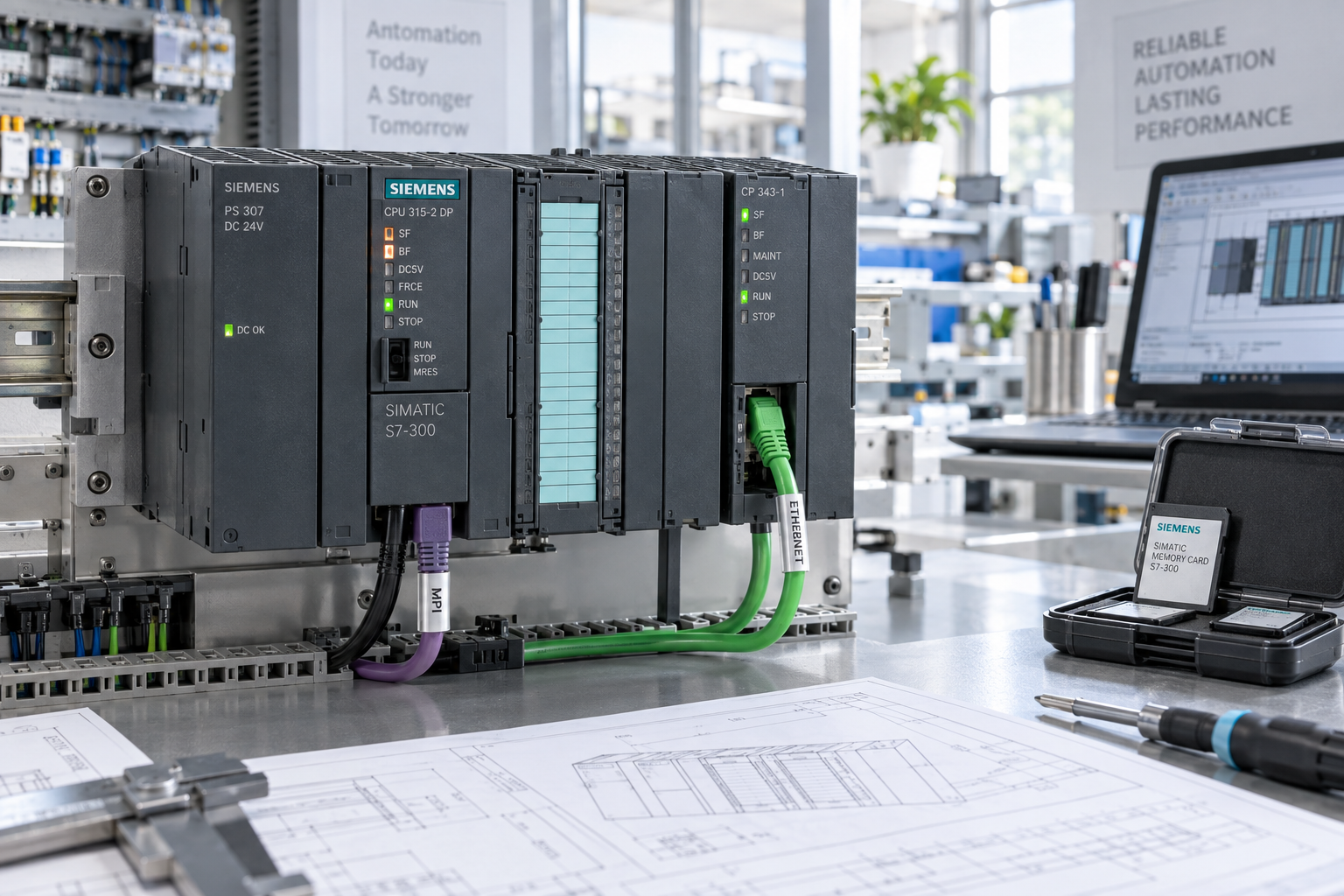
Siemens S7-300 systems are still doing useful work in machines, utilities and process skids that were commissioned years ago. Their risk is not simply age. The real exposure appears when the project backup is incomplete, the communication processor is undocumented or the plant discovers that a replacement needs a different commissioning sequence. A good S7-300 spare plan protects the running line while the site decides whether a larger migration is justified.
The search for a replacement should begin with evidence. Identify the CPU, communication processor, memory, rack position and network role. Preserve the application and the last known-good diagnostics. Then decide whether the problem is the processor, power, backplane, network, field I/O or configuration.
Record the S7-300 identity
Photograph the rack and nameplates. Record the CPU order number, hardware revision, firmware, memory card, power supply, communication processors, MPI address and connected networks. Export the approved project and archive the hardware configuration, symbols and required libraries. Note who owns the latest backup.
Capture the normal diagnostic buffer, scan behavior, connection list and startup sequence. If the line depends on retentive data or recipes, document how that data is protected. A spare CPU without a reliable project and memory plan can leave the machine technically powered but operationally unavailable.
Separate CPU and communication faults
Check power, rack contacts and the backplane before replacing the CPU. If the CPU is running but a supervisory system or remote station has disappeared, inspect the communication processor, cable, switch, address and configuration. Record whether the failure affects one device or the whole network.
The Siemens S7-300 CPU 315-2EH14-0AB0 must be matched to the application, memory, firmware and commissioning process. Confirm whether the spare is intended for direct replacement, a test rack or a planned migration bridge. Ask for the condition and test scope.
The Siemens CP 343-1 communication processor should be checked against the network role, addressing, connector, firmware and engineering configuration. A module that powers up but has no valid network parameters is not a recovery-ready spare.
Make the replacement reversible
Write the swap sequence before the outage. Protect the project, label connectors, freeze unrelated changes and define the rollback condition. Bench-test the spare for power-up, diagnostics and representative communication. Record the serial number and what was not tested.
After installation, verify CPU state, communication links, remote I/O, HMI values, alarms, historian data and sequence permissives. Confirm the machine at normal operation. Keep the removed unit until the failure review is complete, because it may reveal a power or network problem rather than a CPU failure.
Do not let a lifecycle discussion become a reason to skip a backup test. Open the project on a controlled engineering workstation, confirm the hardware catalog and document any missing library or license. The recovery package should be usable by the authorized maintenance team even if the original engineer is unavailable.
For critical S7-300 machines, set a review date for the bridge plan. Compare remaining spares, platform availability, production consequence and migration progress. A small, well-documented stock can be more useful than a large untested pile of modules.
When a part is sourced from the used or repair market, ask for serial photographs and the exact test scope. Keep the condition statement with the part. A power-up test does not prove a communication processor’s network configuration or sustained communication path.
Record the remaining S7-300 installed base by machine and consequence. A controller serving a non-critical auxiliary can have a different bridge strategy from one that controls a continuous process. The decision should be based on recovery time and production impact, not only on the age of the module.
If the platform will be migrated, freeze the current backup before making changes. A clean baseline gives the engineering team a reference for comparing the new system and gives maintenance a rollback point during the transition.
For a machine with limited spare stock, set a review date for the bridge plan and verify that the authorized team can still access the engineering tools. The availability of software and knowledge is part of the S7-300 recovery capability.
Questions maintenance teams usually ask
Can a newer S7-300 CPU be installed without changing the project?
Not automatically. Check hardware configuration, firmware, memory, communication dependencies and the project restore procedure before installation.
What if the CPU runs but the supervisory system cannot connect?
Check the communication processor, address, cable, switch, network parameters and configuration. Do not assume the CPU is the failed part.
Is a CPU power-up test sufficient?
No. Test diagnostics, project loading, network behavior and representative I/O where practical. State the limitations of any bench test.
What should an S7-300 RFQ include?
Include the exact order number, revision, firmware, memory, rack position, network role, quantity, condition, test requirement, destination and photos.
Use the spare to buy time intelligently
S7-300 lifecycle planning is not only a question of whether parts remain available. It is a question of how much evidence the plant has to recover the machine and how long the installed platform must remain supported. A disciplined record gives the maintenance team time to engineer the next step.
Send the CPU and communication labels, project details, diagnostics and required date to SiemensPLC. We can help verify the S7-300 match, explain the condition and prepare a quotation for controlled recovery.
© 2026 SiemensPLC. All rights reserved. Official Website: https://siemensplc.com Inquiry: [email protected] | WhatsApp/Tel: +86 18359293191