Siemens
RFQ Ready
Siemens 6ES7321-1BL00-0AA0 Digital Input Module
SIMATIC
Origin DE
PLC Digital Input Module
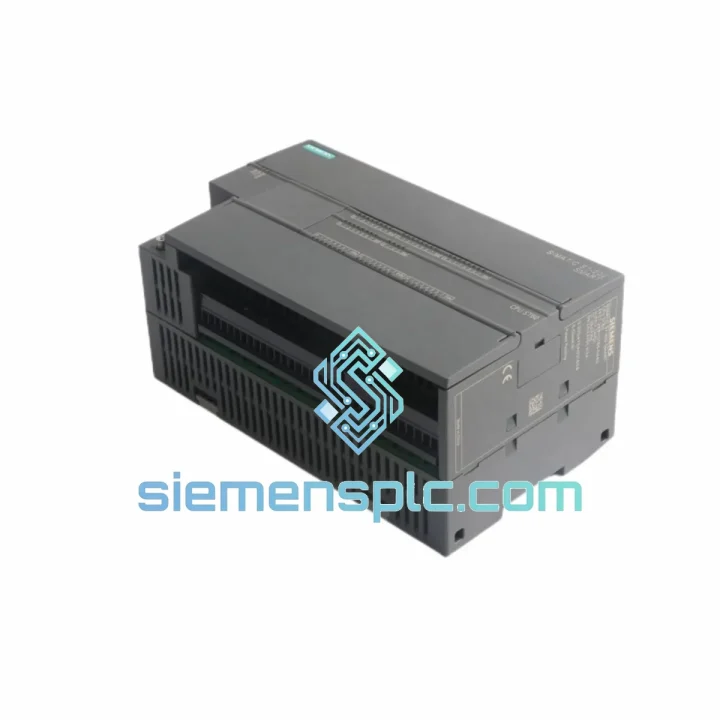
Request verified availability, condition, replacement risk review, packing options and courier lead time for 6ES7288-1ST60-0AA0.
Click Request Quote and the part number is inserted into the inquiry form automatically.
Core fields for model confirmation and RFQ routing. Detailed product narrative remains below.
Your line stopped. The HMI is blank. The CPU fault LED is solid red. You’ve already pulled the module and confirmed it’s the Siemens 6ES7288-1ST60-0AA0 — the ST60 CPU at the heart of your S7-200 SMART system. You don’t need a sales pitch. You need the part on a plane tonight.
We stock the 6ES7288-1ST60-0AA0 in Xiamen and ship same-day via DHL Express or FedEx International Priority. Most destinations in Southeast Asia, the Middle East, and Europe receive delivery within 2–4 business days. While your procurement team is still filling out the requisition form, your replacement unit is already at the airport.
URGENT REQUIREMENT? Contact: [email protected] | WhatsApp: +86 18359268345
| Parameter | Specification |
|---|---|
| Part Number | 6ES7288-1ST60-0AA0 |
| Model Designation | ST60 |
| Series | SIMATIC S7-200 SMART |
| Digital Inputs | 36 × 24 V DC |
| Digital Outputs | 24 × Transistor (Source type) |
| Total Onboard I/O | 60 Points |
| Analog Input | 1 × 0–10 V DC (built-in) |
| Program Memory | 24 KB |
| Data Memory | 10 KB |
| Retentive Memory | 10 KB EEPROM |
| Communication | 1 × Ethernet RJ45 + 1 × RS485 |
| Supported Protocols | S7 Comm, Modbus TCP, OUC |
| Max Expansion Modules | 6 × EM + 1 × SB |
| Supply Voltage | 24 V DC (20.4–28.8 V) |
| Power Consumption | ≤ 15 W |
| Operating Temperature | 0 °C to +55 °C |
| Storage Temperature | −40 °C to +70 °C |
| Humidity | 5%–95% RH, non-condensing |
| Protection Class | IP20 |
| Mounting | DIN Rail / Panel Mount |
| Dimensions (W×H×D) | 175 × 100 × 81 mm |
| Weight | 540 g |
| Programming Software | STEP 7-Micro/WIN SMART V2.x |
| Certifications | CE, UL, IEC 61131-2, RoHS |
| Stock Status | ✅ Ready to Ship — Xiamen Warehouse |
Ten years on the floor taught me one thing: most ST60 failures follow a pattern. Here’s what you need to know before you swap the module.
Common Failure Modes on the 6ES7288-1ST60-0AA0:
1. SF/DIAG LED solid red — CPU in STOP with internal fault. This is the most common call I get. Nine times out of ten it’s a firmware corruption caused by a power surge or improper shutdown during a program download. Before condemning the CPU, try a hard reset: hold the MODE switch to STOP for 3 seconds, then cycle 24 V DC power. If the LED clears and the CPU enters RUN, back up your program immediately via STEP 7-Micro/WIN SMART and check your 24 V supply quality — ripple above 200 mV will kill these CPUs repeatedly.
2. CPU enters RUN but outputs don’t switch. Check the output group fusing first. The ST60 transistor outputs are grouped in blocks of 8, each with a shared 24 V supply terminal. A blown external fuse on one output group will leave the other groups functional. Measure 24 V at the L+ terminal of each output group before pulling the module.
3. Ethernet port unresponsive — can’t connect from STEP 7-Micro/WIN SMART. The ST60 ships with a default IP of 192.168.2.1. If your network is on a different subnet, you must use the “Find & Replace IP” function in Micro/WIN SMART (Communications → Find CPU) via direct Ethernet cable — not through a switch — to reassign the IP. A factory reset (MODE switch sequence: STOP → TERM → STOP × 3 within 5 seconds) will restore the default IP if the address has been lost.
4. RTC (Real-Time Clock) losing time after power cycle. The ST60 has a built-in RTC backed by a supercapacitor, not a replaceable battery. After extended storage or a deep discharge, the supercap needs 24–48 hours at 24 V DC to fully recharge. If the RTC continues to lose time after recharging, the supercap has degraded — this is a module-level failure and the CPU must be replaced.
Replacement Procedure — Step by Step:
Step 1 — Backup first. If the old CPU still powers on, connect via Ethernet and upload the program block (OB1 + all SBs + DB blocks) and system data (hardware configuration) using STEP 7-Micro/WIN SMART. Save to a dated project folder. Do not skip this step even if you think you have a recent backup — field programs drift.
Step 2 — Document the IP configuration. Note the CPU IP address, subnet mask, and gateway from the Communications settings in Micro/WIN SMART. You’ll need to re-enter these on the new module.
Step 3 — Power down the panel. Isolate 24 V DC supply to the CPU and all expansion modules. The S7-200 SMART does not support hot-swap. Attempting to remove the CPU under power will corrupt the EM bus and may damage expansion modules.
Step 4 — Disconnect the EM bus connector. The expansion modules connect via a ribbon-style bus connector on the right side of the CPU. Slide it out horizontally — do not lever it. Label the connector orientation before removal.
Step 5 — Remove wiring from CPU terminals. The ST60 has three terminal blocks: power supply (L+/M), digital inputs (I0.0–I4.3), and digital outputs (Q0.0–Q2.7). Photograph the wiring before removal. Terminal blocks are removable as a unit on most panel builds — check if yours are plug-in type.
Step 6 — Swap the module. The replacement 6ES7288-1ST60-0AA0 is mechanically identical. Mount on DIN rail, reconnect terminal blocks and EM bus connector.
Step 7 — Configure IP address before powering expansion modules. Connect a laptop directly to the CPU Ethernet port. Use Micro/WIN SMART to assign the correct IP. Power up the full panel only after IP is confirmed.
Step 8 — Download program and verify. Download the backed-up project. Force a few I/O points to verify wiring integrity before returning to AUTO mode. Check the EM module status in the hardware configuration — all modules should show green.
Firmware Note: The 6ES7288-1ST60-0AA0 firmware version is embedded and not field-upgradeable via standard means. If your application uses specific Micro/WIN SMART V2.4+ features (e.g., enhanced motion control, extended Modbus FC), verify the firmware version via CPU → System Block → CPU Information in Micro/WIN SMART after replacement. Firmware mismatches between CPU and EM modules can cause EM communication errors (Error Code 0x0003).
The S7-200 SMART ST60 was not designed for a climate-controlled server room. It was built for the factory floor — and the 6ES7288-1ST60-0AA0 reflects that in every design decision.
The PCB assembly uses a conformal coating process that protects against condensation, industrial cleaning agents, and airborne particulates common in food processing, textile, and chemical environments. Humidity cycling between 5% and 95% RH — the kind of swing you see in coastal facilities or plants with steam processes — does not degrade the coating or cause inter-trace leakage on the logic board.
Vibration resistance is validated to IEC 60068-2-6: 10–57 Hz at 0.075 mm displacement, 57–150 Hz at 1 g. In practice, this covers the harmonic frequencies generated by most industrial motors, compressors, and press machinery when the CPU is DIN-rail mounted with proper end stops. I’ve seen ST60 units running continuously on the frame of a 200-ton stamping press for over three years without a single CPU fault attributable to vibration.
Shock resistance per IEC 60068-2-27 (15 g, 11 ms half-sine) means the module survives the kind of mechanical impact that happens during panel installation, forklift incidents near control cabinets, and emergency shutdowns that slam contactors. The internal EEPROM retains program data through power loss and mechanical shock without a battery — a critical advantage over older CPU designs that relied on RAM with battery backup.
Thermal performance is rated to 55 °C ambient without derating. In practice, inside a sealed steel enclosure in a tropical climate, ambient can easily reach 45–50 °C. The ST60 handles this without throttling or fault. For installations above 55 °C, add a panel air conditioner or heat exchanger — do not rely on ventilation slots alone.
The 24 V DC power input tolerates a supply range of 20.4–28.8 V, providing headroom for voltage drop across long cable runs and the transient dips caused by large motor starts on the same distribution panel. Built-in reverse polarity protection prevents damage from wiring errors during installation or maintenance.
Our warehouse is located in Xiamen, Fujian Province — one of China’s primary export hubs with direct access to Xiamen Gaoqi International Airport and Xiamen Port. This geography is not accidental. It means your urgent order moves fast.
Same-Day Dispatch: Orders confirmed and payment cleared before 15:00 CST ship the same business day. We maintain pre-packed export cartons for high-velocity SKUs including the 6ES7288-1ST60-0AA0, so there is no pick-and-pack delay.
DHL Express: Our primary carrier for urgent shipments. Xiamen to Singapore: 1–2 days. Xiamen to Dubai: 2–3 days. Xiamen to Frankfurt: 2–3 days. Xiamen to Los Angeles: 3–4 days. DHL account rates apply — no retail surcharges.
FedEx International Priority: Available as an alternative for destinations where FedEx has stronger last-mile coverage. Transit times are comparable to DHL. We select the faster option for your destination by default unless you specify a carrier preference.
Export Documentation: Every shipment includes a commercial invoice, packing list, and certificate of origin (CO) as standard. For customers requiring an EUR.1 movement certificate, Form A GSP certificate, or specific customs declaration formats, notify us at order placement. We handle all export customs clearance from the China side — your freight arrives at destination customs ready for import.
HS Code: The 6ES7288-1ST60-0AA0 is classified under HS 8537.10 (Boards, panels, consoles, desks, cabinets and other bases for electric control or the distribution of electricity). Duty rates vary by destination — consult your import broker for the applicable rate in your country.
Tracking: AWB number provided within 2 hours of dispatch. Real-time tracking link sent to your registered email. WhatsApp updates available on request for critical shipments.
Production line down? Don’t wait for a callback queue. Reach us directly:
📧 Email: [email protected]
📱 WhatsApp: +86 18359268345
🌐 Web: siemensplc.com
Response time: < 30 minutes during business hours (08:00–22:00 CST, Mon–Sat). Emergency WhatsApp monitored 24/7 for active downtime situations.
© 2026 siemensplc.com. All rights reserved.
We check the full part number, brand, series and visible nameplate information before quotation.
Sales confirms stock path, condition option, quantity and realistic lead time for export dispatch.
DHL, FedEx, UPS or buyer courier arrangements can be reviewed with packing requirements.
Similar brand or category products for fast comparison and multi-item RFQ lists.