Siemens PLC sourcing desk · Multi-brand automation spares [email protected] +86 18359268345
Siemens In Stock OK

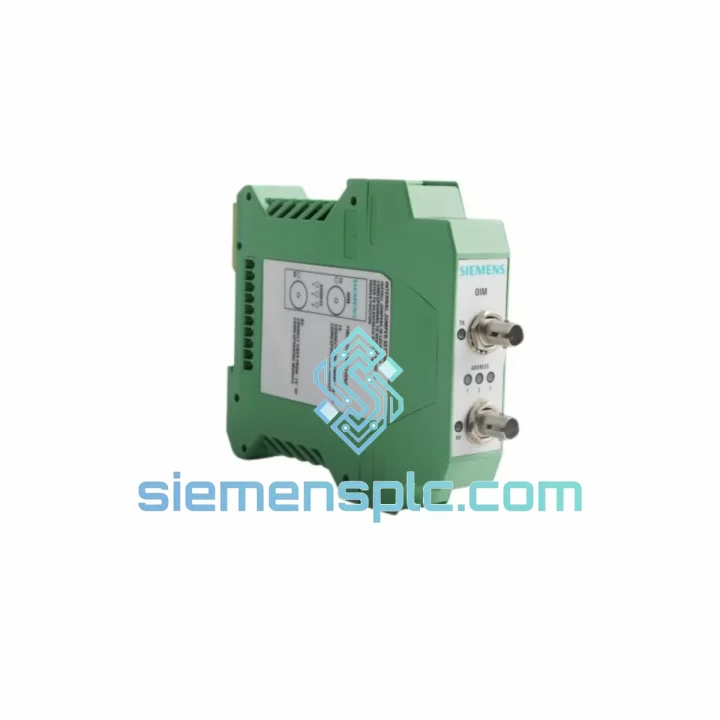
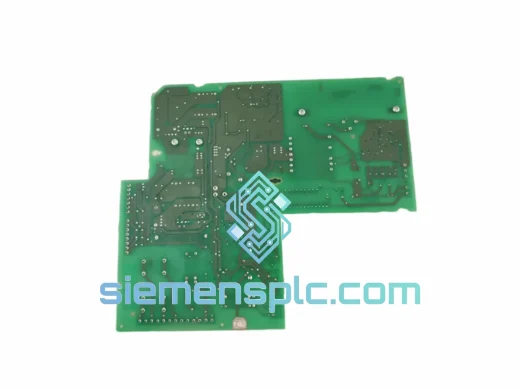
Siemens 16804-43 Optical Interface Module

Request verified availability, condition, replacement risk review, packing options and courier lead time for 16804-43.

Exact part16804-43 RFQ auto-fillPart number attached Export packingDHL / FedEx / UPS Sales replyEmail or WhatsApp
BrandSiemens Part Number16804-43 ConditionAvailability Check Lead TimeRFQ Confirmation DocumentsDatasheet / photos by RFQ ShippingExport packing available
Auto-filled RFQ 16804-43

Click Request Quote and the part number is inserted into the inquiry form automatically.

Procurement Data

Key Product Information

Core fields for model confirmation and RFQ routing. Detailed product narrative remains below.

Brand
Siemens
Primary Part Number
16804-43
Product Type
Optical Interface Module
Series / Family
SIMOVERT
Manufacturer
Siemens
Country of Origin
DE
Catalog Category
Motor Drives
Operating Temp.
0°C to +55°C
Compliance
CE, UL
Model confirmed for inquiry 16804-43 Send quantity, destination and urgency. The RFQ form keeps this part number attached.
Request Quote
Product Overview

Siemens 16804-43 OIM – Ship Today, Restart Tomorrow: Every Hour of Downtime Costs You Money

Your SIMOVERT MASTERDRIVES line is down. The fiber-optic ring is broken. Production is bleeding cash by the minute. The Siemens 16804-43 Optical Interface Module (OIM) is the exact card that bridges your drive system’s high-speed optical bus — and we have it on the shelf in Xiamen, packed and ready to move via DHL Express within hours of your order confirmation. No lead-time games. No “check back in 6 weeks.” Real stock, real speed.

URGENT REQUIREMENT? Contact: [email protected] | WhatsApp: +86 18359268345


Quick Technical Datasheet

Parameter Value Status
Part Number 16804-43 ✅ Ready to Ship
Manufacturer Siemens 100% Original OEM
Module Type OIM – Optical Interface Module
Compatible Platform SIMOVERT MASTERDRIVES MC/VC, SIMODRIVE 611
Interface Fiber-Optic Duplex (660 nm / 820 nm)
Bus Topology Optical peer-to-peer ring / point-to-point
Power Supply Via backplane / system bus
Operating Temperature 0°C to +55°C
Weight 140 g
Compliance CE, UL
Origin Germany
Dispatch Location Xiamen, China ✅ Ready to Ship

Troubleshooting & Replacement Tips

After ten years of pulling failed OIMs out of SIMOVERT cabinets at 2 AM, here is what actually matters on the bench:

Common Failure Signatures

  • F023 / F024 fault codes on SIMOVERT MASTERDRIVES — optical ring communication loss. Before condemning the drive board, swap the OIM first. It fails far more often than the CU or PMU.
  • Intermittent F023 that clears on power cycle — classic sign of a degraded fiber-optic transmitter LED inside the 16804-43. The LED output drops below threshold under heat. Replace the module; cleaning the fiber ends alone will not fix it.
  • All drives in the ring go to fault simultaneously — one failed OIM breaks the entire optical ring. Isolate by disconnecting drives one at a time until the ring recovers, then you have your culprit.
  • F028 – Peer-to-peer communication error — check fiber bend radius first (minimum 25 mm for plastic optical fiber). If fiber is intact, the OIM transmitter or receiver is the next suspect.

Step-by-Step Replacement Procedure

  1. Power down the drive cabinet — wait the full DC bus discharge time (minimum 5 minutes after mains off; verify with a meter before touching anything).
  2. Label and photograph all fiber connections before removal. TX and RX are not always marked clearly on aged modules; a photo saves you from a reversed ring on restart.
  3. Note the DIP switch / parameter settings on the outgoing module if accessible. On SIMOVERT MC units, the OIM address is typically set via P918 (peer-to-peer address) in the drive parameters — record this before the board goes dark.
  4. Seat the new 16804-43 firmly into the option slot. The module uses a card-edge connector; partial seating causes intermittent faults that are maddening to diagnose.
  5. Reconnect fiber in correct TX→RX order. Clean fiber ends with an IEC 61300-3-35 grade cleaner before insertion — contamination is the number-one cause of “new module, same fault.”
  6. Restore P918 peer address and any SIMOLINK node parameters before powering up. Firmware version mismatch between the OIM and the CU board can cause F023 even with a good module — confirm firmware revision compatibility if the fault persists after a clean swap.
  7. Power up and monitor — the optical ring should self-initialize within 2–3 seconds. If F023 returns, the issue is upstream (fiber path or adjacent drive OIM).

Configuration Checklist Before Commissioning

  • ☐ P918 peer-to-peer address restored and unique within the ring
  • ☐ Fiber TX/RX polarity confirmed correct
  • ☐ Fiber ends cleaned and inspected
  • ☐ Firmware revision on CU board compatible with 16804-43 hardware revision
  • ☐ DC bus fully discharged before module swap
  • ☐ All other drives in the ring confirmed operational before final test

Reliability in Harsh Conditions

The 16804-43 was engineered for the environments where most electronics give up. Siemens designed this module to operate continuously inside drive cabinets that see vibration from heavy presses, radiated heat from adjacent power electronics, and humidity swings in coastal or chemical plant installations.

The fiber-optic interface is inherently immune to the electromagnetic interference that destroys copper-based communication cards in high-power drive environments. Where RS-485 or CAN bus cards fail within months next to large VFDs, the optical ring keeps running. The module’s conformal-coated PCB resists condensation and airborne contaminants — a critical factor in paper mills, food processing, and offshore applications where humidity regularly exceeds 90% RH.

Vibration tolerance is validated to IEC 60068-2-6 standards, covering the 5–150 Hz range that covers both structural resonance from heavy machinery and transport shock. Units sourced through our Xiamen facility are individually inspected for physical integrity — connector pins, fiber port alignment, and PCB condition — before dispatch. We do not ship modules with cracked housings, bent pins, or damaged fiber ports regardless of whether they “test good.” A module that passes a bench test but has a hairline crack in the fiber port will fail again within weeks under vibration.


Global Express Logistics

Our dispatch hub in Xiamen, China is positioned for fast access to both DHL and FedEx international express networks. Here is how a typical urgent order moves:

  • Order confirmed before 14:00 CST → same-day packing and handover to DHL/FedEx courier
  • DHL Express Worldwide: 1–3 business days to most of Europe, Southeast Asia, Middle East, and Australia
  • FedEx International Priority: 1–2 business days to North America
  • Export documentation: Commercial invoice, packing list, and HS code (8537.10 / 8504.40 as applicable) prepared and attached to every shipment for smooth customs clearance
  • Tracking: AWB number sent within 2 hours of carrier pickup
  • Packaging: Anti-static bag, foam-lined carton, fragile labeling — the module arrives in the same condition it left our warehouse

For destinations with import restrictions or specific customs requirements (India IGST, Brazil ICMS, EU IOSS), contact us before ordering and we will advise on the correct documentation structure to avoid clearance delays.


Contact Information

📧 Email: [email protected]
💬 WhatsApp: +86 18359268345
🌐 Web: siemensplc.com
© 2026 siemensplc.com. All rights reserved.

Ready to quote

Send This Part Number to Sales

[email protected]
RFQ workflow

Confirmation Process

Quality workflow ->
01Model confirmation

We check the full part number, brand, series and visible nameplate information before quotation.

02Availability reply

Sales confirms stock path, condition option, quantity and realistic lead time for export dispatch.

03Packing & courier

DHL, FedEx, UPS or buyer courier arrangements can be reviewed with packing requirements.