Siemens PLC sourcing desk · Multi-brand automation spares [email protected] +86 18359268345
Omron In Stock OK

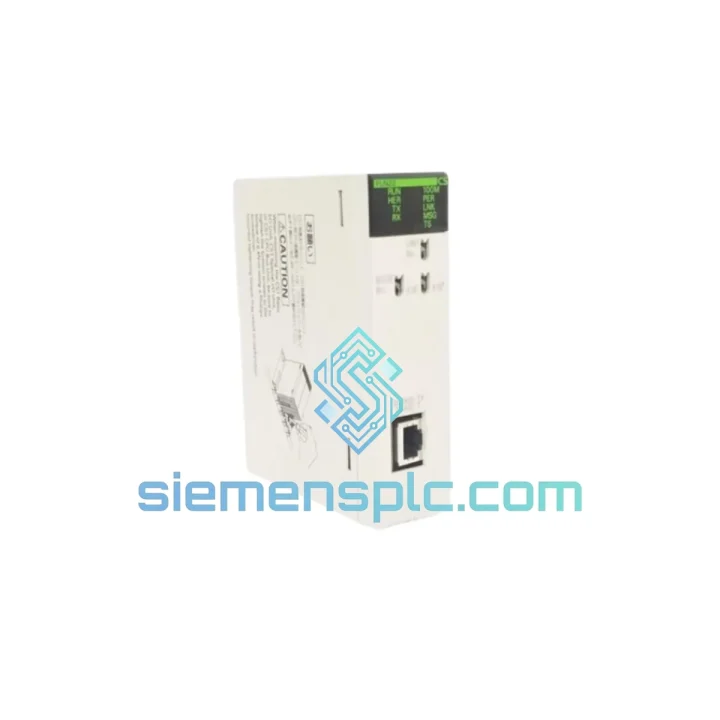
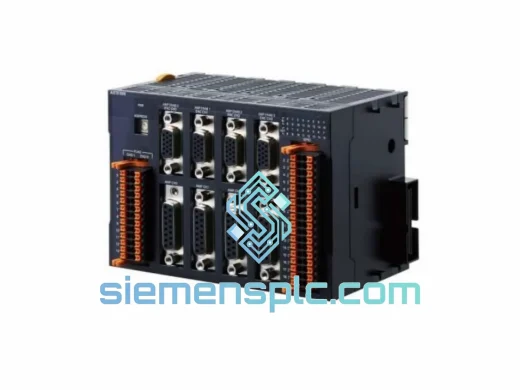
Omron CS1W-FLN22 PLC Communication Module

Request verified availability, condition, replacement risk review, packing options and courier lead time for CS1W-FLN22.

Exact partCS1W-FLN22 RFQ auto-fillPart number attached Export packingDHL / FedEx / UPS Sales replyEmail or WhatsApp
BrandOmron Part NumberCS1W-FLN22 ConditionAvailability Check Lead TimeRFQ Confirmation DocumentsDatasheet / photos by RFQ ShippingExport packing available
Auto-filled RFQ CS1W-FLN22

Click Request Quote and the part number is inserted into the inquiry form automatically.

Procurement Data

Key Product Information

Core fields for model confirmation and RFQ routing. Detailed product narrative remains below.

Brand
Omron
Primary Part Number
CS1W-FLN22
Product Type
PLC Communication Module
Series / Family
CS1 Series
Country of Origin
JP
Catalog Category
Communication
Operating Temp.
0 °C to 55 °C
Humidity
10%–90% RH, non-condensing
Model confirmed for inquiry CS1W-FLN22 Send quantity, destination and urgency. The RFQ form keeps this part number attached.
Request Quote
Product Overview

CS1W-FLN22 Down? Every Minute of Downtime Costs You — Get It Back Online Fast

Your CS1 Series PLC just dropped off the FL-net. The line is stopped. Maintenance is on the phone. You already know the CS1W-FLN22 is the culprit — you’ve seen this failure before. What you need right now is a verified replacement unit on its way to your facility, not a three-week lead time from a regional distributor.

We stock the Omron CS1W-FLN22 in Xiamen and ship globally via DHL Express and FedEx International Priority. Most orders clear customs and arrive at your plant within 3–5 business days. For critical shutdowns, contact us directly — we’ll coordinate same-day dispatch where stock permits.

URGENT REQUIREMENT? Contact: [email protected] | WhatsApp: +86 18359268345

Quick Technical Datasheet

Parameter Specification
Part Number CS1W-FLN22
Brand Omron
Series CS1 / CJ1 Compatible
Module Function FL-net (OPCN-2) Communication Unit
Network Protocol FL-net (OPCN-2), IEEE 802.3 Ethernet-based
Transmission Speed 10 Mbps (10BASE-T)
Max Network Nodes 254 nodes per FL-net segment
Cyclic Word Area 512 words
Cyclic Bit Area 8,192 bits
Message Communication Supported (token-passing)
Physical Connector RJ-45 (10BASE-T)
Backplane Power Draw 5 VDC, 0.49 A
Operating Temperature 0 °C to 55 °C
Storage Temperature −20 °C to 75 °C
Humidity 10%–90% RH, non-condensing
Unit Weight Approx. 200 g
Certifications CE, UL, cUL, FL-net (OPCN-2) Certified, RoHS
Origin Japan
Stock Status ✔ Ready to Ship — Xiamen Warehouse

Troubleshooting & Replacement Tips

The CS1W-FLN22 fails in predictable ways. Here’s what field experience tells you to check before you even pull the module:

Common Failure Indicators:

  • RUN LED off, ERR LED solid red: Hardware fault — module has failed internal self-diagnostics. Replacement is the only path forward.
  • COMM LED not blinking: No FL-net token activity. Could be a dead module, a bad RJ-45 port, or a network topology issue. Swap the module first — it’s the fastest variable to eliminate.
  • Intermittent node dropout (Error Code 8003 / 8004 in CX-Integrator): Often caused by a degraded internal oscillator or marginal power supply on the backplane. Check 5 V rail with a meter before condemning the module outright.
  • Node address conflict after replacement: The CS1W-FLN22 stores its FL-net node address in non-volatile memory. On a new unit, the default node address is typically 1. You must reassign it via CX-Integrator before the unit will participate correctly in the network.

Step-by-Step Replacement Procedure:

  1. Power down the CS1 rack. Do not hot-swap this module — the CS1W-FLN22 is not designed for live insertion. Confirm the CPU is in STOP mode and the rack power supply is off.
  2. Document the existing node address. Before removing the failed unit, record the node address from CX-Integrator or from the unit’s front-panel label if it was marked during commissioning. You’ll need this for the replacement.
  3. Seat the replacement unit in the same slot. The CS1W-FLN22 uses the CS1 backplane bus — slot position matters for I/O table mapping. Install in the identical slot as the failed unit.
  4. Power up and connect CX-Integrator. Navigate to Network > FL-net > Unit Setup. Assign the correct node address (1–254, must be unique on the segment). Set the cyclic data area parameters to match your existing network configuration — word area start address and bit area start address must align with the other nodes’ expectations.
  5. Verify token circulation. In CX-Integrator’s FL-net monitor, confirm the replacement node appears in the node list and the COMM LED is blinking at the expected rate. Check that cyclic data is updating correctly in the CPU’s I/O memory.
  6. Firmware note: The CS1W-FLN22 firmware is embedded and not field-upgradeable via standard tools. If you’re replacing an older revision unit with a newer hardware revision, verify compatibility with your CPU firmware version — particularly for CS1G/CS1H CPUs running firmware below V3.0.

Configuration Checklist Before Declaring the Line Ready:

  • Node address confirmed unique on FL-net segment
  • Cyclic word area and bit area start addresses match network map
  • COMM LED blinking — token is circulating
  • All expected nodes visible in CX-Integrator node list
  • CPU I/O table refreshed and FL-net unit recognized
  • No active error codes in CPU error log

Reliability in Harsh Conditions

The CS1W-FLN22 was engineered for continuous operation in environments that would kill consumer-grade electronics. Omron’s CS1 platform is deployed in automotive stamping lines, chemical processing plants, and offshore utility infrastructure — places where ambient temperature swings, persistent vibration, and airborne contaminants are daily realities, not edge cases.

The module’s conformal-coated PCB resists moisture ingress and corrosive atmospheres. The backplane connector is rated for thousands of insertion cycles, which matters when you’re doing scheduled maintenance on a rack that’s been in service for a decade. Operating range of 0 °C to 55 °C covers the vast majority of industrial enclosure environments, even in poorly climate-controlled facilities in tropical regions.

Vibration resistance meets IEC 60068-2-6 standards — the module won’t develop intermittent faults from the mechanical stress of a press line or a compressor room. EMC compliance under CE (2014/30/EU) means it holds its network connection even in electrically noisy environments with variable-frequency drives and large motor starters nearby.

Units shipped from our Xiamen warehouse are stored in climate-controlled conditions and packed in anti-static, foam-lined packaging. They arrive at your facility in the same condition they left ours.

Global Express Logistics

Our dispatch operation runs out of Xiamen, Fujian — one of China’s primary export hubs with direct access to DHL, FedEx, and UPS international gateways. Here’s how a typical urgent order moves:

  • Order confirmed before 14:00 CST: Same-day pick, pack, and handoff to carrier. Tracking number issued within 2 hours of dispatch.
  • DHL Express Worldwide: Southeast Asia — 1–2 days. Europe — 3–4 days. Americas — 3–5 days. Middle East / Africa — 4–6 days.
  • FedEx International Priority: Available as an alternative for destinations where FedEx has stronger last-mile coverage. Transit times comparable to DHL.
  • Export documentation: Commercial invoice, packing list, and certificate of origin are prepared for every shipment. HS Code 8537.10 is pre-declared. For customers requiring a Certificate of Conformance or material traceability documentation, request at time of order.
  • Customs clearance: We declare accurate commercial values and provide complete HS code documentation to minimize customs hold risk. For EU imports, EORI-compatible documentation is standard.
  • Insurance: All shipments are covered for declared value. For high-value orders, extended cargo insurance is available on request.

If your plant is down and every hour matters, call or WhatsApp us directly. We’ll confirm stock, cut the paperwork fast, and get the unit moving the same day.

Contact Information

Email: [email protected]
WhatsApp: +86 18359268345
Web: siemensplc.com
© 2026 siemensplc.com. All rights reserved.

Ready to quote

Send This Part Number to Sales

[email protected]
RFQ workflow

Confirmation Process

Quality workflow ->
01Model confirmation

We check the full part number, brand, series and visible nameplate information before quotation.

02Availability reply

Sales confirms stock path, condition option, quantity and realistic lead time for export dispatch.

03Packing & courier

DHL, FedEx, UPS or buyer courier arrangements can be reviewed with packing requirements.