Siemens
RFQ Ready
Siemens T8191 Safety Controller Module – Trusted TMR Series
Trusted Series
Origin DE
Safety Controller Module
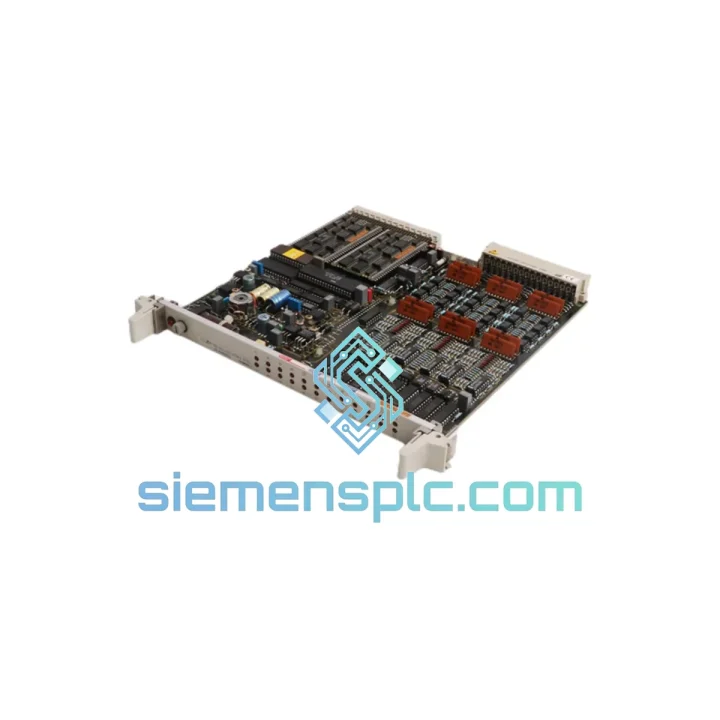
Request verified availability, condition, replacement risk review, packing options and courier lead time for 6DP1360-8BA.
Click Request Quote and the part number is inserted into the inquiry form automatically.
Core fields for model confirmation and RFQ routing. Detailed product narrative remains below.
Every minute your TELEPERM M automation station sits idle, the losses compound. A failed FUM360 function module doesn’t just halt a loop — it can cascade across an entire AS230 or AS388 rack, taking process control offline in power plants, chemical reactors, and continuous manufacturing lines where stopping is never an option. We stock the SIEMENS 6DP1360-8BA FUM360 precisely for this moment. Verified, tested, packed, and ready to leave Xiamen on the next available DHL or FedEx flight to your facility — anywhere on the planet.
This isn’t a catalog listing. It’s a lifeline for engineers who need a confirmed, traceable spare in hand before the next shift starts.
⚡ URGENT REQUIREMENT? Contact us now:
📧 [email protected] | 📱 WhatsApp: +86 18359268345
| Manufacturer | SIEMENS AG |
| Part Number | 6DP1360-8BA |
| Module Designation | FUM360 — Function Module |
| Platform Compatibility | TELEPERM M — AS230 / AS388 Automation Stations |
| Module Function | Configurable control logic, PID, arithmetic & sequencing execution |
| Form Factor | Eurocard, TELEPERM M backplane bus-compatible |
| Operating Temperature | 0 °C to +60 °C |
| Storage Temperature | −40 °C to +70 °C |
| Humidity | 5 % – 95 % RH, non-condensing |
| Power Supply | Via TELEPERM M backplane bus (no external PSU required) |
| Engineering Tool | SIEMENS PROGRAF AP |
| Country of Origin | Germany |
| Weight | 520 g (approx.) |
| Compliance | CE, UL (per TELEPERM M platform certification) |
| Stock Status | ✅ Ready to Ship — Xiamen Warehouse |
Swapping a FUM360 in a live TELEPERM M rack is not a plug-and-play exercise. Here’s what ten years of field calls have taught us about getting it right the first time:
1. Confirm the Fault Before You Pull the Card
Before touching the module, check the AS230/AS388 diagnostic display for fault codes. Common FUM360-related faults include F01 (module not responding), F07 (configuration mismatch), and F12 (internal watchdog timeout). An F07 after a cold restart almost always points to a firmware version mismatch between the replacement module and the existing rack configuration — not a hardware failure. Pulling a healthy card wastes time and risks introducing new faults.
2. Document the Slot Address Before Removal
TELEPERM M uses physical slot addressing. The FUM360’s rack position directly maps to its logical address in the PROGRAF AP configuration. Photograph the rack layout and note the exact slot number before extraction. Inserting the replacement into the wrong slot will generate an address conflict that requires a full rack re-initialization to clear.
3. Check DIP Switch Settings on the Replacement Module
Some FUM360 variants carry hardware DIP switches on the PCB edge that set interrupt priority or bus arbitration parameters. These must match the extracted module exactly. Compare switch positions under good lighting before insertion — a single bit difference here will cause intermittent communication errors that are notoriously difficult to trace.
4. Firmware Version Matching
Verify the firmware label on the replacement module against the version recorded in your plant’s spare parts register. TELEPERM M AS388 stations running firmware revision 4.x and above may reject FUM360 modules with firmware below 3.2. If you’re unsure of your station’s firmware level, read it from the AS operator panel before ordering. We can confirm the firmware version of our stock units on request.
5. Cold-Start Sequence After Insertion
After seating the replacement module, perform a controlled cold start of the affected automation station — not a hot swap. TELEPERM M does not support live module replacement on the FUM360 series. Initiate the cold start from the operator station, allow the self-test cycle to complete (typically 45–90 seconds), and verify all function block outputs return to their last valid state before releasing the station to automatic control.
6. Post-Replacement Loop Check
Force each PID loop associated with the replaced FUM360 into manual mode and verify setpoint tracking before returning to auto. A firmware-loaded module that has lost its tuning parameters will drive outputs to their initialization defaults — which in a boiler or reactor context can mean a hard trip.
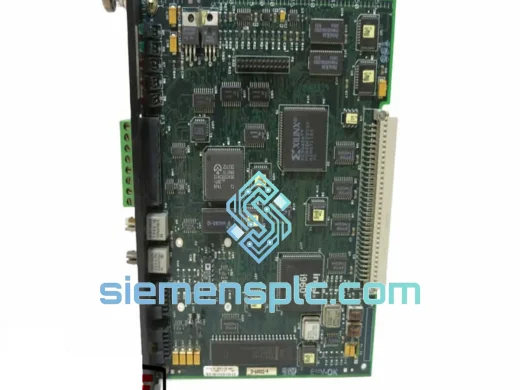
The SIEMENS TELEPERM M FUM360 was engineered for environments that would destroy consumer-grade electronics in hours. The module’s conformal-coated PCB resists condensation and airborne contaminants common in coastal chemical plants and offshore platforms. Vibration damping on the card-edge connector maintains signal integrity under the continuous mechanical stress of rotating machinery environments — compressor halls, turbine decks, and pump stations where the floor never stops moving.
Thermal performance is equally robust. The FUM360 operates continuously at 60 °C ambient without derating, making it suitable for non-air-conditioned control rooms in tropical climates and desert installations where summer cabinet temperatures routinely exceed what most industrial electronics can sustain. Internal components are selected for extended temperature cycling endurance, not just steady-state operation — because real plants heat up and cool down every day.
EMC shielding on the TELEPERM M backplane bus interface suppresses conducted and radiated interference from variable-frequency drives, high-current switchgear, and welding equipment operating in adjacent bays. In our experience, FUM360 modules pulled from 20-year-old installations frequently test fully functional — a testament to the design margins SIEMENS built into the TELEPERM M platform from the outset.
Every unit we ship undergoes a pre-dispatch functional check: power-on self-test verification, bus communication handshake confirmation, and visual inspection of connector pins and PCB surface. Units showing any sign of corrosion, pin damage, or component stress are quarantined and not offered for sale. You receive a module that is ready to go into service, not one that needs to be evaluated on your bench at 2 AM during a plant emergency.
Our warehouse is located in Xiamen, Fujian Province, China — one of the country’s primary export hubs with direct access to international freight lanes via Xiamen Gaoqi International Airport and Xiamen Port. This geography is deliberate: it gives us same-day handoff to DHL Express, FedEx International Priority, and UPS Worldwide Express for shipments to Europe, the Americas, Southeast Asia, the Middle East, and Australia.
Typical transit times from Xiamen:
Orders confirmed before 14:00 CST are processed for same-day dispatch. You receive a tracking number within 2 hours of shipment. All international shipments include a commercial invoice, packing list, and certificate of origin — the complete documentation set required for customs clearance in most jurisdictions. For shipments to the EU, we provide the necessary HS code declaration (HS 8537.10) to facilitate smooth import processing. Dangerous goods classification does not apply to this module.
For plant shutdowns or turnaround projects requiring multiple units, we coordinate consolidated shipments to reduce per-unit freight cost without sacrificing delivery speed. Contact us with your full BOM and we’ll build a logistics plan around your maintenance window.
📧 Email: [email protected]
📱 WhatsApp: +86 18359268345
🌐 Web: siemensplc.com
© 2026 siemensplc.com. All rights reserved.
We check the full part number, brand, series and visible nameplate information before quotation.
Sales confirms stock path, condition option, quantity and realistic lead time for export dispatch.
DHL, FedEx, UPS or buyer courier arrangements can be reviewed with packing requirements.
Similar brand or category products for fast comparison and multi-item RFQ lists.