

Siemens
RFQ Ready
Siemens 6AV7240-0HC07-0PA0 Industrial Panel PC Motherboard – SIMATIC IPC477D
SIMATIC
Origin DE
Industrial Panel PC Motherboard
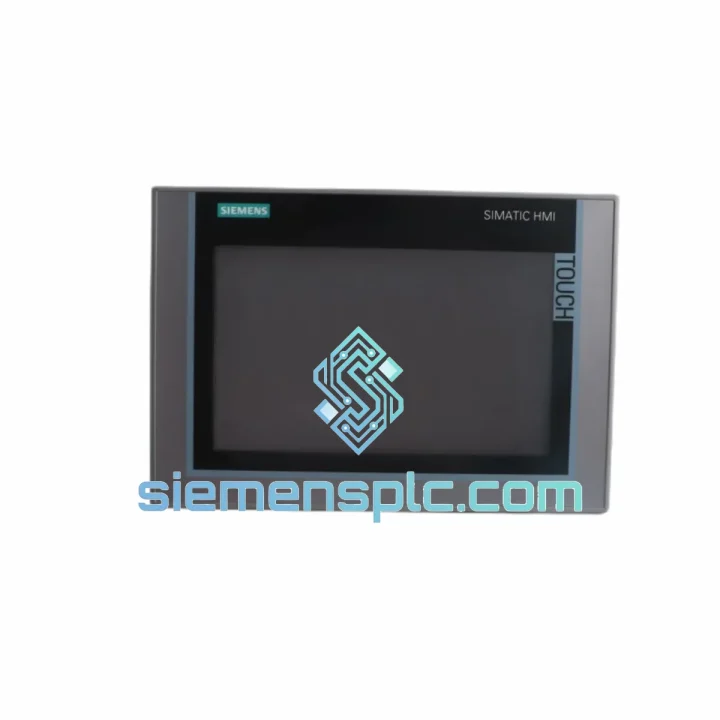
Request verified availability, condition, replacement risk review, packing options and courier lead time for 6AV2124-0JC01-0AX0.
Click Request Quote and the part number is inserted into the inquiry form automatically.
Core fields for model confirmation and RFQ routing. Detailed product narrative remains below.
Every minute your line sits dark costs real money. A failed HMI panel shouldn’t be the reason your production manager is on the phone at 2 AM. The Siemens 6AV2124-0JC01-0AX0 — SIMATIC HMI Comfort Panel, 9-inch WVGA resistive touch — is on our shelf in Xiamen right now. We’ve shipped this exact part to automotive plants in Germany, food processing facilities in Southeast Asia, and water treatment stations across the Middle East. Same-day dispatch is not a marketing line; it’s how we operate.
If your operator screen is frozen, showing a white display, or simply dead after a power surge, stop troubleshooting the panel itself. Pull it, swap it, and get your process back online. We’ll handle the logistics while your team handles the restart.
⚡ URGENT REQUIREMENT?
Email: [email protected] | WhatsApp: +86 18359268345
| Part Number | 6AV2124-0JC01-0AX0 ✅ Ready to Ship |
| Brand | Siemens |
| Series | SIMATIC HMI Comfort Panel |
| Display | 9.0″ TFT Widescreen, 16:9, 800×480 px (WVGA) |
| Colors | 16 million (24-bit) |
| Operating System | Windows CE 6.0 |
| Processor | ARM Cortex-A8, 600 MHz |
| Memory | 128 MB RAM / 256 MB Flash |
| Touch Type | Resistive, single-touch |
| Interfaces | 2× PROFINET (RJ45), 1× MPI/PROFIBUS DP (RS-485), 2× USB 2.0, 1× SD slot |
| Supply Voltage | 24 V DC (19.2 – 28.8 V) |
| Power Draw | ~18 W typical |
| Protection | IP65 front / IP20 rear |
| Operating Temp | 0 °C to +50 °C |
| Storage Temp | -20 °C to +60 °C |
| Humidity | 10–90% RH, non-condensing |
| Dimensions (W×H×D) | ~260 × 183 × 46 mm |
| Weight | 1,880 g |
| Engineering Tool | SIMATIC WinCC Comfort / Advanced V13 SP1 or higher |
| Certifications | CE, UL, cULus, RoHS |
| Country of Origin | Germany |
| Stock Status | ✅ In Stock — Ready to Ship from Xiamen |
Ten years of field calls on Comfort Panels teach you the same lessons repeatedly. Here’s what actually matters when you’re standing in front of a dead 6AV2124-0JC01-0AX0:
Fault 1 — White Screen / Backlight On, No Content
Ninety percent of the time this is a corrupted CE 6.0 image, not a hardware failure. Before condemning the panel, attempt a firmware recovery via USB: hold the reset button during power-up to enter the BIOS loader, then reflash using the Siemens ProSave tool. If the loader itself won’t respond, the flash memory is gone — replace the panel.
Fault 2 — “No Connection to PLC” Runtime Error
Check the PROFINET port assignment first. On the 6AV2124-0JC01-0AX0, X1 and X2 are both active PROFINET ports but they are not a switch — they are two independent interfaces. If your project was configured on X1 and the cable is plugged into X2, you’ll get a connection timeout every time. Verify in WinCC Comfort under Device Settings → Interfaces.
Fault 3 — Touchscreen Calibration Drift
Resistive touch panels drift after thermal cycling. Access the calibration utility via Start → Settings → Control Panel → Stylus (CE 6.0 path). If calibration won’t hold across power cycles, the touch overlay is delaminating — a physical replacement is the only fix.
Fault 4 — Panel Boots to OS but WinCC Runtime Won’t Start
Check the project file path on the SD card or internal flash. CE 6.0 is case-sensitive on file paths. A project transferred from a Windows machine with mixed-case folder names will silently fail to load. Rename all folders to uppercase and re-transfer.
Replacement Configuration Checklist
The 6AV2124-0JC01-0AX0 was not designed for a climate-controlled server room. It was built for the floor — and it shows. The IP65-rated front bezel keeps out fine dust and directed water jets, which matters in food processing wash-down zones and outdoor pump stations where operators don’t stop to protect the HMI before hosing down the area.
The ARM Cortex-A8 processor runs without a cooling fan. No fan means no fan failure — one of the most common causes of HMI downtime in high-ambient-temperature environments like steel mills, foundries, and tropical outdoor enclosures. Passive thermal management keeps the unit operational from 0 °C to +50 °C without derating.
Vibration resistance is validated to IEC 60068-2-6 (sinusoidal) and IEC 60068-2-27 (shock). In practice, this means the panel survives panel-door mounting on heavy presses, compressor skids, and mobile equipment where vibration is constant. The resistive touch overlay, while less glamorous than capacitive, is immune to false touches from water droplets and gloved hands — a real advantage in wet or PPE-mandatory environments.
EMC immunity is certified to EN 61000-6-2, the industrial immunity standard. The panel handles the conducted and radiated interference generated by variable frequency drives, contactors, and welding equipment sharing the same cabinet — without display artifacts or communication dropouts that plague consumer-grade displays pressed into industrial service.
Units we supply are stored in climate-controlled warehousing in Xiamen, in original anti-static ESD packaging. Long-term storage in humid coastal environments degrades PCB surface finish and connector contacts; our inventory rotation policy ensures you receive a unit that hasn’t been sitting in a warehouse for three years.
Our dispatch hub is in Xiamen, Fujian — one of China’s primary export ports with direct DHL Express and FedEx International Priority service to over 220 countries. Here’s exactly how your order moves:
Day 0 — Order Confirmed: Payment or PO received before 14:00 CST triggers same-day picking and packing. The unit is inspected, photographed, and packed in double-wall carton with foam inserts. Export documentation (commercial invoice, packing list, HS code 8537.10) is prepared simultaneously.
Day 0–1 — Customs Clearance: We handle all Chinese export customs declarations. For destinations requiring import permits or specific HS code declarations (EU, US, Australia), we coordinate with your freight forwarder or use our established broker network.
Day 1–3 — In Transit: DHL Express typically delivers to Western Europe in 2–3 business days from Xiamen. North America: 3–4 days. Southeast Asia: 1–2 days. Middle East: 2–4 days. FedEx International Priority is available as an alternative for destinations where DHL coverage is limited.
Tracking: AWB number is emailed within 2 hours of dispatch. Real-time tracking is available via DHL/FedEx portals. For urgent shipments, our logistics team monitors the shipment and proactively contacts you if any customs hold occurs.
Import Duties: Buyer is responsible for destination country import duties and taxes. We can declare at actual transaction value or provide documentation to support your duty drawback claims if applicable. We do not under-declare — this protects your import compliance record.
📧 Email: [email protected]
📱 WhatsApp: +86 18359268345
🌐 Web: siemensplc.com
© 2026 siemensplc.com. All rights reserved.
We check the full part number, brand, series and visible nameplate information before quotation.
Sales confirms stock path, condition option, quantity and realistic lead time for export dispatch.
DHL, FedEx, UPS or buyer courier arrangements can be reviewed with packing requirements.
Similar brand or category products for fast comparison and multi-item RFQ lists.


