

Siemens
RFQ Ready
Siemens 6AV7240-0HC07-0PA0 Industrial Panel PC Motherboard – SIMATIC IPC477D
SIMATIC
Origin DE
Industrial Panel PC Motherboard
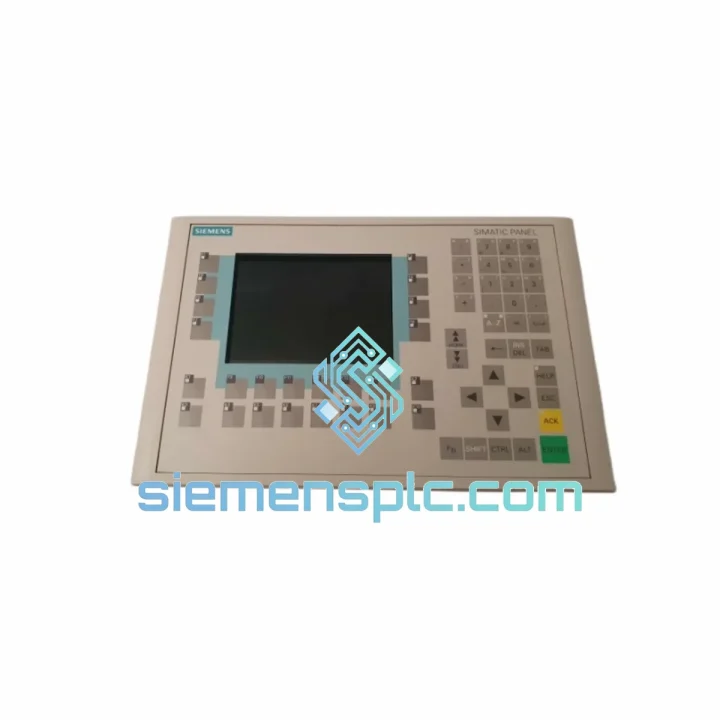
Request verified availability, condition, replacement risk review, packing options and courier lead time for 6AV6542-0CA10-0AX1.
Click Request Quote and the part number is inserted into the inquiry form automatically.
Core fields for model confirmation and RFQ routing. Detailed product narrative remains below.
Every minute your line sits idle, the losses compound. A failed HMI panel shouldn’t be the bottleneck that costs you a shift — or a contract. The Siemens 6AV6542-0CA10-0AX1 OP270 is one of the most widely deployed operator panels in SIMATIC S7-300/400 environments, and when it fails, there is no workaround. Operators go blind. Production stops. The pressure lands on you.
We stock the 6AV6542-0CA10-0AX1 in Xiamen, verified, boxed, and ready to clear customs today. Our logistics pipeline runs DHL Express and FedEx International Priority direct to your plant gate — most destinations in Asia, Europe, and the Americas receive within 3–5 business days from order confirmation. No broker delays, no grey-market risk, no excuses.
URGENT REQUIREMENT? Contact: [email protected] | WhatsApp: +86 18359268345
| Part Number | 6AV6542-0CA10-0AX1 ✅ Ready to Ship |
| Brand | Siemens |
| Series | SIMATIC HMI OP270 |
| Display | 7.5″ STN monochrome LCD, 320 × 240 px (QVGA) |
| Input Device | Membrane keypad with dedicated function keys (F1–F14) |
| Communication Ports | MPI / PROFIBUS DP (RS-485), RS-422/485 serial, USB Type-A |
| User Memory | 512 KB (project + recipe data) |
| Supply Voltage | 24 V DC (20.4–28.8 V tolerance) |
| Power Draw | 12 W typical |
| Ambient Operating Temp | 0 °C to +50 °C |
| Storage Temp | −20 °C to +60 °C |
| Front Panel Protection | IP65 (NEMA 4X equivalent) |
| Dimensions (W × H × D) | 290 × 220 × 60 mm |
| Weight | 1,300 g |
| Engineering Software | WinCC flexible 2004 SP1 or later |
| Certifications | CE, UL, cUL, RoHS |
| Origin | Germany (Siemens AG OEM) |
| Stock Status | ✅ In Stock — Ships within 24 hrs of payment |
After ten years of field work, these are the failure modes and swap pitfalls that catch engineers off guard on the OP270:
Common Failure Signatures
Replacement Checklist (Field-Proven)
The OP270 was engineered for the factory floor, not the office. The front panel carries an IP65 rating, meaning it withstands sustained water jets and heavy dust ingress — critical in food processing, chemical, and outdoor enclosure applications. The membrane keypad surface resists common industrial solvents and cleaning agents, maintaining tactile response after years of daily use.
Vibration tolerance meets IEC 60068-2-6 standards, qualifying the panel for installation on machinery with continuous mechanical vibration — press lines, compressors, and conveyor drives included. The operating temperature ceiling of +50 °C covers the majority of non-climate-controlled panel enclosures in tropical and desert climates. For enclosures exceeding this threshold, forced-air cooling of the cabinet is required; the panel itself has no active cooling and relies on convection.
Electrostatic discharge and conducted EMI immunity are validated to EN 61000-4 series, making the OP270 stable in environments with variable-frequency drives, large motor starters, and welding equipment on the same power bus — provided proper cabinet grounding and cable shielding practices are followed. This is not a panel that flinches under industrial load.
Our warehouse is located in Xiamen, Fujian, China — one of China primary export hubs with direct access to international freight lanes. Here is exactly how your order moves:
📧 Email: [email protected]
💬 WhatsApp: +86 18359268345
🌐 Web: siemensplc.com
© 2026 siemensplc.com. All rights reserved.
We check the full part number, brand, series and visible nameplate information before quotation.
Sales confirms stock path, condition option, quantity and realistic lead time for export dispatch.
DHL, FedEx, UPS or buyer courier arrangements can be reviewed with packing requirements.
Similar brand or category products for fast comparison and multi-item RFQ lists.


