

Siemens
RFQ Ready
Siemens 6AV7240-0HC07-0PA0 Industrial Panel PC Motherboard – SIMATIC IPC477D
SIMATIC
Origin DE
Industrial Panel PC Motherboard
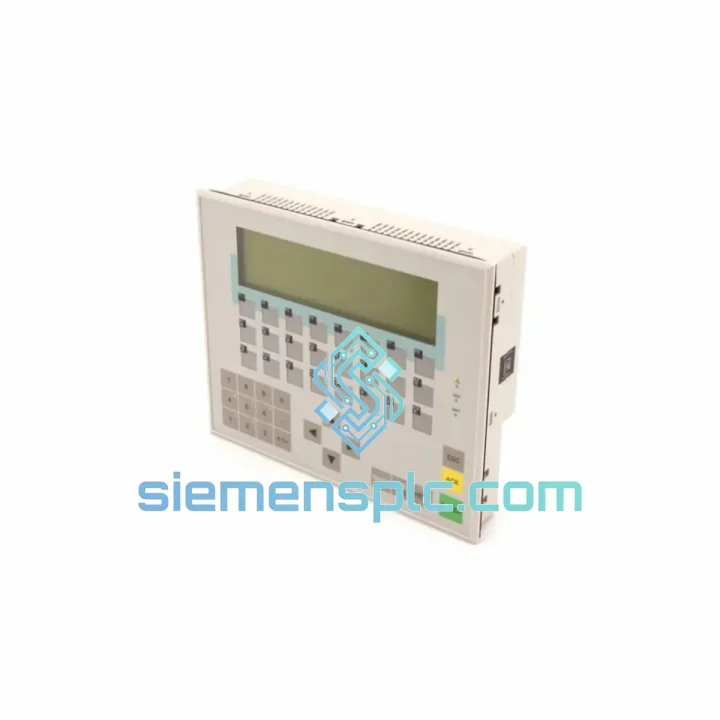
Request verified availability, condition, replacement risk review, packing options and courier lead time for 6AV3617-1JC00-0AX1.
Click Request Quote and the part number is inserted into the inquiry form automatically.
Core fields for model confirmation and RFQ routing. Detailed product narrative remains below.
Every minute your line is dark, you’re bleeding production revenue. A failed OP17 panel shouldn’t be the reason your S7-300 system stays offline for days. The Siemens 6AV3617-1JC00-0AX1 SIMATIC OP17 is physically on our shelf in Xiamen — not on a 6-week ocean freight schedule, not stuck in a distributor’s backorder queue. We ship same day or next business day via DHL Express or FedEx International Priority. Your panel arrives, your line restarts.
URGENT REQUIREMENT? Contact: [email protected] | WhatsApp: +86 18359268345
| Parameter | Specification |
|---|---|
| Part Number | 6AV3617-1JC00-0AX1 |
| Product Series | SIMATIC HMI OP17 |
| Display Type | LCD, 4-line x 20-character text with backlight |
| Communication Interface | MPI / PROFIBUS DP (RS-485) |
| Compatible Controllers | SIMATIC S7-300, S7-400, S5 (via adapter) |
| Supply Voltage | 24 V DC (+/-15%) |
| Current Consumption | max. 400 mA |
| Protection Rating | IP65 (front panel), IP20 (rear) |
| Operating Temperature | 0 deg C to +50 deg C |
| Storage Temperature | -20 deg C to +70 deg C |
| Relative Humidity | 10-90%, non-condensing |
| Panel Cutout (W x H) | 220 mm x 110 mm |
| Dimensions (W x H x D) | 240 mm x 130 mm x 55 mm |
| Weight | approx. 1,200 g |
| Configuration Software | ProTool V6.0 or later |
| Country of Origin | Germany |
| Availability | Ready to Ship – Xiamen Stock |
Swapping an OP17 in the field is straightforward if you know the traps. Here is what years of emergency callouts have taught:
1. MPI Address Conflict — the number one silent killer after a swap. The replacement unit ships with a default MPI address of 1. Your failed panel was almost certainly running on address 3 or higher. Before powering up, connect a PG/PC via MPI and use STEP 7 Accessible Nodes to confirm the address your S7-300 CPU expects. Set the OP17 address via the panel startup menu — hold F1 and F4 simultaneously on boot — before going online. Skipping this step produces a No Connection to PLC error that looks like a hardware fault but is purely a configuration issue.
2. ProTool Project Transfer — match the version exactly. The 6AV3617-1JC00-0AX1 requires ProTool V6.0 SP2 or later. If your project was built on an older release, open it in the matching ProTool version and recompile before downloading. Mismatched project versions cause garbled display characters or a blank screen after transfer — not a panel defect.
3. PROFIBUS DP Termination. If the OP17 sits at either physical end of the PROFIBUS segment, the bus connector must have its termination switch set to ON. A missing terminator causes intermittent communication dropouts that are notoriously difficult to trace under load. Verify this before assuming the replacement panel is faulty.
4. Backlight Failure vs. Full Panel Failure. A completely dark screen with the panel still responding to keystrokes almost always means backlight failure — not a dead panel. The CCFL backlight on the OP17 has a rated life of approximately 20,000 hours. If the unit is otherwise functional, backlight replacement is a cost-effective repair. If the screen is frozen, shows corrupted characters, or the panel is unresponsive to all input, the main board has failed and full replacement is the correct call.
5. 24 V DC Power Quality. The OP17 is sensitive to supply ripple. If you are powering it from an unregulated transformer rather than a SITOP or equivalent switched-mode PSU, voltage dips during motor starts can corrupt the panel internal flash. Always use a regulated 24 V DC supply with at least 10% headroom above the panel 400 mA draw.
6. Firmware and Suffix Variants. The -0AX1 suffix denotes the standard firmware version. The -2AX1 variant carries extended memory and a different firmware build. These are not interchangeable without recompiling and redownloading the ProTool project. Confirm your existing panel exact order number from the rating plate before ordering a replacement.
Common Error Codes:
The 6AV3617-1JC00-0AX1 was engineered for environments that destroy consumer-grade electronics. The IP65-rated front bezel is sealed against dust ingress and direct water jets — it survives wash-down cycles in food processing lines and the fine metallic dust of machining cells. The operating temperature range of 0 to 50 degrees Celsius covers the majority of industrial enclosure environments, including poorly ventilated outdoor cabinets in subtropical climates.
Vibration resistance meets IEC 60068-2-6 — sinusoidal, 10 to 58 Hz at 0.075 mm amplitude, and 58 to 500 Hz at 1 g. This means the panel holds up on press lines, compressor skids, and mobile equipment where constant mechanical shock is the norm. The LCD assembly is mounted on shock-absorbing standoffs internally, reducing the risk of display cracking from cabinet door slams or transport impacts.
Humidity tolerance up to 90% non-condensing makes it viable in coastal facilities, paper mills, and chemical plants where moisture is a constant threat. The conformal-coated PCB on genuine Siemens units provides an additional barrier against corrosive atmospheres — one of the key reasons to insist on original parts rather than aftermarket substitutes. Every unit we ship has been stored in climate-controlled conditions and inspected for physical integrity prior to dispatch.
Our warehouse is located in Xiamen, Fujian — one of China primary export hubs with direct DHL and FedEx gateway access. Here is how your order moves from shelf to your site:
We have shipped industrial automation components to over 40 countries. Customs documentation is prepared correctly the first time — no delays caused by paperwork errors on our end.
Email: [email protected]
WhatsApp: +86 18359268345
Web: siemensplc.com
© 2026 siemensplc.com. All rights reserved.
We check the full part number, brand, series and visible nameplate information before quotation.
Sales confirms stock path, condition option, quantity and realistic lead time for export dispatch.
DHL, FedEx, UPS or buyer courier arrangements can be reviewed with packing requirements.
Similar brand or category products for fast comparison and multi-item RFQ lists.


