

Siemens
RFQ Ready
Siemens 6AV7240-0HC07-0PA0 Industrial Panel PC Motherboard – SIMATIC IPC477D
SIMATIC
Origin DE
Industrial Panel PC Motherboard
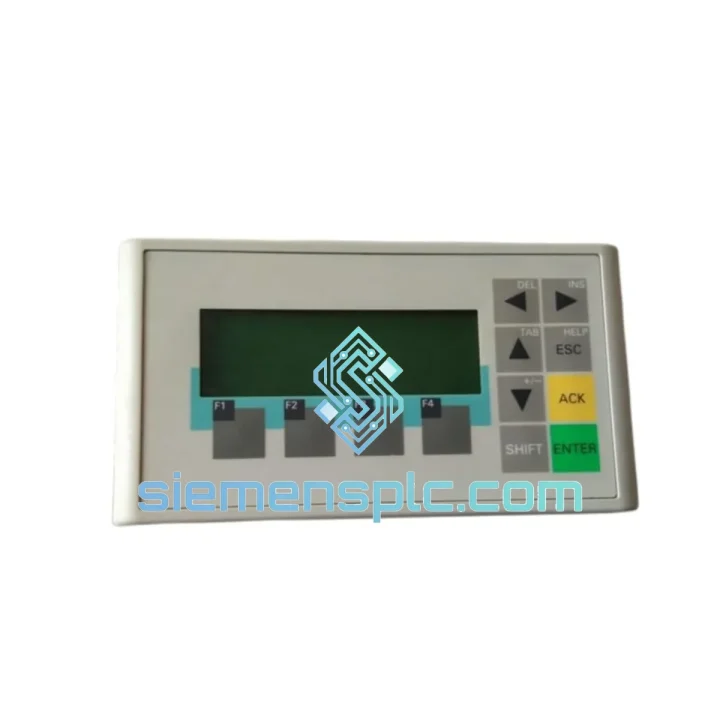
Request verified availability, condition, replacement risk review, packing options and courier lead time for 6AV6641-0AA11-0AX0.
Click Request Quote and the part number is inserted into the inquiry form automatically.
Core fields for model confirmation and RFQ routing. Detailed product narrative remains below.
Your line is down. Every minute the OP73 stays dark costs you money — rejected batches, idle labor, missed delivery windows. The 6AV6641-0AA11-0AX0 is a compact SIMATIC HMI panel that sits at the nerve center of your machine: it’s the screen your operators stare at, the keypad they punch alarms into, the interface that bridges your S7 PLC logic to the shop floor. When it fails, nothing moves. We keep verified stock of this exact part number in Xiamen and ship globally via DHL and FedEx — because a 3-week lead time from a distributor is not an option when your press line is cold.
This is not a refurbished unit dressed up in new packaging. Every 6AV6641-0AA11-0AX0 we dispatch is inspected under power, tested on a live MPI bus, and packed in anti-static foam before it leaves our warehouse. We’ve handled emergency orders for automotive stamping plants, pharmaceutical filling lines, and water treatment facilities across Europe, Southeast Asia, and the Middle East. The part ships. The line restarts. That’s the only metric that matters.
URGENT REQUIREMENT? Contact: [email protected] | WhatsApp: +86 18359268345
| Parameter | Specification | Notes |
|---|---|---|
| Part Number | 6AV6641-0AA11-0AX0 | Exact SIEMENS catalog reference |
| Series | OP73 (SIMATIC HMI) | Compact operator panel, SIMATIC-native |
| Display | 3.2″ STN monochrome LCD, 160×80 px | High contrast for bright ambient lighting |
| Interface | MPI / PROFIBUS DP (RS-485) | Direct S7-200/300/1200 connection, no gateway |
| Max Baud Rate | 1.5 Mbit/s (PROFIBUS DP) | Sub-10 ms polling cycle for fast alarm refresh |
| Power Supply | 24 V DC (20.4–28.8 V) | Standard PLC panel rail supply |
| Power Consumption | ≤ 3.5 W | Minimal heat load in compact enclosures |
| Front Protection | IP65 (IEC 60529) | Dust-tight, water jet resistant — factory integrated |
| Operating Temp | 0°C to +50°C | Standard indoor industrial range |
| Storage Temp | −20°C to +70°C | Safe for cold-chain warehouse and air freight |
| Humidity | 10–90% RH non-condensing | Suitable for coastal and food processing sites |
| Keypad | 18 membrane keys | Gloved-hand operable, no touchscreen drift |
| Memory | 512 KB internal flash | Up to 500 alarm messages, 50 screens |
| Config Software | WinCC flexible Compact / STEP 7 Micro/WIN | No additional license for basic project |
| Dimensions | 144 × 108 × 42 mm | Panel cutout: 138 × 102 mm (standard DIN) |
| Weight | ~300 g | Door-mount and swing-arm compatible |
| Certifications | CE, UL, cUL, RCM | Global market compliance |
| Stock Status | ✅ Ready to Ship | Xiamen warehouse — same-day dispatch available |
Most Common Failure Modes on the 6AV6641-0AA11-0AX0
1. Blank display, panel powers on (backlight visible)
Ninety percent of the time this is a lost MPI address conflict after a PLC firmware update or a bus topology change. The OP73 stores its MPI node address in non-volatile flash. If another device on the bus was assigned the same address (default is 1), the panel will boot but fail to establish communication and display nothing. Fix: disconnect the MPI cable, power-cycle the panel, enter the Start Center menu (hold F1 + F4 on boot), navigate to Transfer → Settings, and manually reassign the MPI address to an unused node (typically 3–5 in most installations). Reconnect and verify with STEP 7 → Accessible Nodes.
2. “Connection to PLC interrupted” alarm loop
This is almost always a cable or termination issue, not a panel fault. PROFIBUS DP requires 220 Ω termination resistors at both physical ends of the bus segment. If the OP73 is the last device on the segment and the termination switch on the bus connector (6ES7 972-0CB35-0XA0) is set to OFF, you’ll get intermittent disconnects that look like a panel fault. Check the green LED on the bus connector — it should be solid. Flickering means bus contention. Also verify the cable shield is grounded at one end only to avoid ground loops.
3. Keypad keys unresponsive or registering wrong inputs
Membrane keypad delamination from chemical exposure or repeated impact. This is a hardware fault — the panel requires replacement. There is no field repair for the membrane assembly on the OP73. When ordering a replacement, confirm the firmware version of the failed unit (visible in Start Center → System → Version) and match it on the replacement before downloading the WinCC flexible project. Mismatched firmware versions between the project and the panel will cause a download rejection error in WinCC flexible.
4. Project download fails — “Panel type mismatch”
This happens when a replacement unit has a different hardware revision than the original. The 6AV6641-0AA11-0AX0 has had two hardware revisions (HW: 01 and HW: 02). WinCC flexible Compact is revision-aware. If your project was compiled for HW:01 and the replacement is HW:02, recompile the project in WinCC flexible with the correct target panel selected under Project → Properties → Device. No logic changes required — just a recompile and re-download.
Step-by-Step Replacement Procedure
The OP73 was not designed for office environments. SIEMENS engineered this panel to survive the conditions that kill consumer-grade electronics within weeks. The front membrane is sealed to IP65 — not as a marketing claim, but as a factory-tested rating per IEC 60529, meaning it withstands sustained water jets from any direction without ingress. The STN display operates without a heater down to 0°C ambient, and the internal components are rated to −20°C storage, making it suitable for cold-chain facilities and unheated equipment rooms in northern climates.
Vibration resistance is validated to IEC 60068-2-6: sinusoidal vibration at 10–58 Hz, 0.075 mm amplitude; 58–500 Hz, 1 g acceleration. This covers the vibration spectrum of most industrial machinery including compressors, presses, and conveyor drives. The membrane keypad has no moving parts that can fatigue — it is rated for over one million actuations per key, which at 100 keystrokes per shift over three shifts equates to more than nine years of continuous operation before wear becomes a factor.
The 24 V DC power input is protected against reverse polarity and transient overvoltage per IEC 61000-4-5 (surge immunity, 1 kV line-to-line). In environments with frequent motor starts and VFD switching — the most common source of 24 V rail transients in industrial panels — the OP73 maintains stable operation without requiring additional surge suppression on the supply line, though a 1 A slow-blow fuse on the supply is always recommended practice.
EMC compliance under EN 61000-6-2 (industrial immunity) means the panel operates correctly in environments with strong electromagnetic fields from welding equipment, large motors, and radio transmitters — conditions that cause false alarms and communication dropouts on non-industrial-grade HMI devices.
Stock is held at our Xiamen warehouse, positioned for fast access to major international air freight hubs — Xiamen Gaoqi International Airport (XMN) handles direct cargo connections to Frankfurt, Dubai, Los Angeles, Singapore, and Sydney. For urgent orders, we dispatch via DHL Express Worldwide or FedEx International Priority, both of which offer door-to-door transit times of 2–5 business days to most industrial regions globally.
Typical transit times from Xiamen:
Every shipment includes a full commercial invoice with HS code declaration (HS 8537.10 for programmable operator panels), packing list, certificate of origin, and inspection report. For customers in the EU, we provide the necessary documentation for customs clearance under the standard import procedure. For customers in countries with import duty exemptions on industrial automation components, we can provide additional supporting documentation on request.
Same-day dispatch is available for orders confirmed before 14:00 CST on business days. For critical plant shutdowns, contact us directly via WhatsApp for real-time stock confirmation and expedited booking — we have handled emergency air freight bookings with same-day departure for customers facing production shutdowns with contractual penalty clauses.
📧 Email: [email protected]
📱 WhatsApp: +86 18359268345
🌐 Web: siemensplc.com
© 2026 siemensplc.com. All rights reserved.
We check the full part number, brand, series and visible nameplate information before quotation.
Sales confirms stock path, condition option, quantity and realistic lead time for export dispatch.
DHL, FedEx, UPS or buyer courier arrangements can be reviewed with packing requirements.
Similar brand or category products for fast comparison and multi-item RFQ lists.


