Yokogawa
RFQ Ready
Yokogawa SAI143-H63/PRP S3 DCS Analog Input Module
CENTUM VP
Origin JP
DCS Analog Input Module
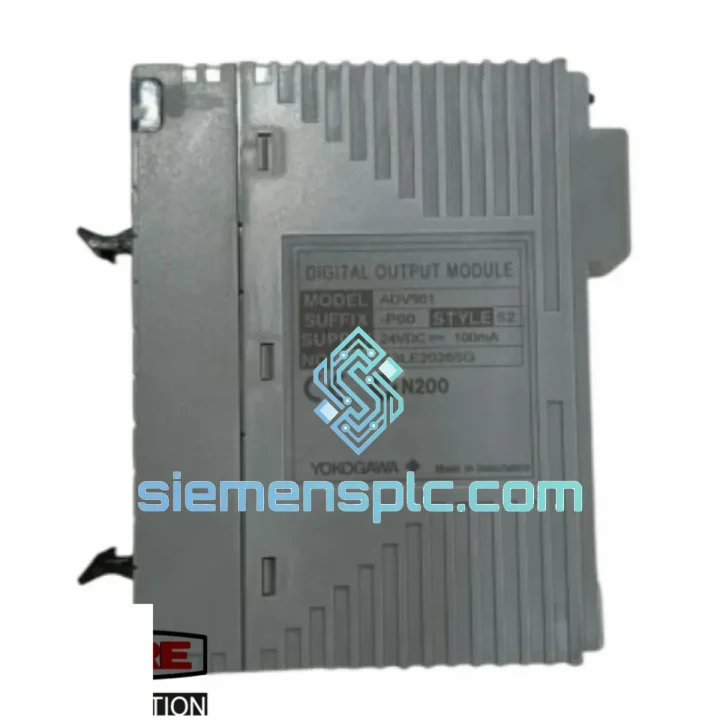
Request verified availability, condition, replacement risk review, packing options and courier lead time for ADV561-P00.
Click Request Quote and the part number is inserted into the inquiry form automatically.
Core fields for model confirmation and RFQ routing. Detailed product narrative remains below.
Your CENTUM VP line just tripped. The HMI is throwing a DO module fault on node slot 3. Your shift supervisor is on the phone. You’ve already pulled the card and confirmed it’s the ADV561-P00 S2 — dead transistor outputs, no field response. You don’t have a spare on the shelf. That’s exactly why this page exists.
We stock the YOKOGAWA ADV561-P00 S2 in Xiamen, China — tested, verified, and ready to leave the warehouse today. DHL Express to most destinations in 2–4 business days. No waiting on OEM lead times. No broker markups. Just the part you need, moving fast.
⚡ URGENT REQUIREMENT? Contact: [email protected] | WhatsApp: +86 18359268345
| Parameter | Specification |
|---|---|
| Part Number | ADV561-P00 S2 |
| Manufacturer | YOKOGAWA Electric Corporation |
| Module Type | Digital Output (DO) — Transistor Sink/Source |
| Output Points | 16 points per module |
| Field Voltage | 24 VDC |
| Isolation | Optical isolation, field-to-bus |
| System Bus | YOKOGAWA ESB / V-net |
| Compatible Platforms | CENTUM VP R4.01+, CS 3000 R3.08+ |
| Node Units | ANB10D, ANB11D, ANR10D series |
| Hardware Suffix | S2 — conformal coating / hardware rev 2 |
| Operating Temperature | 0°C to 55°C |
| Weight | Approx. 200 g |
| Compliance | CE, UL, IEC 61508 SIL-capable |
| Origin | Japan |
| Stock Status | ✅ Ready to Ship — Xiamen Warehouse |
After ten years of pulling cards in refineries and power plants, here’s what actually matters when you’re swapping an ADV561-P00 S2 under pressure:
Common Fault Codes That Point to This Card:
Step-by-Step Hot-Swap Procedure (CENTUM VP):
Critical Configuration Notes:
The ADV561-P00 S2 is not a lab instrument. It’s built for the environments where automation actually runs — and those environments are brutal.
The S2 hardware revision adds conformal coating to the PCB, a critical upgrade for offshore platforms, coastal chemical plants, and humid tropical facilities where bare boards corrode within months. The coating protects against salt fog, condensation, and airborne chemical contaminants that would degrade an uncoated board’s isolation resistance over time.
Vibration is the silent killer of I/O modules in compressor stations and rotating equipment areas. YOKOGAWA’s ADV561 series is qualified to IEC 60068-2-6 sinusoidal vibration testing — 10 to 57 Hz at 0.075 mm displacement, 57 to 150 Hz at 1g. The card-edge connector design distributes mechanical stress across the full backplane interface rather than concentrating it at solder joints.
Thermal cycling is equally demanding. In outdoor substations and non-climate-controlled MCC rooms, ambient temperatures swing from near-freezing nights to 50°C+ afternoons. The ADV561-P00 S2 is rated for continuous operation across 0°C to 55°C with storage down to -25°C, and the optical isolation barrier maintains its dielectric integrity across the full operating range.
Electromagnetic interference from VFDs, large motor starters, and welding equipment is a constant threat to digital I/O. The optical isolation on every output channel provides a galvanic break that stops ground loops and transient spikes from propagating back into the system bus — protecting not just this card, but the entire node.
Speed matters when a line is down. Here’s exactly how the shipment moves from our Xiamen warehouse to your site:
Day 0 — Order Confirmed: Payment cleared before 14:00 CST triggers same-day pick, test verification, and ESD packaging. The module is photographed, serial number logged, and packed in anti-static foam with a test certificate.
Day 0–1 — Export Clearance: We handle all Chinese customs export documentation, including the commercial invoice, packing list, and HS code declaration (HS 8537.10). No delays from your end on export paperwork.
Day 1–3 — DHL Express / FedEx International Priority: Xiamen Gaoqi International Airport has direct freight connections to major hubs — Frankfurt, Dubai, Singapore, Los Angeles. Transit time to most industrial destinations in Europe, Middle East, and Southeast Asia is 2–3 business days. North America typically 3–4 days.
Tracking: You receive a live DHL or FedEx tracking number within 2 hours of dispatch. No chasing us for updates — the courier app tells you exactly where your part is.
Import Duties: We declare accurate commercial value. For most destinations, industrial automation components under a certain threshold qualify for expedited customs clearance. We can provide a detailed invoice with HS code to support your import broker if needed.
Emergency Options: For truly critical shutdowns, contact us via WhatsApp before ordering. We can coordinate courier pickup timing, split shipments if you need partial stock immediately, and provide a proforma invoice for emergency purchase order approval within the hour.
📧 Email: [email protected]
📱 WhatsApp: +86 18359268345
🌐 Web: siemensplc.com
© 2026 siemensplc.com. All rights reserved. Specifications subject to manufacturer revision. Always verify compatibility with your system documentation before installation.
We check the full part number, brand, series and visible nameplate information before quotation.
Sales confirms stock path, condition option, quantity and realistic lead time for export dispatch.
DHL, FedEx, UPS or buyer courier arrangements can be reviewed with packing requirements.
Similar brand or category products for fast comparison and multi-item RFQ lists.