Siemens
RFQ Ready
SIEMENS 6GK5108-0BA00-2AA3 Industrial Ethernet Switch
SIMATIC
Origin DE
Industrial Ethernet Switch
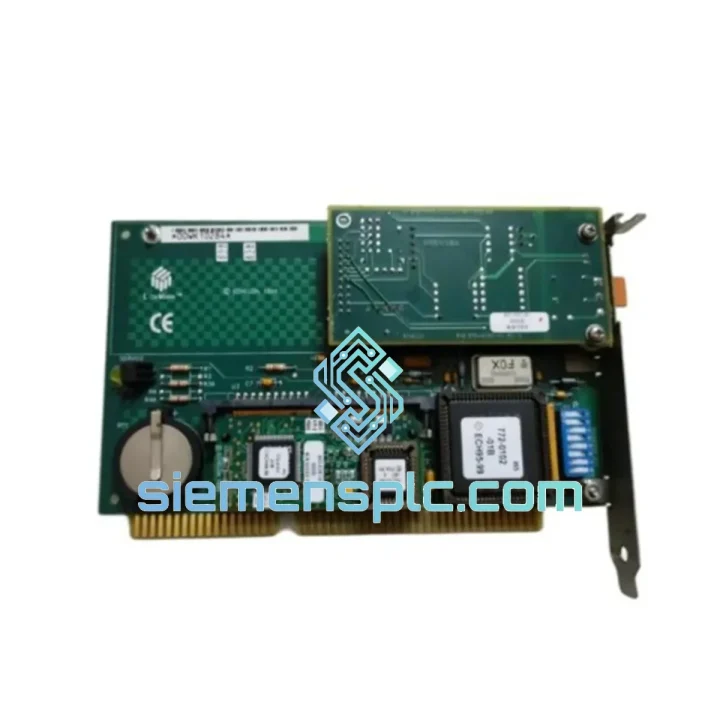
Request verified availability, condition, replacement risk review, packing options and courier lead time for 35100-ISA-FTM10-SMX-LONWORKS.
Click Request Quote and the part number is inserted into the inquiry form automatically.
Core fields for model confirmation and RFQ routing. Detailed product narrative remains below.
Every minute your LonWorks backbone is dark, your HVAC zones go uncontrolled, your energy meters go blind, and your maintenance team is fielding calls they can’t answer. The Echelon 35100 ISA NIC with FTM-10 SMX transceiver is the exact hardware that puts your network management PC back on the bus — and we ship it from Xiamen within 24 hours of order confirmation. No waiting on distributor lead times. No back-order queues. Stock confirmed, tested, and ready to move.
URGENT REQUIREMENT? Contact: [email protected] | WhatsApp: +86 18359268345
| Part Number | 35100-ISA-FTM10-SMX-LONWORKS |
| Brand | Echelon Corporation |
| Series | LonWorks ISA NIC |
| Form Factor | ISA 16-bit Bus Card |
| Transceiver | FTM-10 SMX (Free-Topology TP/FT-10) |
| Network Protocol | LonWorks / LON (ISO/IEC 14908) |
| Topology | Free-topology: bus, star, loop, mixed |
| Data Rate | 78 kbps (TP/FT-10) |
| Max Nodes/Segment | 128 nodes (with repeater) |
| Onboard Processor | Echelon Neuron 3150 / 3120 |
| Host Interface | ISA 16-bit slot |
| Supply Voltage | 5 VDC (ISA bus) |
| Operating Temp | 0°C to +70°C |
| Certifications | LONMARK Certified, CE |
| Software Support | LonMaker, LNS, NodeBuilder, OpenLNS |
| Country of Origin | USA |
| Stock Status | ✔ Ready to Ship — Xiamen Warehouse |
Swapping a 35100 ISA NIC is not a plug-and-play exercise if you skip the configuration steps. Here is what ten years of field replacements have taught:
1. IRQ and I/O Address Conflicts
The 35100 uses jumper-selectable IRQ (typically IRQ 5, 10, or 11) and I/O base address (default 0x300). Before seating the card, document the IRQ map of the host industrial PC. Conflicts with legacy sound cards or secondary COM ports are the most common cause of “NIC not detected” errors in LNS. Set jumpers to match the previous card’s configuration exactly — do not assume defaults.
2. LNS Network Database Binding
After physical installation, open your LNS network database. The replacement NIC must be re-bound to the network interface channel. In LonMaker, navigate to Network Interface → Properties → select the new COM/ISA port assignment. Failure to rebind results in “Network Interface Offline” status even when the card is physically functional.
3. Neuron Firmware Version Matching
If your LNS version is 3.2x or later, verify the Neuron firmware on the replacement card is compatible. Mismatched firmware between the NIC’s Neuron chip and the LNS host stack can cause intermittent packet loss or node enumeration failures. Use Echelon’s NodeBuilder or LNS Turbo Setup to read and confirm the firmware revision before going live.
4. FTM-10 SMX Transceiver Seating
The FTM-10 SMX is a plug-in module. On used units, inspect the transceiver connector pins for oxidation or bent contacts. A partially seated FTM-10 SMX produces a symptom identical to a broken network segment — all nodes appear offline. Re-seat firmly and verify the locking tab engages.
5. Common Fault Codes
— “No Network Interface Found”: IRQ conflict or I/O address mismatch. Check jumpers.
— “Channel Offline”: FTM-10 SMX not seated or TP/FT-10 termination missing at segment ends.
— “Node Authentication Failed”: LNS database not rebound to replacement NIC. Rebind in LonMaker.
— “Neuron Reset Loop”: Firmware incompatibility. Flash Neuron to correct version via NodeBuilder.
Industrial environments do not forgive weak hardware. The Echelon 35100 was engineered for exactly the conditions that destroy consumer-grade electronics. The ISA card substrate uses FR-4 glass-epoxy laminate rated for continuous operation at 70°C ambient — a temperature that most building automation equipment rooms routinely approach in summer. The FTM-10 SMX transceiver’s differential signaling architecture provides inherent common-mode noise rejection, which means the card maintains clean 78 kbps communication even when installed in panels adjacent to variable-frequency drives generating significant EMI.
Vibration tolerance is a function of the ISA slot’s mechanical retention combined with the card’s conformal-coated PCB. Units that have operated for years in transportation infrastructure applications — tunnel ventilation control panels subject to constant mechanical vibration — show no degradation in connector integrity when properly seated. Humidity resistance is addressed through the board’s surface finish and the Neuron chip’s hermetic packaging, allowing operation in environments up to 95% relative humidity non-condensing without derating.
Every unit we ship from Xiamen undergoes a pre-dispatch functional check: visual inspection of PCB and connector integrity, FTM-10 SMX transceiver seating verification, and a LON network enumeration test confirming the Neuron chip initializes and the card is recognized by LNS. We do not ship untested hardware.
Our Xiamen warehouse operates on a same-day dispatch model for orders confirmed before 15:00 CST. Here is the exact flow from your purchase order to your loading dock:
Step 1 — Order Confirmation (0–2 hours): You send your PO or place the Shopify order. We confirm stock availability and issue a proforma invoice within two hours during business hours.
Step 2 — Pre-Shipment Inspection (2–4 hours): The unit is pulled from bonded stock, photographed, functionally tested, and packed in anti-static ESD packaging with foam cushioning. A packing list and inspection report are generated.
Step 3 — Customs Documentation (same day): We prepare the commercial invoice, packing list, and HS code declaration (HS 8537.10 for industrial control cards). For destinations requiring a certificate of origin, we issue it from Xiamen Customs on the same day.
Step 4 — DHL / FedEx Express Dispatch: Shipment is handed to DHL Express or FedEx International Priority depending on destination. Tracking number is sent to you within one hour of carrier pickup. Typical transit times: Southeast Asia 1–2 days, Europe 3–4 days, North America 3–5 days, Middle East 2–3 days.
Step 5 — Customs Clearance Support: We provide full customs clearance documentation and are available via WhatsApp to assist your import broker with any queries. Duties and taxes are destination-country responsibility unless DDP terms are agreed in advance.
For critical downtime situations, contact us directly on WhatsApp before placing the order — we can arrange priority pick and same-day evening dispatch for urgent cases.
Email: [email protected]
WhatsApp: +86 18359268345
Web: siemensplc.com
© 2026 siemensplc.com. All rights reserved.
We check the full part number, brand, series and visible nameplate information before quotation.
Sales confirms stock path, condition option, quantity and realistic lead time for export dispatch.
DHL, FedEx, UPS or buyer courier arrangements can be reviewed with packing requirements.
Similar brand or category products for fast comparison and multi-item RFQ lists.