SICK
RFQ Ready
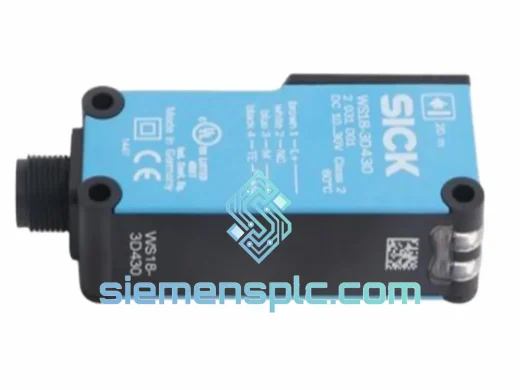
SICK WS18-3D430 Photoelectric Sensor
W18 Series Photoelectric
Origin DE
Photoelectric Sensor
Request verified availability, condition, replacement risk review, packing options and courier lead time for ICR620S-T11503.
Click Request Quote and the part number is inserted into the inquiry form automatically.
Core fields for model confirmation and RFQ routing. Detailed product narrative remains below.
Your conveyor line is stopped. The ICR620S-T11503 has failed. Maintenance is waiting. Every minute the line sits idle, you’re bleeding production output and burning shift labor. We’ve been there — and we built this inventory specifically for moments like this one.
We stock the SICK ICR620S-T11503 as a verified OEM unit, ready to pull from shelf and ship same-day via DHL Express or FedEx International Priority from Xiamen, China. No lead time negotiation. No factory order. No waiting three weeks for a distributor to locate stock. You get the part, you get back online.
URGENT REQUIREMENT? Contact: [email protected] | WhatsApp: +86 18359268345
| Parameter | Specification |
|---|---|
| Manufacturer | SICK AG |
| Part Number | ICR620S-T11503 |
| Series | ICR620S |
| Device Type | Stationary Industrial Laser Barcode Reader |
| Supported Code Types | Code 128, Code 39, EAN/UPC, Interleaved 2/5, Codabar |
| Interface | RS-232 / RS-422 (suffix -T11503 specific) |
| Supply Voltage | 10–30 V DC |
| Operating Temperature | 0 °C to +50 °C |
| Protection Rating | IP 65 |
| Configuration Tool | SOPAS Engineering Tool (SICK native) |
| Weight | approx. 500 g |
| Origin | Germany |
| Stock Status | ✅ Ready to Ship — Xiamen Warehouse |
| Certifications | CE, UL |
After ten years of field work, these are the failure modes and swap pitfalls that catch engineers off guard on the ICR620S-T11503:
Common Failure Symptoms:
Replacement Procedure — Step by Step:
Configuration Notes:
The ICR620S-T11503 is not a lab instrument. It was designed for the floor — and the floor is unforgiving.
Vibration: Conveyor frames transmit continuous low-frequency vibration. The ICR620S series uses a rigid die-cast housing with internal shock-mount isolation for the laser assembly. The optical path remains stable under sustained vibration loads typical of belt and roller conveyor systems. That said, always use the correct SICK mounting bracket — improvised mounts that allow resonance will shorten service life regardless of the reader’s internal damping.
Temperature: The rated operating range of 0 °C to +50 °C covers the majority of indoor industrial environments. In cold-chain or refrigerated warehouse applications approaching the lower limit, allow the unit to thermally stabilize before expecting full read performance — condensation on the scan window is the real enemy, not the temperature itself. A simple compressed-air purge fitting on the housing solves this in most installations.
Humidity and Contamination: IP65 protection means the ICR620S-T11503 is fully dust-tight and protected against low-pressure water jets. In food and beverage lines where washdown occurs, position the reader to avoid direct spray impact on the scan window. IP65 is not IP67 — sustained immersion or high-pressure washdown requires a different product class.
EMI: Industrial environments with large VFDs, welding equipment, or high-current bus bars generate significant electromagnetic interference. The ICR620S-T11503’s shielded cable requirement is not optional in these environments. Use the SICK-specified shielded M12 cable assemblies and ensure the shield is grounded at one end only to avoid ground loops.
Our warehouse is located in Xiamen, Fujian, China — one of China’s primary export hubs with direct access to DHL, FedEx, and UPS international gateways.
Standard Dispatch Process:
We have shipped to Germany, the United States, Australia, South Korea, India, Brazil, Saudi Arabia, and over 40 other countries. If your customs authority requires specific documentation formats, contact us before shipment and we will accommodate.
For plant shutdowns or production emergencies, contact us directly on WhatsApp for real-time shipment coordination: +86 18359268345.
Email: [email protected]
WhatsApp: +86 18359268345
Web: siemensplc.com
© 2026 siemensplc.com. All rights reserved.
We check the full part number, brand, series and visible nameplate information before quotation.
Sales confirms stock path, condition option, quantity and realistic lead time for export dispatch.
DHL, FedEx, UPS or buyer courier arrangements can be reviewed with packing requirements.
Similar brand or category products for fast comparison and multi-item RFQ lists.