Siemens
In Stock OK
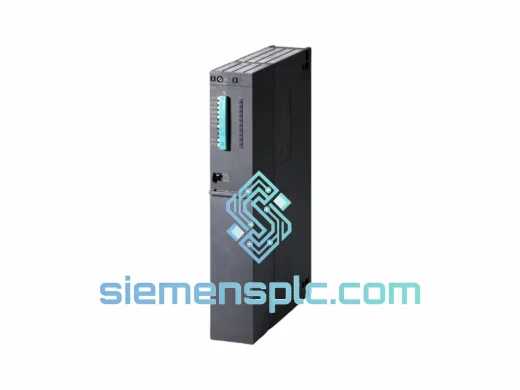
Siemens 6ES7414-3EM07-0AB0 CPU 414-3 EM
Request verified availability, condition, replacement risk review, packing options and courier lead time for 6ES7414-3EM07-0AB0.
BrandSiemens
Part Number6ES7414-3EM07-0AB0
ConditionAvailability Check
Lead TimeRFQ Confirmation
DocumentsDatasheet / photos by RFQ
ShippingExport packing available
Auto-filled RFQ
6ES7414-3EM07-0AB0
Click Request Quote and the part number is inserted into the inquiry form automatically.
- Reply by email: [email protected]
- WhatsApp / Tel: +86 18359268345
- Mon-Sat 9:00-18:00 GMT+8
Procurement Data
Key Product Information
Core fields for model confirmation and RFQ routing. Detailed product narrative remains below.
- Brand
- Siemens
- Primary Part Number
- 6ES7414-3EM07-0AB0
- Product Type
- PLC CPU Module
- Series / Family
- SIMATIC S7-400
- Country of Origin
- DE
- Catalog Category
- PLCs & Controllers
- Operating Temp.
- 0 °C to +60 °C
Model confirmed for inquiry
6ES7414-3EM07-0AB0
Send quantity, destination and urgency. The RFQ form keeps this part number attached.
Request Quote
Product Overview
Siemens 6ES7414-3EM07-0AB0 CPU 414-3 EM — Stop the Clock on Your Downtime
Every minute your line is down, you’re bleeding money. The Siemens 6ES7414-3EM07-0AB0 CPU 414-3 EM is a high-performance central processing unit for the SIMATIC S7-400 platform — and when yours fails, there is no time to wait weeks for factory lead times. We stock this unit in Xiamen, China, and we ship globally via DHL Express and FedEx Priority. From the moment you confirm your order to the moment the courier picks it up, our target is under four hours on business days.
This is not a listing. This is a recovery plan.
⚡ URGENT REQUIREMENT? Contact: [email protected] | WhatsApp: +86 18359268345
Quick Technical Datasheet
| Parameter | Value |
|---|---|
| Part Number | 6ES7414-3EM07-0AB0 |
| Product Family | SIMATIC S7-400 |
| Module Type | CPU 414-3 EM — Central Processing Unit |
| Work Memory | 4 MB (2 MB code / 2 MB data) |
| Load Memory | Integrated 1 MB Flash; expandable via MMC up to 64 MB |
| Processing Speed | 0.1 µs per binary instruction |
| Integrated Interfaces | MPI/DP (12 Mbit/s) × 1; PROFIBUS DP Master/Slave × 2 |
| Max. I/O Addresses | 16 KB inputs / 16 KB outputs |
| Max. Process Image | 8 KB inputs / 8 KB outputs |
| Counters / Timers | 2048 / 2048 |
| Supply Voltage | DC 5 V (via S7-400 backplane) |
| Operating Temperature | 0 °C to +60 °C |
| Dimensions (W×H×D) | 25 mm × 290 mm × 219 mm |
| Weight | Approx. 820 g |
| Country of Origin | Germany |
| Stock Status | ✅ Ready to Ship — Xiamen, China |
Troubleshooting & Replacement Tips
After ten years of field work, here are the failure patterns I see most often with the 6ES7414-3EM07-0AB0 — and what you need to know before you swap it out.
Common Fault Indicators:
- SF (System Fault) LED solid red — Usually a corrupted program block or a hardware fault in the CPU itself. Pull the diagnostic buffer via STEP 7 or TIA Portal before condemning the unit; sometimes it’s a downstream DP slave causing the CPU to fault.
- BF (Bus Fault) LED flashing — PROFIBUS DP configuration mismatch. After swapping the CPU, re-download the hardware configuration. Do not assume the MMC card alone will restore DP parameters correctly on a new firmware revision.
- CPU stuck in STOP mode after MMC insertion — Firmware version mismatch between the MMC card and the new CPU. Check the firmware version on the replacement unit (readable via STEP 7 HW Config → Module Information). If the MMC was programmed on a V6.x CPU and your replacement is V7.x, you may need to re-compile and re-download the project.
- Intermittent STOP/RUN cycling — Often caused by backplane connector wear or a failing PS407 power supply delivering marginal 5 V DC. Measure backplane voltage before blaming the CPU.
Replacement Procedure — Key Steps:
- Set the mode selector to STOP. Record the current IP/MPI node address from the existing CPU before removal.
- Back up the program to the MMC card if the CPU is still partially functional. If not, ensure you have the project file in STEP 7 or TIA Portal.
- Power down the rack. Remove the CPU. Note the slot position — the 414-3 EM must occupy the designated CPU slot in the UR1/UR2 rack.
- Insert the replacement CPU. The MPI address is stored on the MMC card; if you are reusing the original MMC, the address will be restored automatically on first power-up.
- Power up. Observe the LED sequence: RUN (green) should illuminate within 30–60 seconds after the CPU completes its self-test. If SF remains on, connect STEP 7 and read the diagnostic buffer immediately.
- Re-download hardware configuration if the firmware version differs from the original unit. This is non-negotiable — skipping this step causes unpredictable DP bus behavior.
- Verify PROFIBUS DP slave addresses and cycle times match the original configuration before releasing the line to production.
Configuration Notes: The 6ES7414-3EM07-0AB0 does not use physical DIP switches for addressing — all configuration is software-defined via STEP 7 HW Config. The MPI node address defaults to 2 on a blank CPU; if your network uses a non-default address, set it before going online.
Reliability in Harsh Conditions
The S7-400 platform was not designed for office environments. The 6ES7414-3EM07-0AB0 is built to operate continuously in the kind of conditions that destroy lesser hardware.
The CPU module is rated to IEC 61131-2 for programmable controller hardware, which includes vibration testing at 10–57 Hz with 0.075 mm amplitude and 57–150 Hz at 1 g — the kind of mechanical stress found in compressor rooms, rolling mill floors, and turbine halls. Shock resistance is tested to 15 g / 11 ms half-sine, covering the impact events common during maintenance activities in heavy industry.
Thermal performance is validated across 0 °C to +60 °C continuous operation, with storage down to −40 °C. The conformal coating on the PCB provides protection against humidity up to 95% non-condensing, resisting the condensation cycles common in coastal and tropical plant environments. EMC immunity is certified to EN 61000-6-2, covering conducted and radiated interference from variable frequency drives, welding equipment, and high-voltage switching — the exact noise sources present in the plants where this CPU is deployed.
Units we ship have been stored in climate-controlled conditions and inspected for corrosion, connector damage, and label integrity before dispatch. We do not ship units with bent pins, cracked housings, or missing firmware labels.
Global Express Logistics
Our warehouse is located in Xiamen, Fujian Province, China — one of the country’s primary export hubs with direct access to international freight lanes. This is not a drop-ship arrangement. The unit is physically on our shelf.
Shipping Process:
- Order Confirmation → Pick & Pack: Orders confirmed before 14:00 CST (UTC+8) are picked, tested, photographed, and packed the same business day.
- Export Documentation: Commercial invoice, packing list, and certificate of origin are prepared in parallel with packing. For destinations requiring import licenses or HS code declarations, we coordinate in advance.
- Carrier: DHL Express Worldwide or FedEx International Priority — your choice at checkout, or we select the fastest available lane for your destination.
- Transit Times (typical): Southeast Asia 1–2 days; Europe 3–5 days; North America 3–5 days; Middle East 3–4 days; South America 5–7 days.
- Tracking: Waybill number sent via email within 2 hours of carrier pickup. Real-time tracking link included.
- Emergency Shipments: For critical plant shutdowns, contact us via WhatsApp before placing the order. We can arrange Saturday pickup and priority lane booking for select destinations.
We have shipped SIMATIC S7-400 components to steel mills in Turkey, power plants in India, paper mills in Scandinavia, and petrochemical facilities in the Middle East. The logistics process is tested and repeatable.
Contact Information
📧 Email: [email protected]
💬 WhatsApp: +86 18359268345
🌐 Web: siemensplc.com
© 2026 siemensplc.com. All rights reserved.
Ready to quote
[email protected]
Send This Part Number to Sales
RFQ workflow
Quality workflow ->
Confirmation Process
01Model confirmation
We check the full part number, brand, series and visible nameplate information before quotation.
02Availability reply
Sales confirms stock path, condition option, quantity and realistic lead time for export dispatch.
03Packing & courier
DHL, FedEx, UPS or buyer courier arrangements can be reviewed with packing requirements.
Continue sourcing
Browse full catalog ->
Related Automation Parts
Similar brand or category products for fast comparison and multi-item RFQ lists.
Siemens
RFQ Ready
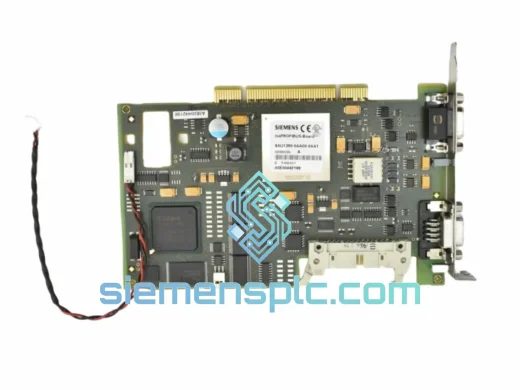
Siemens 6ES7648-2BF02-0XG0 Compact Flash Card
SIMATIC S7-400
Origin DE
Industrial Memory Card