Siemens
In Stock OK
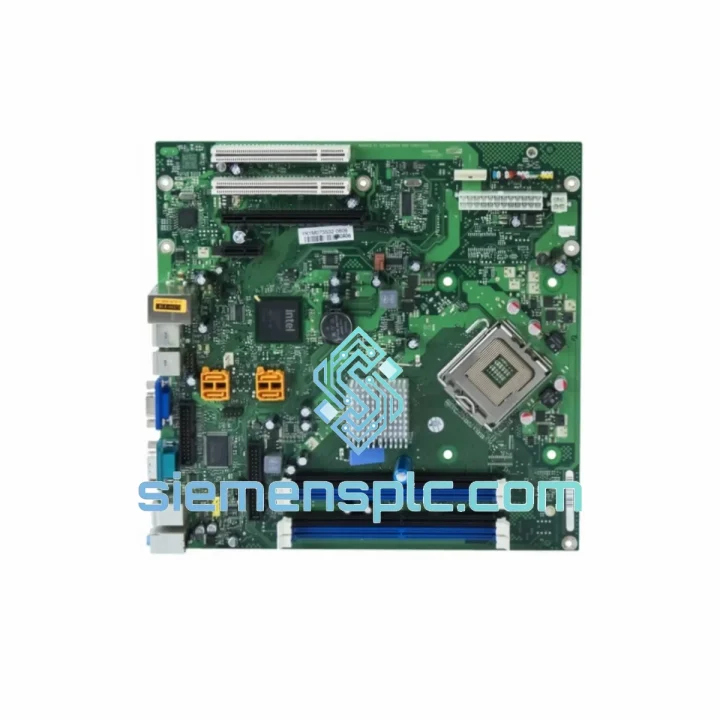
Siemens A5E03383663 CPU Motherboard
Request verified availability, condition, replacement risk review, packing options and courier lead time for A5E03383663.
BrandSiemens
Part NumberA5E03383663
ConditionAvailability Check
Lead TimeRFQ Confirmation
DocumentsDatasheet / photos by RFQ
ShippingExport packing available
Auto-filled RFQ
A5E03383663
Click Request Quote and the part number is inserted into the inquiry form automatically.
- Reply by email: [email protected]
- WhatsApp / Tel: +86 18359268345
- Mon-Sat 9:00-18:00 GMT+8
Procurement Data
Key Product Information
Core fields for model confirmation and RFQ routing. Detailed product narrative remains below.
- Brand
- Siemens
- Primary Part Number
- A5E03383663
- Product Type
- PLC CPU Motherboard
- Series / Family
- SIMATIC S7-400
- Manufacturer
- Siemens AG
- Country of Origin
- DE
- Catalog Category
- PLCs & Controllers
- Operating Temp.
- 0 °C to +60 °C
- Humidity
- 5 % to 95 % RH, non-condensing
Model confirmed for inquiry
A5E03383663
Send quantity, destination and urgency. The RFQ form keeps this part number attached.
Request Quote
Product Overview
Siemens A5E03383663 CPU Motherboard — Stop the Clock on Your Downtime
Your line is down. Every minute costs money — labor standing idle, production targets slipping, customer commitments at risk. The Siemens A5E03383663 CPU Motherboard is the core mainboard assembly for the SIMATIC S7-400 CPU rack, and when it fails, there is no workaround. You need the exact part, verified genuine, in your hands fast. That is precisely what siemensplc.com delivers: confirmed stock in Xiamen, same-day dispatch on orders confirmed before 15:00 CST, and DHL/FedEx express routing to your facility anywhere on the planet.
We have handled emergency procurement for plant engineers across automotive, petrochemical, semiconductor fab, and heavy manufacturing. We know what a 48-hour unplanned outage costs. We built our entire logistics model around eliminating that pain.
URGENT REQUIREMENT? Contact: [email protected] | WhatsApp: +86 18359268345
Quick Technical Datasheet
| Parameter | Specification |
|---|---|
| Part Number | A5E03383663 |
| Manufacturer | Siemens AG |
| Series | SIMATIC S7-400 |
| Component Role | CPU Mainboard / Core Processing Board |
| Compatible CPUs | S7-400 CPU 41x / 41xH / 41x-2 DP family |
| Communication | PROFIBUS DP, MPI integrated |
| Operating Voltage | DC 5 V (supplied via backplane) |
| Operating Temperature | 0 °C to +60 °C |
| Storage Temperature | -40 °C to +70 °C |
| Humidity | 5 % to 95 % RH, non-condensing |
| Degree of Protection | IP20 (installed in rack) |
| Condition | New / Surplus-New (specify on inquiry) |
| Origin | Germany (Siemens AG manufacturing) |
| Stock Status | ✔ Ready to Ship — Xiamen Warehouse |
| Dispatch Lead Time | Same day if order confirmed before 15:00 CST |
Troubleshooting & Replacement Tips
The A5E03383663 is the nerve center of the S7-400 CPU. When it fails, the symptoms are rarely subtle — but misdiagnosis wastes hours you cannot afford. Here is what field experience actually looks like:
Common Failure Signatures
- SF/BF LED solid red on power-up, no STOP→RUN transition: Classic mainboard fault. The CPU initializes the backplane bus, fails internal self-test, and locks in STOP. Check event log via STEP 7 / TIA Portal diagnostics buffer first — error codes 0x2521 or 0x2522 point directly to the CPU board hardware fault.
- Intermittent PROFIBUS DP communication drops with no field device changes: The integrated DP ASIC on the mainboard degrades under thermal cycling. Symptoms appear as sporadic OB86 calls (rack failure) or DP slave diagnostics without actual wiring faults. Swap the CPU board before chasing field wiring.
- CPU powers on, MMC card recognized, but program will not load: Internal flash interface on the mainboard has failed. The MMC card tests fine in another CPU — the board is the culprit.
- Random STOP faults under high ambient temperature (>45 °C cabinet): Electrolytic capacitors on the power regulation section of the mainboard are the first components to degrade thermally. If the fault clears after the cabinet cools overnight, the board is failing — not the program.
Replacement Procedure — Step by Step
- Document current configuration: Before powering down, upload the complete project from the CPU to your PG/PC using STEP 7 or TIA Portal. Confirm the MMC card contains the latest compiled project. Note the MPI address and DP master system configuration.
- Safe shutdown: Switch CPU to STOP via the mode selector. Confirm all outputs are de-energized at the field level. Notify process operators. Power down the S7-400 rack via the PS module switch — do not pull the CPU hot.
- ESD precautions: Ground yourself with a wrist strap before handling the board. The A5E03383663 contains sensitive CMOS logic that is vulnerable to electrostatic discharge even from a brief touch.
- Remove the CPU module: Loosen the two front panel screws (top and bottom). Pull the CPU module straight out of the rack slot. Do not rock or twist — the backplane connector is a 120-pin edge connector and bending pins will damage the rack.
- Transfer the MMC card: The Micro Memory Card (MMC) in the slot on the CPU front panel contains your program and CPU parameters. Transfer it to the replacement CPU before installation. This is your program — do not lose it.
- Check firmware revision: The replacement A5E03383663 board must match or exceed the firmware version of the original. Mismatched firmware between the mainboard and the CPU front-end processor can cause boot failures. Verify via the CPU order number suffix or the diagnostic buffer after first power-on.
- Install and power up: Seat the replacement CPU firmly until both front panel screws engage. Power up the PS module. The CPU should cycle through STOP (yellow STOP LED) and then transition to RUN if the MMC card program is valid and the hardware configuration matches.
- Verify DP addressing: After RUN state is confirmed, check PROFIBUS DP slave diagnostics in STEP 7 / TIA Portal. All slaves should come online within 30 seconds. If any slave shows BF, verify the DP master system address has not changed — the replacement board inherits the address from the MMC card parameters.
- Run a full I/O force test on critical outputs before handing back to operations. Do not skip this step.
Configuration Notes
- The S7-400 CPU does not use DIP switches for addressing — all configuration is stored on the MMC card and in the hardware configuration downloaded via STEP 7 / TIA Portal.
- If replacing a CPU in an H-system (redundant), follow the S7-400H switchover procedure. Do not replace both CPUs simultaneously.
- Firmware updates require a Siemens PG or PC with STEP 7 V5.x or TIA Portal V13+. Confirm compatibility before attempting a firmware flash on a replacement board.
Reliability in Harsh Conditions
The SIMATIC S7-400 platform was engineered for environments where consumer-grade electronics would fail within weeks. The A5E03383663 mainboard reflects that design philosophy at the component level.
The PCB substrate uses a multi-layer construction with controlled impedance traces, designed to maintain signal integrity under the vibration loads common in press shops, compressor rooms, and heavy-duty conveyor systems. Siemens specifies the S7-400 for vibration resistance per IEC 60068-2-6 — sinusoidal vibration up to 10–58 Hz at 0.075 mm displacement and 58–500 Hz at 1g acceleration. In practice, units installed adjacent to large motors and hydraulic presses routinely outlast their expected service intervals.
Thermal management on the board uses conformal coating on critical sections to resist moisture ingress in high-humidity environments — foundries, food processing, coastal installations. The operating range of 0 °C to +60 °C covers the vast majority of industrial cabinet installations, and the storage range of -40 °C to +70 °C means units shipped through extreme climates arrive fully functional.
Every unit we ship from Xiamen is inspected for physical integrity: no bent pins, no cracked solder joints, no evidence of prior repair or component substitution. Surplus-new units are tested for power-on response before dispatch. We do not ship boards that we would not install ourselves.
Global Express Logistics
Our Xiamen warehouse is positioned for rapid export. Xiamen Gaoqi International Airport (XMN) has direct DHL and FedEx hub connections, enabling next-flight-out dispatch for urgent orders.
Standard Express Routing:
- Southeast Asia (SG, MY, TH, VN, ID): DHL Express — 1 to 2 business days door-to-door
- East Asia (JP, KR, TW, HK): FedEx International Priority — 1 to 2 business days
- Europe (DE, NL, FR, PL, IT, ES): DHL Express Worldwide — 3 to 4 business days
- North America (US, CA, MX): FedEx International Priority — 3 to 5 business days
- Middle East (AE, SA, QA, KW): DHL Express — 2 to 3 business days
- South Asia (IN, PK, BD): DHL Express — 2 to 4 business days
- Australia / New Zealand: FedEx International Priority — 3 to 4 business days
All shipments include commercial invoice, packing list, and HS code declaration pre-completed for customs clearance. For destinations with specific import licensing requirements for industrial electronics, we advise in advance. Export compliance screening is completed on every order before dispatch — no surprises at customs.
For orders requiring air freight on a dedicated basis (large quantities, time-critical multi-line orders), we coordinate directly with freight forwarders and can provide airway bill tracking within 2 hours of dispatch confirmation.
Packaging: the A5E03383663 board ships in anti-static shielding bag, foam-lined rigid carton, with desiccant pack. Outer carton is double-walled corrugated. We have shipped to oil platforms, remote mining sites, and island facilities — the packaging holds.
Contact Information
Ready to place an order or need a formal quotation? Reach us directly — no ticket queues, no automated responses.
- Email: [email protected]
- WhatsApp: +86 18359268345
- Web: siemensplc.com
© 2026 siemensplc.com. All rights reserved. Xiamen, China.
Ready to quote
[email protected]
Send This Part Number to Sales
RFQ workflow
Quality workflow ->
Confirmation Process
01Model confirmation
We check the full part number, brand, series and visible nameplate information before quotation.
02Availability reply
Sales confirms stock path, condition option, quantity and realistic lead time for export dispatch.
03Packing & courier
DHL, FedEx, UPS or buyer courier arrangements can be reviewed with packing requirements.
Continue sourcing
Browse full catalog ->
Related Automation Parts
Similar brand or category products for fast comparison and multi-item RFQ lists.
Siemens
RFQ Ready
Siemens 6ES7648-2BF02-0XG0 Compact Flash Card
SIMATIC S7-400
Origin DE
Industrial Memory Card