ABB
In Stock OK
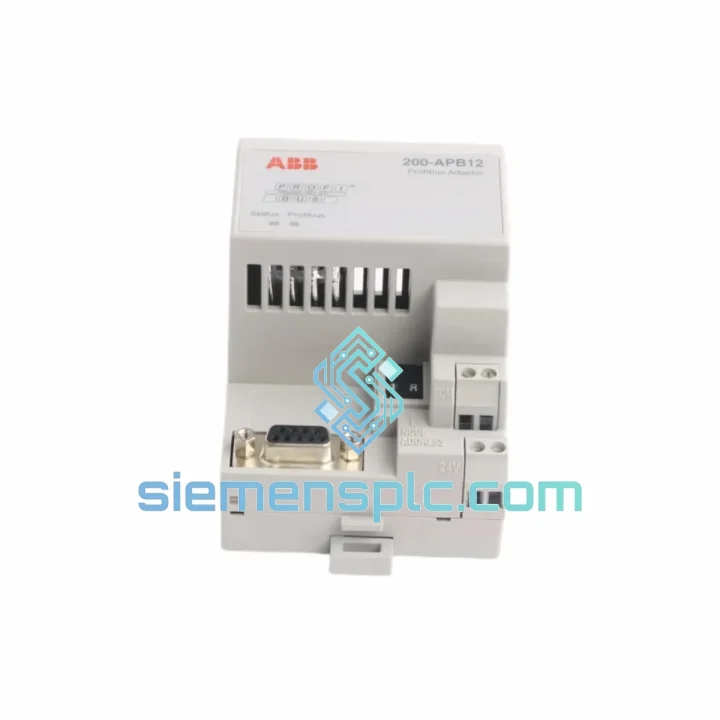
ABB 200-APB12 PROFIBUS Adapter
Request verified availability, condition, replacement risk review, packing options and courier lead time for 200-APB12.
BrandABB
Part Number200-APB12
ConditionAvailability Check
Lead TimeRFQ Confirmation
DocumentsDatasheet / photos by RFQ
ShippingExport packing available
Auto-filled RFQ
200-APB12
Click Request Quote and the part number is inserted into the inquiry form automatically.
- Reply by email: [email protected]
- WhatsApp / Tel: +86 18359268345
- Mon-Sat 9:00-18:00 GMT+8
Procurement Data
Key Product Information
Core fields for model confirmation and RFQ routing. Detailed product narrative remains below.
- Brand
- ABB
- Primary Part Number
- 200-APB12
- Product Type
- Fieldbus Adapter
- Series / Family
- S800
- Manufacturer
- ABB
- Country of Origin
- SE
- Catalog Category
- Industrial Automation Spares
Model confirmed for inquiry
200-APB12
Send quantity, destination and urgency. The RFQ form keeps this part number attached.
Request Quote
Product Overview
ABB 200-APB12 PROFIBUS DP Adapter — Stop the Clock on Your Downtime
Your ACS800 drive just dropped off the PROFIBUS network. The line is stopped. Every minute costs real money — and you already know the 200-APB12 adapter is the culprit. We stock it. We ship it today. From Xiamen to your plant floor via DHL or FedEx, this is the fastest path back to production.
The ABB 200-APB12 is the dedicated PROFIBUS DP communication adapter for the ACS800 drive family. When this card fails, the drive goes blind to the PLC — no speed reference, no status feedback, no remote control. There is no workaround. You need the card replaced, configured, and back online. This page tells you exactly how to do that, and we have the part ready to go.
URGENT REQUIREMENT? Contact: [email protected] | WhatsApp: +86 18359268345
Quick Technical Datasheet
| Parameter | Specification | Status |
|---|---|---|
| Part Number | 200-APB12 / 200APB12 | ✅ Ready to Ship |
| Manufacturer | ABB | 100% Original |
| Compatible Drive | ACS800 series (single & multidrive) | — |
| Protocol | PROFIBUS DP (EN 50170 / IEC 61158) | — |
| Baud Rate | 9.6 kbps – 12 Mbps (auto-detect) | — |
| Connector | 9-pin D-sub (DB9) female | — |
| Cyclic Data | Up to 10 words IN / 10 words OUT | — |
| Acyclic Services | DP-V1 supported | — |
| Power Source | Drive fieldbus adapter slot (no external PSU) | — |
| Operating Temp | 0 °C to +55 °C | — |
| Storage Temp | -40 °C to +70 °C | — |
| Weight | ~180 g | — |
| Certifications | CE, UL, cUL, RoHS, PROFIBUS PI Certified | — |
| Ship From | Xiamen, China | ✅ Same-Day Dispatch Available |
Troubleshooting & Replacement Tips
How to confirm the 200-APB12 is the failed component:
- Drive panel shows fault FF (Fieldbus Fault) or alarm FA (Fieldbus Warning) — the drive lost communication with the PROFIBUS master.
- The adapter’s POWER LED is off or STATUS LED is solid red — card is not initializing correctly.
- PLC diagnostic buffer shows Station Failure on the PROFIBUS segment at the drive’s node address — the slave has gone silent.
- Swapping to a known-good adapter immediately restores communication — confirms the card, not the cable or PLC, is the fault source.
Step-by-step replacement procedure:
- Power down the drive completely. Wait for the DC bus to discharge — minimum 5 minutes after mains isolation. Verify with a multimeter across the DC bus terminals before touching any internal components.
- Note the existing node address. Before removing the old card, photograph or record the PROFIBUS node address set in the drive parameters (Parameter Group 51 in ACS800 standard firmware). You will need this exact value on the replacement card.
- Remove the old 200-APB12. The adapter slots into the drive’s option slot (typically Slot 1 or Slot 2 depending on drive variant). Release the two retaining clips and pull the card straight out. Do not rock it sideways — the connector is fragile.
- Inspect the slot connector on the drive. Check for bent pins or corrosion. A damaged slot connector means the drive control board needs attention — a new adapter will not fix a broken slot.
- Install the new 200-APB12. Align the card carefully and press firmly until both retaining clips engage. The card should seat flush with no gap.
- Restore PROFIBUS node address. Power up the drive and navigate to Parameter 51.01 (Node Address). Set it to the same address as the failed card. Mismatch here means the PLC will not find the slave — a common post-replacement mistake that wastes hours.
- Check Parameter 51.02 (Baud Rate). The 200-APB12 supports auto-baud detection, but verify the parameter is set to AUTO or matches your segment speed. If the segment runs at 1.5 Mbps and the parameter is locked to a different value, communication will fail.
- Verify GSD file version. If the PLC project was configured with an older GSD file version, a new adapter with updated firmware may present a different device identity. Download the current ABB GSD file and re-import into TIA Portal or STEP 7 if the PLC throws a configuration mismatch error.
- Confirm LED status after power-up. POWER LED solid green = card is powered. STATUS LED flashing green = card is in data exchange with the master. Solid green on STATUS = bus is idle but card is healthy. Any red = fault condition — check drive fault log.
- Run a cyclic data test. From the PLC, force a speed reference to the drive via PROFIBUS and confirm the drive responds. Check that process data words (PPO type) match what the PLC project expects — a PPO type mismatch causes silent data errors that are hard to diagnose.
Common post-replacement faults and fixes:
- Drive shows FF fault immediately after replacement: Node address mismatch or baud rate parameter not set correctly. Check Parameters 51.01 and 51.02 first.
- PLC shows station failure despite card being installed: PROFIBUS termination resistor missing or double-terminated on the segment. Check both ends of the cable run.
- Intermittent communication drops after replacement: DB9 connector not fully seated on the cable, or cable shield not grounded at the drive end. Re-terminate the PROFIBUS cable at the drive connector.
- DP-V1 acyclic reads failing from SCADA: Firmware version on the new card may differ. Check ABB firmware release notes for the 200-APB12 and update if required using ABB DriveWindow.
Reliability in Harsh Conditions
The 200-APB12 was not designed for a climate-controlled server room. It was built for the inside of a drive cabinet on a paper mill floor, a cement plant conveyor system, or an offshore pump skid. ABB engineered this card to operate continuously in environments that would kill consumer-grade electronics.
The card’s conformal-coated PCB resists moisture ingress and condensation — critical in plants where humidity swings are extreme during seasonal shutdowns and restarts. The operating temperature ceiling of +55 °C means it handles the thermal load inside a fully loaded ACS800 cabinet without throttling or faulting. Vibration tolerance is validated to IEC 60068-2-6 standards, covering the mechanical stress of being mounted inside a drive that is itself bolted to a vibrating machine frame.
The DB9 PROFIBUS connector uses gold-plated contacts rated for thousands of mating cycles — relevant when maintenance teams are repeatedly connecting and disconnecting programming cables during commissioning. The card’s slot connector is designed to maintain reliable electrical contact even in environments with minor mechanical flex in the drive enclosure.
Every unit we ship has been stored in climate-controlled, ESD-safe conditions. We do not sell units that have been sitting in uncontrolled warehouse environments where humidity and temperature cycling degrade connector integrity before the card even reaches your site.
Global Express Logistics
Our dispatch hub is in Xiamen, China — one of the country’s primary export ports with direct DHL and FedEx gateway access. When you place an order before 15:00 CST, the unit ships the same business day. No exceptions, no delays waiting for internal approvals.
Transit times from Xiamen:
- Southeast Asia (Singapore, Thailand, Malaysia, Vietnam): DHL Express 1–2 business days
- Australia & New Zealand: FedEx International Priority 2–3 business days
- Middle East (UAE, Saudi Arabia, Qatar): DHL Express 2–3 business days
- Europe (Germany, UK, France, Netherlands): DHL Express 3–4 business days
- North America (USA, Canada): FedEx International Priority 3–5 business days
- South America (Brazil, Chile, Colombia): DHL Express 4–6 business days
Every shipment includes a commercial invoice, packing list, certificate of origin, and HS code declaration (8537.10) as standard — no customs clearance surprises on your end. For orders requiring formal export documentation or end-user certificates, contact us before placing the order and we will prepare the paperwork in parallel with picking and packing.
Tracking numbers are sent via email within 2 hours of dispatch. For urgent shipments, we can also send the AWB number directly via WhatsApp so your logistics team can monitor the shipment in real time.
Contact Information
📧 Email: [email protected]
💬 WhatsApp: +86 18359268345
🌐 Web: siemensplc.com
© 2026 siemensplc.com. All rights reserved.
Ready to quote
[email protected]
Send This Part Number to Sales
RFQ workflow
Quality workflow ->
Confirmation Process
01Model confirmation
We check the full part number, brand, series and visible nameplate information before quotation.
02Availability reply
Sales confirms stock path, condition option, quantity and realistic lead time for export dispatch.
03Packing & courier
DHL, FedEx, UPS or buyer courier arrangements can be reviewed with packing requirements.
Continue sourcing
Browse full catalog ->
Related Automation Parts
Similar brand or category products for fast comparison and multi-item RFQ lists.
ABB
RFQ Ready
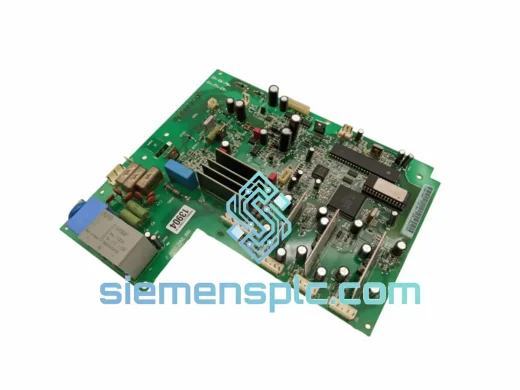
ABB SNAT-7120 SNAZ7120J Drive Control Module – ACS/DCS Series
S800
Origin SE
Drive Control Module