ABB
In Stock OK
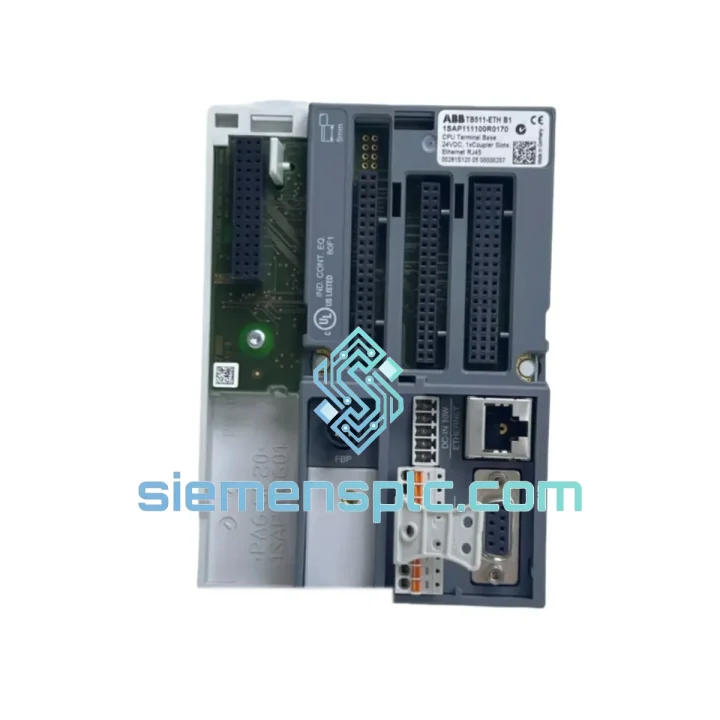
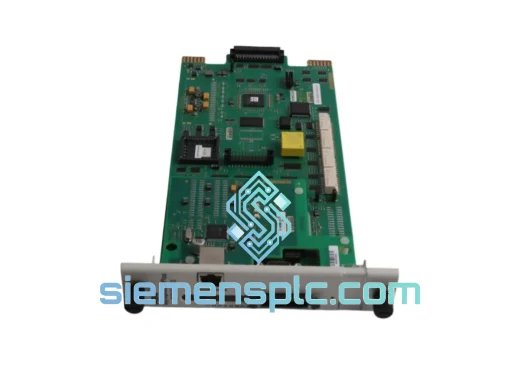
ABB TB511-ETH 1SAP111100R0170 Terminal Base
Request verified availability, condition, replacement risk review, packing options and courier lead time for TB511-ETH.
BrandABB
Part NumberTB511-ETH
ConditionAvailability Check
Lead TimeRFQ Confirmation
DocumentsDatasheet / photos by RFQ
ShippingExport packing available
Auto-filled RFQ
TB511-ETH
Click Request Quote and the part number is inserted into the inquiry form automatically.
- Reply by email: [email protected]
- WhatsApp / Tel: +86 18359268345
- Mon-Sat 9:00-18:00 GMT+8
Procurement Data
Key Product Information
Core fields for model confirmation and RFQ routing. Detailed product narrative remains below.
- Brand
- ABB
- Primary Part Number
- TB511-ETH
- Product Type
- PLC Terminal Base
- Series / Family
- AC500
- Manufacturer
- ABB Ltd.
- Country of Origin
- SE
- Catalog Category
- Communication
- Operating Temp.
- -25°C to +60°C
Model confirmed for inquiry
TB511-ETH
Send quantity, destination and urgency. The RFQ form keeps this part number attached.
Request Quote
Product Overview
ABB TB511-ETH 1SAP111100R0170 — Stop the Clock on Your Downtime
Every minute your AC500 system sits offline, the losses compound. A failed terminal base shouldn’t take your line down for days waiting on slow supply chains. The ABB TB511-ETH (order code 1SAP111100R0170) is physically in stock at our Xiamen warehouse — inspected, verified, and ready to ship within 24 hours of order confirmation. We’ve handled enough emergency callouts to know that the difference between a 4-hour fix and a 4-day nightmare is having the right part on the shelf. This is that part.
URGENT REQUIREMENT? Contact: [email protected] | WhatsApp: +86 18359268345
Quick Technical Datasheet
| Parameter | Specification |
|---|---|
| Manufacturer | ABB Ltd. |
| Part Number | TB511-ETH |
| Order Code | 1SAP111100R0170 |
| Product Series | AC500 PLC Platform |
| Module Function | Ethernet I/O Terminal Base |
| Communication | Ethernet 10/100 Mbps |
| Mounting | DIN Rail (EN 60715 / TS 35) |
| Protection Class | IP20 |
| Operating Temperature | -25°C to +60°C |
| Storage Temperature | -40°C to +70°C |
| Relative Humidity | 5–95% non-condensing |
| Supply Voltage | 24 V DC (backplane) |
| Max I/O Modules | Up to 10 × S500 I/O modules |
| Weight | ~170 g |
| Country of Origin | Germany |
| Certifications | CE, UL, cUL, ATEX Zone 2, IEC 61131-2 |
| Compatible CPUs | AC500 PM5xx series (V2 & V3) |
| Stock Status | ✔ Ready to Ship — Xiamen Warehouse |
Troubleshooting & Replacement Tips
Swapping a TB511-ETH in a live AC500 system isn’t complicated, but cut corners here and you’ll be back on-site within a week. Here’s what actually matters in the field:
Step 1 — Confirm the fault is the terminal base, not the CPU or I/O module. The TB511-ETH sits between the CPU backplane and the Ethernet I/O network. If your AC500 CPU is throwing a CS31 bus error or the Ethernet I/O station shows as unreachable in Automation Builder, start by checking the RJ45 link LEDs on the TB511-ETH. No link light with a known-good cable = terminal base or port failure. A solid link but no data = check IP address assignment and subnet configuration first before condemning the hardware.
Step 2 — IP address and node configuration. The TB511-ETH does not use DIP switches for addressing — it uses software-based IP assignment via ABB Automation Builder or a direct DHCP lease. Before powering up the replacement unit, confirm the IP address of the failed unit from your project documentation or from the DHCP server lease table. Assign the same IP to the new unit before inserting it into the live network. Bringing up a new unit with a factory-default IP (192.168.1.1) on a live network will cause an address conflict and may disrupt other nodes.
Step 3 — Firmware version matching. Check the firmware version of your existing AC500 CPU against the TB511-ETH firmware compatibility matrix in the AC500 release notes. Mismatched firmware between the CPU and terminal base is a known cause of intermittent communication dropouts that are extremely difficult to diagnose without version data. If the replacement unit ships with an older firmware, update it via Automation Builder before commissioning.
Step 4 — Hot-swap procedure. The TB511-ETH supports hot-swap in most AC500 configurations, but verify this is enabled in your CPU project settings before attempting it. Power down the I/O station at the field terminal strip level, not at the backplane, to avoid voltage spikes on the backplane bus. Seat the new module firmly — the locking tab must click. Restore power and monitor the Automation Builder I/O diagnostics for 2–3 scan cycles before declaring the swap successful.
Common fault codes to watch:
- ERR LED solid red: Hardware fault on the terminal base — replace the unit.
- ERR LED flashing: Configuration mismatch or IP conflict — check network settings before replacing hardware.
- No LEDs at all: Check 24 V DC backplane supply voltage at the terminal base power connector. A blown fuse upstream is the most common cause.
- I/O station visible in network scan but not in project: Firmware version mismatch or incorrect GSD/EDS file in the project. Re-import the device description file matching the unit’s firmware version.
Reliability in Harsh Conditions
The TB511-ETH was engineered for environments where consumer-grade hardware fails within months. ABB designed the AC500 platform to IEC 61131-2 standards, which means the TB511-ETH has been validated against the full suite of industrial environmental stresses — not just rated on paper.
Vibration: Tested to IEC 60068-2-6 sinusoidal vibration profiles, covering the frequency ranges typical of motor-driven machinery, compressor rooms, and rail-mounted control cabinets. The DIN rail locking mechanism maintains positive engagement under continuous vibration without requiring additional fasteners.
Thermal cycling: The -25°C to +60°C operating range isn’t a marketing figure — it reflects validated performance across repeated thermal cycles. Outdoor enclosures in northern climates and high-ambient process areas both fall within spec. The PCB substrate and connector materials are selected for low thermal expansion mismatch to prevent solder joint fatigue over years of cycling.
Humidity and condensation: Rated to 95% relative humidity non-condensing. The IP20 enclosure protects internal circuitry from dust ingress and incidental contact. For installations in high-humidity environments such as food processing or coastal facilities, ensure the control cabinet maintains positive pressure with filtered air to prevent condensation cycles on the PCB.
EMC immunity: Compliant with IEC 61000-4 series immunity tests including ESD (Level 3), radiated RF immunity (Level 3), and fast transient/burst (Level 3). In practice, this means the TB511-ETH will hold its Ethernet link and maintain data integrity in the presence of VFD switching noise, arc welding interference, and high-voltage bus switching — the real-world EMC environment of most industrial plants.
Global Express Logistics
Our Xiamen warehouse operates on a 24-hour pick-and-pack cycle for in-stock items. Here’s exactly what happens after you confirm your order:
- Day 0 (Order Confirmation): Payment or PO confirmed before 15:00 CST triggers same-day picking and ESD packaging. Each unit is photographed and serial number recorded before sealing.
- Day 1 (Export Documentation): Commercial invoice, packing list, and certificate of origin prepared. HS code 8537.10 applied for customs classification. For ATEX-certified units, additional conformity documentation included in the shipment envelope.
- Day 1–2 (Carrier Handoff): DHL Express or FedEx International Priority pickup from Xiamen. Both carriers offer direct flights from Xiamen Gaoqi International Airport to major European, North American, and Southeast Asian hubs, typically achieving 2–4 business day door-to-door transit.
- Transit Tracking: AWB number provided via email within 2 hours of carrier pickup. Real-time tracking link shared via WhatsApp on request.
- Customs Clearance: We pre-declare shipment value and HS codes accurately to avoid customs holds. For EU destinations, EORI number required from the consignee. For US destinations, IOR (Importer of Record) details required for shipments above USD 2,500.
- Emergency freight: For genuine production-down situations, contact us directly on WhatsApp. We can arrange same-day courier dispatch and charter freight options for critical shipments where standard express timelines are insufficient.
Contact Information
Email: [email protected]
WhatsApp: +86 18359268345
Web: siemensplc.com
© 2026 siemensplc.com. All rights reserved.
Ready to quote
[email protected]
Send This Part Number to Sales
RFQ workflow
Quality workflow ->
Confirmation Process
01Model confirmation
We check the full part number, brand, series and visible nameplate information before quotation.
02Availability reply
Sales confirms stock path, condition option, quantity and realistic lead time for export dispatch.
03Packing & courier
DHL, FedEx, UPS or buyer courier arrangements can be reviewed with packing requirements.
Continue sourcing
Browse full catalog ->
Related Automation Parts
Similar brand or category products for fast comparison and multi-item RFQ lists.
ABB
RFQ Ready
ABB SPBRC410 PLC Communication Controller
AC500
Origin SE
PLC Communication Controller